
WordPress pricing can feel confusing at first glance. Costs vary widely, and hidden expenses often surprise new site owners. A simple blog may cost very little, while a custom business site can scale quickly. The key is knowing what drives the price. From hosting to plugins and design, every choice impacts your budget.
This guide breaks it down in clear terms so you can plan smart, avoid overspending, and build a website that fits both your goals and your wallet.
TL;DR: What You’ll Actually Pay and Why
- Costs vary based on website type, features, and customization needs.
- Design, development, hosting, and plugins shape the overall budget.
- Advanced features and eCommerce setups increase total expenses.
- Ongoing maintenance and smart budgeting help control long-term costs.
Factors That Influence WordPress Pricing
Here is a complete list of factors that influence the cost of building a WordPress website.
Type of Website
The cost of building a WordPress website largely depends on the type of website you want to create. Whether you want to create a professional website for your small business or a dynamic online store to sell products, this factor will determine the expense.
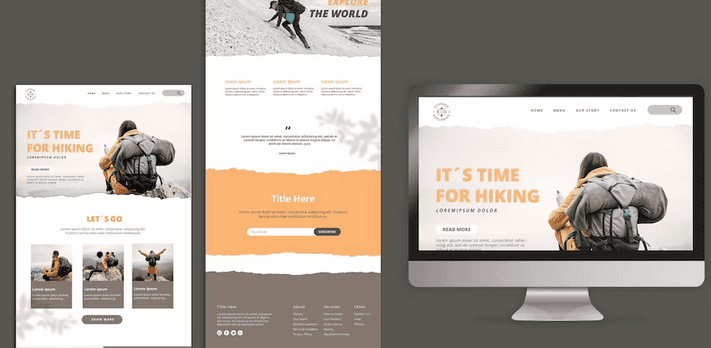
For instance, a custom WordPress site might cost more than setting up a theme-based WordPress site. At the same time, websites with complex features might involve higher costs. Understanding your website needs can also help you determine the budget more accurately.
Customization and Functionality Requirements
The cost of your WordPress website also depends on how unique you want it to be and the features & functionality you want.
The cost will be higher if you want lots of features and a bespoke design. This is because building a custom WordPress website requires more time and effort.

On the other hand, a simple theme-based WordPress site with basic features might be more cost-effective for those who want to create a WordPress website on a low budget. So, having specific ideas for how your website should look and work can affect how much money you’ll need to spend.
Theme Selection and Customization
The cost of building a website on WordPress is also influenced by the way you want your website to look. With WordPress, you can choose from free WordPress themes and premium WordPress themes.

It can increase costs if you want to make major changes to the theme, such as colors or layout. In short, more changes mean more work = more cost. If you want to save money, choose a professional WordPress theme with the required functionality.
Related: How Much Does A Website Design Cost
Plugins and Additional Features
Plugins are needed to add extra functionalities to your WordPress website. Some WordPress plugins are free, but if you need specific features not already in your WordPress theme or the basic WordPress setup, you might need to invest in premium plugins.
Remember that some premium plugins can slow down your site or make it more complex, affecting load time and overall website performance.
So, while WordPress plugins can give your site more functionality, they also add to the cost of building a WordPress site.
Related: Top 5 Best WordPress Plugins To Use
Hosting and Domain Names
Two crucial factors impacting WordPress pricing are hosting and domain names.

Hosting costs can vary based on factors such as the type of hosting and the level of customer support. Shared hosting is usually cheaper when you share server space with other websites. On the other hand, dedicated hosting, where you have a whole server to yourself, tends to be more expensive.
There is also the option of WordPress hosting. Many hosting providers offer different WordPress hosting packages so that you can choose one based on your needs.
Opting for WordPress hosting for WordPress sites also ensures WordPress-based support.
Related: Reasons To Avoid Cheap Hosting For WordPress Websites
Your Domain name is your website’s address (like www.example.com). Domain costs vary based on factors such as domain name popularity and domain extension (e.g., .com, .net, .org).
Some domain registrars offer special deals for the first year, but there’s usually an annual fee to keep the domain. Hosting and domain name expenses are recurring costs that significantly contribute to the overall WordPress website pricing.
Read More: Free WordPress Hosting Providers
Maintenance and Ongoing Support
Another essential aspect of WordPress costs revolves around maintenance and ongoing support. Once your website is up and running, it requires regular updates to keep it secure, functional, and compatible with the latest technologies.

Regular WordPress website maintenance tasks include:
- Backing up your website
- Monitoring for security vulnerabilities
- Fixing common WordPress errors or issues that arise
- Ensuring optimal website performance.
While website owners can do some WordPress website maintenance tasks, more complex tasks might require professional assistance.
Ongoing WordPress support is equally crucial. As your website evolves and your needs change, you may require assistance adding new features, modifying design elements, or addressing unforeseen technical challenges.
Related: Best WordPress Maintenance Service Providers
Cost Breakdown for a WordPress Website
The question of how much it costs to build a WordPress website is one that we frequently encounter as a WordPress agency.
To provide a straightforward overview, we’ve compiled estimates of the general expenses for building a WordPress website.
Note: These WordPress pricing estimates are approximate and subject to change based on factors such as the website’s complexity, project scope, and specific requirements.
WordPress Website Design Cost
Designing a WordPress website involves crafting its visual appearance and layout. The WordPress website design cost can vary depending on the complexity of the design.
Factors influencing this cost include the number of pages, the uniqueness of the design, and whether you’re using a free theme or seeking custom WordPress web design services.
Generally, this expense covers the creation of a user-friendly interface, selecting color schemes and fonts, and arranging elements for an optimal user experience.

Remember, the intricacy of the design can significantly impact the overall cost, as more complex/intricate designs require more time and expertise.
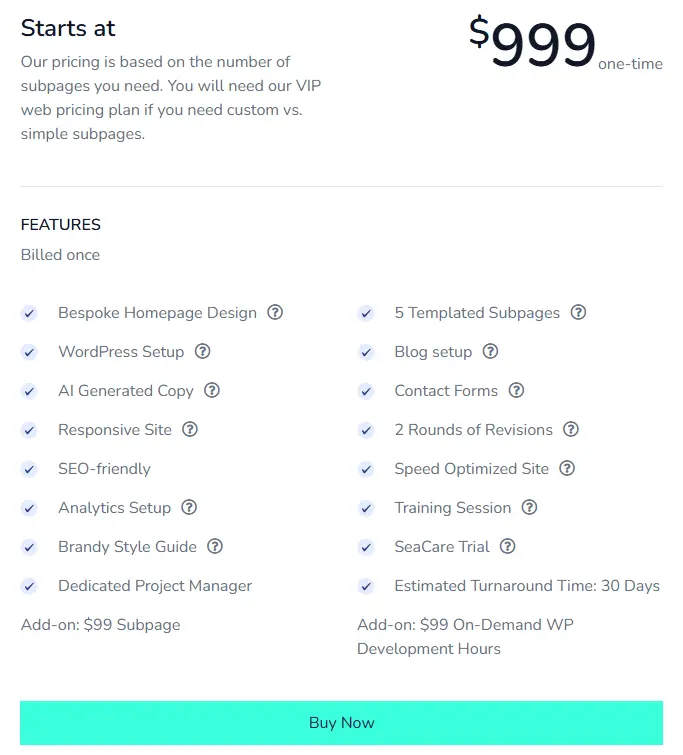
At Seahawk, our website design pricing starts at $999 (one-time). The pricing is based on the number of subpages you need. If you need custom vs. simple subpages, you will need our VIP web designer pricing plan.
WordPress Website Development Cost
Developing WordPress websites involves turning the design into a functional and interactive online platform. This stage includes coding, integrating features, and ensuring responsiveness across different devices and browsers.
The cost of WordPress development can vary based on the complexity of your site, the features you require (such as forms or an eCommerce site), and the level of customization. At Seahawk Media, dev hours start at $129/per hr.
Hiring a skilled WordPress developer is an investment that can influence the cost. Rates can vary depending on their expertise and location.
Customizations or complex functionalities often require more time and effort, thereby increasing overall development costs.
Learn: Best WordPress Development Agencies
WordPress eCommerce Website Cost
Building an eCommerce website with WordPress can be a great way to get your online store up and running quickly.

The cost of building an eCommerce website with WordPress will depend on the specific features and functionality you need for your store, but it typically ranges from $1,999 to $9,999 for a basic website.
Hosting and Domain for WordPress Websites
Securing a domain name and reliable hosting are fundamental steps in launching your WordPress site.
- Domain: Domain costs range from $10 to $50 per year, depending on the domain extension (.com, .net, .org) and its popularity.
- Hosting: Hosting expenses can vary greatly. Basic shared hosting plans can range from $3 to $10 per month. More advanced options like managed WordPress hosting may cost between $20 and $100 per month, depending on the provider, resources, and features.
It’s worth considering that investing in quality hosting ensures a smooth user experience, faster loading times, and better website security.
Additionally, domain and web host renewal fees are recurring expenses essential for the continued operation of your website.
- Yearly Domain Renewal: $15 to $50 per year (depending on the domain extension and provider)
- Yearly Hosting Renewal: $50 to $300+ per year (based on hosting plan)
Advanced Features and Plugins for a WordPress Site
Enhancing your WordPress website with additional features and functionalities often involves using plugins.
Here are some estimated costs for popular types of plugins:
- Contact Form Plugins: $0 to $100 (depending on complexity)
- eCommerce Plugins: $0 to $300+ (for premium options)
- SEO Plugins: $0 to $100 (for premium options)
- Security Plugins: $0 to $100 (for premium options)
- Membership Plugins: $0 to $200+ (for premium options)
Many free WordPress plugins are available, but paid plugins often offer advanced features and better support. The approximate costs are approximate and can vary based on the specific plugin, licensing, and ongoing subscription fees.
Ongoing Maintenance and Support
Once your WordPress website is live, it requires ongoing maintenance and support to stay secure and up to date. While costs can vary, here’s an estimated breakdown:
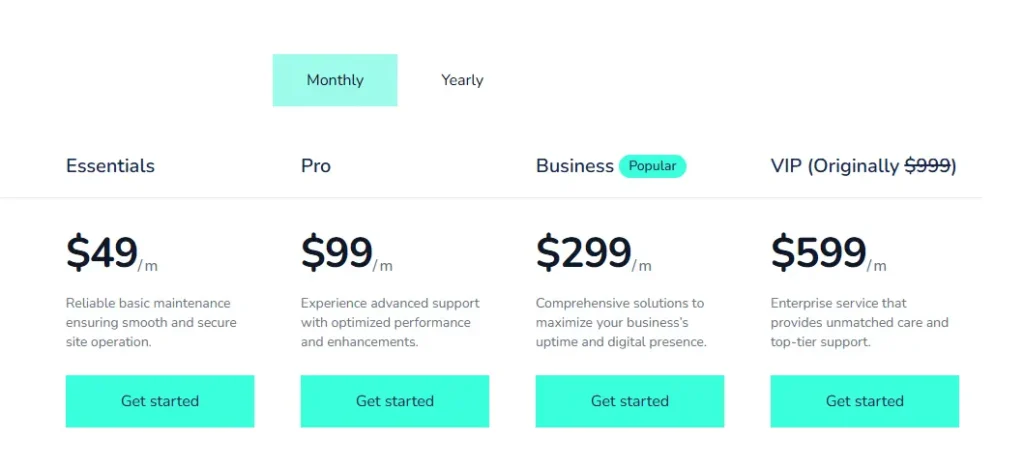
Monthly Maintenance Retainer: $49-$599 per month (depending on site complexity and included services).
Professional WordPress maintenance and support agencies often offer monthly maintenance packages that include tasks like updates, backups, security checks, and technical support.
Here’s an overview of our SeaCare website maintenance plans, starting at $49 per month.
Additional Services (Content and SEO)
Creating quality content and optimizing your website for search engines is crucial for attracting visitors and achieving your website’s goals. Here’s an estimated cost breakdown for these services:
- Content Creation: Content creation costs can vary widely based on the type of content (blog posts, articles, product descriptions), length, and complexity. Freelance writers might charge $50 to $150+ per article, while digital marketing companies may have different pricing models. Get in touch with us to learn more about our content writing services.
- SEO Services: Improve your website’s visibility in search engines. Prices for ongoing SEO services can range from $500 to $1,000+ per month. One-time SEO audits or optimizations might cost around $500 to $1,500.
At Seahawk, we offer a one-time free SEO audit. Under our managed SEO services, we offer three monthly plans starting from $499/. Here’s an overview of our managed SEO services:
We also offer WordPress site speed optimization services starting at $499 (billed once).
Tips for WordPress Cost Optimization and Budgeting
Now that you have a basic understanding of the cost for a WordPress website, let’s check out some tips to help you with WordPress cost optimization and budgeting.
Research and Compare Different Service Providers
Before making any commitments, thoroughly research and compare various WordPress agencies and service providers. Look into their offerings, prices, and customer reviews.
This applies to everything from web hosting plans and domain providers to WordPress developers. By exploring different options, you can find the best value for the services you need, ensuring you’re not overspending on any aspect of your WordPress project.
Prioritize Website Requirements and Functionality
Identify the core features and functionalities your website truly needs. Avoid getting caught up in unnecessary features that might drive up costs. Focus on essential elements that align with your website’s purpose and user experience.
By prioritizing features, you can allocate your budget where it matters most, ensuring a well-balanced, cost-effective WordPress website that fulfills its intended objectives.
Seize Cost-saving Opportunities
Look for bundled packages or discounts offered by service providers. Hosting companies, for instance, often provide hosting packages that include a free domain name and a free SSL certificate. Similarly, some premium WordPress plugins are available at discounted rates for a limited time.
Keep an eye out for these opportunities to save money without compromising quality. Capitalizing on such deals can significantly lower overall expenses while achieving the desired results.
Evaluate Long-term Objectives
Consider your long-term goals for the website. While certain cost-cutting measures might seem attractive initially, they could hinder your site’s future growth. Investing in quality hosting, professional design, and reliable plugins may come with a higher upfront cost.
Still, it can pay off in the long run by providing better user experiences, scalability, and security. Striking a balance between short-term savings and long-term benefits is essential for building a fully functional WordPress website.
Cost for a WordPress Website: Summary
Here’s a summary of the estimated prices for various aspects of a WordPress website:
| WordPress Website Cost | Estimated Price Range |
| WordPress Website Design Cost | $699 – $4,999 |
| WordPress Website Development Cost (Web Developer Fees) | $499 – $2,999+ |
| Hosting and Domain | Hosting: $3-$100+ per month Domain: $10-$50/per year |
| Advanced Features and Plugins | Varies based on requirements |
| Ongoing Maintenance and Support | $49 – $599+ per month |
| Additional Services (Content and SEO) | Content Creation: $50 – $150+ per articleSEO Services: $499 – $1,000+ per month |
Need an expert to build a WordPress website for your business? Contact us today!
FAQs About WordPress Pricing
Is WordPress completely free to use?
The WordPress software is open source and free. But you still pay for a domain name, web hosting, and optional themes and plugins. The free version on WordPress.com has limits. A self-hosted setup gives more control, flexibility, and customization options.
How much does a WordPress website cost per year?
The total cost depends on your needs and the plan you choose. Basic sites may cost a low annual fee. An ecommerce store with WooCommerce, premium plugins, and advanced features can cost more. Hosting provider, bandwidth, and add-ons also affect pricing tiers.
What are the main costs in the setup process?
You pay for domain registration, web hosting, and a theme. A premium theme, page builder, and SEO tools like Google Analytics or Rank Math can increase costs. Security tools such as SSL certificates, malware scanning, and a web application firewall add protection.
Which hosting options are best for beginners?
Beginners can choose managed hosting or shared hosting from providers like Hostinger or BlueHost. Managed hosting offers ease of use, a support team, and better performance and security. It is a good choice for people who want a simple setup.
Are there hidden costs to consider?
Yes. Premium features, plugins, a custom domain name, and maintenance can add up. You may also pay for SSL, backups, and developer help. Plan for updates, security features, and scalability as your traffic and audience grow.



