

Website defacement in WordPress is one of the most visible and damaging forms of cyberattacks. When a site is defaced, attackers alter visible content, inject malicious code, or redirect users to harmful destinations.
Beyond reputation damage, defacement can lead to traffic loss, search engine penalties, and compromised user trust.
Understanding what WordPress defacement is, how to fix it quickly, and how to prevent it long-term is critical for maintaining a secure and reliable website.
TL;DR: WordPress Website Defacement
- WordPress defacement occurs when attackers exploit security weaknesses to alter site content or inject malware.
- Common causes include weak passwords, outdated plugins or themes, and poor access controls.
- Immediate response involves taking the site offline, preserving evidence, and securing credentials.
- Cleaning requires removing malicious files, fixing the database, and restoring from clean backups.
- Long-term prevention relies on updates, strong authentication, monitoring, backups, and a WAF.
What is WordPress Website Defacement?
WordPress website defacement occurs when unauthorized users gain access to a site and modify its content without permission. This often involves replacing pages with spam messages, political content, hacker signatures, or inserting malicious scripts or links.

Common characteristics include:
- Altered homepage or landing pages
- Hidden spam links are injected into posts or templates
- Redirects to phishing or malicious websites
- Search engine warnings flagging the site as unsafe
Defacement is typically a symptom of deeper security issues, such as compromised credentials or vulnerable plugins.
What Website Defacement Looks Like (Early Warning Signs)
Below are the most common indicators that a WordPress website may have been defaced.
Visible Content Changes
One of the clearest signs of website defacement is unauthorized visible content. Attackers may replace the homepage with spam, political messages, or hacker tags to make their presence obvious.
In other cases, the changes are more subtle. For example, malicious links or scripts may be injected into pages, posts, or templates without altering the overall layout.
As a result, users may unknowingly interact with harmful content, increasing security and compliance risks.
Unexpected Redirects
Another strong indicator of defacement is unexpected redirection behavior. Visitors may be automatically redirected to phishing pages, gambling websites, or malicious domains.
Often, these redirects are selectively triggered, such as appearing only for mobile users or first-time visitors. Consequently, site owners may not notice the issue immediately, while users and search engines are already being affected.
Traffic and SEO Signals
Finally, defacement often causes noticeable SEO and performance issues. Sudden drops in organic traffic can indicate that search engines have detected malicious activity.
Additionally, pages may become deindexed, or warnings may appear in search results flagging the site as unsafe. Therefore, monitoring analytics and search console alerts is essential for early detection.
Hiring WordPress Support for a Quick Fix
When a WordPress site is defaced, time is critical. Hiring professional WordPress support helps contain the damage, restore the site faster, and minimize SEO and business impact.

Benefits of expert intervention include:
- Rapid identification of the attack vector
- Safe malware removal without data loss
- Recovery from clean backups
- Proper security hardening to prevent reinfection
Professional support is especially important when defacement reoccurs, backups are unavailable, or the site handles sensitive user data.
Common Causes of WordPress Website Defacement
Understanding the root causes of WordPress website defacement is essential for preventing repeated attacks and strengthening overall site security. In most cases, defacement does not happen randomly.
Instead, attackers exploit known weaknesses that have been left unaddressed over time. By identifying these vulnerabilities early, website owners can take corrective action before serious damage occurs.
Below are the most common causes of WordPress site defacement, explained in brief for clarity and prevention.
Weak or Reused Admin Passwords
One of the most frequent entry points for attackers is weak or reused admin passwords. When login credentials are easy to guess or reused across multiple platforms, hackers can gain unauthorized access through brute-force or credential-stuffing attacks.
Moreover, if a password has been exposed in a previous data breach, attackers may already have access without triggering obvious alerts. Therefore, enforcing strong, unique passwords for all admin accounts is a foundational security requirement.
Outdated WordPress Core, Plugins, or Themes
Another major cause of defacement is outdated software. WordPress core, plugins, and themes regularly receive security patches to fix known vulnerabilities.
However, when updates are delayed or ignored, attackers can exploit publicly disclosed flaws to inject malicious code or alter site content. As a result, even reputable plugins can become a security risk if they are not kept up to date.
Nulled or Pirated Plugins and Themes
While nulled plugins and themes may appear cost-effective, they often contain hidden malware or backdoors. In many cases, attackers intentionally distribute pirated software with malicious payloads embedded inside the code.
Consequently, installing such themes or plugins can immediately compromise a WordPress site, leading to defacement, redirects, or data theft. Using licensed software from trusted sources significantly reduces this risk.
Insecure File Permissions
Incorrect file and directory permissions can also expose a WordPress site to defacement. When files are writable by unauthorized users, attackers can easily modify core files, inject scripts, or replace content.
For instance, overly permissive permissions such as 777 allow anyone to write to critical files. Therefore, maintaining proper permission settings is a key part of WordPress hardening.
Exposed FTP or Database Credentials
FTP and database credentials are often overlooked, yet they provide direct access to a website’s core infrastructure. If these credentials are leaked, reused, or stored insecurely, attackers can bypass WordPress entirely and modify files or databases directly.
As a result, defacement may occur even when admin passwords remain secure. Rotating credentials and limiting access are essential preventive measures.
Lack of Security Monitoring or Firewall Protection
Finally, the absence of active security monitoring makes it difficult to detect and stop attacks early. Without a firewall or intrusion detection system, malicious activity can go unnoticed for long periods.
Consequently, attackers may exploit vulnerabilities repeatedly, causing ongoing damage. Implementing a Web Application Firewall (WAF) and real-time monitoring significantly improves threat detection and response.
In many cases, WordPress defacement occurs because known vulnerabilities remain unpatched for extended periods. Addressing these common causes proactively is the most effective way to prevent future attacks and maintain a secure website.
How to Fix a Defaced WordPress Website?
Fixing WordPress defacement requires a structured and cautious approach to avoid reinfection. Key remediation steps include:
Google Search Console Alerts (First Confirmation)
Google Search Console is often the first reliable source confirming that a WordPress site has been compromised. In many cases, Google detects malicious activity before site owners notice visible issues. Therefore, reviewing Search Console alerts should be your starting point when defacement is suspected.
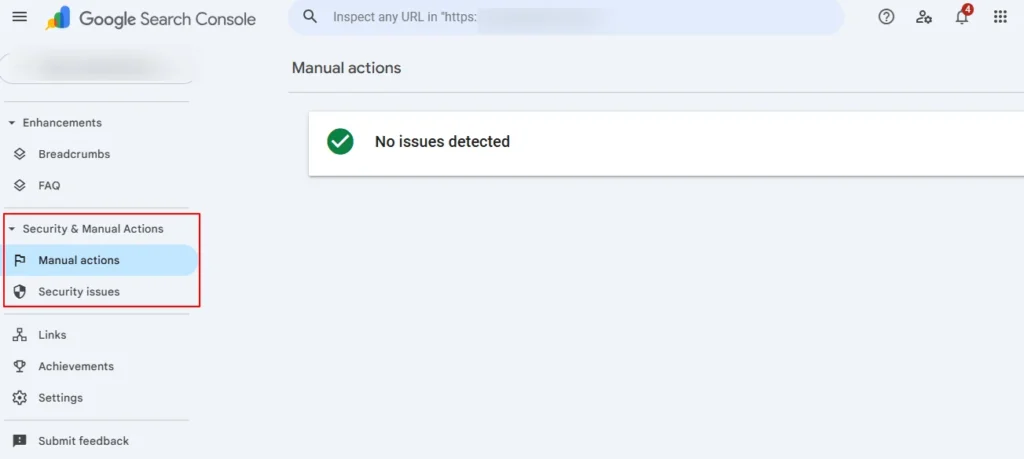
- Review Security Issues Report: Begin by opening the Security Issues section in Google Search Console. Here, Google flags malware, hacked content, or spam injections detected during crawls.
- Identify Affected URLs: Carefully identify and copy all affected URLs listed in the report. These URLs will guide your cleanup process and help ensure no infected pages are missed.
- Note the Type of Warning: Take note of whether the issue is malware, spam, or hacked content. Each requires a slightly different cleanup approach.
- Plan Cleanup Before Review: Importantly, do not request a review until remediation is complete. Submitting a premature review may delay trust restoration.
Immediate Response to a Hacked Website
Once defacement is confirmed, immediate action is critical to limit further damage. Acting quickly helps prevent data loss, SEO penalties, and reinfection.
Firstly, temporarily block public access to the site. This prevents users and search engines from interacting with malicious content. At the same time, disable any compromised entry points such as vulnerable plugins or exposed admin panels.
However, avoid overwriting files immediately. Preserving logs, timestamps, and file states is essential for identifying how the breach occurred and preventing future incidents.
Check Site Access and Login Credentials
After containment, access control must be reviewed to ensure attackers are fully removed from the system. To do this, follow the steps below:
- Secure Admin Access: Attempt to log in to the WordPress admin dashboard from a secure and trusted IP address. If access fails, credentials may already be compromised.
- Verify Admin Users: Next, review the
wp_userstable directly to confirm all administrator accounts are legitimate. Attackers often create hidden admin users for persistent access.
Finally, remove unauthorized users and reset all compromised passwords immediately, including admin, editor, and contributor roles.
Put the Site into Maintenance Mode
Before beginning cleanup, the site should be placed into a controlled offline state to avoid further exploitation.
Enable a maintenance mode page to inform visitors that the site is temporarily unavailable. At the same time, apply a no-index directive to prevent search engines from indexing infected pages during cleanup.
This controlled environment ensures that remediation efforts do not introduce new vulnerabilities.
Contact Your Hosting Provider
Your hosting provider plays a key role in incident response, especially at the server level. So, immediately notify hosting support about the security breach. Most providers have dedicated abuse or security teams.
Also, request raw access, error logs, and server logs to help trace the attack vector. Lastly, if the site is on shared hosting, request temporary account isolation to prevent cross-site contamination.
Back Up the Current State (Before Cleaning)
Even though the site is compromised, creating a backup is essential for investigation and recovery.
- Download all website files via SFTP to preserve the current state.
- Export the complete WordPress database, including all tables.
Additionally, archive server and access logs for later forensic analysis.
Restore from a Clean Backup (If Available)
If a clean backup exists, restoration can significantly speed up recovery. To start with:
- Confirm that the backup predates the compromise. Restoring an infected backup will reintroduce malware.
- Restore the backup only to a staging environment first. This allows testing without affecting the live site.
Before pushing live, scan and test the restored site for hidden threats.
Lock Down Access and Prevent Brute Force Attacks
Once recovery begins, access hardening is essential to stop repeat attacks. To begin:
- Enforce strong, unique passwords across all user roles.
- Enable multi-factor authentication for all admin accounts to add an extra layer of security.
Lastly, revoke unused admin accounts and regenerate WordPress SALTs in wp-config.php to invalidate old sessions.
Harden Login and Monitor Access
Beyond securing credentials, it is equally important to monitor login behavior to detect and stop attacks early. Brute-force attempts often target the WordPress login page, making proactive controls essential.
- Install reliable login rate-limiting or security plugins to restrict the number of login attempts within a defined time frame. This significantly reduces the success of automated brute-force attacks.
- Configure automatic IP blocking after multiple failed login attempts. By doing so, suspicious sources are prevented from repeatedly accessing the login page.
Finally, review failed login logs daily to identify unusual patterns or repeated access attempts, allowing you to respond before an attack escalates.
Address Leaked Passwords and Credentials
Once a WordPress site is compromised, addressing leaked passwords and credentials becomes a critical priority.
- Start by forcing password resets for all affected users, with special attention to administrators and editors who have elevated privileges.
- Next, check exposed email addresses and login credentials against known breach databases to identify any previously compromised accounts.
- In addition, rotate FTP, database, and hosting control panel passwords to immediately invalidate any stolen access.
Finally, review configuration files and server settings to remove stored credentials from unsecured files or outdated configurations, ensuring attackers cannot reuse old authentication data.
Update and Clean Plugins and Themes
Keeping WordPress components updated is essential for closing security vulnerabilities that attackers commonly exploit.
- Begin by updating the WordPress core to the latest stable version to ensure critical security patches are applied.
- Next, update all installed plugins and themes, as outdated extensions often contain known security gaps.
- At the same time, remove any unused, outdated, or abandoned plugins and themes to reduce the overall attack surface.
Finally, completely delete nulled or pirated extensions, as these frequently include hidden malware or backdoors that can reinfect the site.
Audit Plugins and Themes for Malware
Auditing plugins and themes for malware helps identify threats that automated scans may miss.
- Start by comparing active theme files against clean originals from the official source to detect unauthorized changes.
- Then, scan plugin directories for unfamiliar or recently modified PHP files that may indicate injected code.
- Additionally, look for obfuscated code, encoded strings, or suspicious file names commonly used to hide malware.
If you detect any compromise, replace or reinstall the affected plugins or themes from verified vendors.
Scan Files and Remove Hidden Backdoors
Scanning website files is critical to ensure attackers cannot regain access after cleanup.

- Begin by running a full malware scan across all website files to identify known threats.
- Next, manually search the wp-content and uploads directories for unauthorized PHP files, which are commonly used as backdoors.
- In addition, review the .htaccess and server configuration files for malicious redirects or injected rules.
Finally, remove all hidden backdoors to fully eliminate persistent access points.
Check File Uploads and Permissions
Properly managing file uploads and permissions reduces the risk of malicious file execution.
- Restrict allowed file types to prevent attackers from uploading harmful scripts.
- Apply correct file and directory permissions according to WordPress security standards to limit unauthorized access.
Additionally, identify and quarantine suspicious uploaded files for further analysis, and disable PHP execution in upload directories wherever possible.
Clean the WordPress Database
Cleaning the WordPress database is essential to remove hidden infections that power spam and redirects.
- Scan all database tables for injected scripts, malicious links, or suspicious content.
- Remove rogue admin users, unknown options, and unauthorized cron jobs created by attackers.
Additionally, clean infected posts, pages, and widget content, and export a verified clean database backup after remediation.
Rescan Live Site and Use Google Search Console
After cleanup, rescanning the live site ensures all security threats have been fully removed.
- Begin by running external malware scans to confirm the website is clean.
- Next, rescan all previously affected URLs to verify they no longer contain malicious content.
- Once confirmed, submit the cleaned pages for review in Google Search Console.
Continue monitoring the security issues report closely until all warnings are cleared and trust is restored.
Recover and Relaunch the Website
It is important to recover and relaunch the website carefully to avoid reintroducing issues.
- Start by reuploading cleaned files from a secure staging environment to the live site.
- Disable maintenance mode only after completing final functionality and security testing.
- Then, clear server, plugin, and CDN caches to ensure visitors receive clean content.
Finally, monitor traffic patterns and access logs closely during the initial relaunch period to detect any suspicious activity early.
How to Prevent WordPress Defacement Long-Term?
By following proven best practices, site owners can significantly lower the risk of future defacement and maintain long-term stability.
- Enable a Web Application Firewall (WAF) to filter malicious traffic before it reaches your website. A WAF blocks common attacks such as SQL injection, cross-site scripting, and brute-force attempts, providing an essential first line of defense.
- Next, strengthen authentication by enforcing strong, unique passwords for all users. In addition, enable two-factor authentication for administrator accounts to add an extra layer of security even if credentials are compromised.
- Equally important, limit administrator privileges to only those who absolutely need them. Regularly review user accounts and remove unused or inactive access to reduce potential entry points.
- Moreover, keep WordPress core, plugins, and themes updated at all times. Updates often include security patches that close known vulnerabilities that attackers actively exploit.
Finally, run scheduled malware scans to detect issues early and maintain regular offsite backups to ensure fast recovery if an incident occurs.
Ongoing monitoring and routine security audits further reduce the likelihood of future defacement.
Conclusion
WordPress website defacement is not just a cosmetic issue; it is a serious security incident that can impact traffic, rankings, and brand credibility.
Quick action, proper cleanup, and long-term security hardening are essential to fully recover and prevent recurrence.
Whether handled internally or through professional WordPress support, a proactive security strategy is the most effective defense against defacement attacks.
FAQs About Website Defacement
How does a WP site usually get compromised?
A WordPress site is often compromised due to security flaws such as weak passwords, outdated themes & plugins, and known security flaws that attackers exploit to deface websites or steal data.
Why is web security important for a hacked site recovery?
Web security is essential because a hacked site may expose sensitive data, infected files, or indicate a potential data breach that can impact business’s online operations and damage trust in a digital storefront.
How do passwords affect WordPress website security?
Poor user passwords, reused password combinations, and a lack of strong passwords allow attackers with minimal technical expertise to bypass security measures and gain unauthorized access.
Can WordPress defacement affect customer trust?
Yes, a defaced site signals weak network security and can lead to loss of credibility, especially if customers believe their sensitive data or payments protected by an SSL certificate are at risk.
What long-term actions prevent reinfection?
Following security best practices, regularly patch vulnerabilities, monitoring for infected files, and treating WordPress security as a critical component of site management reduces the risk of repeat attacks.


