Your WooCommerce store is doing something right. Customers are finding your products, browsing, and adding items to their cart. Then they leave.
Cart abandonment is not a sign that something is wrong with your store. It is a normal part of eCommerce behavior. Globally, the average cart abandonment rate is 70.19%. That means for every 10 customers who add something to their cart, roughly seven leave without buying.
The stores that recover that revenue have one thing in common: an automated cart recovery system. This guide shows you exactly how to build one the right way, from plugin selection through a three-email recovery sequence, with the timing, subject lines, and settings that actually bring customers back.
WooCommerce cart recovery is the process of bringing back customers who leave items in their cart without completing checkout. It uses automated emails, SMS, or push notifications to remind shoppers to return and finish their purchase.
An effective cart recovery strategy includes timely reminder emails, one-click cart restore links, reliable email delivery, and optional incentives such as limited-time discounts to encourage completed orders.
Most WooCommerce stores recover 5% to 15% of abandoned carts with a properly configured recovery system, making it one of the highest ROI optimizations for increasing revenue.
The Revenue Case for WooCommerce Cart Recovery
Before choosing a plugin or writing a subject line, understand what cart abandonment is costing your store.
If your WooCommerce store generates $10,000 in completed revenue per month, a 70% abandonment rate means customers are leaving roughly $23,000 in carts behind each month. A 10% recovery rate on that abandoned revenue brings back $2,300 per month without increasing advertising spend or acquiring new customers.
Cart recovery is one of the highest-ROI marketing activities available to a WooCommerce store owner because it targets customers who have already expressed purchase intent. The harder work (acquiring the customer, convincing them to add to the cart) is already done.
Why Most WooCommerce Cart Recovery Setups Fail?
Most stores that install a cart recovery plugin still recover very little revenue. The reasons are almost always the same.
Recovery emails go to spam. WordPress’s default PHP mail is unreliable. Without WP Mail SMTP connecting to a proper email provider, a significant portion of recovery emails never reach the inbox. This is the most common and most damaging setup mistake.
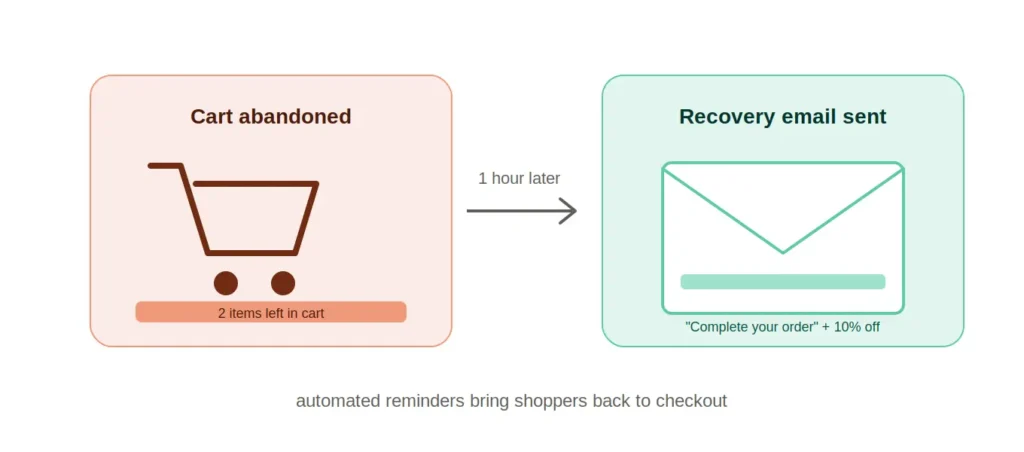
The first email arrives too late. Sending the first recovery email six or twelve hours after abandonment misses the peak recovery window. Customers who just left are most likely to return within the first hour.
Only one email is sent. A single recovery email recovers a fraction of what a three-email sequence recovers. Most of the incremental revenue from cart recovery comes from the second and third emails.
Every email offers a discount. Sending a coupon in the first recovery email trains customers to intentionally abandon receiving discounts. Reserve discounts for later in the sequence.
The restore link does not work. If the cart restore link in your recovery email leads to an empty cart or a 404 error, you lose the customer again at the point of maximum intent.
Recover 5% to 15% of Your Abandoned Carts
Seahawk configures cart recovery sequences that turn abandoned carts back into completed purchases. Full setup including email flows, discount logic, and reporting. No contracts. No retainers.
Best WooCommerce Cart Recovery Plugins
Choosing the right plugin depends on your store’s volume, budget, and whether you need advanced automation features.
| Plugin | Best For | Email Sequences | SMS Support | Free Option | Starting Price |
| WooCommerce Cart Abandonment Recovery (CartFlows) | Most stores, simple setup | Yes | No | Yes (free) | Free |
| FunnelKit Automations | High-volume stores, advanced sequences | Yes, visual builder | Yes (Twilio) | Limited free | $99/year |
| Retainful | Mid-size stores, next-order coupons | Yes | No | Yes (limited) | $19/month |
| MailPoet | Stores already using MailPoet for email | Yes | No | Yes (up to 1,000 subscribers) | $10/month |
| Omnisend | Multi-channel: email + SMS + push | Yes | Yes | Yes (500 emails/month) | $16/month |
| Klaviyo | Enterprise stores, deep analytics | Yes | Yes | Yes (limited) | $45/month |
For most WooCommerce stores: Start with WooCommerce Cart Abandonment Recovery by CartFlows. It is free, has over 400,000 active installs, and covers the full three-email sequence with one-click cart restore and dynamic coupon generation.
For stores processing 100+ orders per month: FunnelKit Automations provides a visual workflow builder, conditional logic, A/B testing, and detailed recovery analytics that justify the cost at higher volume.
How to Set Up WooCommerce Cart Recovery the Right Way?
Cart abandonment costs your store more revenue than most owners realize. Follow these steps in order, and your recovery system will be running and converting within the hour.
Step 1: Install and Configure WP Mail SMTP First
Before installing any cart recovery plugin, ensure your WordPress site delivers emails reliably. Go to Plugins > Add New and install WP Mail SMTP. Connect it to SendLayer, Brevo, Gmail SMTP, or your preferred mail provider.
Send a test email from WP Mail SMTP > Tools > Email Test to confirm emails are delivering. Do not skip this step. Cart recovery emails that end up in spam are invisible and generate zero recoveries.
Step 2: Install the WooCommerce Cart Abandonment Recovery Plugin
Go to Plugins > Add New and search for “WooCommerce Cart Abandonment Recovery” by CartFlows. Install and activate.
Navigate to WooCommerce > Cart Abandonment in your dashboard. The plugin begins tracking abandoned carts immediately after activation. It captures customer email addresses when they reach the checkout page and enter their email, even if they do not complete the order.
Step 3: Configure Cart Abandonment Settings
Go to WooCommerce > Cart Abandonment > Settings.
Cart abandonment time: Set this to 15 minutes. This is the period of inactivity after which a cart is classified as abandoned. The default is 15 minutes, which is appropriate for most stores.
Exclude admin orders: Enable this to prevent test orders from appearing in your abandonment data.
GDPR compliance: Enable the GDPR compliance option if you are serving customers in the EU. This adds a consent checkbox to the checkout form so customers explicitly agree to receive cart recovery emails. Do not skip this on EU-facing stores.
Order status exclusions: Configure the plugin to exclude completed, processing, and refunded orders from abandonment tracking so only genuinely abandoned carts trigger recovery emails.
Step 4: Build Your Three-Email Recovery Sequence
Navigate to WooCommerce > Cart Abandonment > Email Templates. Delete any default templates and build your sequence from scratch with the following timing and structure.
Email 1: The Reminder (Send at 1 Hour)
Goal: Remind the customer their cart is saved. No pressure, no discount.
Timing: 1 hour after abandonment
Subject line options:
- “You left something behind, [First Name]”
- “Your cart is saved – come back when you’re ready”
- “[Product Name] is still waiting for you”
Email structure:
- Opening line: acknowledge they were browsing and their cart is saved
- Show the abandoned product(s) with image, name, and price
- Large, obvious “Return to Cart” button with the one-click restore link
- No discount. Convert at full price first.
- Brief trust signals: return policy, secure checkout badge
Subject line to avoid: “Did you forget something?” — overused and performs poorly in testing.
Email 2: Social Proof (Send at 24 Hours)
Goal: Address hesitation with reviews and social proof. Introduce a soft incentive.
Timing: 24 hours after abandonment
Subject line options:
- “Here’s what other customers are saying about [Product Name]”
- “Still thinking it over? Here’s what to know”
- “Last chance before we let this go, [First Name]”
Email structure:
- Brief reminder of the abandoned product
- 2 to 3 customer reviews or testimonials for the specific product
- Address the most common objection (price, quality, returns)
- Optional: introduce a small incentive such as free shipping or 5% off
- “Return to Cart” button
Email 3: The Incentive (Send at 72 Hours)
Goal: Convert remaining hesitant customers with a time-limited offer.
Timing: 72 hours after abandonment
Subject line options:
- “Your 10% discount expires tonight, [First Name]”
- “Final reminder – your cart expires soon”
- “We saved this for you (but not for much longer)”
Email structure:
- Urgency framing: their cart or offer is expiring
- The abandoned product(s) with clear pricing
- A visible discount code (10% off or free shipping) with an expiration time
- A prominent “Claim Your Discount” button linking to the cart
- Clear expiration date and time for the coupon
After sending the third email, stop. Sending recovery emails beyond 72 hours reduces returns and increases unsubscribe rates.
Step 5: Set Up Dynamic Coupons for Email 3
In the CartFlows Cart Abandonment Recovery plugin, go to Email Templates and edit your third email template. Enable the dynamic coupon feature. Set:
- Discount type: percentage or fixed amount
- Discount value: 10% is the standard starting point
- Coupon expiry: 24 hours from the time the email is sent
- Usage limit: 1 per customer
The plugin automatically generates a unique coupon code for each customer. This prevents coupon sharing and ensures the discount is tied to the specific abandoned cart.
Step 6: Test the Full Sequence Before Going Live
Before activating your live sequence, test every email end-to-end.
Test process:
- Add a product to the cart on your WooCommerce store
- Reach the checkout page and enter a test email address
- Leave the page without completing the order
- Wait 15 minutes for the cart to register as abandoned
- Check WooCommerce > Cart Abandonment > Carts to confirm the cart was captured
- Manually trigger the first email from the plugin’s test function
- Verify the email arrives in your test inbox (not spam)
- Click the restore link and confirm it returns to the correct cart with the correct items
- Repeat for emails 2 and 3
Fix any delivery, formatting, or restore link issues before enabling the live sequence.
Adding SMS Recovery to Your WooCommerce Cart Recovery Sequence
Email is the foundation of WooCommerce cart recovery, but SMS adds a high-engagement second channel. SMS messages have an open rate of 98% compared to 20% for email, and customers who receive both email and SMS recovery messages convert at higher rates than those receiving email only.
For SMS recovery, both FunnelKit Automations and Omnisend support SMS via Twilio integration. Add a single SMS message 30 minutes after abandonment as a complement to, not a replacement for, your email sequence.
SMS message structure:
“Hi [First Name], your cart at [Store Name] is saved. [Product Name] is still available. Complete your order here: [Cart Restore Link].”
Keep SMS messages under 160 characters, include the restore link, and always include an opt-out option to comply with SMS marketing regulations.
WooCommerce Cart Recovery Analytics: What to Measure
Once your recovery sequence is live, these metrics indicate whether it is working.
| Metric | What It Measures | Benchmark |
| Abandonment rate | % of carts that are never completed | 65% to 75% for most stores |
| Recovery rate | % of abandoned carts that convert after follow-up | 5% to 15% is strong |
| Email open rate | % of recovery emails opened | 40% to 60% for first email |
| Click-through rate | % who click the restore link | 10% to 20% |
| Revenue recovered | Total revenue from recovered carts | Measure month over month |
| Unsubscribe rate | % opting out after recovery emails | Under 1% is healthy |
Review these metrics monthly. If your open rate is low, test new subject lines. If your click-through rate is low, check whether the restore link works correctly and whether your product images are loading. If your recovery rate is below 5%, check email deliverability first.
Final Thoughts on WooCommerce Cart Recovery
The right WooCommerce cart recovery setup is not complicated. It is sequential and specific.
Install WP Mail SMTP first and confirm delivery before anything else. Use a three-email sequence with deliberate timing: one hour, 24 hours, 72 hours. Keep the first email clean with no discount. Reserve incentives for the third. Test every email end-to-end before going live.
Most stores that run a cart recovery sequence consistently recover 5% to 15% of abandoned cart revenue. At any meaningful order volume, that represents a significant revenue increase from a system that runs without ongoing effort after initial setup.
If you want help configuring a WooCommerce cart recovery system or building a broader email automation setup for your store, Seahawk’s WooCommerce development team handles the full implementation.
Frequently Asked Questions About WooCommerce Cart Recovery
What is WooCommerce cart recovery?
WooCommerce cart recovery is the process of automatically following up with customers who added items to their cart but did not complete checkout. It uses automated emails, SMS messages, or push notifications containing a one-click link that restores the customer’s exact cart, making it easy for them to return and complete the purchase.
What is the best plugin for WooCommerce cart abandonment recovery?
For most stores, WooCommerce Cart Abandonment Recovery by CartFlows is the best starting point. It is free, supports a full three-email sequence, generates dynamic coupon codes, and includes one-click cart restore links. For high-volume stores needing advanced automation, conditional logic, and A/B testing, FunnelKit Automations is the most powerful option.
How many cart recovery emails should I send?
Three emails are the optimal sequence for most WooCommerce stores. Send the first within one hour of abandonment, the second at 24 hours, and the third at 72 hours. Most recoveries happen within the first 24 hours. Sending more than three emails yields diminishing returns and increases unsubscribe rates.
Should I offer a discount in my first cart recovery email?
No. Sending a discount in the first recovery email trains customers to intentionally decline coupons. Send a simple reminder with a restore link in the first email. If the customer has not returned after 24 hours, introduce social proof. Reserve your discount offer for the third email within 72 hours when other approaches have not converted them.
Why are my WooCommerce cart recovery emails going to spam?
WordPress sends email via PHP’s mail () function by default, which has poor deliverability. Install WP Mail SMTP and connect it to a proper email sending service such as SendLayer, Brevo, or Gmail SMTP. This single fix resolves the majority of cart recovery email deliverability issues.
Can I recover carts from customers who used guest checkout?
Only if the guest customer entered their email address before abandoning. WooCommerce cart recovery plugins capture the customer’s email when they reach the checkout page and enter their email, even if they do not complete the order. Customers who abandon before reaching checkout or who do not enter an email address cannot be tracked or recovered.
How much revenue can WooCommerce cart recovery generate?
A well-configured three-email cart recovery sequence typically recovers 5% to 15% of abandoned cart revenue. For a store doing $10,000 per month in completed revenue with a 70% abandonment rate, that represents approximately $1,150 to $3,450 in additional monthly revenue from a system that runs automatically after initial setup.
What is the best time to send WooCommerce abandoned cart emails?
Send the first email within one hour of abandonment, the second at 24 hours, and the third at 72 hours. The first-hour window is the highest-converting because the customer’s intent is still fresh. The 24-hour email catches customers who need time to think. The 72-hour email is your last attempt with an incentive before the sequence closes.