
WordPress salts are powerful cryptographic keys that enhance the security of your WordPress site. They work as unique, complex strings of characters that encrypt and hash sensitive data, including user passwords and authentication tokens, making your site safer from intrusions.
TL;DR: WordPress Salts Strengthen Login Security
- Salts protect logins: WordPress salts and security keys secure login credentials, cookies, and user sessions.
- Stored in wp-config.php: You will find authentication unique keys and salts inside the wp-config.php file. Protect this file at all times.
- Change salts when needed: Change WordPress salts after security breaches, malware issues, or suspicious login activity.
- Adds strong protection: Salts and keys make it harder for hackers to crack hashed passwords or hijack login sessions.
What Are WordPress Security Keys vs WordPress Salts?
WordPress salts and security keys work together to protect your website during the login process. Many people confuse salts with security keys, but they serve different yet connected roles in WordPress security.

WordPress uses authentication keys and corresponding salts inside the wp-config.php file. These unique keys and salts secure login information, browser cookies, and user sessions across your WordPress website.
- Authentication keys: These include AUTH_KEY, SECURE_AUTH_KEY, LOGGED_IN_KEY, and NONCE_KEY. They act as encryption keys during authentication and protect login credentials and tokens.
- Corresponding salts: Each key has a matching salt, such as AUTH_SALT and SECURE_AUTH_SALT. Salts add random characters to hashes, making it harder for hackers to reverse engineer passwords.
- Hashing process: WordPress combines keys and salts before generating a hash. This method protects actual passwords by preventing them from being stored in plaintext in the database.
- Session protection: WordPress salts and keys secure cookies and login sessions, preventing attackers from easily hijacking session data.
In a nutshell, security keys create the base encryption layer, while salts strengthen it. Together, WordPress salt keys add a powerful layer of protection to your site’s login system.
Protect and Restore Your WordPress Site Now!
Don’t let cyber threats disrupt your online presence. Our expert team is ready to restore your hacked website and enhance its security.
How WordPress Salts Work?
When a user logs into a WordPress site by entering their username and password, the system first stores this information in two browser cookies. It then saves the data in the site’s database for future reference.
However, storing passwords in plaintext poses a significant security risk, making them vulnerable to unauthorized access.
To address this concern, WordPress employs security keys and salts. Salts are unique strings of characters generated randomly by WordPress for each installation.
These salts play a crucial role in security by being added to the user’s password before it gets encrypted and stored in the database.
For instance, take the password “mypassword.” Storing it as is would allow anyone with database access to read it easily.
Instead, when using salts, the password is transformed into a complex, random string like “hsd78q34%7832$4jkhkjsfd7878782^429nsdf” before it’s stored.
This method significantly enhances security and protects user data.
The purpose of salts is to add an extra layer of security by making it virtually impossible for anyone without access to the salts to recover the original password from the stored string.
It would be highly challenging to reverse-engineer the transformed password without the corresponding salts and security keys.
By employing salts, WordPress ensures that the stored passwords remain cryptographically protected even if a malicious actor gains unauthorized access to the database.
The salts are an integral part of the encryption process, making it significantly more difficult for hackers to retrieve the original passwords.
WordPress salts are unique to each installation and generated automatically during installation. They’re securely stored in the wp-config.php file, ensuring that only authorized individuals can access them.
Read: Essential Cybersecurity Measures to Monitoring Your Website
Location of WordPress Salts
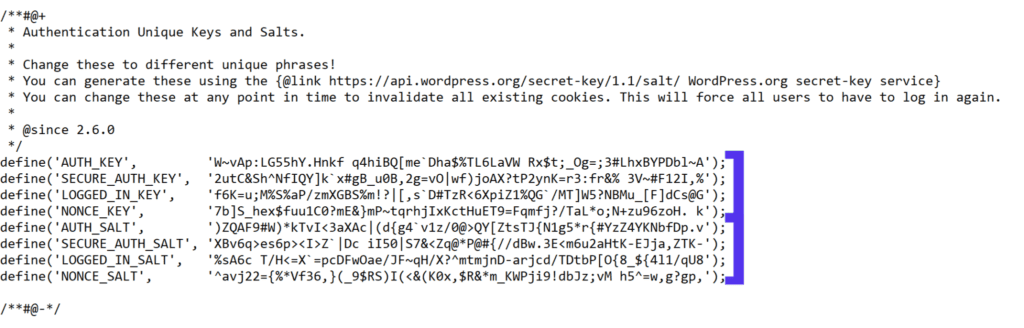
WordPress salts are located in your site’s wp-config.php file. This file contains various configurations for your WordPress installation, including the encryption salts and keys.
What Happens if WordPress Salts Are Compromised or Missing?
WordPress security keys and salts are stored inside the wp-config.php file in the root directory of your WordPress installation. If someone gains access to this configuration file, serious risks can arise.
When salts and keys are exposed, attackers may attempt to hijack sessions or manipulate login sessions.
Although they still cannot directly read the actual password, compromised values weaken overall WordPress security.
- Session hijacking risk: If hackers obtain WordPress salt keys, they may forge browser cookies and access active user sessions.
- Invalidated login sessions: When you change WordPress salts, all logged-in users are forced to log in again. This immediately blocks unauthorized access.
- Database exposure: Even if database credentials leak, salts and security keys prevent attackers from easily cracking hashed login data.
- Urgent regeneration: If your hosting provider reports malware, file changes, or security breaches, generate new unique keys and salts immediately.
As a security measure, consider changing your WordPress salts after suspicious activity. Quick action strengthens defenses and restores trust in your website’s login process.
Why Should You Change Your Security Keys and WordPress Salts?
Changing your WordPress security keys and salts regularly is a recommended practice to enhance your WordPress website’s security.
Here are some reasons why you should consider changing them:
- Improved Security: Periodically changing your security keys and salts adds an extra layer of security to your WordPress site. This helps to safeguard sensitive information and protect against potential security breaches.
- Automatic Logout: When you change the security keys and salts, all logged-in users will be automatically logged out. This is particularly beneficial if you frequently access your WordPress site from multiple devices or browsers. Changing the keys ensures unauthorized access to your login details is immediately invalidated.
- Restricting Unauthorized Access: Changing your security keys and salts helps to prevent unauthorized access to your site’s back-end. Modifying the salts and passwords effectively locks out any hackers who may have gained access to your previous keys.
Learn: How to Protect Your WordPress Site From Malware
Two Methods to Change WordPress Salts
If you wish to change salts in WordPress, there are two primary methods: manually editing the wp-config.php file or using a plugin. Let’s explore both approaches in detail:
Method 1: Change WordPress Salts Manually
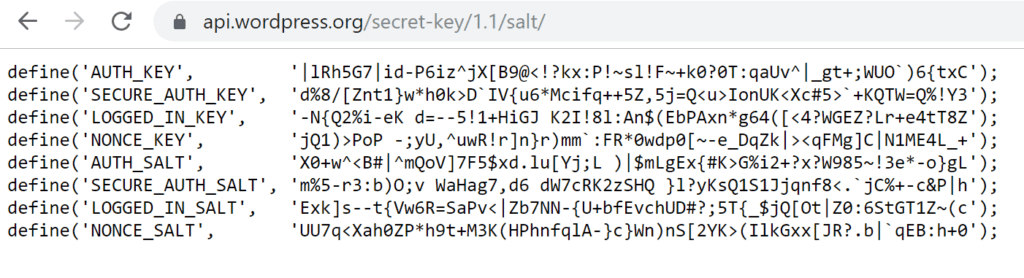
To change your WordPress salts, you can follow these steps:
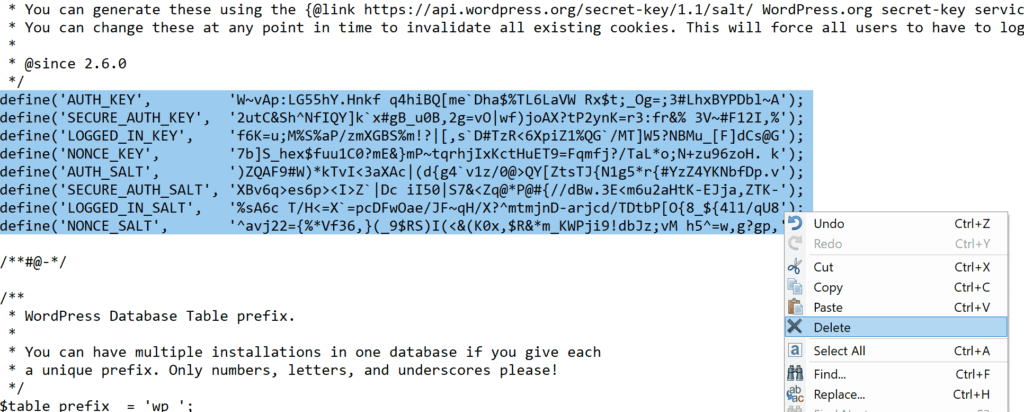
- Access your WordPress site’s wp-config.php file, usually in your site’s root directory.
- Open the file using a text editor.
- Look for the section that contains the salts and keys. It should be labeled with comments mentioning “Authentication Unique Keys and Salts.”
- Generate new salts using a reliable online generator or a security plugin.
- Replace the existing salts with the newly generated ones.
- Save the wp-config.php file.
By regularly changing your WordPress salts, you ensure that even if someone gains unauthorized access to your database, the encrypted data will remain extremely difficult to decrypt.
This adds an extra layer of protection to your WordPress site and helps safeguard sensitive user information.
Related: How to Fix ‘Deceptive Site Ahead’ Warning
Method 2: Change WordPress Salts with a Plugin
Changing WordPress salts with a plugin is a safe and beginner-friendly method. If you prefer not to edit the wp-config.php file manually, you can use SolidWP, a trusted WordPress security plugin that helps manage authentication, unique keys, and salts from your dashboard.
Here is how you can change WordPress salts using SolidWP:
- Install and activate SolidWP from the WordPress repository.
- Go to your WordPress dashboard and open the Security settings.
- Navigate to the Advanced or WordPress Tweaks section, depending on your version.
- Locate the feature related to Security Keys and Salts.
- Click the option to regenerate security keys. The plugin will generate new random strings for your authentication keys and salts.
- Confirm the action and allow the plugin to automatically update the wp-config.php file.
- Once completed, all logged-in users will be logged out. New login sessions will begin using the updated WordPress salt keys.
Using a security plugin reduces the risk of errors that may occur during the manual method. It simplifies the process, protects sensitive login information, and strengthens your website’s security.
Note: Always create backups before making changes, and ensure the plugin has proper file permissions to modify your configuration file securely.
Best Practices for Managing WordPress Salts in Production Environments
Managing WordPress salts and keys correctly is essential for long-term website security. Many security breaches occur because developers overlook best practices in production environments.
You will find authentication, unique keys, and salts inside your wp-config.php file. Treat this file as a priority security element and protect it at the server level.
- Avoid public repositories: Never commit wp-config.php or WordPress secret keys to public code repositories. Use environment variables instead of hardcoding values.
- Use a salt generator: Always generate new random strings using the official WordPress secret key generator or a trusted security plugin.
- Separate environments: Use different salts and security keys for staging and live sites. This prevents cross-environment session conflicts.
- Rotate strategically: Change your WordPress salts after major updates, suspected attacks, or changes to team access.
- Secure access methods: Use SFTP or SSH instead of plain FTP when you manually change salts. Protect the configuration file with proper server permissions.
These best practices strengthen your site’s security and reduce risks across hosting environments. Regular updates and controlled access keep your WordPress website protected at every level.
Wrap Up
WordPress salts play a crucial role in strengthening your website’s security by encrypting sensitive data. Changing your security keys and salts regularly is a recommended practice to enhance the protection of your WordPress site.
Doing so can minimize the risk of unauthorized access and safeguard your users’ information.
Whether you choose to update the salts manually or utilize a plugin, taking proactive measures to modify your security keys ensures your WordPress website’s ongoing security and integrity.
Don’t underestimate the importance of strong security measures, and stay one step ahead in protecting your online presence.
WordPress Salts FAQs
What are WordPress salts and why are they important?
WordPress salts are random strings stored in the wp-config.php file. WordPress uses them with security keys to protect login credentials and browser cookies. They add a strong layer of protection and make it harder for hackers to crack hashed passwords.
How often should I change WordPress salts?
You should change WordPress salts after a security breach, a malware attack, or a change in team access. Many site owners also rotate them during major updates. Regular changes improve WordPress security and invalidate old login sessions.
Will changing the salts log out users?
Yes. When you change WordPress salts, all logged-in users are forced to log in again. This protects user sessions and blocks unauthorized access if someone hijacks cookies.
Where are WordPress security keys and salts located?
You can find authentication keys and salts inside the wp-config.php file in the root directory of your WordPress installation. Protect this configuration file because it contains sensitive information.
Can hackers read my actual password if salts are exposed?
No. WordPress does not store passwords in plaintext. It uses hashing with keys and salts. Even if attackers access the database, it is extremely difficult to reverse-engineer the original login password without the correct encryption keys.


