

Today, enterprises are choosing WordPress at an unprecedented rate, and for good reason. As digital operations grow more complex, businesses need a Content Management System that is flexible, scalable, and cost-efficient. WordPress delivers on all three fronts, making it the preferred platform for large organizations across virtually every industry.
From media houses to Fortune 500 companies, the shift toward WordPress reflects a broader demand for open, adaptable infrastructure.
Organizations no longer want to be locked into expensive proprietary platforms that limit growth. They want full control, a rich ecosystem, and the freedom to build exactly what their business requires.
TL;DR: What You’ll Learn in This Blog
- Open-source architecture, an expansive plugin ecosystem, and zero vendor lock-in are the top drivers behind enterprise adoption.
- Headless architecture, multisite capabilities, and seamless third-party integrations make WordPress adaptable for complex enterprise needs.
- Lower total cost of ownership, a vast global developer community, and proven scalability make it a long-term investment for the enterprise.
WordPress Market Leadership and Enterprise Adoption Trends
WordPress dominates the CMS market, and its scalability, flexibility, and massive ecosystem make it a trusted choice for enterprises managing complex digital platforms.

Market Share and Its Dominance Among CMS Platforms
WordPress currently powers over 43% of all websites on the internet. In the CMS market specifically, it holds more than 59.8% market share, a figure that no other platform comes close to matching.
This dominance is not accidental. It reflects decades of community-driven development, consistent core updates, and genuine responsiveness to enterprise requirements.
The platform supports millions of websites worldwide, from personal blogs to high-traffic digital properties run by organizations such as NASA, Sony, and The New York Times. These are not small deployments. They represent mission-critical digital infrastructure built on WordPress at scale.
Compared with other CMS platforms, including Drupal, Sitecore, Adobe Experience Manager, and Contentful, WordPress consistently leads in adoption, developer availability, and third-party integrations. Its reach across industries is unmatched.
Build a Scalable Enterprise WordPress Platform
Upgrade your agency’s hosting and effortlessly handle more users with high-performance, scalable plans.
How WordPress Compares to Other Enterprise CMS Platforms?
Many large organizations evaluate enterprise WordPress solutions alongside proprietary alternatives before making a platform decision. The comparison often comes down to flexibility, total cost, and long-term ownership.
Proprietary platforms like Sitecore or Adobe Experience Manager come with significant licensing costs, vendor dependencies, and steep implementation fees.
Open-source alternatives like Drupal offer flexibility but require a much steeper learning curve and a more limited plugin ecosystem. Platforms like Arc XP are purpose-built for media and publishing but lack the broad adaptability that most enterprises need.
An Arc XP vs WordPress CMS comparison illustrates this clearly. While Arc XP serves around 1,200 websites with a media-centric focus, WordPress supports hundreds of millions of sites across every sector.
For enterprises seeking versatility, cost-effectiveness, and a future-proof foundation, WordPress consistently wins.
Why Large Organizations Are Migrating to WordPress?
Enterprise migration to WordPress is accelerating. Organizations move to WordPress for multiple reasons: outdated legacy systems, rising proprietary licensing costs, limited customization options, and the need for modern, API-first architecture.
The rationale for using WordPress in the enterprise is straightforward. WordPress offers affordability, robust security, scalability, and support for custom development and third-party integrations.
As more large enterprises make the switch, the case for migration becomes even stronger, both in terms of capability and competitive advantage.
Key Reasons Enterprises Are Choosing WordPress Over Other CMS Platforms
Enterprises prefer WordPress because it offers flexibility, scalability, strong security, seamless integrations, and full ownership of their digital infrastructure, free from vendor restrictions.
Open Source Architecture and Freedom from Vendor Lock-In
WordPress is free, open-source software. Enterprises can deploy, modify, and extend it without paying licensing fees or seeking vendor approval. This freedom is foundational.
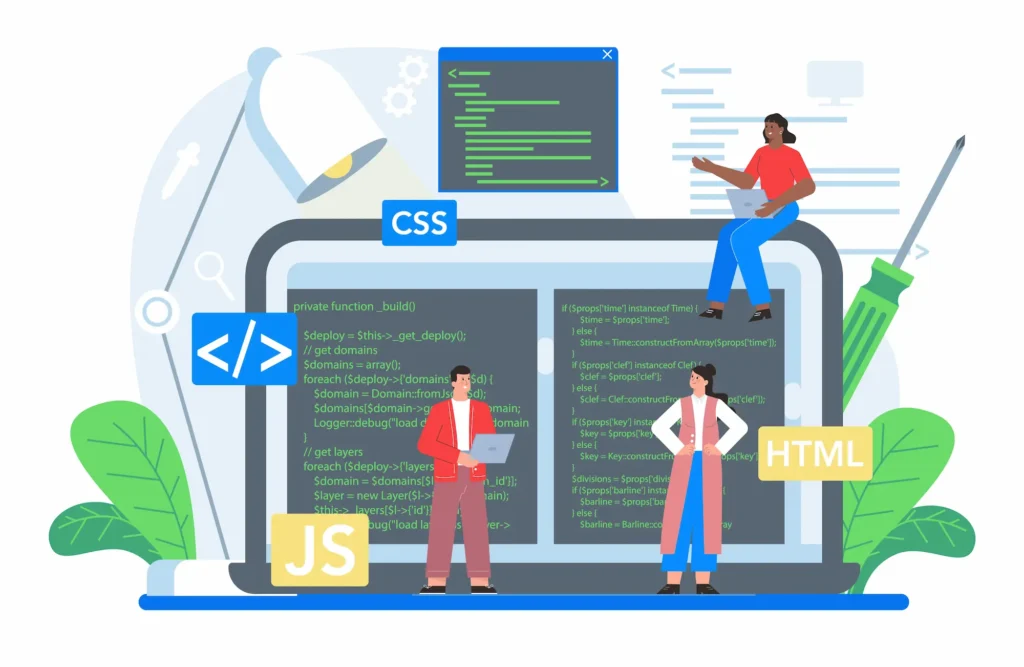
Proprietary platforms create limitations that compound over time. When a vendor changes pricing, discontinues a feature, or sunsets a product, enterprises are left scrambling.
With WordPress, the core software is community-maintained, publicly auditable, and infinitely extensible. No single company controls the roadmap.
This architecture gives large organizations full ownership of their digital infrastructure. They can hire any web developer, switch hosting providers, or rebuild their tech stack without being constrained by contractual vendor lock-in.
Content Ownership, Portability, and Easier CMS Migration
Data portability is a critical concern for enterprises. Proprietary CMS platforms often store content in closed formats, making migration expensive and risky.
WordPress stores content in a standard MySQL database with a well-documented structure, making it straightforward to export, import, and move.
Organizations that choose to migrate to WordPress from legacy systems, including Drupal, HubSpot, Magento, and others, find that the process is manageable with proper planning.
Specialized WordPress migration services handle everything from pre-migration audits to post-launch testing, ensuring zero data loss and minimal downtime.
For teams managing the migration independently, best WordPress migration plugins like Duplicator Pro, Migrate Guru, and BackupBuddy automate file transfers, database exports, and URL updates with precision.
Extensive Plugin Ecosystem and Advanced Enterprise Features
The WordPress plugin repository contains over 60,000 free plugins, with thousands more available as premium options. For enterprises, this ecosystem eliminates the need for custom development in many scenarios, dramatically reducing time-to-market and implementation costs.
- Need advanced SEO? Plugins like Yoast SEO and Rank Math provide granular control over search visibility without touching a single line of code.
- Need payment gateways, booking systems, or membership management. The ecosystem covers it.
- Need to build a full e-commerce store. WooCommerce transforms WordPress into a powerful sales engine capable of handling complex product catalogs and high transaction volumes.
Page builders like Elementor and Divi enable non-technical teams to design and manage pages independently, reducing reliance on developers for routine content updates. This combination of tools makes the WordPress ecosystem genuinely enterprise-ready.
Seamless Integrations with CRM, Marketing Automation, and Analytics Platforms
Large organizations rely on a connected stack of tools, including CRM platforms such as Salesforce and HubSpot, marketing automation systems, analytics dashboards, ERP software, and data warehouses.
WordPress integrates seamlessly with all of these through its robust REST API and a wide range of pre-built connectors.
These integrations ensure that content, data, and customer behavior are unified across the enterprise technology stack. Marketing teams can trigger automation workflows based on on-site behavior.
Sales teams can capture lead data directly into CRM systems. Analytics platforms receive real-time event data from every page interaction.
This level of integration, without expensive middleware or proprietary connectors, is one of the key reasons enterprises consistently favor WordPress over closed platforms.
Headless WordPress, REST API, and Omnichannel Content Delivery
Modern enterprises need to deliver content across multiple channels simultaneously: websites, mobile apps, digital kiosks, smart devices, and more. Enterprise headless WordPress development enables exactly this.
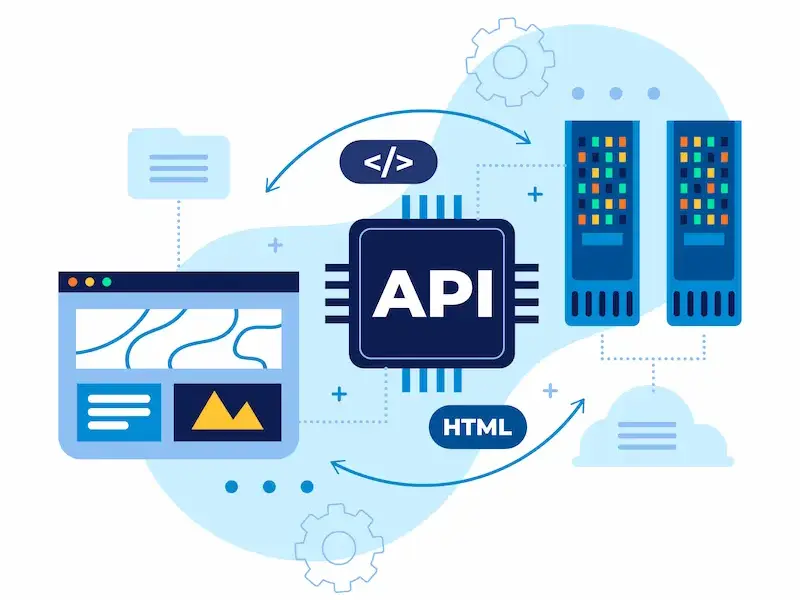
In a headless architecture, WordPress serves as the content backend, while content is delivered via the REST API or WPGraphQL to any frontend built with React, Next.js, Vue, or another framework.
This decoupled model gives development teams full flexibility to build fast, modern frontends without constraints from the CMS presentation layer.
For organizations building a comprehensive digital experience platform, WordPress functions as the central content hub.
It manages structured content, editorial workflows, and publishing permissions while APIs distribute that content wherever it needs to appear. This approach supports omnichannel strategies without duplicating content management effort.
Multisite Capabilities for Managing Multiple Enterprise Websites
Enterprises often operate multiple brands, regional websites, or product lines under one organizational umbrella. WordPress Multisite allows teams to manage multiple sites from a single installation and a centralized dashboard.
Network administrators can manage plugins, themes, and user permissions across every property in the network simultaneously.
Individual site admins retain control over their own content and settings without needing access to the full network. This structure reduces infrastructure costs, simplifies governance, and ensures brand consistency across all digital properties.
For organizations that have built fragmented website networks over time, merging multiple sites into a unified WordPress Multisite setup can dramatically streamline operations, consolidate SEO authority, and reduce ongoing maintenance costs.
Enterprise Grade Security, Compliance, and Regular Core Updates
Security is non-negotiable for large organizations managing sensitive data, financial transactions, and regulated content. WordPress takes security seriously at its core, with a dedicated security team releasing regular patches, updates, and advisories.
Enterprise implementations go further. Role-based access control limits who can view, edit, or publish content. Web application firewalls block malicious traffic at the edge.
Automated malware scanning detects threats before they escalate. The best WordPress security service providers, including platforms like JetPack, SolidWP, and Wordfence, offer enterprise-grade threat monitoring, intrusion detection, and incident response.
Security patches are released promptly and applied automatically or via controlled deployment pipelines, ensuring the hosting environment remains protected against emerging vulnerabilities at all times.
High Performance with CDN, Caching, and Cloud Infrastructure
Site performance directly impacts user experience, search visibility, and revenue. WordPress supports multiple layers of performance optimization that enterprises can implement at scale.

Caching plugins like WP Rocket and FastPixel reduce server load by serving pre-rendered pages to visitors. CDN integration distributes static assets across global data centers, reducing latency for users in every region.
Image optimization, lazy loading, and code minification further reduce page weight. Following proven tips to speed up WordPress site performance helps enterprises maintain fast load times even during peak traffic events.
When deployed on cloud infrastructure, whether AWS, Google Cloud, or Azure, WordPress scales horizontally to absorb traffic spikes without performance degradation.
This combination of caching, CDN, and cloud hosting creates a resilient, high-performing foundation for enterprise-grade deployments.
Managed WordPress Hosting and Scalable Infrastructure
Enterprise teams should not spend engineering resources managing server infrastructure. Managed WordPress hosting solves this problem by offloading server management, security patching, performance optimization, and automated backups to a specialized hosting provider.
Leading managed WordPress hosting providers are purpose-built for WordPress at scale. These include:
They offer container-based scaling, staging sites, one-click restores, and WordPress-specific support teams who understand plugin conflicts, theme issues, and core update risks.
For enterprises, managed hosting is not an optional upgrade; it is a baseline requirement for operating a reliable, high-performance digital property without incurring unnecessary technical overhead.
CI/CD Workflows and Enterprise Ready Development Operations
Enterprise WordPress development benefits from structured CI/CD (Continuous Integration/Continuous Deployment) pipelines. These workflows automate code testing, deployment, and rollback processes, reducing the risk of introducing errors into production environments.
Staging sites allow development and QA teams to test updates, new features, and plugin changes before they go live. Version control via Git enables multiple developers to work in parallel without conflicts.
Combined with robust WordPress website management tools, these workflows align WordPress with the development operations standards expected in enterprise software environments.
This level of process maturity is often cited as a reason enterprises view WordPress not just as a website platform but as a full digital operations infrastructure.
Lower Total Cost of Ownership Compared to Proprietary CMS Platforms
The financial case for WordPress is compelling. The core software is free. Thousands of plugins and premium themes are available at a fraction of what proprietary platforms charge for equivalent features.
Enterprises eliminate licensing fees entirely and redirect those budgets toward custom development, performance infrastructure, or strategic integrations.
Over a three-to-five-year horizon, the total cost of ownership for WordPress is significantly lower than for alternatives such as Sitecore, Adobe Experience Manager, or Episerver.
This cost advantage is not just about software; it extends to staffing, since WordPress developers are far more available globally than specialists in niche proprietary platforms.
Large Global Developer Community and Enterprise Support Ecosystem
WordPress is supported by one of the largest developer communities in technology. More than 80,000 contributors have submitted code to the WordPress project, and millions of developers worldwide build on the platform daily.
This global community means enterprises never face a shortage of talent for new development, ongoing maintenance, or specialized integrations.
It also ensures that security vulnerabilities are identified and patched quickly, and that the platform continues to evolve in response to industry trends.
For organizations that need dedicated enterprise WordPress support, specialized agencies provide 24/7 assistance, covering everything from performance tuning to security incident response.
This support ecosystem removes the operational risk that organizations sometimes associate with open-source software.
Flexible Custom Development for Complex Enterprise Requirements
Off-the-shelf solutions rarely meet all of an enterprise’s requirements out of the box.
WordPress excels here because its open architecture allows complete customization at every layer, from custom post types and taxonomies to custom REST API endpoints and purpose-built admin interfaces.
Specialist WordPress development services can build bespoke plugins, custom themes, WooCommerce extensions, and full enterprise platforms tailored to specific business workflows.
Working with an experienced enterprise web agency ensures that architecture decisions are made with long-term scalability, performance, and security in mind.
This flexibility means WordPress adapts to the business, not the other way around.
Proven Enterprise Use Cases Across Industries
WordPress powers enterprise deployments across healthcare, finance, media, education, retail, and government. Healthcare providers use it to build patient portals and appointment booking systems.
Financial services firms use it to manage content-heavy compliance sites. Media companies use it to power high-traffic news and publishing operations.
E-commerce enterprises rely on WooCommerce and broader e-commerce site optimization strategies to run online stores handling millions of transactions annually.
Educational institutions use WordPress with translation plugins to serve student communities worldwide in multiple languages.
These real-world deployments demonstrate that WordPress is not a theoretical enterprise solution. It is a proven, battle-tested platform operating at the highest levels of digital complexity.
Key Considerations Before Choosing WordPress for Enterprise Projects
WordPress is an excellent choice for most enterprises, but informed decisions require honest evaluation. Before committing, consider the following:
- Governance and plugin management: The freedom to install any plugin also carries risks. Enterprises need strict plugin governance policies to avoid bloat, security vulnerabilities, and compatibility issues.
- Hosting environment selection: Shared hosting is inappropriate for enterprise workloads. Always plan for managed hosting, a dedicated server, or a cloud infrastructure from day one.
- Custom development planning: Complex enterprise requirements need experienced developers. Factor in custom development costs and timelines in addition to platform and hosting costs.
- Ongoing maintenance: WordPress requires regular updates to core software, themes, and plugins. Plan for dedicated resources (internal or external) to manage WordPress website on an ongoing basis.
- Security posture: Enterprises should implement layered security, including firewalls, malware scanning, role-based access, and automated backups from launch.
Conclusion: Why WordPress Continues to Win Enterprise CMS Adoption
The evidence is clear. Enterprises across every industry are choosing WordPress because it combines the flexibility of open-source architecture with the robustness of enterprise-grade infrastructure.
It eliminates vendor lock-in, reduces total cost of ownership, and supports everything from headless omnichannel delivery to complex multisite management.
WordPress adapts to the evolving demands of large organizations without forcing trade-offs between functionality and freedom.
Its global developer community, extensive plugin ecosystem, and mature hosting options make it a platform that grows with the business rather than constraining it.
Whether you are planning a CMS migration, launching a new enterprise digital property, or scaling an existing WordPress installation, the platform offers the tools, the community, and the track record to support long-term success.
For enterprises that want full control, proven performance, and lasting value, WordPress remains the definitive choice.
FAQs About Enterprises Choosing WordPress
Why do enterprises choose a WordPress website over many CMS platforms?
Enterprises choose a WordPress website because the WordPress software offers flexibility, scalability, and full control over a company’s digital presence.
Unlike many CMS platforms and website builders, it provides built in tools, additional features, and customization options that support modern websites and an evolving business.
What is the best hosting plan for an enterprise WordPress site?
The best hosting plan depends on how many visitors the WordPress site receives and the level of performance required. Many enterprises choose dedicated hosting or a virtual private server because these hosting options offer better performance, enhanced security, and improved site management for high-traffic modern websites.
How can enterprises install WordPress and launch their first WordPress website?
Most web hosting providers allow users to install WordPress in a few clicks from the site’s dashboard. After installation, businesses can choose a WordPress theme, configure essential features, and customize the site’s functionality to quickly launch their first WordPress website.
Can WordPress manage multiple sites for the same company?
Yes. WordPress supports site management for multiple sites through WordPress Multisite. This feature allows enterprises to manage multiple sites for a single company from a single dashboard, while maintaining consistent branding and centralized control.
Is WordPress secure enough for an ecommerce store or enterprise website?
Yes. With the right web hosting, advanced security practices, and premium plans, a WordPress site can stay protected. Regular updates, security plugins, and managed hosting help keep the site protected while supporting advanced features required for enterprise websites and ecommerce stores.


