

In the ever-evolving world of WordPress, Ninja Forms has become a reliable and feature-rich form builder plugin. It presents various features, comprehensive customization options, and an incredibly user-friendly interface. With the enhancements and upgrades, Ninja Forms remains a strong contender in WordPress form plugins. In this Ninja Forms review, we have shared a detailed review of this WordPress form plugin. Let’s dive in!
TL;DR: Quick Insights on Ninja Forms
- Ninja Forms is a powerful and user-friendly WordPress form builder with an intuitive drag-and-drop interface.
- It supports diverse form fields, file uploads, email notifications, and seamless payment integration.
- You can connect it to CRM tools and email marketing platforms, and ensure GDPR compliance.
- The free version covers basic needs, while premium add-ons unlock advanced features and deeper integrations.
An Overview of Ninja Forms
Ninja Forms is a well-known WordPress plugin that lets users create highly customized forms with an easy-to-use drag-and-drop interface.

Its impressive range of form fields and the simplicity of form building make it a favorite amongst WordPress users. Whether you want a simple contact form or a multi-step registration form, Ninja Forms makes it a breeze.
Here are some of the excellent key features of the Ninja Forms WordPress plugin:
Intuitive Drag-and-Drop Form Builder
Creating a form is simple with the Ninja Forms plugin. The form builder is intuitive and user-friendly.
You can choose from various form fields, drag and drop them into your form, and arrange them as you need. Even for the technologically unskilled, Ninja Forms ensures the form creation process is smooth and hassle-free.
Related: Best WordPress Page Builders
Diverse Form Fields
One of Ninja Forms’ standout features is its extensive array of form fields. From primary fields like name and email to specialized ones like star ratings and file uploads, Ninja Forms has you covered.
This variety of form fields allows you to capture all the necessary information from your visitors in the way that best suits your requirements.
File Uploads and Submission Exports
With Ninja Forms, you can turn any form into an upload form, allowing your users to upload files easily. This feature can be beneficial in various scenarios, such as job applications, customer feedback, or document submissions.
Submissions can be sent or exported in different formats, including PDFs, Microsoft Excel files, or Google Sheets, providing flexibility in managing your data.
Email Notifications
Ninja Forms offers enhanced control over your communication by allowing you to send email notifications to specific recipients from any form.
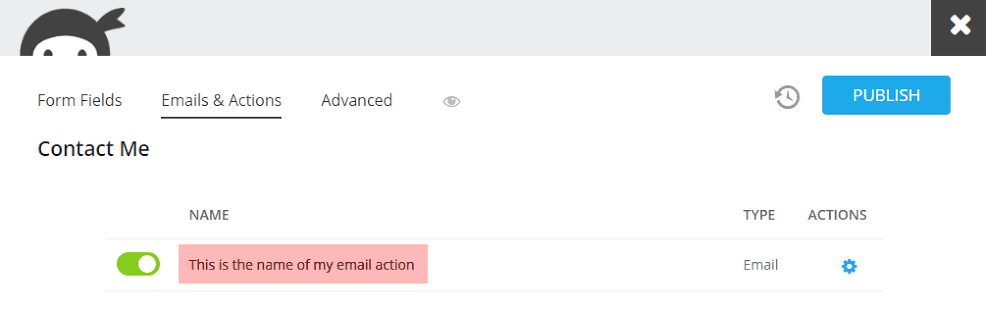
Whether notifying your team of a new form submission or sending an acknowledgment to the user, Ninja Forms makes email automation easy.
Advanced Calculations
Ninja Forms includes powerful data calculations that let you automate totals, scores, and pricing logic directly inside your forms. From quizzes to dynamic pricing and order summaries, you can perform complex math without custom code.
Submission Management and Data Control
You get full control over your form data. View, edit, search, filter, and export submissions anytime. You can export data on demand or schedule exports in formats such as Excel or PDF, ensuring smooth reporting and recordkeeping.
Custom Success Actions
Go beyond a simple confirmation message. Show a custom success message, redirect users to any page, or deliver downloadable lead magnets after submission. This helps improve conversions and user engagement.
Build Smarter Forms with Ninja Forms
Create powerful, user friendly forms for your WordPress site with flexible features and seamless integrations.
User Restrictions and Access Control
Control who can access and submit your forms. Restrict forms to logged-in users or limit submissions based on unique values, such as one entry per email address. This is ideal for registrations, applications, and gated content.
Built-in Anti-Spam Protection
Ninja Forms includes multiple layers of anti-spam and bot-blocking technology. This keeps your inbox clean and protects your site from unwanted submissions.
Extensive Add-On Marketplace
With more than 40 official add-ons, you can extend functionality as your needs grow. Add payment gateways, CRM integrations, automation tools, styling options, and more without switching plugins.
Custom and Favorite Fields
Save time by customizing fields and marking them as favorites. Reuse them across different forms to maintain consistency and speed up your workflow.
Related: Best WordPress Contact Form Plugins
Ninja Forms Integration Capabilities
Ninja Form stands out with its robust integration options. It seamlessly syncs with numerous third-party applications, streamlining your workflow. Let’s check:
- Seamless Payment Integration: Securing online transaction capabilities on your website is crucial in this digital age. Ninja Forms facilitates this with its integrations with popular payment platforms, PayPal and Stripe. Whether selling products, accepting donations, or providing paid services, Ninja Forms makes payment collection straightforward and secure.
- CRM and Email Marketing Integrations: Beyond payments, Ninja Forms supports integrations with popular email marketing platforms such as MailChimp and Constant Contact, as well as CRM platforms such as Salesforce and Zoho. This allows you to easily create subscription and lead-generating forms, helping you grow your email lists and leads effectively.
- GDPR Compliance: Ninja Forms also prioritizes your site’s compliance with GDPR. It provides simple templates for Right to Be Forgotten and Data Export requests and integrates seamlessly with WordPress’s inherent GDPR capabilities for automatic compliance.
Ninja Forms Plans and Pricing Structure
Ninja Forms offers four flexible plans to match different website needs, from simple forms to advanced business workflows.
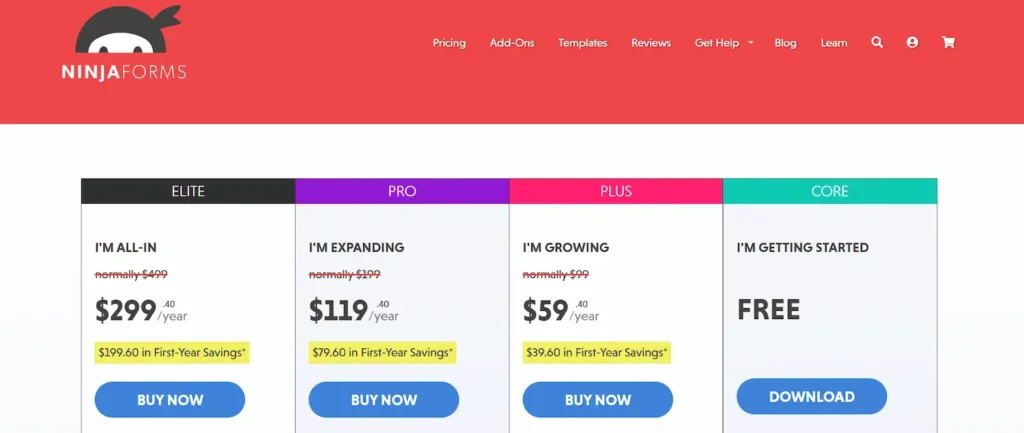
- Core is free and supports unlimited sites, forms, submissions, and emails. It includes 28 plus form fields, templates, anti-spam protection, advanced calculations, submission management, GDPR tools, and email notifications. It is ideal for basic contact forms and lead collection.
- Plus is designed for growing websites. It covers three sites and includes file uploads, conditional logic, layout and styling options, multi-step forms, PayPal integration, and email marketing connections such as Mailchimp and Constant Contact. Priority support and discounts on extra add-ons are included.
- Pro expands to twenty sites and unlocks Stripe, Authorize.net, CRM integrations like Salesforce and HubSpot, user management, save progress, and automation tools such as Zapier and Slack.
- Elite is built for agencies and developers. It supports unlimited sites and includes all add-ons, all payment gateways, full CRM and email marketing integrations, automation features, priority support, and early access to new add-ons.
All plans include spam protection and unlimited usage, making Ninja Forms a scalable solution for any WordPress site.
Know more: Best WordPress Membership Plugins
Ninja Forms Review: Is it Worth it?
Despite potential cost considerations for premium features, Ninja Forms’ powerful capabilities make it a compelling choice for WordPress users. Its intuitive interface, rich feature set, and comprehensive integrations provide a superior form-building experience.
The value of Ninja Forms goes beyond the creation of simple contact forms. With its help, you can build complex, multi-step forms, integrate secure payment gateways, create GDPR-compliant forms, and more.
Whether running a personal blog or managing a large corporate website, Ninja Forms can quickly handle your form-building needs.
However, the ongoing costs should be considered if you plan to use many premium add-ons. As your needs grow, individual add-ons can add up, making it more expensive than some competitors.
That said, the free base version of Ninja Forms provides a robust set of features that can meet the needs of many websites. It is a capable form builder that can meet the needs of most sites.
Furthermore, the customer support offered by the Ninja Forms team is noteworthy. They provide extensive documentation, guides, and responsive email support, making it easier for you to navigate and use the plugin effectively.
Summary
Ninja Forms has consistently proven itself as a powerful, user-friendly, and feature-packed WordPress form builder.
Despite the premium pricing for advanced features, its functionality and ease of use make it a strong contender.
The upgrades have further enhanced Ninja Forms’ functionality, making it a valuable tool for any WordPress user. It offers a blend of simplicity and flexibility to cater to basic and complex form-building needs.
FAQs About Ninja Forms Plugin
Is Ninja Forms a free contact form plugin for a WordPress website?
Yes. The free Ninja Forms plugin includes the core plugin, which lets you create forms with a drag-and-drop builder.
You can build a basic contact form, basic forms, and even unlimited forms with the core version. It is a great starting point for free users who need simple data collection.
What features are included in the Ninja Forms free version?
Ninja Forms free includes the core Ninja Forms plugin, built-in spam protection, a default success message, and a user-friendly forms interface.
You can create online forms, manage form data, and design your first Ninja Form through a straightforward process. It supports basic contact form needs without a paid add-on.
How does Ninja Forms compare in Ninja Forms vs other popular form plugins?
In Ninja Forms vs other popular form plugins, it stands out for its clean user interface and flexible drop builder. The learning curve is low.
You can extend functionality with paid add-ons to build advanced forms, multi-page forms, post-submission forms, and order forms that accept payments.
Does Ninja Forms support conditional logic and advanced features?
Yes. With paid add-ons, you can use conditional logic to build smarter forms. You can create advanced forms with restriction settings, user registration, save progress options, and customer relationship management integrations.
Can I securely collect and manage all users’ information?
Yes. Ninja Forms allows structured data collection and internal reference tracking. You can customize the success message, avoid a blank screen after submission, and even connect forms to your blog posts or online services. Free support is available, while priority support comes with premium plans.


