
Most websites quietly bleed revenue, not from bad design, but from slow, rigid content delivery. WordPress GraphQL development fixes that. It strips away the bloated data transfers and brittle APIs that are holding your platform back.
Instead, it gives your frontend exactly what it needs, precisely when it needs it.
The result? Faster pages, cleaner code, and a content infrastructure built to scale. If you’re serious about headless CMS performance, this is where it starts.
TL;DR: Build Faster, Scale Smarter with Headless CMS
- GraphQL replaces bloated REST calls with precise, single-request data fetching, improving speed and efficiency.
- WPGraphQL turns WordPress into a flexible, API-first content engine for any frontend framework.
- Headless WordPress with GraphQL supports omnichannel delivery across web, mobile, and beyond.
- A schema-driven API future-proofs your platform, letting frontend and backend teams scale independently.
Understanding WordPress GraphQL Development in Modern Headless CMS Architecture
Before diving into benefits and best practices, it helps to understand how GraphQL development fits into the broader headless CMS ecosystem.
What Headless WordPress Means in a Decoupled CMS?
A headless CMS separates the content management backend from the presentation layer. In a traditional WordPress setup, the backend and the theme (frontend) are tightly coupled. A headless WordPress setup decouples these two layers entirely.
With headless WordPress, editors and developers manage content in the WordPress admin panel. But instead of WordPress rendering HTML pages directly, it exposes content through an API. A separate frontend application, built in Next.js, React, Vue, or another framework, consumes that API and handles all rendering.
This decoupled architecture gives teams enormous flexibility. The frontend can be built using any modern JavaScript framework. The backend remains familiar to content editors who already know WordPress. Both sides can be developed, deployed, and scaled independently.
How GraphQL for WordPress Powers API-First Content Delivery?
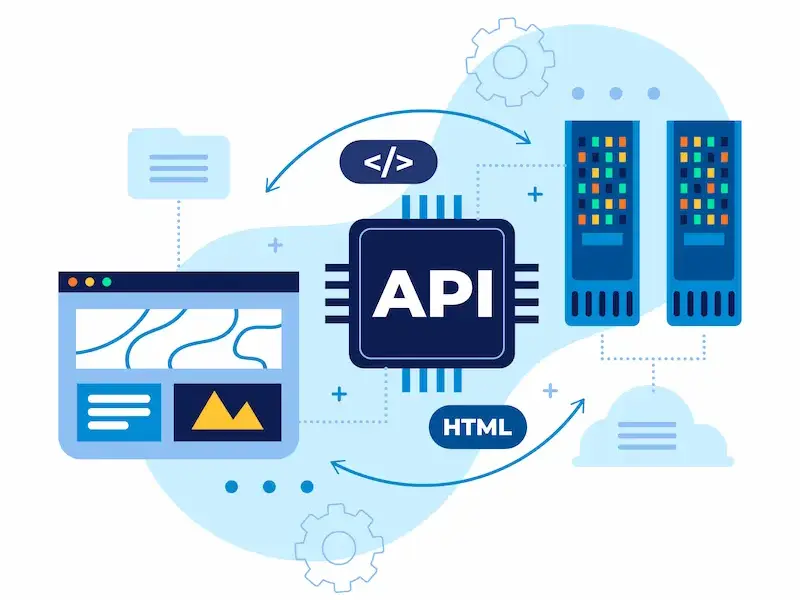
REST APIs have long been the standard for exposing WordPress content to external applications. But REST has limitations. Each endpoint returns a fixed data structure, which often means fetching more data than needed or making multiple requests to get everything a page requires.
GraphQL solves both problems. It is a query language and runtime for APIs that lets clients request exactly the data they need, no more, no less, in a single request.
Instead of hitting multiple REST endpoints and filtering the response client-side, a frontend application sends a single GraphQL query that specifies precisely which fields to return.
For WordPress GraphQL development, this means dramatically more efficient communication between the frontend and the backend. A blog listing page might only need post titles, slugs, and featured image URLs.
A GraphQL query fetches exactly that, not the full post body, author metadata, and dozens of other fields that a REST endpoint would include by default.
Build Future-Ready Headless CMS Solutions
Launch a scalable, API driven headless website powered by WordPress GraphQL Development and built for speed, SEO, and growth.
The Role of WPGraphQL in Structuring and Exposing WordPress Data
WPGraphQL is an open-source WordPress plugin that adds a fully functional GraphQL API to any WordPress installation. It is the foundation of virtually every WordPress GraphQL development project.
Once installed and activated, WPGraphQL automatically generates a schema based on your WordPress data model.
Posts, pages, categories, tags, custom post types, and custom fields are all exposed through a unified GraphQL endpoint. The plugin is actively maintained and has become the de facto standard for headless WordPress projects.
WPGraphQL also integrates with popular WordPress plugins like Advanced Custom Fields (ACF) and WooCommerce through dedicated extension plugins.
This makes it possible to expose complex, custom data structures and e-commerce data through a clean, queryable API without writing custom backend code.
Connecting Frontend Frameworks like Next.js and React to Headless WordPress
The most common frontend frameworks used with headless WordPress are Next.js and React. Next.js is particularly popular because it offers server-side rendering (SSR), static site generation (SSG), and incremental static regeneration (ISR) out of the box, all of which align well with content-heavy WordPress sites.
Connecting a Next.js application to a headless WordPress backend via WPGraphQL is straightforward.
Developers use a GraphQL client like Apollo Client or the lightweight graphql-request library to send queries from the frontend to the WPGraphQL endpoint. The data is then passed into React components as props, just like any other data source.
This setup gives development teams the full power of the React ecosystem on the frontend while retaining WordPress as a familiar, feature-rich content management tool on the backend.
Strategic Benefits of WordPress GraphQL Development for Headless CMS Solutions
Adopting GraphQL development for WordPress within a headless CMS architecture is not just a technical preference. It delivers measurable strategic advantages.

Enabling Precise Data Fetching Without Overfetching or Underfetching
One of GraphQL’s most celebrated benefits is eliminating the twin problems of overfetching and underfetching. With REST APIs, clients often receive far more data than they need (overfetching) or must make additional requests to gather all required data (underfetching).
GraphQL queries are declarative. A frontend developer specifies the exact fields needed for a given view. The API returns only those fields. This reduces payload size, speeds up data transfer, and makes frontend components easier to reason about.
In a headless WordPress project with many content types and complex data relationships, this precision is invaluable. It keeps performance tight even as the content model grows.
Supporting Omnichannel Content Distribution Across Web and Mobile
Modern brands need to deliver content across websites, mobile apps, digital signage, smartwatches, and voice interfaces. A headless WordPress setup with a GraphQL API makes this omnichannel distribution straightforward.
Because content is decoupled from presentation, the same WordPress backend can serve multiple frontends simultaneously.
A mobile app queries the same WPGraphQL endpoint as the web application, requesting only the fields relevant to its interface. Content editors publish once in WordPress, and every channel receives the update instantly.
This content-as-a-service model is a core reason enterprises are choosing headless WordPress with GraphQL for their digital infrastructure.
Improving Performance and Scalability in High-Traffic Applications
Performance is a competitive advantage. Slower pages lose visitors, reduce conversions, and rank lower in search results. WordPress GraphQL development contributes to performance in several ways.
Smaller payloads mean faster network transfers. Fewer API requests mean less latency. And because the frontend is a standalone application, it can be deployed on a global CDN, serving pre-rendered pages from edge locations close to every user.
Scalability also improves significantly. Since the WordPress backend only handles API requests rather than rendering every page, it handles much higher traffic loads without resource exhaustion.
The frontend and backend can scale independently based on their own bottlenecks.
Accelerating Frontend Innovation with Schema-Driven APIs
GraphQL schemas act as contracts between frontend and backend teams. The schema defines all available types, queries, and mutations. Frontend developers know exactly what data is available and what shape it takes before writing a single line of UI code.
This schema-driven development model allows frontend and backend work to proceed in parallel. Teams can use schema mocking tools to build and test UI components before the backend data is finalized. This accelerates development timelines and reduces integration friction.
Read More: API vs White Label
Future-Proofing Digital Platforms with API-First Architecture
An API-first platform built on headless WordPress and GraphQL is inherently adaptable. When new technologies emerge, a new frontend framework, a new device category, a new delivery channel, the backend does not need to change. The GraphQL API is already in place, ready to serve any new consumer.
This future-proofing is a major reason enterprises are investing in headless CMS architecture today. The upfront investment in decoupling the frontend and backend pays compounding dividends as the platform evolves.
WordPress GraphQL Development vs REST API in Headless CMS Implementations
Many WordPress developers are familiar with the WordPress REST API. Understanding when and why to choose GraphQL over REST is essential for making the right architectural decisions.
REST API vs GraphQL for WordPress Data Retrieval and Flexibility
The WordPress REST API is mature, well-documented, and widely supported. For simple use cases, fetching a list of posts or creating basic content integrations, it works perfectly well.
However, REST becomes cumbersome as complexity grows. Endpoints are rigid. Data shapes are fixed by the server.
Clients often need to request multiple endpoints and combine the results themselves. This increases both development complexity and the number of HTTP requests.
GraphQL addresses these limitations by putting the client in control of data requirements. One request, one response, exactly the right data. For complex headless WordPress applications, this flexibility is a decisive advantage.
Handling Complex Content Models, Custom Post Types, and Advanced Fields
Modern WordPress sites often use custom post types, taxonomies, and Advanced Custom Fields to build sophisticated content models.
Exposing this complexity through REST endpoints requires writing custom endpoint logic or relying on plugins that may not cover all edge cases.
WPGraphQL handles this elegantly. The WPGraphQL for ACF plugin automatically exposes ACF field groups in the GraphQL schema.
Custom post types registered with show_in_graphql appear in the schema automatically. The result is a clean, queryable API that reflects the full richness of the WordPress data model.
Comparing Query Efficiency, Performance, and Caching Strategies
REST APIs benefit from HTTP caching at the URL level. Since each endpoint has a stable URL, CDNs and browsers can cache responses aggressively. GraphQL POST requests are harder to cache at the HTTP level because query bodies vary.
However, this challenge is well-addressed in the WPGraphQL ecosystem. Persisted queries, where named queries are stored server-side and referenced by ID, allow GraphQL requests to be made as GET requests, enabling HTTP caching. Tools like Faust.js and Next.js revalidation strategies complement this with application-level caching.
For most headless WordPress applications, the efficiency gains of precise data fetching outweigh the additional caching complexity.
Choosing the Right API Approach for Enterprise Headless WordPress
For simple integrations, mobile apps needing basic content, or teams without deep GraphQL experience, the REST API remains a valid choice.
For enterprise headless WordPress, with complex content models, multiple frontends, strict performance requirements, and large development teams, GraphQL is almost always the better fit.
The key factors to evaluate are: content model complexity, the number of frontend consumers, team expertise, and long-term scalability requirements.
For most modern enterprise projects, these factors point strongly toward WordPress GraphQL development.
WPGraphQL Ecosystem for Headless WordPress
WPGraphQL does not exist in isolation. A thriving ecosystem of plugins and tools has grown around it.
- WPGraphQL for ACF exposes Advanced Custom Fields in the GraphQL schema, making it possible to query custom field data alongside standard post content.
- WPGraphQL for WooCommerce (WooGraphQL) brings full e-commerce data, products, orders, cart, and checkout into the GraphQL API, enabling headless commerce applications.
- Faust.js is a React-based framework specifically designed for headless WordPress. It wraps WPGraphQL with authentication support, preview mode, seed query optimization, and routing conventions that mirror WordPress’s URL structure. Faust.js dramatically reduces the boilerplate required to build a production-ready headless WordPress application.
- Apollo Client and graphql-request are the most popular GraphQL clients used on the frontend. Apollo Client provides advanced features like normalized caching, reactive queries, and optimistic UI updates.
graphql-requestis a simpler, lighter alternative that works well for projects that do not need Apollo’s full feature set.
Together, these tools form a mature, production-ready ecosystem that makes WordPress GraphQL development accessible to teams of all sizes.
Scalable Headless CMS with WordPress GraphQL
Scalability in a headless WordPress GraphQL stack operates at multiple layers. Each layer can be optimized and scaled independently.

- The WordPress backend handles content management, authentication, and API requests. It can be hosted on managed WordPress hosting providers like WP Engine, Kinsta, or Pressable, all of which offer performance-optimized environments for headless deployments.
- The GraphQL API layer benefits from object caching using Redis or Memcached to reduce database load. WPGraphQL supports query caching, which stores the results of expensive queries and serves them from cache on repeated requests.
- The frontend application, typically a Next.js app, can be deployed to Vercel or Netlify, both of which offer global edge networks, automatic CDN distribution, and seamless integration with Next.js’s static site generation and incremental static regeneration features.
This architecture scales horizontally and independently at every layer. Traffic spikes on the frontend do not affect the WordPress backend.
Content updates do not require full frontend rebuilds. The result is a platform that handles growth gracefully.
WordPress GraphQL Use Cases in Headless CMS
WordPress GraphQL development is not limited to simple blog sites. It powers a wide range of real-world applications.
- Publishing platforms and media sites benefit from precise data fetching across dozens of content types. News organizations use headless WordPress with GraphQL to power websites, mobile apps, and third-party content syndication from a single CMS.
- E-commerce stores combine WooGraphQL with custom frontends built in Next.js to deliver fast, conversion-optimized shopping experiences. The headless approach allows checkout flows and product pages to be A/B tested and optimized without touching the WooCommerce backend.
- Enterprise intranets and portals use headless WordPress as a content hub that feeds multiple internal applications. Role-based access control in WPGraphQL allows different user roles to query different subsets of content.
- Marketing sites and landing pages leverage Next.js static site generation with WPGraphQL to produce blazing-fast pages that score near-perfect on Core Web Vitals, a critical factor for SEO performance.
- Multi-brand and multi-site platforms use a single headless WordPress installation as a shared content backend for multiple frontend applications, each with its own brand identity and UX, all powered by the same GraphQL API.
Best Practices in WordPress GraphQL Development for Headless CMS
Successful WP GraphQL development requires discipline and adherence to proven practices.
- Design your content model first. Before writing queries or building UI components, define your custom post types, taxonomies, and ACF field groups carefully. A well-designed content model produces a clean, intuitive GraphQL schema. A poorly designed model creates fragile queries and unnecessary complexity.
- Use persisted queries in production. Persisted queries improve security by preventing arbitrary query execution and enable HTTP-level caching. Implement them early; retrofitting persisted queries into an existing application is more difficult than implementing them from the start.
- Implement authentication correctly. WPGraphQL supports JWT-based authentication for accessing private content and performing mutations. Use the WPGraphQL JWT Authentication plugin and store tokens securely. Never expose sensitive content through public, unauthenticated queries.
- Minimize query depth and complexity. Deeply nested GraphQL queries can trigger expensive database operations. Use query complexity limits and query depth limits in WPGraphQL’s settings to prevent unintentional or malicious overloading of the backend.
- Leverage ISR in Next.js for content freshness. Incremental static regeneration serves pages from a static cache and revalidates them in the background when content updates. This approach delivers the speed of static pages while maintaining the freshness of dynamic content, making it ideal for content heavy headless WordPress sites.
- Keep WPGraphQL and its extensions up to date. The WPGraphQL ecosystem is actively developed. Updates often include performance improvements, security patches, and new features. Establish a regular update cadence to keep the stack healthy.
To Sum Up
WordPress GraphQL development is no longer a niche technical choice; it is a strategic advantage. Businesses that adopt headless CMS architecture today position themselves to deliver faster experiences, serve more channels, and adapt to tomorrow’s technology without rebuilding from scratch.
WPGraphQL gives WordPress a new identity, not just a blogging platform, but a powerful, API-first content engine. Paired with modern frontends like Next.js and React, it becomes the backbone of scalable, high-performance digital products.
The shift to headless is happening now. Teams that move early gain compounding benefits in performance, developer velocity, and platform flexibility. Don’t let outdated architecture slow your growth. Build headless. Built with GraphQL. Build for the future.
FAQs About WordPress GraphQL Development
What is WordPress GraphQL Development?
WP GraphQL development refers to using GraphQL, typically through WPGraphQL, to fetch and manage WordPress data in a headless setup. It allows developers to query exactly the content they need from WordPress and deliver it to modern frontend frameworks like React or Next.js.
Why is GraphQL better than REST API for headless WordPress?
GraphQL lets you request specific fields in a single query. This reduces overfetching and multiple API calls. It works well for complex content structures and dynamic frontend applications.
Do I need WPGraphQL to build a headless WordPress site?
No. You can use the default REST API. However, WPGraphQL provides more flexibility, better query control, and improved developer experience for advanced headless CMS projects.
Does WordPress GraphQL Development improve website performance?
It can. GraphQL reduces unnecessary data transfer and API requests. When combined with proper caching and static generation, it improves speed and scalability.
Is WordPress GraphQL Development suitable for enterprise projects?
Yes. Many enterprises use GraphQL with WordPress for scalable, omnichannel content delivery. It supports complex data models and modern digital experiences across platforms.


