

Among the many threats site owners face, remote code execution (RCE) attacks in WordPress stand out as some of the most dangerous.
A successful RCE attack gives an attacker the ability to run arbitrary malicious code directly on your server, and by the time you notice something is wrong, the damage is already done.
This guide explains what RCE is, how attackers pull it off, the warning signs to watch for. We will also cover the practical steps you can take right now to protect your WordPress site.
TL;DR: Prevent Remote Code Execution (RCE) Attacks in WordPress
- RCE is one of the most dangerous WordPress vulnerabilities because it allows attackers to run malicious code directly on your server.
- Most RCE attacks happen through outdated plugins, vulnerable themes, or poorly secured file uploads.
- Attackers can use RCE access to install malware, steal data, create hidden admin accounts, or fully take control of your server.
- Common warning signs include unexpected admin users, suspicious PHP files, unusual server activity, and security alerts from plugins.
- Preventing RCE requires layered security such as regular updates, secure file upload validation, server hardening, and limiting unnecessary plugins.
- Tools like Web Application Firewalls, two-factor authentication, and continuous malware scanning significantly reduce the risk of exploitation.
- If you suspect an RCE compromise, act immediately. Scan for malware, rotate credentials, review logs, and restore from a clean backup if necessary.
What is a Remote Code Execution Attack in WordPress?
Remote code execution is a class of vulnerability that allows an attacker to run code of their choosing on your web server without needing physical or direct access.
This is done remotely by exploiting weaknesses in how your WordPress installation, plugins, or themes.
Think of it this way. Your server is your house. Normally, only you hold the keys. An RCE vulnerability is like a hidden back door that an attacker discovered before you did. They can walk in, look around, take what they want, and leave without you ever receiving a notification.
Unlike a defacement attack or a brute force attempt, which are visible, RCE attacks are often completely silent. The attacker is not trying to crash your site. They want persistent, quiet access to your environment.
Here is what a successful RCE attack typically allows an attacker to do:
- Steal sensitive data including customer records, payment information, and login credentials
- Install malware or ransomware directly on your server
- Create rogue administrator accounts to maintain long-term access
- Use your server to send spam or participate in botnet activity
- Fully wipe or corrupt your site and database
RCE is also sometimes referred to as code injection, remote command execution, or arbitrary code execution depending on the context. But they all describe the same fundamental threat.
Suspect a Remote Code Execution Attack on Your WordPress Site?
If an RCE attack compromised your site, Seahawk Media can quickly remove malware and restore your WordPress site securely.
How Do Hackers Actually Execute RCE Attacks on WordPress Sites?
Understanding the attack vectors is critical because you cannot defend what you do not understand.

Attackers use several well-documented entry points to achieve remote code execution on WordPress sites. Let us break down the most common ones.
Exploiting Outdated Plugins and Themes
This is by far the most common pathway for RCE attacks. When a security researcher discovers a vulnerability in a widely used plugin, they typically report it privately to the developer first.
But once a patch is released and the vulnerability becomes public knowledge, attackers immediately start scanning millions of sites for installations still running the unpatched version.
A real-world example: In February 2024, the Bricks Builder theme, which has over 25,000 active installations, was found to have an unauthenticated RCE vulnerability tracked as CVE-2024-25600.
Within 24 hours of public disclosure, attackers were already actively exploiting sites running the vulnerable version.
Another widely reported 2024 example involved the Bit File Manager plugin, where a rare condition vulnerability allowed attackers to upload and execute arbitrary PHP files on affected sites.
The window between a patch being released and active exploitation begins is often measured in hours, not days. That is how fast attackers move once a vulnerability goes public.
Key takeaway: If a plugin or theme you use has more than 10,000 active installs and an unpatched critical vulnerability gets announced, assume your site is already being scanned and targeted.
Unrestricted or Poorly Validated File Uploads
WordPress powers countless websites with file upload functionality, from contact forms with attachment options to media-heavy portfolios and membership platforms. When file upload handling is coded poorly, it becomes a direct RCE entry point.
The attack works like this. An attacker uploads a file that looks harmless on the surface but is actually a PHP webshell. A webshell is a small script that allows the attacker to send commands to your server through a browser, essentially giving them a remote terminal into your environment.
Common techniques attackers use to bypass weak upload validation include:
- Using double extensions such as malware.png.php to trick basic extension checks
- Changing the Content-Type header to make a PHP file appear as a legitimate image
- Uploading files with null byte injection to truncate the real extension during server-side processing
The core problem is that many developers only check the file extension on the client side. Or only validate the MIME type without enforcing it server-side. Both checks are necessary, and neither one alone is sufficient.
Object Injection and Deserialization Exploits
PHP has a built-in function called unserialize() that converts a string back into a PHP object.
If an attacker can control what gets passed into unserialize(), they can craft a malicious payload that triggers a chain of method calls in your application, known as a POP chain, which ultimately executes arbitrary code on the server.
WordPress itself patched a significant POP chain vulnerability in version 6.4.2.
The core vulnerability alone was not directly exploitable. However, when combined with certain plugins that had their own object injection flaws, it created a full RCE attack path.
This is a perfect example of how two seemingly unrelated vulnerabilities can combine to form a critical threat.
Server-Side Template Injection
Some WordPress themes and page builders use templating engines to render dynamic content.
If user input flows into these templates without proper sanitization, an attacker can inject template syntax that gets evaluated and executed by the server.
The Bricks Builder CVE-2024-25600 mentioned earlier was actually a server-side template injection vulnerability at its core.
User-controlled data was being passed directly into a PHP evaluation function through the template rendering engine. This is what made it so dangerous and so easy to exploit remotely.
Remote File Inclusion Attacks
Remote file inclusion takes advantage of misconfigured PHP settings.
When the allow_url_include directive is enabled and an application uses dynamic file paths that incorporate user input, an attacker can force your server to fetch and execute a PHP script hosted on their own server entirely.
While modern PHP configurations disable allow_url_include by default, many shared hosting environments and older WordPress setups still carry insecure configurations that were never revisited after initial deployment.
What Are the Warning Signs Your WordPress Site May Have Been Compromised?
Many RCE attacks stay hidden for weeks or even months. Attackers prefer quiet, persistent access over obvious disruption. However, there are signs that can tip you off even when the damage is not immediately visible on the front end of your site.
Here are the most important red flags to look out for:
- Security plugin alerts flagging suspicious or unfamiliar PHP scripts appearing inside your uploads or plugins directory
- New administrator accounts appearing in your WordPress dashboard that you did not create yourself
- Unusual spikes in server CPU usage or outbound bandwidth. This can indicate your server is being used for spam or botnet activity without your knowledge
- Unexpected changes to core WordPress files, theme files, or plugin files when compared against their verified original versions
- Suspicious POST requests in your server access logs directed at files inside the wp-content/uploads directory
- Outbound network connections originating from PHP processes and communicating with unknown external IP addresses
- Search engines flagging your site with malware warnings or your hosting provider suspending your account without a clear explanation
The most reliable way to catch these signs early is through automated monitoring and file integrity scanning. If you are already seeing multiple red flags, go to the incident response section at the end of this article.
How to Prevent Remote Code Execution Attacks in WordPress?
Preventing RCE attacks is not about a single plugin or a single configuration change. It requires layered defenses across your entire WordPress environment.
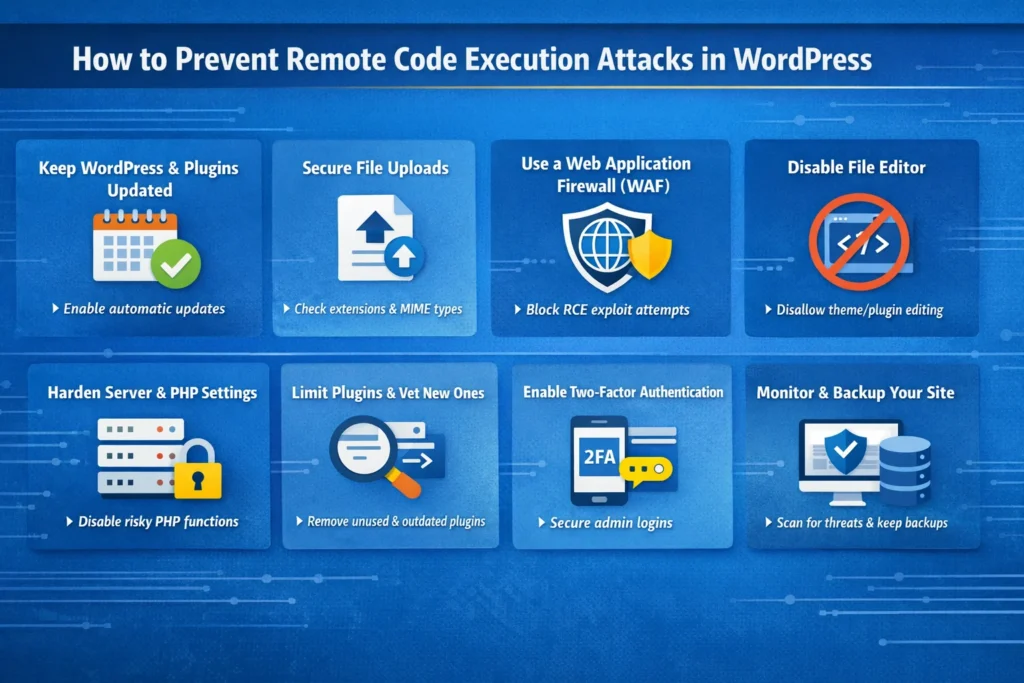
Each layer reduces your attack surface and makes it significantly harder for an attacker to find a workable entry point.
Keep WordPress Core, Plugins, and Themes Updated Immediately
This is the single most impactful thing you can do. The majority of successful RCE attacks target known vulnerabilities in outdated software.
These are vulnerabilities that already have patches available and waiting to be applied. Delaying updates is the primary reason sites get compromised in mass exploitation campaigns.
Here is what a solid update strategy looks like in practice:
- Enable automatic background updates for WordPress core minor releases by adding
define('WP_AUTO_UPDATE_CORE', 'minor');to your wp-config.php file
- Subscribe to vulnerability alerts from Patchstack Intelligence so you know the moment a plugin you are running reports a new security issue
- Audit your plugin list monthly and remove anything that has not received a developer update in over 12 months, since abandoned plugins are consistently high-risk targets
- Test updates in a staging environment before pushing to production for major version upgrades where compatibility issues are more likely
If you are managing multiple client sites, a centralized dashboard tool makes it significantly easier to keep every installation updated without manually logging into each one.
Lock Down Every File Upload Path on Your Site
If your site has any functionality that allows users to upload files, whether through a contact form, a membership plugin, a WooCommerce storefront, or a portfolio builder, treat that upload path as a high-risk attack surface by default.
Here is what proper file upload hardening looks like:
- Validate both the file extension and the MIME type server-side on every upload, never rely on client-side JavaScript validation alone
- Maintain an explicit whitelist of allowed file types and reject everything not on that list with a hard error response
- Block double extensions at the server level so files like image.php.jpg are rejected before they reach your application logic
- Store uploaded files outside the web root directory wherever the application architecture allows, so they cannot be directly accessed or executed via a URL
- Block PHP execution inside the uploads folder entirely by placing an .htaccess file in wp-content/uploads with the following rules:
deny from all
Options -ExecCGI
AddType text/plain .php .php5 .phtml
Pro tip: Even if an attacker successfully uploads a PHP webshell to your uploads folder, blocking PHP execution in that directory means the file cannot actually run. This single .htaccess rule has stopped countless RCE attempts that otherwise would have succeeded.
Deploy a Web Application Firewall with Virtual Patching
A Web Application Firewall sits between your site and incoming traffic, inspecting requests before they reach WordPress.
A quality WAF blocks known malicious payloads, including the attack signatures associated with RCE attempts, before they can interact with any vulnerable code on your server.
The most valuable WAF feature for RCE prevention specifically is virtual patching. When a critical vulnerability is disclosed publicly, reputable WAF providers push a virtual patch within hours, blocking known exploit attempts even before the plugin or theme developer releases an official fix.
This closes the dangerous window between disclosure and patch availability that attackers aggressively exploit.
For WordPress, Cloudflare WAF with its WordPress-specific ruleset offers excellent coverage alongside strong DDoS mitigation.
Sucuri Firewall is purpose-built for WordPress and bundles malware scanning, CDN performance, and virtual patching into a single managed solution.
One important distinction worth knowing: some security plugins include a built-in firewall, but it operates at the PHP endpoint level, meaning it still loads within WordPress itself.
A cloud-based WAF filters traffic before it ever touches your server, making it a stronger first line of defense for preventing RCE exploitation.
Disable the WordPress File Editor in the Dashboard
WordPress ships with a built-in code editor that lets administrators modify theme and plugin files directly from the dashboard.
While convenient during development, this editor becomes a major liability if an attacker ever gains access to an admin account. With it enabled, they can inject malicious PHP into any file on the site instantly, without needing FTP or SSH credentials.
Disable it permanently in wp-config.php:
define('DISALLOW_FILE_EDIT', true);
define('DISALLOW_FILE_MODS', true);
The second constant goes further by preventing plugin and theme installation from the dashboard entirely.
This is an optional but highly recommended setting for production environments. It means a compromised admin account cannot be used to install a malicious plugin through the WordPress interface.
This was also the recommended mitigation for CVE-2024-31210 before WordPress released version 6.4.3.
Harden PHP and Your Server Configuration
Much of WordPress security is actually server security. Even with every plugin on your site fully updated, a misconfigured server can still expose you to RCE attacks at the infrastructure level.
Work with your host or systems administrator to implement these hardening measures:
- Add
eval(),system(),shell_exec(),passthru(),proc_open(), andpopen()to the disable_functions directive in your php.ini to prevent the most dangerous PHP execution functions from running
- Set correct file permissions: wp-config.php should be 400 or 440, directories should be 755, and individual files should be 644
- Make wp-config.php read-only at the file system level so that even partial code execution cannot be used to modify your database credentials or security keys
- Disable allow_url_include in PHP configuration to eliminate the remote file inclusion attack vector
- Ensure PHP never runs as the server root, since root-level execution means a successful RCE attack has unrestricted access to your entire hosting environment
If you are on a managed WordPress hosting plan, many of these configurations are handled at the infrastructure level by your provider. It is still worth confirming what is and is not covered.
Reduce Your Plugin Footprint and Vet What You Install
Every plugin on your site is code running on your server. Every piece of code is a potential attack surface. The more plugins you carry, especially inactive or abandoned ones, the more entry points exist for exploitation.
Follow these plugin hygiene practices consistently:
- Deactivate and completely delete plugins you are no longer actively using. Deactivation alone leaves the code sitting on the server where it can still potentially be targeted through leftover file paths
- Before installing any plugin, check its last update date, active install count, and known vulnerability history on the official WordPress plugin repository
- Never install plugins from unofficial sources or nulled repositories, as these frequently come with pre-installed backdoors and obfuscated malicious code baked in
- Use Patchstack or a similar vulnerability monitoring service to receive automatic alerts when any plugin currently running on your site has a newly discovered security issue
In a widely reported 2025 incident, attackers compromised thousands of WordPress sites by targeting discontinued plugins that had been deactivated but not deleted.
The plugin code was still present on the server and still accessible via URL, which was enough for the exploitation to succeed.
Enable Two-Factor Authentication for All Admin Accounts
RCE attacks through stolen admin credentials are less common than exploit-based attacks, but they are a real and documented pathway.
An attacker who gains admin access can install a malicious plugin, edit theme files, or use the dashboard file editor to execute arbitrary code in seconds.
Two-factor authentication adds a verification layer that makes credential-based attacks significantly harder to carry out, even when passwords have been exposed in a data breach elsewhere.
Enable it for all administrator and editor-level accounts at minimum. Plugins like WP 2FA or the built-in 2FA features within Wordfence make implementation straightforward for any site owner.
For a deeper look at hardening your admin login, WordPress login security requires attention to more than just passwords.
Set Up Continuous Security Monitoring and File Integrity Scanning
You cannot respond to an attack you do not know is happening.
Continuous monitoring and file integrity scanning are what allow you to catch a compromise early, before attackers have had time to establish deep, persistent access that becomes much harder to clean up.
A solid monitoring setup includes:
- File integrity monitoring that tracks every change to core WordPress files, themes, and active plugins in real time and alerts you immediately when unexpected modifications are detected
- Scheduled malware scanning that looks for known malicious signatures, obfuscated PHP patterns like
eval(base64_decode(...)), and unauthorized backdoor files within your installation
- Login activity logging that records every failed and successful login attempt, flagging unusual geographic access patterns or rapid sequential login failures from the same IP
- Outbound connection monitoring at the server level to detect PHP processes attempting to communicate with external command-and-control servers
Wordfence, Sucuri, and MalCare are the most widely used tools for WordPress-specific security monitoring.
If you would rather have experts handling this layer, WordPress maintenance services that include proactive monitoring are worth considering for any business-critical site.
Keep Secure, Tested Backups and Know How to Restore Them
Backups are your final safety net when everything else fails. If an RCE attack succeeds and your site is compromised or destroyed, a clean backup is what gets you back online.
But a backup strategy only works if your restoration process has actually been tested before a crisis hits.
Follow these backup practices:
- Store backups off-site and completely separate from your hosting environment, since a server-level attack can destroy or encrypt local backups alongside your site files
- Run daily automated backups at minimum, and always before any major update or code deployment
- Test your restoration process at least quarterly so you know exactly how long it takes and what steps are involved before you actually need it under pressure
- Maintain multiple restore points so you can roll back to a version that predates the compromise and not just the most recent snapshot
What to Do Immediately if You Suspect an RCE Attack?
If you are seeing red flags or have received a security alert, speed matters. Here is the sequence to follow:
- Take the site offline or switch to maintenance mode immediately to prevent the attacker from continuing to use established access points or exfiltrating additional data while you investigate
- Run a full malware scan to identify malicious files, backdoors, and injected code throughout your installation
- Audit all WordPress admin accounts and remove any accounts that you did not create yourself, paying particular attention to recently added accounts with administrator-level roles
- Rotate every credential including WordPress admin passwords, database passwords, FTP and SFTP credentials, SSH keys, hosting control panel passwords, and your WordPress security keys and salts in wp-config.php
- Review your server access logs and error logs for indicators of compromise such as POST requests directed at files in the uploads directory, PHP execution from unexpected locations, or outbound connections to external IP addresses
- Restore from a clean backup if one is available from before the suspected compromise date, and then immediately apply all outstanding updates before bringing the site back online
- Identify and patch the original vulnerability so that restoring the site does not simply recreate the exact conditions that allowed the attack to succeed in the first place
If you are not confident handling incident response yourself, professional WordPress site recovery is available and is often faster and more thorough than attempting a manual cleanup without the right tooling and experience.
Final Thoughts
Remote code execution attacks are among the most severe threats in the WordPress security, but they are far from inevitable.
The sites that get compromised are almost always the ones that treated security as something to deal with later. Attackers are not targeting your site specifically.
They are scanning millions of sites simultaneously, looking for the ones with unpatched plugins, open upload directories, disabled monitoring, and no active defenses in place.
The protections covered in this guide are not complicated individually. What makes them powerful is using them together as a layered strategy. Keep everything updated. Lock down file uploads. Deploy a WAF. Harden your PHP environment. Monitor continuously. And have a clean, tested backup ready before you ever need it.
If you want expert help implementing these protections or need a professional audit of your current WordPress security setup, the Seahawk Media team is ready to help. Reach out and let us take a look at what your site needs.
FAQs About WordPress RCE Attacks
What is the difference between RCE and SQL injection in WordPress?
SQL injection targets your database to steal or manipulate data. RCE goes further and lets an attacker run code directly on your server.
With SQL injection, they might read your user table. With RCE, they can take over your entire hosting environment. RCE is the more severe threat by a significant margin.
Can RCE attacks happen on a fully updated WordPress site?
Yes, they can. Zero-day vulnerabilities exist before any patch is available, which means even a fully updated site can be exploited.
This is why updates alone are not enough. A WAF with virtual patching, strict upload controls, and active monitoring give you protection even when no official fix exists yet.
How often should I run security audits on my WordPress site?
Run a manual review quarterly at minimum. Check all user accounts, audit your plugin list for abandoned software, and verify your backup restoration actually works.
Automated scanning should run daily or continuously in the background. If your site handles payments or sensitive customer data, bring in a professional for a penetration test at least once a year.


