

If you are searching for a WooCommerce website designer guide, chances are something is not working as it should. Maybe your store feels outdated, your checkout feels clunky, or performance issues are quietly hurting conversions.
The truth is simple. WooCommerce is rarely the problem. The real issue is hiring the wrong professional or relying too long on a DIY ecommerce website that has outgrown the business. Weak website design and poor technical decisions eventually affect customer experience and growth.
WooCommerce offers powerful flexibility, but it only works when your store is planned, designed, and built correctly.
This guide shows you who to hire, when to hire them, and what skills actually matter if you want a store that converts and scales.
TLDR: What You Need to Know Before Hiring a WooCommerce Website Designer
- A WooCommerce web designer focuses on layout, branding, user experience, product pages, and conversion flow. Whereas, a WooCommerce developer handles WooCommerce development, payments, shipping carriers, integrations, security, and backend functionality that keeps your ecommerce website running smoothly.
- Many business owners confuse design with development and end up with a visually impressive website that fails at checkout, struggles with scalability, or breaks when advanced functionality is added to the online store.
- DIY can be cost effective for a small e commerce store, but once revenue grows and marketing efforts increase traffic, professional WooCommerce website design and custom development become critical.
- Custom themes and custom WooCommerce builds outperform bloated templates because they remove unnecessary code, improve Core Web Vitals, strengthen search engine optimization, and support long term scalability as your business grows.
- Hiring should be based on WooCommerce specific expertise and proven ecommerce platform experience, not just attractive web design examples. The right WooCommerce experts directly impact checkout reliability, performance across mobile devices, and overall website success.
What Does a WooCommerce Website Designer Actually Do?
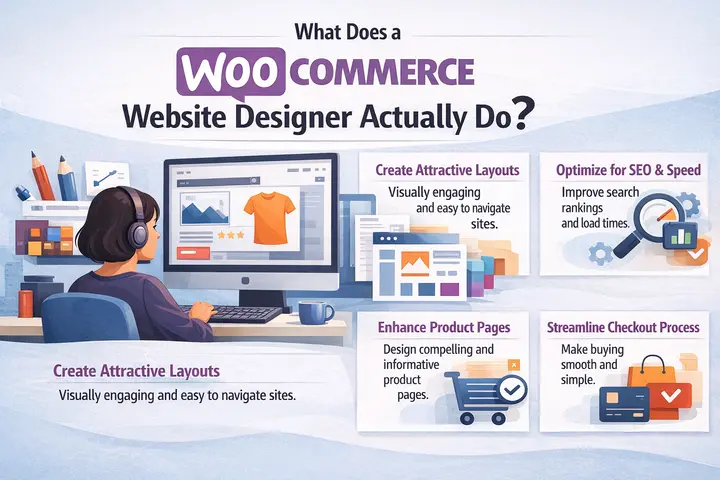
A WooCommerce web designer is responsible for shaping how your ecommerce website looks, feels, and guides visitors toward purchasing.
Their work focuses on visual structure, design elements, layout consistency, and product presentation so users can navigate your site easily and trust your brand.
Strong WooCommerce website design connects branding with usability and supports real purchasing decisions.
Visual Strategy and Brand Alignment
Your WooCommerce store is not just a transaction platform. It is a digital storefront that communicates credibility and trust. A designer ensures that your typography, color palette, imagery, and visual hierarchy reflect your brand positioning.
For example, a luxury fashion brand requires a completely different visual strategy than a wholesale industrial supplier. A strong designer adapts the layout, white space usage, and product presentation to match your audience expectations. Without brand alignment, even technically perfect stores can struggle to convert.
UX Mapping and Conversion Flow Planning
Before pixels are finalized, a professional designer maps out the user journey. This includes how users move from homepage to category pages, product pages, cart, and checkout.
Poor UX mapping often results in unnecessary friction. Hidden shipping information, confusing product variations, or cluttered layouts increase bounce rates and cart abandonment. A good WooCommerce designer reduces cognitive load and ensures every step feels intuitive.
Conversion flow planning also includes strategic placement of reviews, guarantees, security badges, urgency messaging, and call to action buttons. These are not decorative elements. They are conversion drivers rooted in ecommerce psychology.
Responsive Layouts for Mobile and Tablet
More than half of ecommerce traffic comes from mobile devices. A WooCommerce designer must think mobile first, not mobile later.
This means touch friendly buttons, readable typography without zooming, properly spaced form fields, and fast loading images. A responsive layout is not just about shrinking a desktop design. It requires rethinking navigation patterns and prioritizing key content for smaller screens.
If your mobile experience feels cramped or slow, you are losing customers before they even reach checkout.
Need a WooCommerce Store That Drive Conversions?
Whether you need a new WooCommerce website, custom functionality, performance optimization, or ongoing support, we can help.
What a WooCommerce Developer Handles That Designers Do Not?
While designers shape how your store looks and feels, WooCommerce developers handle the technical engine that makes everything work. They build the infrastructure behind the design.
If a customer clicks Place Order and the transaction fails, that is not a design issue. It is a development issue. Payment gateways, shipping calculations, database queries, and API connections all depend on proper backend implementation.
Core Platform and Database Architecture
WooCommerce runs on WordPress, which is built using PHP and MySQL. A developer understands how themes, plugins, and database tables interact.
As your product catalog grows and order history expands, inefficient database queries can slow down your store dramatically. A developer optimizes queries, manages the wp_options table, and ensures that your hosting environment supports your traffic.
Without proper architecture, performance decays over time even if the design remains unchanged.
Payments, Shipping, and Checkout Logic
Payment gateways like Stripe or PayPal require secure tokenization and correct configuration. A WooCommerce developer ensures that credit card data never touches your server and that webhooks confirm successful transactions.
Shipping logic can become even more complex. If you sell internationally, offer weight based rates, or provide wholesale pricing tiers, those calculations must be implemented accurately.
Developers extend WooCommerce classes and integrate carrier APIs to ensure real time shipping accuracy. Errors in this area lead directly to lost revenue.
Security, Performance, and Scalability
WooCommerce stores handle sensitive customer data. Developers implement SSL, secure form handling, data sanitization, and protection against common vulnerabilities.
Performance optimization also falls under development. This includes caching strategies, code minification, image optimization workflows, and server configuration. A fast store improves both SEO and conversion rates.
Scalability is equally important. A store generating ten orders per day behaves very differently from one generating a thousand. Developers build systems that grow with you instead of breaking under pressure.
WooCommerce Designer vs Developer: Which One Do You Need?
This is where most confusion happens. Store owners search for a WooCommerce website designer but often require development expertise as well.
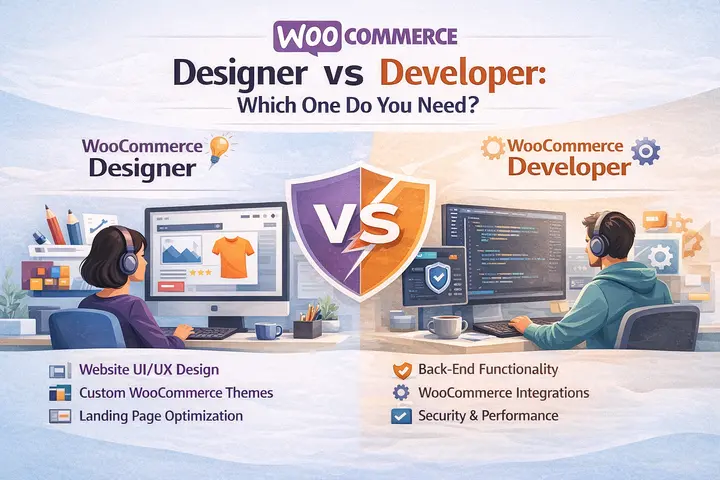
If your store only needs a visual refresh while the backend remains stable and simple, a designer may be enough. However, if you plan to add custom functionality, integrate third party systems, or optimize for performance at scale, you will need development support.
When a Designer Alone is Enough?
If you are launching a new brand with standard product types and basic checkout, and you are using reliable hosting with minimal customization, a designer can create an effective visual foundation.
They will define your brand look, structure product pages properly, and improve usability. For early stage businesses, this can significantly improve perceived professionalism and trust.
When You Absolutely Need a Developer?
If your store is slow, if checkout errors occur, if you need wholesale pricing, subscriptions, membership functionality, or ERP integrations, you need a developer.
Revenue growth is another signal. Once your store consistently generates meaningful monthly income, technical reliability becomes critical. Downtime or payment failures cost more than professional development fees.
Why Agencies Like Seahawk Media Provide Both Under One Roof?
Many failed projects happen because design and development are handled separately without coordination. A designer creates mockups that are technically inefficient.

A developer implements features without considering user experience.
At Seahawk Media, cross functional teams handle WooCommerce projects end to end. Designers and developers collaborate from the beginning, ensuring that layouts are performance conscious and backend logic supports conversion goals.
This unified approach reduces miscommunication, shortens timelines, and results in WooCommerce stores that are both beautiful and technically sound.
When Should You Hire a WooCommerce Professional Instead of DIY?
DIY WooCommerce setups are common. WordPress makes installation simple, and many themes promise quick ecommerce launches. However, simplicity at the beginning can become complexity later. The real question is not whether you can build it yourself. It is whether you should.
Revenue and Traffic Based Signals
If your monthly revenue is minimal and your product catalog is small, DIY can be practical. However, once your store crosses significant revenue milestones, technical mistakes become expensive.
A three second delay in page load time can reduce conversions noticeably. As traffic increases, server strain and plugin conflicts become more frequent. At that point, professional optimization pays for itself.
Technical and Performance Warning Signs
Frequent plugin conflicts, slow admin dashboards, checkout timeouts, or mobile performance issues are clear indicators that your store needs professional attention.
Another warning sign is plugin overload. Many DIY stores accumulate dozens of plugins to add small features. Over time, this creates compatibility issues and security vulnerabilities.
Business Risk and Opportunity Cost
Time spent troubleshooting technical issues is time not spent on marketing, product development, or customer experience. If your time is valuable, continuing DIY beyond a certain scale becomes inefficient.
Hiring a WooCommerce professional shifts your focus back to growth while ensuring your store infrastructure remains stable and optimized.
Why Custom WooCommerce Design Outperforms Prebuilt Themes?
Prebuilt WooCommerce themes promise speed and convenience. Install a theme, import a demo, upload products, and launch. For very small stores, this approach can work temporarily. But as soon as you care about performance, SEO, and conversions, the limitations become obvious.
Most multipurpose themes are built to serve hundreds of different use cases. To achieve that flexibility, they load massive CSS and JavaScript files on every page, even when most of that code is never used. This unnecessary bloat slows down page rendering and hurts user experience.
Custom WooCommerce design takes the opposite approach. Instead of shipping everything to everyone, it delivers only what your store actually needs.
Faster Core Web Vitals and PageSpeed
Google evaluates ecommerce sites using Core Web Vitals such as Largest Contentful Paint, Total Blocking Time, and Cumulative Layout Shift. These metrics directly influence rankings and visibility in search results.
Custom WooCommerce themes are built with performance in mind. Developers load assets conditionally, optimize image delivery, and remove unused libraries. The result is a lighter page that renders faster, especially on mobile devices.
In practical terms, custom built WooCommerce stores often achieve mobile PageSpeed scores in the 85 to 95 range, while heavy multipurpose themes frequently sit between 40 and 60.
Cleaner Code and Better AI Readability
Search engines and AI systems do not see your website the way humans do. They analyze the underlying HTML structure, headings, schema markup, and data relationships.
Custom WooCommerce builds use semantic HTML5, logical heading hierarchy, and properly structured Schema.org markup. This makes it easier for Google and AI tools to understand your product information, pricing, availability, and reviews.
Drag and drop builders often generate deeply nested markup that confuses crawlers. Clean code improves crawl efficiency and increases the likelihood of your products appearing in rich results and AI generated shopping summaries.
Conversion Focused Layouts Instead of Generic Templates
Prebuilt themes are designed to look good for everyone. That means they are optimized for no one.
Custom WooCommerce design focuses on your specific audience, product type, and buying behavior. A store selling digital courses requires a different layout than a store selling apparel or industrial equipment.
Design decisions are based on conversion data, not aesthetic trends. This includes strategic placement of trust signals, simplified navigation, frictionless checkout flows, and clear calls to action.
What to Look for in a WooCommerce Website Designer?
Not every web designer understands ecommerce. Not every ecommerce designer understands WooCommerce. You need someone who sits at the intersection of both. The goal is not to find the most artistic designer. The goal is to find someone who designs for revenue.
Proven WooCommerce Specific Portfolio
A strong candidate should be able to show real WooCommerce projects, not just general WordPress websites. Ask for live store examples, not static screenshots.
Look for diversity in layouts, product types, and industries. If every portfolio item looks like a variation of the same theme, that is a warning sign.
Understanding of UX Psychology and Ecommerce Patterns
Good WooCommerce designers understand why certain layouts convert better.
They know how to structure product pages, where to place reviews, how to present pricing, and how to reduce checkout friction. They can explain the reasoning behind their decisions, not just describe what looks good.
Collaboration With Developers or In House Technical Skills
Design that ignores technical realities creates problems later. A qualified WooCommerce designer either has development knowledge or works closely with developers. They understand how design choices affect performance, load times, and implementation complexity.
Ability to Design for Speed and Scalability
Design impacts performance. Large hero images, excessive animations, and complex layouts can slow down your site. A good designer balances aesthetics with speed. They prioritize fast loading layouts that still feel polished and professional.
Technical Skills a Serious WooCommerce Professional Should Have
Even if you are primarily hiring for design, technical awareness matters. WooCommerce is not a simple website builder. It is a complex application.
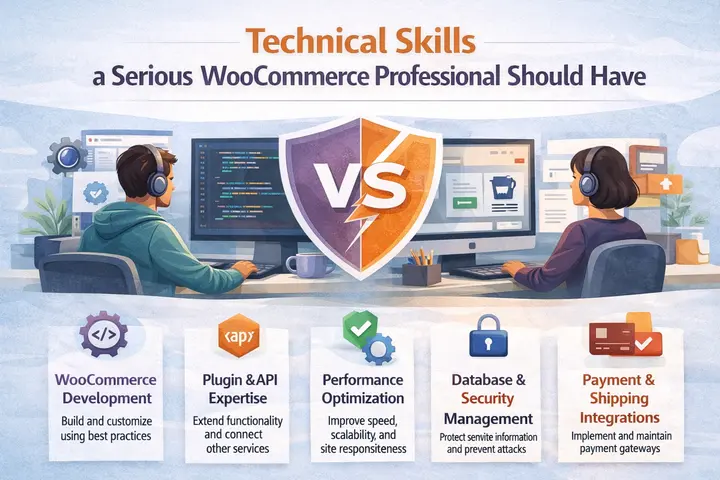
- WordPress Hook Awareness and Update Safe Customization: Professionals use hooks and filters to customize WooCommerce behavior instead of editing core files. This ensures updates do not break custom features. If someone talks about editing WooCommerce core files directly, that is a red flag.
- Payment Gateway and Shipping Architecture Knowledge: A qualified WooCommerce professional understands how payment gateways and shipping methods are structured. They know how tokenization works, how webhooks confirm transactions, and how shipping zones and classes affect pricing logic. This knowledge prevents checkout failures and pricing errors.
- Security Best Practices: They should understand nonces, data sanitization, and secure form handling. They should also recommend security hardening and regular updates.
- Performance Optimization Fundamentals: They should know how caching works, how to reduce database load, and how to optimize assets. Performance is not an afterthought. It is part of the build process.
Questions to Ask Before Hiring a WooCommerce Designer
Asking the right questions quickly reveals whether someone understands WooCommerce or only surface level design.
- Ask how they handle theme customizations. The correct answer includes child themes and site specific plugins.
- Ask how they approach performance issues. Good answers mention database optimization, query monitoring, and caching strategies.
- Ask about their update workflow. Professionals test updates in staging environments before pushing live.
- Ask how they collaborate with developers. You want to hear about documented handoff processes and shared project management.
Red Flags That Signal You Should Walk Away
Certain patterns indicate future problems. If every project in a portfolio relies on the same prebuilt theme, it usually indicates the person is configuring templates rather than building custom WooCommerce solutions. This limits flexibility and often leads to performance and scalability problems.
When someone relies on installing a new plugin for every feature request, it creates long term risk. Over time, plugin conflicts, security vulnerabilities, and performance slowdowns become almost inevitable.
Another serious warning sign is any suggestion to work directly on your live site without using a staging environment. A professional WooCommerce workflow always includes testing changes safely before deployment.
Where to Find Reliable WooCommerce Website Designers?
General freelance marketplaces contain talented people, but they also contain many unqualified providers. Vetting becomes your responsibility.
Specialized WordPress and WooCommerce platforms reduce risk because candidates are pre evaluated. Official WooCommerce partner directories list agencies with verified experience.
Another option is working with an established WooCommerce agency like Seahawk Media, where designers and developers collaborate under one roof and follow proven workflows.
WooCommerce vs Hosted Platforms: Which is Better for You?
WooCommerce is ideal if you need customization, data ownership, and long term flexibility. You control your store, your database, and your business logic.
Hosted platforms prioritize speed to market and simplicity. They work well for standard catalogs with minimal customization needs.
For businesses that rely on SEO, content marketing, and advanced functionality, WooCommerce provides significantly more control.
Final Thoughts
Hiring a WooCommerce website designer is not about finding someone who makes things look pretty. It is about finding a professional who understands ecommerce, performance, and long term scalability.
Once your store becomes an important revenue channel, professional design and development are no longer optional. They are essential.
If you want a WooCommerce store that loads fast, converts consistently, and scales without headaches, partnering with an experienced WooCommerce agency like Seahawk Media is the safest path forward.
WooCommerce Website Designer FAQs
When should I upgrade from DIY to professional WooCommerce development?
When your store becomes slow, checkout errors appear, or revenue grows enough that downtime impacts sales. At that point, professional WooCommerce development becomes essential.
How much does it cost to hire a WooCommerce website designer?
Costs vary based on project scope. Simple stores cost less, while custom WooCommerce website design with advanced functionality costs more. Investing in professional design usually leads to better conversions and fewer issues.
Do I need both a WooCommerce web designer and a WooCommerce developer?
Yes. A designer handles layout and user experience, while a WooCommerce developer manages functionality, payments, integrations, and performance. Most successful stores need both working together.


