
Designing high-performing websites is no longer just about aesthetics; it is also about speed, personalization, and data-driven decisions. That’s where AI comes into play to streamline the web design process.
For WordPress designers and developers, AI is transforming workflows by automating repetitive tasks, enhancing creativity, and improving user experience outcomes. Instead of replacing your expertise, it acts as a powerful co-pilot.
Moreover, as client expectations grow, leveraging AI can help you deliver faster, smarter, and more scalable solutions. In this guide, you’ll discover how to strategically integrate AI into your website design process, so you can stay competitive, efficient, and future-ready.
TL;DR: Quick Action Plan
- Start with AI for research and content: Use AI to gather insights, analyze competitors, and create structured, SEO-friendly content that aligns with user intent and business goals.
- Experiment with AI design tools: Test AI-powered wireframing and UI tools to speed up design processes while exploring creative layout variations efficiently.
- Integrate AI plugins into WordPress: Leverage AI-driven plugins for SEO, performance, and personalization to enhance functionality and user experience.
- Continuously test and optimize: Regularly audit performance, refine outputs, and combine AI insights with human expertise to ensure consistent improvement and high-quality results.
Why AI Matters in Modern Web Design?
To begin with, AI is reshaping how websites are conceptualized, designed, and optimized. Traditional workflows often involve manual research, wireframing, testing, and iteration. However, AI accelerates each of these phases. Key benefits for WordPress professionals include:
- Efficiency Gains: Automate repetitive design and development tasks.
- Improved UX: Use data-driven insights for better user journeys.
- Content Optimization: Generate SEO-friendly content faster.
- Personalization: Deliver dynamic user experiences.
- Scalability: Handle larger projects without a proportional increase in effort.
As a result, WordPress developers and designers can focus more on strategy and creativity rather than manual execution.
WordPress AI Services: What We Offer
AI-powered WordPress services help businesses automate workflows, enhance user experience, and improve performance. This enables smarter websites that scale efficiently and drive measurable growth.

- WordPress AI Consultation: Get expert guidance on integrating AI into your WordPress site, ensuring solutions align with business goals, improve workflows, and deliver measurable performance improvements.
- AI-Based Search Engine Optimization: Leverage AI-driven SEO strategies to analyze search patterns, optimize content, and improve search engine rankings, helping your website attract more qualified organic traffic.
- AI Content Creation: Create high-quality, engaging, and SEO-friendly content using AI assistance tailored to your target audience and optimized for better readability, relevance, and conversions.
- AI-Based Performance Optimization: Enhance website speed, responsiveness, and overall performance by leveraging AI tools to identify bottlenecks and optimize Core Web Vitals for a seamless user experience.
- AI Chatbots Integration: Implement AI-powered chatbots to provide real-time support, improve customer engagement, and automate responses. Thus, ensuring 24/7 assistance without increasing manual workload.
- AI-Powered Translation Tools Integration: Break language barriers by integrating AI translation tools, enabling your WordPress site to reach global audiences and deliver localized user experiences effectively.
- AI-Based Website Security & Maintenance: Strengthen website security with AI-driven monitoring, threat detection, and proactive maintenance. Thereby, ensuring data protection, uptime, and long-term site stability.
- Custom AI Implementation: Deploy tailored AI solutions based on your unique requirements to automate processes, improve efficiency, and support long-term business growth through intelligent automation.
Supercharge Your Website with AI-Powered WordPress Services
Leverage AI-driven WordPress solutions to build smarter, faster, and more conversion-focused websites that are optimized for performance, personalization, and scalable business growth.
Strategic Use of AI in WordPress Web Design and Development Process
AI is transforming WordPress workflows by automating repetitive tasks, improving design accuracy, and enhancing user experience. This helps developers build faster, smarter, and more scalable websites.
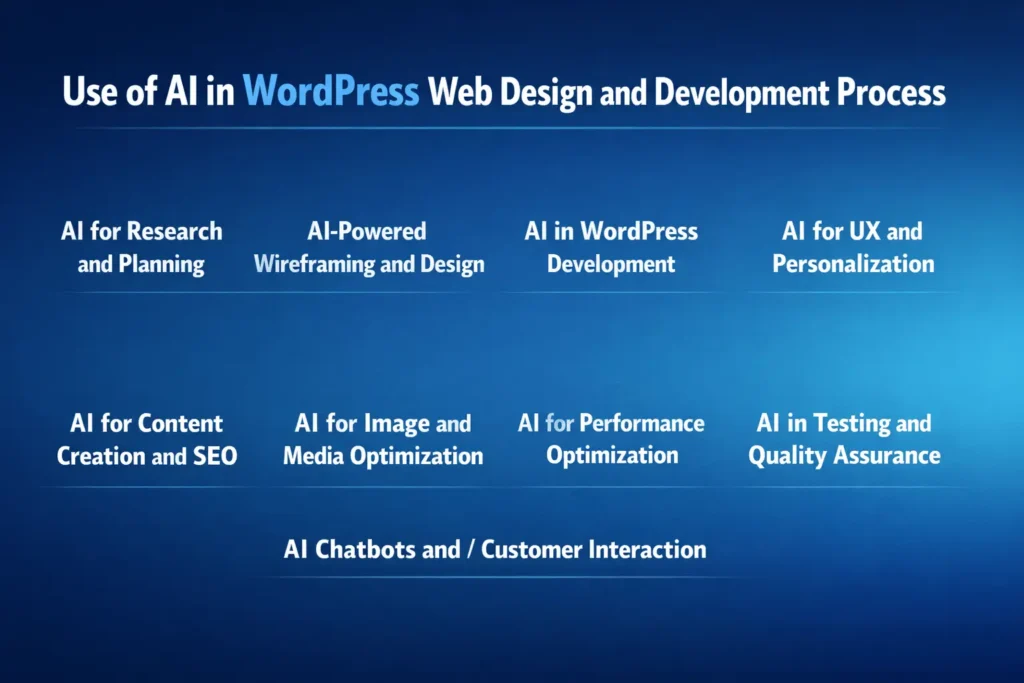
AI for Research and Planning
AI streamlines early-stage planning by analyzing competitors, identifying user intent, and generating structured insights. This allows WordPress professionals to make data-backed design and content decisions faster.
- Competitor Analysis: Tools like Semrush and Ahrefs reveal top-performing pages, keywords, and backlink strategies.
- User Persona Creation: AI tools such as ChatGPT help define audience demographics, pain points, and behavior patterns.
- Content Structuring: Generate sitemap ideas, landing page sections, and blog outlines aligned with search intent.
- Keyword Clustering: Platforms like Ubersuggest group keywords for better content hierarchy.
AI-Powered Wireframing and Design
AI accelerates UI/UX design by generating wireframes and layouts from prompts. This helps designers visualize ideas quickly and iterate efficiently within WordPress page builders.
- Instant Wireframes: Tools like Uizard convert text prompts into UI mockups.
- Design Assistance: Figma AI plugins suggest layout improvements and components.
- Rapid Prototyping: Galileo AI creates high-fidelity designs instantly.
- WordPress Implementation: Translate designs into Elementor or Gutenberg blocks efficiently.
AI in WordPress Development
AI enhances development by assisting with code generation, debugging, and optimization. This reduces manual effort while maintaining clean, scalable WordPress builds.
- Code Generation: GitHub Copilot helps generate PHP, CSS, and JavaScript snippets.
- WordPress-Specific Coding: CodeWP provides tailored code for themes and plugins.
- Debugging: AI quickly identifies errors and suggests fixes.
- Plugin Recommendations: AI tools suggest relevant plugins based on project needs.
AI for UX and Personalization
AI enables personalized user experiences by analyzing behavior and dynamically adapting content. This leads to higher engagement, improved retention, and better conversion rates on WordPress websites.
- Behavior Tracking: AI tools analyze clicks, scroll depth, and user journeys.
- Dynamic Content: Personalize homepage sections based on user preferences.
- Recommendation Engines: Suggest products or content automatically.
- Plugins: Tools like If-So Dynamic Content enable conditional content display.
AI for Content Creation and SEO
AI simplifies content production and optimization by generating SEO-friendly copy, improving readability, and aligning content with search intent. This is essential for ranking WordPress websites effectively.
- Content Drafting: Use ChatGPT for blogs, landing pages, and product descriptions.
- SEO Optimization: Rank Math provides AI-driven suggestions.
- Meta Tags and Headlines: Generate optimized titles and descriptions.
- Content Refreshing: Update outdated content with AI insights.
AI for Image and Media Optimization
AI improves visual content by generating, compressing, and enhancing images. This ensures faster loading speeds and better visual appeal across WordPress websites.
- Image Generation: Tools like DALL·E create custom visuals.
- Compression: TinyPNG reduces file size without quality loss.
- Design Assistance: Canva AI features simplify graphic creation.
- Background Removal: Automate editing for product images.
AI for Performance Optimization
AI identifies performance bottlenecks and recommends improvements. This helps WordPress websites achieve faster load times, better Core Web Vitals, and improved SEO rankings.
- Speed Optimization: NitroPack automates caching and CDN integration.
- Caching Plugins: WP Rocket improves page load times.
- Performance Analysis: Google PageSpeed Insights provides actionable suggestions.
- Database Optimization: AI tools identify inefficient queries.
AI in Testing and Quality Assurance
AI enhances testing by automating QA processes, detecting bugs, and ensuring compatibility. This leads to more reliable and user-friendly WordPress websites.
- Automated Testing: Testim uses AI for faster QA cycles.
- Cross-Browser Testing: BrowserStack ensures compatibility.
- Performance Audits: Google Lighthouse analyzes speed and accessibility.
- Error Detection: AI flags issues before deployment.
AI Chatbots and Customer Interaction
AI chatbots improve user engagement by offering real-time support, answering queries, and guiding visitors. This helps WordPress sites increase conversions and customer satisfaction.
- 24/7 Support: Chatbots handle customer queries instantly.
- Lead Generation: Capture and qualify leads automatically.
- User Guidance: Assist users through navigation and purchasing decisions.
Best Practices for Using AI in Web Design: Do’s and Don’ts
Using AI strategically enhances efficiency, creativity, and scalability in web design. However, balancing automation with human expertise ensures originality, performance, and user-focused outcomes.
| Do’s | Don’ts |
|---|---|
| Use AI to automate repetitive tasks like content drafts and code snippets. | Don’t rely entirely on AI without human validation. |
| Combine AI insights with your design expertise for better outcomes. | Avoid generating generic, uncustomized designs. |
| Maintain brand consistency by editing AI-generated outputs. | Don’t ignore brand voice and tone guidelines. |
| Leverage AI for data-driven UX improvements. | Avoid over-automating critical user experience decisions. |
| Regularly test and optimize AI-assisted outputs. | Don’t skip QA or performance testing. |
| Use AI tools for SEO and content structuring. | Avoid keyword stuffing or low-quality AI content. |
| Keep learning and experimenting with new AI tools. | Don’t stick to outdated workflows. |
Common Challenges of Using AI for Website Design and Development
While AI improves efficiency and scalability in web design, it also introduces challenges that require strategic human oversight and refinement.
Generic and Repetitive Outputs
AI-generated outputs often feel generic and repetitive, which can weaken a website’s uniqueness and brand identity. Since many AI tools rely on existing data patterns, the results may lack originality or creative differentiation.
To overcome this, designers should treat AI as a foundation rather than a final solution. By customizing layouts, refining content, and incorporating brand-specific elements, you can ensure the end product feels distinct and engaging.
Lack of Brand Voice and Consistency
AI tools may generate content or designs that do not align with a company’s tone, messaging, or visual identity, resulting in a disconnected user experience.
To address this, it is essential to provide clear prompts and detailed brand guidelines. Additionally, reviewing and editing AI-generated outputs ensures consistency across all pages and maintains a strong brand identity.
Over-Reliance on Automation
While AI can significantly speed up workflows, over-dependence on automation may lead to poor design decisions and reduced creative control.
Therefore, it is important to strike a balance between efficiency and expertise. Use AI for support tasks such as ideation and drafting, but rely on human judgment for strategy, creativity, and final decision-making.
Accuracy and Context Issues
AI may occasionally produce incorrect code, outdated SEO practices, or irrelevant content due to its limited understanding of context. This makes validation a critical step in the process.
To minimize errors, always review outputs, cross-check with trusted sources, and conduct thorough testing before implementation.
Integration and Compatibility Challenges
Not all AI tools integrate seamlessly with WordPress themes, plugins, or development workflows, which can create technical inconsistencies.
To overcome this, choose tools that are compatible with WordPress and test them in staging environments before deployment. This ensures smoother implementation and reduces the risk of site issues.
Ethical and Data Privacy Concerns
Using AI in web design may raise concerns related to data security, copyright, and user privacy. Mishandling sensitive information can lead to compliance issues and loss of trust.
To mitigate these risks, follow data protection regulations, avoid sharing confidential data with AI tools, and use reliable, compliant platforms to ensure ethical usage.
To Sum Up
AI is no longer optional; it’s a strategic advantage for WordPress designers and developers. By integrating AI into your workflow, you can streamline processes, enhance creativity, and deliver better results for clients. However, the key lies in balance. Use AI to augment your skills, not replace them. Ultimately, those who embrace AI thoughtfully will not only save time but also create more impactful, user-centric websites.
FAQs About AI in Web Design
How can AI help in WordPress web design?
AI automates tasks such as content creation, design suggestions, and performance optimization, enabling designers to work faster and make data-driven decisions.
Is AI replacing WordPress developers and designers?
No, AI supports professionals by improving efficiency. But human creativity, strategy, and problem-solving are still essential for high-quality websites.
Which AI tools are best for WordPress development?
Popular tools include ChatGPT for content, GitHub Copilot for coding, and plugins like Rank Math for optimization.
Can AI improve website SEO performance?
Yes, AI can assist with keyword research, content optimization, and technical SEO improvements, helping websites rank higher in search results.
Is it safe to use AI tools for web development?
Yes, but it’s important to follow data privacy guidelines, avoid sharing sensitive information, and always review AI-generated outputs before implementation.


