
Switching platforms without a proper CMS migration SEO checklist is how businesses lose years of rankings in a matter of weeks. Broken redirects, missing metadata, staging blocks left on after launch, and technical signals never rebuilt in WordPress. Each one quietly drains organic traffic while the new site looks perfectly fine on the surface.
At Seahawk Media, we have guided businesses through CMS migrations to WordPress, where protecting organic equity was non-negotiable. This guide covers every step of that process, from pre-migration preparation to post-launch monitoring, so your rankings survive the move and have room to grow on the other side.
TL;DR: What This CMS Migration SEO Checklist Covers
- Run a full site crawl and build a complete URL inventory before anything changes
- Lock in your SEO baseline, so you have real numbers to compare post-launch
- Build your redirect map first, before development begins. Every URL needs a documented destination
- Manually rebuild canonical tags, schema markup, hreflang, and robots.txt in WordPress
- Block staging from indexing and validate all SEO signals before approving go-live
- Deploy 301 redirects on launch day and remove all noindex staging blocks immediately
- Monitor Google Search Console every day for the first 48 hours after launch
- Track rankings, crawl errors, and organic traffic for a minimum of 30 days post-migration
- Use Rank Math to manage all on-page SEO signals in your new WordPress setup
A well-executed migration does not just preserve rankings; it can improve them
Why Your SEO is at Risk During a CMS Migration?
Here is something most migration guides do not say clearly enough: switching your CMS is one of the highest-risk events in your site’s entire digital life. From Google’s perspective, you are not just moving content. You are rebuilding the infrastructure that signals relevance, authority, and trustworthiness.
The four areas where SEO equity most commonly gets lost are:
- URL structures. Even minor changes to slugs or folder paths can break thousands of backlinks overnight and send high-value organic traffic into dead 404 pages.
- Metadata and technical signals. Title tags, meta descriptions, canonical tags, schema markup, and hreflang attributes do not transfer automatically when you switch CMS platforms. Every one of them needs to be rebuilt from scratch in WordPress.
- Content interpretation. How search engines read and rank your content depends partly on how your CMS and theme render it. Change the template architecture without planning, and you risk altering how Google interprets your pages.
- Site performance. Core Web Vitals are a confirmed Google ranking factor. A migration that introduces slower templates, unoptimized images, or misconfigured hosting can both drop your performance scores and affect your rankings.
In 2026, there is an additional layer to think about. AI-powered search tools like ChatGPT, Perplexity, and Gemini are changing how content gets discovered and surfaced.
A migration that weakens your content structure, schema, or E-E-A-T signals can affect your visibility in AI-generated answers just as much as in traditional search results.
CMS Migration SEO Checklist That You Should Follow
The good news is that every one of these risks is entirely preventable with the right sequence of steps.
Phase 1: Pre-Migration SEO Preparation
This phase is the one most teams rush through or skip entirely. Everything that follows, including how quickly you can diagnose post-launch problems and how much equity you preserve, comes back to the quality of the work you do here.
Step 1: Crawl Your Entire Site and Build a URL Inventory
Before you move a single file, you need a complete map of all the URLs on your site. Run a full crawl using Screaming Frog or Sitebulb to log every live page, redirect, and error along with status codes, metadata, and inbound link counts.
Do not rely solely on your sitemap. Sitemaps frequently miss orphan pages, legacy URLs, and parameterized variations that still carry real SEO weight. A full crawl captures everything.
From this inventory, identify your high-value pages: the ones with the most organic traffic, the most backlinks, and the highest conversion rates. These pages hold the bulk of your site’s SEO equity and deserve extra care at every stage of the migration.
Step 2: Lock in Your SEO Baseline Before Anything Changes
You cannot know whether your migration succeeded if you have nothing to compare it to. Before a single page moves, capture your SEO baseline across these four areas.
- Organic traffic and conversions from Google Analytics 4.
- Keyword rankings for your priority pages from Google Search Console or a rank tracker.
- Current indexation status and crawl coverage from Google Search Console.
- Core Web Vitals scores from PageSpeed Insights or Lighthouse.
Save everything in a shared spreadsheet with clearly labeled tabs. You will return to this document repeatedly during post-launch monitoring. Without a baseline, a traffic dip after launch becomes a debate instead of a diagnosis.
If you are installing MonsterInsights on your new WordPress site, do it early so data starts flowing from the moment the site goes live.
Step 3: Build Your Redirect Map Before Development Begins
This is the single most important deliverable in any CMS migration. It is also the step that gets left until the last minute more often than any other.
A redirect map is a spreadsheet documenting every current URL and its corresponding destination on the new WordPress site. Not just your top 10 pages. Not just the blog. Every URL that exists and carries any backlink, traffic, or conversion value needs a documented destination.
Always use 301 redirects, not 302s. A 301 is permanent and transfers link authority to the new URL. A 302 is temporary and does not pass equity. Mixing them up is one of the most common and expensive mistakes in DIY migrations.
Build the redirect map from your crawl export. Prioritize high-value pages with backlinks and traffic.
Get it reviewed by your SEO and development teams before any development work begins, because fixing redirect errors in production is far more costly than catching them on a spreadsheet.
Step 4: Document Every Technical SEO Signal Your Current CMS Handles
Your current platform likely manages canonical tags, robots directives, hreflang, and schema markup in ways specific to its own architecture. Those signals do not carry over automatically when you move to WordPress.
Go through your current site and document exactly how each one works today. How are canonical tags generated, automatically or manually? Are hreflang tags configured for multilingual content? What schema types are in use and on which page types? What does your robots.txt file block?
Once you are on WordPress, you will rebuild all of this using a plugin like Rank Math. Both handle canonical tags, schema markup, XML sitemaps, robots.txt, and on-page optimization in one place. However, you need thorough documentation of what your current site does before you can replicate it accurately in WordPress.
The Migration Mistakes You Don’t See Coming
SEO drops after a migration are usually preventable. We help you plan, execute, and launch without damaging your search visibility.
Phase 2: Staging Environment Validation
Staging is where migration errors should be caught and fixed. Not on launch day. Not after your site is live and indexed. If SEO validation is not built into your staging process, you are effectively testing in production on a site that search engines can already see.
Block Staging From Search Engines Correctly
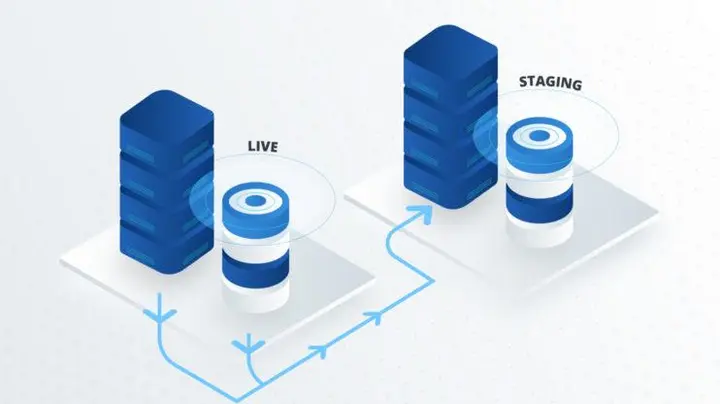
Your staging environment must be completely invisible to Google and other search engines. Use a combination of robots.txt disallow rules, noindex meta tags, and password protection to prevent Googlebot from crawling or indexing your staging site.
This is not a nice-to-have. Staging sites that get accidentally indexed create duplicate content issues, dilute link equity, and confuse search engines before your launch even happens. Confirm the block is in place when development begins and double-check it is still active right up until go-live day.
Run Full SEO Validation Before Anyone Approves Go-Live
Once the staging site is built and the redirect map is deployed, run a full SEO validation pass before any stakeholder approves go-live. Work through this checklist on staging:
Every old URL redirects correctly to its documented destination with no chains or loops. Title tags, meta descriptions, and canonical tags render as expected across all content types and page templates. Schema markup outputs correctly using Google’s Rich Results Test.
Lighthouse performance scores on key page templates show no regressions compared to your pre-migration benchmark. Hreflang tags are correctly configured if your site has multilingual content.
Rank Math makes it easy to audit all of these signals from the WordPress dashboard without switching between multiple tools.
Get Cross-Team Sign-Off Before Setting a Launch Date
SEO equity is distributed across different parts of your site, and different people own different pieces. Your SEO team owns the redirect map and technical signal parity. Your development team owns the template build and schema implementation.
Your content team owns metadata accuracy on individual pages. Your analytics team owns the tracking setup and data layer verification.
No single person can catch everything. A written sign-off from each team before launch day is the only reliable way to ensure nothing gets missed in the handoffs.
Phase 3: Launch Day Execution
By the time launch day arrives, your plan should be locked and tested. This phase is about executing a checklist, not making decisions under pressure.
Final Checks in the 48 Hours Before DNS Switch
Freeze all content edits at least 24 hours before launch. Any changes made after the final crawl and redirect map were built will create gaps that are not accounted for in your migration plan.
- Lower your DNS TTL setting to around 300 seconds at least 48 hours before the planned launch.
- High TTL values mean your old site’s IP address continues to be served for hours after the DNS switch, delaying the new site’s launch and creating a confusing window for search engines.
Run one final crawl of the old site right before launch to confirm the redirect map is up to date, complete, and ready to deploy.
The Go-Live Sequence
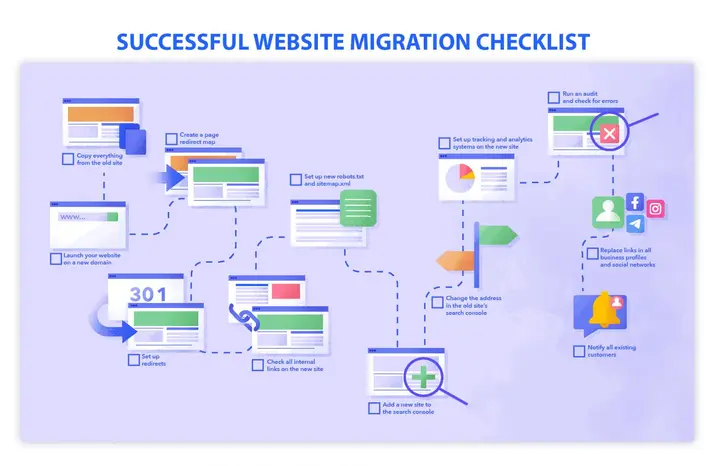
Work through these steps in order when it is time to go live. Deploy all 301 redirects before updating DNS.
- Update DNS settings to point to the new WordPress server. Remove every noindex tag, the staging block in robots.txt, and password protection from the production environment.
- Verify that Google Analytics and Google Tag Manager are firing correctly on the live site.
- Enforce HTTPS across the entire site and confirm that canonical domain resolution is consistent, meaning www and non-www both resolve to the same canonical version.
Do not skip or reorder any of these steps. Each one protects a piece of SEO equity that can be lost if the sequence is broken.
Post-Launch Validation: Do This in the First Hour
Within the first hour of going live, start validating. Spot-check your highest-value URLs manually by opening them in a browser and confirming they load correctly, include the correct title tags, and do not return any redirect errors.
- Run a live crawl of the new site and compare the results against your pre-migration URL inventory.
- Open Google Search Console and verify the robots.txt file is clean with no staging blocks remaining. Submit your new XML sitemaps through Google Search Console.
- Use the URL Inspection tool on your five most important pages to confirm they are crawlable and indexable, and that they carry the correct canonical and schema signals.
If your migration involved a domain change, submit a Change of Address notification in Google Search Console as well.
Phase 4: Post-Migration Monitoring
Going live is not the finish line. It is the start of a monitoring period that determines whether your SEO equity actually survived the move or is quietly eroding in the background.
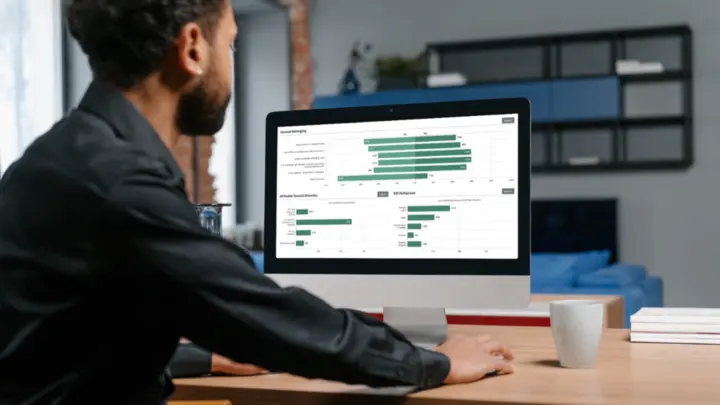
The First 48 Hours: What to Watch Closely
The first two days surface most critical migration errors before they compound. Redirect failures, indexing blocks, and tracking misconfigurations show up here first.
- Open Google Search Console and watch the Coverage and Crawl Stats reports for sudden spikes in 404 errors or 5xx server errors.
- Compare any errors against your pre-migration URL inventory. Check real-time analytics for unexpected drops in organic traffic that may indicate broken redirects or blocked pages.
Keep your pre-migration list of must-protect pages, the top-converting and most-linked URLs, close at hand. Check these first because they have the highest equity concentration.
Weeks One Through Four: Trend Analysis Over Panic
After the immediate issues are resolved, shift your focus from firefighting to trend analysis. Pull the same reports you captured in your pre-migration baseline and compare them against live data.
Is organic traffic holding within a reasonable range of your pre-migration numbers? Are keyword rankings stable across your priority pages and content types?
Expect some fluctuation in the first few weeks. Google’s recrawling and re-evaluation of a large site takes time. What you are watching for is patterns: entire content sections losing visibility, high-value landing pages consistently underperforming, or whole content types dropping.
These patterns point to systematic issues, whether in redirects, metadata, or template configuration, that can be diagnosed and fixed.
Also, run a backlink check using Semrush to identify referring domains pointing to URLs that now return 404 errors. Every broken backlink is authority that should be flowing to your new site.
Ongoing Maintenance: Building on the New Foundation
After the first month, monitoring becomes part of regular WordPress SEO operations. Schedule monthly crawls using Screaming Frog or Sitebulb to surface new 404s, redirect chains, and duplicate content before they accumulate.
Re-run Core Web Vitals tests after significant plugin or theme updates, as these can introduce performance regressions that affect rankings over time.
For caching and performance optimization, WP Rocket is one of the most reliable options available for WordPress. For ongoing site health monitoring across multiple WordPress installs, WP Umbrella and MainWP both provide good visibility.
SolidWP covers security hardening and database cleanup. Keep your redirect map updated as content evolves post-migration, because unmapped URL changes are where equity quietly leaks over time.
The CMS Migration SEO Mistakes That Actually Kill Rankings
A single catastrophic error does not cause most migration failures. They are caused by a series of small, avoidable oversights that compound into major traffic losses. These are the ones we see most often.
Skipping the Pre-Migration SEO Audit
Migrating without an audit means moving content unthinkingly. High-value pages get missed. Low-value pages get unnecessary attention. You lose the ability to protect what actually matters because you never identified it. An audit before migration is what separates deliberate decisions from accidental losses.
Building an Incomplete Redirect Map
An incomplete redirect map is the single most common cause of traffic loss after a CMS migration. One missing high-authority URL can eliminate a significant portion of your organic traffic overnight, as backlinks to that URL stop transferring authority to your site.
Map every URL with backlinks, traffic, or conversions. Validate every redirect in staging before launch.
Forgetting to Remove Noindex Tags After Launch
Teams correctly apply noindex directives to staging environments but forget to remove them when the site goes live. The result is a new WordPress site that is completely invisible to Google until someone notices the flatline in traffic.
Removing staging blocks is a required step in the go-live sequence. Confirming that the robots.txt file is clean is one of the first post-launch checks.
Changing Content, Design, and CMS Platform Simultaneously
Migration is already a significant SEO event. Adding a full redesign and content overhaul simultaneously makes it nearly impossible to diagnose the cause if a problem arises. When too many variables change at once, you cannot isolate the cause of a traffic drop.
If a redesign is part of the plan, build a content audit framework before migration begins. Assign every page a decision: Keep, Improve, or Retire. Every content change should be a deliberate choice, not an accidental side effect of the platform move.
Not Rebuilding Technical SEO Signals in WordPress
Schema markup, canonical tags, hreflang, and robots directives do not carry over automatically from another CMS. A new WordPress install doesn’t have any of these configured by default. They must be deliberately rebuilt using a plugin, which handles all of them from a single dashboard.
Validate every signal in staging before go-live, and do not assume parity just because the visible content looks correct.
Treating Post-Launch Monitoring as Optional
Many teams switch off attention after launch day. Rankings can take weeks to stabilize fully. Crawl errors accumulate quietly. Broken backlinks go unnoticed for months. A structured 30-day monitoring plan catches problems while they are still small, before they create lasting damage that takes much longer to reverse.
Why Migrating to WordPress Can Actually Improve Your SEO?
Done correctly, a CMS migration to WordPress is not a risk management exercise. It is an opportunity to build a stronger SEO foundation than most legacy platforms can offer.
- WordPress provides faster schema deployment with plugins like Schema Pro, enabling structured data and rich snippet opportunities that previously required developer cycles to be managed directly from the CMS.
- Performance can improve significantly on hosting platforms built for WordPress. WP Engine, Kinsta, and Cloudways all provide infrastructure optimized for Core Web Vitals out of the box.
- Content flexibility improves with custom post types, taxonomies, and Gutenberg blocks, giving your team tools to structure content more easily for search engines to interpret and rank.
- Multilingual SEO becomes more manageable with Weglot or TranslatePress, which handle hreflang and translated content at scale.
- Analytics integration is cleaner with MonsterInsights, which connects Google Analytics directly to the WordPress dashboard.
- Internal linking can be actively managed and improved using Rank Math’s link suggestions and audit features.
Many clients who migrate to WordPress with proper SEO planning do not simply maintain their traffic. They grow it in the months that follow because they are on a platform that makes acting on SEO improvements faster and easier than their previous CMS allowed.
Conclusion
A CMS migration is one of the most consequential technical events in your site’s digital life. But it does not have to result in traffic loss, ranking drops, or months of recovery work. Following this checklist from pre-migration preparation through to post-launch monitoring protects the organic equity your site has built over the years.
WordPress, when migrated with proper SEO planning, gives you a stronger foundation, better performance tools, and more direct control over how search engines understand your content. The migration is not the end of your SEO work. It is the beginning of doing it on a platform built for it.
FAQs on CMS Migration SEO Checklist
Will I lose my SEO rankings after migrating to WordPress?
Not if the migration is planned and executed correctly. A complete redirect map, validated metadata, and properly rebuilt technical SEO signals should preserve your rankings. Many sites improve rankings post-migration because WordPress fixes performance and structural issues that the old CMS could not address.
How long does Google take to process a CMS migration?
Smaller sites can stabilize within a few days. Larger sites with thousands of URLs may take several weeks for Google to fully recrawl, reindex, and reconcile all redirect signals. The first 48 hours are the most critical monitoring window, but structured tracking for the full first month is important for catching slower-moving issues.
What is the difference between a 301 and a 302 redirect during migration?
A 301 is permanent and transfers SEO authority from the old URL to the new one. A 302 is temporary and does not pass equity. Always use 301 redirects during a CMS migration. Using 302s by mistake is one of the most common and damaging errors in DIY migrations.
Do I need to rebuild my SEO settings after migrating to WordPress?
Yes. Metadata, schema markup, canonical tags, hreflang, and robots directives do not migrate automatically from another CMS. They must be rebuilt in WordPress using a plugin and validated in staging before going live.
How soon should post-migration monitoring start?
Immediately after going live. Begin checking Google Search Console and analytics within the first hour of launch. The first 48 hours are when most critical errors surface.
Daily monitoring for the first four weeks is strongly recommended to catch ranking fluctuations, crawl errors, and broken backlinks before they compound.
What should I do if rankings drop after migration?
Compare live data against your pre-migration baseline first. Sudden, widespread drops usually point to missing redirects, blocked indexation, or a tracking misconfiguration.
Run a full live crawl, check Google Search Console for crawl errors, and audit your robots.txt file for any leftover staging blocks. With a solid baseline in hand, most issues can be diagnosed and fixed quickly.
Is it safe to redesign while migrating to a new CMS?
It introduces significantly more risk. When multiple variables change simultaneously, diagnosing a traffic drop becomes much harder because you cannot isolate which change caused it.
If a redesign is part of the plan, use a structured content audit framework to make deliberate page-level decisions before migration begins, and tie all design changes back to SEO benchmarks so any impact is measurable.


