

WordPress maintenance is non-negotiable for anyone serious about site performance and success.
In today’s digital landscape, users expect lightning-fast experiences. Google has formalized this expectation with Core Web Vitals.
These vital metrics measure the real-world user experience of a WordPress site. Failing to meet Google’s standards means a drop in search engine rankings and a frustrating experience for your visitors.
Proactive and consistent WordPress maintenance is the single most effective strategy for improving Core Web Vitals.
It involves a systematic approach to optimizing everything from your images and code to your hosting provider and database.
This detailed guide will explore how dedicated WordPress maintenance directly translates into stronger Core Web Vitals scores and ultimately, better business results.
Importance of Core Web Vitals for WordPress SEO and User Experience
Google made Core Web Vitals vital because they directly reflect how users interact with a page.
They are a set of quantifiable signals that measure speed, responsiveness, and visual stability. Ignoring these metrics means leaving a critical factor of SEO rankings on the table.
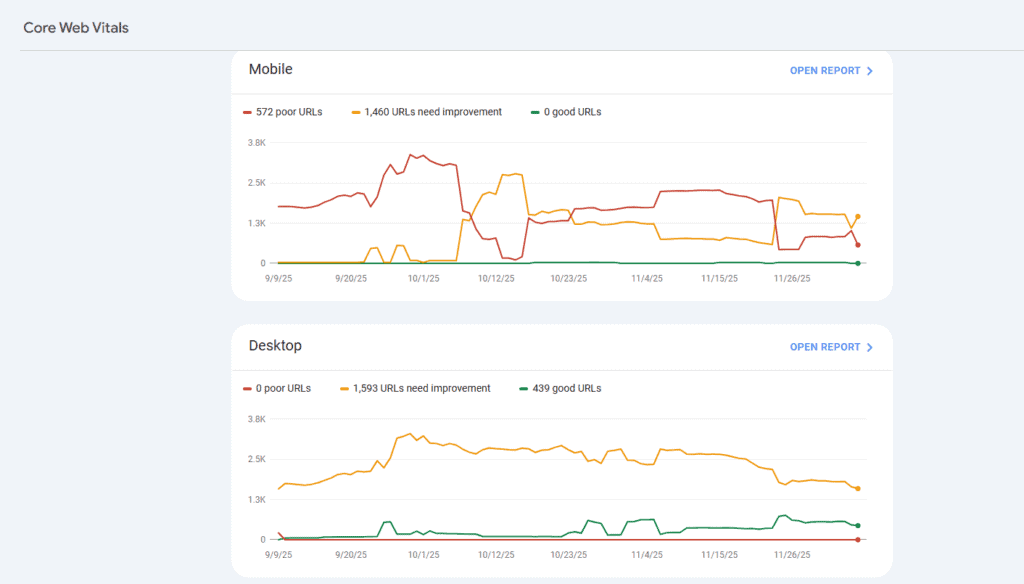
A slow WordPress site will face higher bounce rates, lower conversions, and reduced visibility in search results.
Key Metrics That Define Modern Web Performance
Core Web Vitals consist of three specific metrics. Each measures a different aspect of the user experience.
You can track these scores in the Core Web Vitals report found in Google Search Console.
- Largest Contentful Paint (LCP): This metric measures the loading performance. It measures the time it takes for the most significant content element, such as a central image or a large block of text, to become visible in the viewport. An ideal LCP is 2.5 seconds or less.
- Interaction to Next Paint (INP): INP, replacing First Input Delay (FID), measures responsiveness. It assesses the total time from when a user interacts with a page (e.g., clicking a button) to the moment the visitor’s browser paints the next visual frame. The aim is to have an input delay of 200 milliseconds or less.
- Cumulative Layout Shift (CLS): CLS measures visual stability. It quantifies the unexpected movement of page content during the loading phase. These layout shifts are frustrating for users. The goal is a CLS score of 0.1 or less.
Why WordPress Sites Need Continuous Maintenance for Stability?
A WordPress site is not a static entity. It’s a dynamic system powered by the WordPress core, themes, and installed plugins.
Over time, themes are updated, new plugins are added, and the database grows with posts, revisions, and spam comments. This constant flux introduces bloat and potential conflicts that negatively impact the site’s speed.
Consistent site maintenance is the only way to manage this complexity.
It ensures that all components work efficiently together, preventing unnecessary code from slowing things down and addressing vulnerabilities before they affect your core web vitals scores.
Without ongoing care, even a well-built site will degrade in performance metrics.
How Strong Core Web Vitals Improve Rankings and Conversions?
Google uses Google Core Web Vitals as a ranking signal. Websites with better scores are more likely to achieve higher search engine rankings. This is the direct SEO benefit.
However, the impact is much broader. A faster and more stable site improves the overall user experience.
When the loading speed is excellent, users stay longer, engage more deeply with the content, and are more likely to complete a purchase or sign up.
In essence, strong web vitals drive both organic visibility and higher conversion rates. This makes the effort to optimize Core Web Vitals a direct investment in business success.
Ready to Strengthen Your WordPress Site’s Performance?
Give your site the expert care it needs so you can stay focused on growing your business.
Maintenance Actions That Improve Largest Contentful Paint
Largest Contentful Paint (LCP) is fundamentally a measure of loading performance.
When the LCP element takes too long to appear, it’s usually due to slow server response times, unoptimized media, or blocking render resources. WordPress maintenance focuses on removing these bottlenecks.

Image and Media Optimization for Faster Content Rendering
Images are often the largest content element and, therefore, the primary culprit for a poor LCP score.
- Optimize Media Files: Ensure every image is correctly sized and compressed. Use modern, efficient formats like WebP. Tools can help you compress media files without losing quality.
- Implement Lazy Loading: Use lazy loading for images and videos that are “below the fold.” This prevents the browser from loading non-critical elements, allowing the LCP content to load first. The loading=”lazy” attribute or a dedicated caching plugin can handle this.
- Set Critical Background Image: If your LCP element is a background image, ensure it loads immediately. Techniques such as preloading or inlining image data in the critical CSS can significantly improve its rendering time.
Server and Hosting Enhancements That Reduce Load Time
The initial connection and the time it takes the server to respond are critical LCP factors.
- Choose High-Performance WordPress Hosting: Your hosting provider should specialize in WordPress hosting. A fast server response time is paramount. Look for dedicated resources or managed WordPress hosting that uses high-speed hardware and is configured for optimal PHP execution. You may need to optimize your hosting by upgrading your plan or switching to a more reliable provider.
- Utilize a Content Delivery Network (CDN): A Content Delivery Network geographically distributes your content across multiple servers. When a user requests your page, the CDN serves static assets (like images, CSS files, and JavaScript files) from the server closest to them. This drastically reduces latency and load time.
Efficient Caching and CDN Delivery for Faster Content Access
Caching significantly reduces the workload on your server for repeat visits.
- Browser Caching and Server-Side Caching: Configure browser caching to prevent recurring visitors from having to re-download static assets. Implement aggressive server-side caching (object, page, and fragment caching) to minimize database queries and PHP execution time. Tools like FastPixel or other caching plugins are invaluable in this context.
- Optimize CDN and Caching Settings: Ensure your Content Delivery Network is configured to cache as many assets as possible. Proper use of a CDN, combined with solid server and browser caching, ensures that your content is delivered efficiently from the edge, resulting in a superior page load time.
CSS and Script Optimization for Faster Above the Fold Rendering
Render-blocking resources, especially CSS and JavaScript files, prevent the browser from displaying the LCP content immediately.
- Generate Critical CSS: Only the critical CSS needed for the “above the fold” content should load first. Defer the remaining CSS delivery until after the LCP content is rendered. Many modern optimization tools automate this process.
- Minify and Defer CSS and JavaScript: Utilize JavaScript minification and CSS minification to eliminate unnecessary whitespace and code from your CSS and JavaScript files. Deferring the loading of non-critical JavaScript files ensures they don’t block the initial rendering of the page content.
- Leverage Lightweight Alternatives: Swap out multiple plugins for one that offers the combined functionality, or look for lightweight alternatives to poorly coded or bloated installed plugins to reduce the number of CSS and JavaScript files that need to load.
Maintenance Techniques That Strengthen Interaction to Next Paint
Interaction to Next Paint (INP) measures how responsive your page is to user input.
The core issue behind a poor INP score is often heavy or inefficient JavaScript execution that monopolizes the browser’s main thread, causing an input delay.
WordPress maintenance should focus on optimizing the efficiency of both the backend and frontend code.

Reducing Heavy JavaScript and Third-Party Script Execution
Excessive or blocking JavaScript is the most common cause of high INP.
- Delay Non-Critical JavaScript: Just as with LCP, deferring the loading of non-essential JavaScript files is crucial. Use the ‘defer’ or ‘async’ attributes where appropriate. FastPixel plugin and similar tools offer features to postpone the execution of scripts until user interaction occurs.
- Audit Third-Party Scripts: External scripts (e.g., ads, analytics, social media embeds) often have a significant impact on performance. Routinely audit these scripts. Load them conditionally or use lightweight alternatives to minimize their effect on the main thread, thus improving the site’s maintenance.
Database and Backend Optimization for Faster Interactions
A slow backend translates to a delay in processing user requests.
- Scheduled Database Cleanup: Over time, the WordPress database accumulates overhead, including old revisions, spam comments, and transient files. Scheduled database cleanup and speed optimization ensure high database performance. Plugins can automate the removal of this junk.
- Optimizing PHP Version: Ensure your WordPress hosting is running the latest stable version of PHP. Newer PHP versions offer significant speed improvements over older ones, directly contributing to faster server response times and quicker processing of user inputs.
- Efficient Code Audits: For complex WordPress websites, a code audit can identify and optimize inefficient PHP or database queries that contribute to a high input delay during user interactions.
Regular Performance Testing to Catch Interaction Delays Early
Proactive testing is essential for maintaining a strong INP.
- Use Real User Monitoring (RUM) Tools: RUM tools, often integrated with Google Analytics, provide data on actual user interactions. This real-world data is far more accurate than lab data for diagnosing INP issues.
- Leverage Google PageSpeed Insights: Google PageSpeed Insights and similar lab tools help identify script execution times and main-thread work. You should regularly test your site to diagnose bottlenecks and ensure you improve performance before they impact users.
Maintenance Practices That Reduce Cumulative Layout Shift
Cumulative Layout Shift (CLS) is a user experience killer. It occurs when elements on a page move unexpectedly as the page finishes loading, causing users to click the wrong thing accidentally.
WordPress maintenance focuses on ensuring visual stability from the moment the page starts loading.
Proper Media Dimension Settings for Stable Layouts
The most common cause of high CLS is images loading without explicit dimensions.
- Specify Width and Height for All Media: Every image, video, and background image must have width and height attributes defined in the HTML. This reserves the necessary space on the page before the media file loads, which helps prevent layout shifts.
- Use CSS Aspect Ratio Boxes: For complex responsive designs, using modern CSS techniques to create aspect ratio boxes can effectively reserve the correct space for media, ensuring the layout remains stable regardless of the final image size.
Stabilizing Ads Embeds and Dynamic Interface Elements
Dynamic content, like ads or pop-ups, is a frequent source of layout shifts.
- Reserve Space for Ads and Embeds: If you use ads or third-party embeds (like maps or social feeds), reserve the necessary space using CSS. Don’t let the ad script load and push existing content down. The space reservation should be based on the largest possible size for the dynamic element.
- Avoid Inserting Content Above Existing Content: Never insert banners, notices, or sign-up forms at the top of the page after any initial content has loaded. If a notification is needed, insert it at the very top of the page (before LCP) or use a fixed position that doesn’t cause content to shift.
Optimized Font Loading for Consistent Page Structure
The way fonts load can significantly affect CLS. If a web font takes time to load, the browser may temporarily display a system font, causing a layout shift when the custom font finally renders.
- Use Font Display Swap with Preloading: The font-display: swap CSS property is often recommended for optimal font display. It displays the fallback font immediately and switches to the web font once it becomes available. To minimize the shift, you should host fonts locally and preload them.
- Ensure Hosting Fonts Locally: Serving fonts directly from your WordPress hosting reduces reliance on external servers, improving both LCP and CLS.
Essential WordPress Maintenance Tasks for Consistent Performance
Maintaining your WordPress performance is a continuous loop of testing, updating, and optimization.

Safe Updates for WordPress Core Themes and Plugins
Updates often contain performance enhancements and crucial security measures. So, always keep the WordPress core, your themes, and all installed plugins up to date.
However, use a staging environment (see below) to test updates before pushing them live, as poorly coded updates can introduce conflicts that harm core web vital scores.
Plugin Cleanup and Code Optimization for Lean Performance
Fewer, better-coded assets result in better performance.
- Remove Unused Plugins and Themes: Deactivate and delete any themes or multiple plugins that are no longer actively in use. Even inactive code can sometimes affect the system.
- Code Review for Poorly Coded Elements: Poorly coded themes or plugins can generate excess database queries, slow down PHP execution, and introduce rendering issues. Routinely audit your site for lightweight and efficient alternatives.
Scheduled Database Cleanup and Speed Optimization
Regular database hygiene is essential for responsiveness. Schedule tasks to automatically remove post revisions, expired transients, pingbacks, trackbacks, and spam comments. This improves database performance and keeps your backend fast.
Continuous Tracking of Real User Metrics and Lab Data
You can’t improve core web vitals if you don’t know where you stand.
- Monitor Google Search Console and Google Analytics: Regularly review the Core Web Vitals report in Google Search Console for real-world data. Cross-reference this with Google Analytics to see how performance affects bounce rates and conversions.
- Test with Google PageSpeed Insights: Use Google PageSpeed Insights to get “lab data” and specific recommendations on how to optimize CSS, defer scripts, and reduce the overall load time.
Infrastructure and Tools That Support Strong Core Web Vitals
The right tools and hosting provider simplify WordPress maintenance, making it much easier to achieve high Core Web Vitals scores.
Choosing High-Performance WordPress Optimized Hosting
Your foundation must be rock-solid to achieve a low LCP. Choose WordPress hosting that utilizes high-speed storage (NVMe SSDs), an optimized stack (such as NGINX ), and serves sites from geographically optimized multiple servers. This is key to achieving fast server response times.
Integrating CDN and Smart Caching Solutions
A layered caching strategy is critical for speed and stability. A robust CDN not only delivers files quickly but can also provide edge-caching and security enhancements.
This partnership between your WordPress hosting and CDN is crucial for achieving optimal global site performance.
Using All-in-One Optimization Plugins for Automated Improvements
Plugins can handle the complex technical work for you.
Plugins like WP Rocket offer automated features for optimizing CSS and JavaScript files, implementing lazy loading, browser caching, and JavaScript minification.
They simplify the process of making the site faster and achieving better web vitals. While multiple plugins can accomplish this, an all-in-one solution minimizes the risk of conflict.
Best Practices for a Sustainable WordPress Maintenance Workflow
Maintaining WordPress websites is a long-term commitment. A structured workflow ensures consistency and reliability.

Structured Maintenance Schedules for Reliable Performance
Establish a clear cadence for key maintenance tasks.
- Daily: Check backups, monitor for uptime issues.
- Weekly: Clear cache, review spam comments, check the health of all installed plugins.
- Monthly: Perform scheduled database cleanup and speed optimization, run a full site performance audit with Google PageSpeed Insights, and review the Core Web Vitals report.
- Quarterly: Review security measures, audit third-party scripts, and reassess your hosting provider.
Using Staging Environments to Avoid Performance Regression
Updates and changes are the main source of new performance issues.
Before pushing any update (core, theme, or plugin) or making significant structural changes, implement the change on a staging environment, a clone of your live WordPress site.
This allows you to regularly test for conflicts or performance issues before they are visible to the live audience. This prevents a potential drop in your core web vital scores.
Routine Performance Audits for Long-Term Stability
Continuous auditing ensures your site remains lean and fast. Periodically review all CSS files and JavaScript files being loaded.
Look for opportunities to switch to lightweight alternatives for functionality, ensuring you remove all unnecessary code.
Conclusion on the SEO Value of Proactive WordPress Maintenance
The role of WordPress maintenance in improving core web vitals is not a suggestion; it is a requirement for competitive SEO rankings. The three metrics, LCP, INP, and CLS, are Google’s formal measures of user experience.
By focusing on optimizing Largest Contentful Paint LCP through media and server enhancements, strengthening Interaction to Next Paint by reducing input delay, and stabilizing layout to reduce cumulative layout shift CLS, you are directly improving your search visibility.
Proactive, structured WordPress maintenance is the most effective way to ensure your WordPress site meets and exceeds these standards.
It is the key to achieving better search rankings, providing a superior user experience, and driving long-term success on the web.
Don’t wait for your scores to drop; use consistent maintenance as a competitive advantage to keep your site faster than the competition.
FAQs About WP Maintenance Improving Core Web Vitals
Why are Google Core Web Vitals important for WordPress sites?
Google Core Web Vitals are essential because they show how users experience your pages. They measure loading, interaction, and stability. Strong scores improve the website’s performance and search visibility.
How does my hosting provider affect each core web vital?
Your hosting provider controls server speed, uptime, and resource limits. Faster servers specifically reduce load time, improve first input delay, and support stable rendering. Good hosting strengthens every core web vital.
How do I reduce cumulative layout shift CLS on my WordPress site?
You can reduce cumulative layout shift CLS by adding fixed dimensions to images, videos and ads. Load fonts correctly and avoid inserting new elements at the top of the page. These steps keep layouts stable.
Can a content delivery network and caching plugin improve Google Core Web Vitals?
Yes. A content delivery network (CDN) speeds up delivery by utilizing servers located globally. A caching plugin creates faster pages by storing static versions. Both tools enhance loading speed and improve the overall performance of the website.
How do I track Core Web Vitals in Google Search Console for ongoing improvements?
Google Search Console offers a clear Core Web Vitals report. It highlights slow pages and key aspects that need attention. You can fix issues and retest. All tools in this report are entirely free.


