
When a WordPress site goes down, the clock starts immediately. For an e-commerce store, every minute of downtime is lost revenue. For a publisher, every minute is lost in ad impressions and reader trust. For an agency, every minute is a client crisis. WordPress emergency support is a service designed to stop the bleeding fast and get the site back online before the damage compounds. This guide explains what counts as an emergency, what to expect when you call for help, how fast professional support actually responds, what it costs, and how to prevent the next emergency before it happens.
WordPress emergency support costs between $39 per hour and $499 per incident depending on the provider, severity, and pricing model.
Hourly billing typically runs $39 to $200 per hour. Per-incident flat fees range from $129 to $499. Subscription-based emergency coverage as part of a maintenance plan ranges from $99 to $999 per month with emergency response built in.
Most single-issue emergencies resolve in 1 to 3 hours, putting typical out-of-pocket cost between $39 and $600 for hourly providers, or one flat fee for per-incident providers.
TL;DR: WordPress Emergency Support Cost
- WordPress emergency support pricing falls into three structures: hourly ($39 to $200/hr), per-incident flat fee ($129 to $499), and subscription-based emergency coverage ($99 to $999/mo)
- Hourly pricing is most cost-effective for rare emergencies. Per-incident pricing is predictable but often more expensive for simple fixes. Subscription pricing is the best value for sites that need ongoing peace of mind
- Most single-issue emergencies resolve within 1 to 3 hours, putting the typical hourly total cost between $39 and $600
- The average cost of an unresolved WordPress emergency for an eCommerce site is $15,000 per day in lost revenue, according to Shopify 2024 data, which makes even premium emergency rates a small fraction of the cost of inaction
- Hidden fees to watch for: after-hours surcharges, scope-creep billing, malware removal as a separate add-on, and per-issue minimum hour blocks
- Seahawk’s WordPress emergency support is billed at $39 per hour with no retainer required and no hidden fees
- The cheapest emergency support in the long run is a WordPress maintenance plan that prevents the emergency from happening at all
The Three Pricing Models for WordPress Emergency Support
Every WordPress emergency support provider uses one of three pricing structures. Understanding the difference is the first step to budgeting accurately.
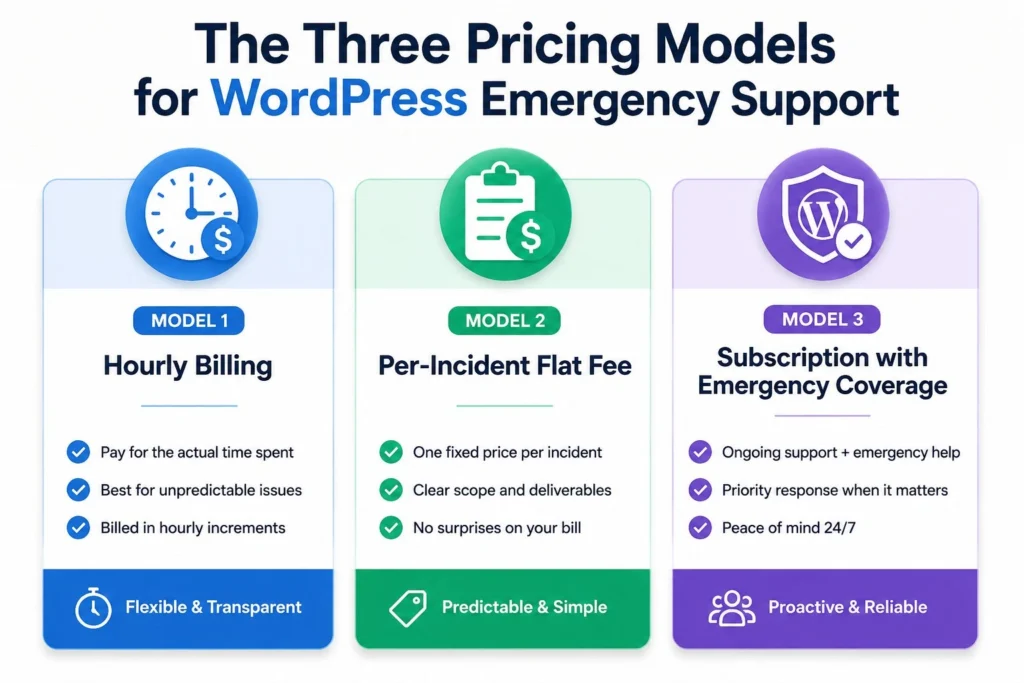
Model 1: Hourly Billing
You pay an hourly rate for the time the team spends resolving your issue. Typical rates run $39 to $200 per hour.
Pros: You only pay for actual work performed. Transparent. Most cost-effective for simple, fast-resolving issues.
Cons: Cost is unpredictable upfront. A complex issue that takes longer than estimated runs higher. Some providers have hour minimums (often 2 to 4 hours) that inflate the cost of small fixes.
Typical use case: A clear, single-issue emergency like a failed plugin update or a broken contact form. Most issues in this category resolve in 1 to 3 hours.
Total cost range: $39 to $600 for typical single-issue emergencies.
Model 2: Per-Incident Flat Fee
You pay a fixed price to resolve a specific incident, regardless of how long it takes. Typical fees range from $129 to $499 per incident.
Pros: Cost is fully predictable. The provider absorbs the time risk. No surprise scope-creep charges.
Cons: You pay the same flat rate for a 30-minute fix as for a 3-hour fix. Less cost-effective for simple issues. Most providers cap the scope of what counts as one incident, so a multi-issue emergency may trigger multiple flat fees.
Typical use case: Hacked site recovery, malware removal, complete site outages, or any scenario where the buyer wants budget certainty.
Total cost range: $129 to $499 per incident.
Model 3: Subscription with Emergency Coverage
A monthly retainer that includes priority emergency response as part of an ongoing maintenance plan. Typical pricing ranges from $99 to $999 per month.
Pros: Best long-term value if emergencies happen more than once or twice per year. Includes proactive WordPress maintenance that prevents most emergencies from happening in the first place. Faster response because the team already knows your site.
Cons: Monthly cost continues even when no emergencies occur. Wasteful for sites that genuinely never have problems.
Typical use case: Active business sites, eCommerce stores, agency-managed client sites, and any site where the cost of downtime outweighs the cost of a maintenance plan.
Total cost range: $99 to $999 per month with emergency coverage included.
What Pricing Looks Like Across the WordPress Emergency Support Market?
Pricing transparency is one of the most useful comparison points in this category, but also one of the least reliable. Of the major providers in the market, only a handful publish their rates publicly.
| Provider | Pricing Model | Public Price Available? |
|---|---|---|
| Seahawk | Hourly at $39/hr | Yes |
| WP Tech Support | $79 one-time fix | Yes |
| WP Buffs | Subscription with included emergency support | No |
| 24x7WPSupport | One-time fix or ongoing | No |
| SiteCare | Custom quotes for enterprise WordPress care | No |
| Codeable | Marketplace freelancer rates | Quoted per project |
Most WordPress emergency support providers gate their pricing behind contact forms or sales calls. The two providers in this list with fully published pricing are Seahawk at $39 per hour and WP Tech Support at $79 per one-time fix. Both publish these rates directly on their websites with no sign-up required.
For buyers comparing options under pressure during an actual emergency, gated pricing is a real friction point. Filling out a contact form and waiting for a response is not viable when a site is down. The two providers who publish pricing publicly are also the two providers a buyer can engage immediately without a waiting period.
The other providers in this list operate primarily on subscription models where emergency support is included with a monthly maintenance plan. WP Buffs, SiteCare, and 24x7WPSupport all bundle emergency support into their care plans rather than offering it as a standalone, hourly, or per-incident purchase. For buyers who want only emergency support without an ongoing subscription, this is a meaningful constraint.
What Should a WordPress Emergency Actually Cost? Real Scenarios
Pricing in the abstract is one thing. Real-world emergency scenarios make it concrete. Here is what each common emergency type typically costs to resolve at the average market rate.

Hacked Site Cleanup
What is involved: Identifying the malware infection, removing malicious code from theme and plugin files, cleaning the database, removing unauthorized admin accounts, hardening the site against re-infection, and submitting for review by Google Safe Browsing if flagged.
Typical resolution time: 2 to 6 hours.
Cost at $39/hr: $78 to $234. Cost at $200/hr: $400-$1,200. Cost as a flat per-incident fee: $299 to $499.
Failed Plugin or Theme Update Rollback
What is involved: Identifying the conflicting plugin or theme, rolling back to the previous working version, testing the rollback, and identifying the underlying compatibility issue.
Typical resolution time: 1 to 2 hours.
Cost at $39/hr: $39 to $78. Cost at $200/hr: $200 to $400. Cost as a flat per-incident fee: $129-$299.
White Screen of Death or Fatal Error
What is involved: Diagnosing the root cause via error logs, disabling the offending plugin or theme via FTP or database, restoring functionality, and identifying the underlying issue.
Typical resolution time: 1 to 3 hours.
Cost at $39/hr: $39 to $117. Cost at $200/hr: $200 to $600. Cost as a flat per-incident fee: $129-$299.
Database Connection Error or Database Corruption
What is involved: Diagnosing whether the issue is wp-config credentials, database server availability, or actual database corruption. Repairing the database or restoring from backup. Verifying data integrity.
Typical resolution time: 2 to 8 hours, depending on severity.
Cost at $39/hr: $78 to $312. Cost at $200/hr: $400-$1,600. Cost: flat per-incident fee of $299-$499.
Complete Site Outage with Unknown Cause
What is involved: Full diagnostic process across hosting, DNS, WordPress core, plugins, themes, and database. Identifying the root cause from multiple possibilities. Resolution of the actual issue.
Typical resolution time: 1 to 6 hours, depending on what is found.
Cost at $39/hr: $39 to $234. Cost at $200/hr: $200 to $1,200. Cost as a flat per-incident fee: $299-$499.
The math becomes clear. For most single-issue emergencies, hourly pricing at a reasonable rate ($39 to $80 per hour) delivers the best value because most issues resolve in under 3 hours. Per-incident flat fees are only competitive for complex, multi-hour situations, and even then, a transparent hourly rate often comes out ahead.
Hidden Fees That Inflate WordPress Emergency Support Costs
The advertised price is rarely the final price with many providers. Here are the seven hidden fees that catch buyers off guard most often.
After-hours surcharges. Some providers charge 1.5 to 2 times the standard rate for emergencies outside business hours. A $ 99-per-hour daytime rate becomes $198 per hour at 2 am on a Sunday. Always confirm whether the rate quoted applies 24/7 or only during business hours.
Minimum hour blocks. Many providers enforce a 2-hour or 4-hour minimum even for fast-resolving issues. A 30-minute fix gets billed as 2 hours. At $99 per hour, that turns a $50 fix into a $198 charge.
Malware removal is a separate add-on. Some providers advertise emergency support pricing but exclude malware removal from the base scope. When you actually need a hacked site cleaned, the malware removal is billed separately at a premium rate of $299 to $999.
Scope-creep billing. “We thought it was a plugin issue, but it turned out to be a database problem, so we are billing for both.” Look for providers who scope upfront and stick to the original quote unless the scope genuinely changes substantively.
Backup restoration fees. Some providers charge extra to restore from a backup during an emergency, even though backup restore is one of the most common emergency actions. This should be included, not surcharged.
Multi-issue billing. A site that has been hacked typically has multiple issues to resolve: malware removal, redirect cleanup, security hardening, and resubmission to Google Safe Browsing. Some providers bill each as a separate incident at the full per-incident rate.
Communication and reporting fees. A few providers charge for status updates, post-incident reports, or scope discussions as separate billable time. The fix takes 2 hours. The associated communication adds another hour at full rate.
Seahawk’s pricing is structured to avoid all seven of these hidden costs. The $39 per hour rate applies 24/7 with no after-hours surcharge. There is no minimum hour block. Malware removal is included in the base hourly rate. Communication and reporting are not separately billed. The advertised price is the price you pay.
Emergency Support Cost vs Maintenance Plan Cost
The single most useful comparison for any site owner considering emergency support costs is how they stack up against the cost of a maintenance plan that prevents the emergency from happening in the first place. Understanding the full breakdown of WordPress website maintenance costs gives you the framework to compare ongoing preventive spending with reactive emergency spending.

Here is the math for a typical small business WordPress site over a 12-month period.
Scenario 1: No maintenance plan, three emergencies per year.
Average emergency resolution cost: $39 per hour. 3 emergencies x 2 hours x $39 = $234 per year.
But that ignores the actual cost of the emergencies themselves. Each emergency averages 4 to 8 hours of site downtime before and during the fix. For a small business site doing $5,000 in monthly revenue, an average of 6 hours of downtime per month costs roughly $208 in lost revenue. Three emergencies per year total $624 in lost revenue and $234 in emergency support fees. Total: $858 per year.
Scenario 2: Pro maintenance plan at $99 per month, one emergency per year.
Annual maintenance plan cost: $1,188. Average emergency cost (rare with maintenance): 1 emergency x 2 hours x $39 = $78. Lost revenue from the rare emergency: roughly $208. Total: $1,474 per year.
Scenario 3: VIP maintenance plan at $599 per month, zero emergencies.
Annual maintenance plan cost: $7,188. Emergency support cost: $0 (covered by the plan but rarely needed). Lost revenue from emergencies: $0. Total: $7,188 per year.
The math looks like Scenario 1 is the cheapest. Until you factor in the operational and reputational cost of three emergencies per year happening on an active business site. For an eCommerce site with $50,000 in monthly revenue, the same three-emergency scenario results in $6,000 in lost revenue plus emergency fees, putting it ahead of even the VIP plan.
The right comparison depends on your site’s revenue profile, not just the headline emergency rate. For WooCommerce stores where checkout downtime directly translates into lost sales, the calculation tilts even more aggressively toward preventive maintenance than toward reactive emergency response.
What Determines the Final Cost of an Emergency Support Engagement?
Five factors influence the cost of an actual emergency engagement.
Severity of the issue. Critical issues like complete site outages and active hacks take priority and are resolved faster than less urgent issues, but the work itself is more complex and may run longer.
Provider’s hourly rate. The biggest single variable. The same 3-hour fix costs $117 at Seahawk versus $600 at a $ 200-per-hour provider.
Whether you have backups. A site with recent backups can be restored quickly. A site with no backups requires manual reconstruction, which is dramatically more expensive.
Hosting environment access. Providers can resolve issues faster when they have direct access to the hosting control panel, FTP credentials, and database access from the start. Each access barrier adds time and cost.
Documentation of the site. A site with documented plugin lists, change logs, and recent activity records is faster to diagnose than a site where the support team has to investigate everything from scratch.
The fastest, cheapest path to emergency resolution is having all five factors in your favor before the emergency happens. This is exactly what an ongoing maintenance plan delivers as a side effect of routine work.
Final Thoughts: WordPress Emergency Support Cost
WordPress emergency support pricing is wider than that of almost any other service category, which makes an informed comparison essential before you commit to a provider. The cheapest hourly rate among reputable providers is around $39 per hour at Seahawk. The most expensive option in the market runs over $200 per hour at premium agencies and freelancer marketplaces. The work itself is largely the same.
Beyond the headline rate, watch for hidden costs that materially inflate the total: after-hours surcharges, minimum-hour blocks, malware removal billed separately, and scope-creep charges. Providers who structure their pricing transparently are easier to budget around and almost always cheaper in practice.
The cheapest emergency support, by far, is the emergency that never happens. A maintenance plan starting at $49 per month prevents the majority of emergencies that lead to support calls. For active business sites, this is not a marketing pitch. It is the actual financial truth of how emergency support economics work.
Frequently Asked Questions
How much does WordPress emergency support cost on average?
WordPress emergency support costs $39 to $200 per hour or $129 to $499 per incident, depending on the provider and pricing model. Most single-issue emergencies resolve in 1 to 3 hours, with typical out-of-pocket costs ranging from $39 to $600 under hourly billing or a flat fee for per-incident billing. Subscription-based emergency coverage as part of a maintenance plan ranges from $99 to $999 per month.
Is hourly or per-incident pricing better for WordPress emergency support?
Hourly pricing is better for simple, fast-resolving issues that take 1 to 2 hours to fix. At $39 per hour, a 2-hour emergency costs $78, which is significantly less than a $299 to $499 per-incident flat fee for the same work. Per-incident pricing is better when the issue is genuinely complex (e.g., a fully compromised site recovery, a multi-system database failure) and you want budget certainty regardless of how long the resolution takes. For most single-issue emergencies, transparent hourly billing at a reasonable rate is the most cost-effective option.
Why is WordPress emergency support so expensive at some providers?
Higher rates at premium providers reflect operational scale, brand positioning, and overhead rather than differences in quality. A $200-per-hour provider does not deliver work that is 5 times better than a $39-per-hour provider. The two are often comparable in quality but differ dramatically in pricing structure and overhead. The most expensive option is rarely the best value, particularly for routine emergencies.
Does Seahawk charge extra for after-hours emergency support?
No. Seahawk’s WordPress emergency support is available 24/7 at $39 per hour, with no after-hours surcharge. Many competitors charge 1.5x to 2x their standard rate on nights and weekends, effectively doubling the cost of an emergency that occurs at the wrong time. Seahawk’s flat 24/7 rate avoids this hidden cost entirely.
What is the cheapest WordPress emergency support option?
For one-off emergencies, Seahawk’s $ 39-per-hour rate is the lowest among reputable providers. For sites that need ongoing protection, the cheapest long-term option is a WordPress maintenance plan that prevents most emergencies, starting at $49 per month. The cost of one prevented emergency typically exceeds the cost of an entire year of maintenance plan fees.
Can I get a fixed-price quote before emergency work starts?
Most providers offer scoped quotes once they understand the issue. The typical process is: you describe the problem, the team performs an initial diagnosis (often free or at a nominal cost), then they provide an hour estimate or fixed quote based on what they found. Reputable providers stick to the quoted scope unless the underlying issue turns out to be substantially different from the diagnosis. Always request a written quote before work begins.
Are there any free WordPress emergency support options?
Genuinely free professional emergency support does not exist. Volunteer-based help is available through the WordPress.org support forums, but response times range from hours to days, which is not viable for an active emergency. Some hosting providers include limited emergency support as part of their premium hosting plans, which can serve as a starting point for hosting-related issues. For application-level emergencies (hacks, plugin failures, database issues), professional paid support is the only realistic option.
What if my emergency takes longer than expected to resolve?
Reputable providers communicate scope changes before continuing the work. If the team estimates 2 hours and discovers the issue is actually 6 hours of work, they will pause and confirm before proceeding. You retain control of the budget at every stage. Avoid providers who simply keep working without communicating and then present a surprise final invoice. This is one of the clearest signs of a low-quality emergency support provider.
Is it worth paying for a maintenance plan to avoid emergency support costs?
For any site generating revenue, yes. Sites on professional WordPress maintenance plans experience 89% fewer security incidents and significantly fewer emergency outages than unmanaged sites. The cost of one emergency that takes a site offline for several hours typically exceeds the cost of a year of professional maintenance. For active business sites, the maintenance plan pays for itself with the first emergency it prevents.
Can I negotiate WordPress emergency support pricing?
Reputable providers have published rates that they apply consistently. Negotiating the headline hourly rate is rare and usually unsuccessful. What you can negotiate is scope (what counts as a single incident), payment terms (net 30 instead of upfront), and bundle discounts (multiple emergency engagements at a reduced per-incident rate). Custom enterprise arrangements are available for high-volume needs, but rarely make sense for individual emergencies.


