
WordPress powers millions of business websites, ecommerce stores, and digital platforms. While it is flexible and reliable, it is not immune to sudden breakdowns. In 2025, WordPress emergencies are no longer rare technical hiccups. They are business disrupting events that can impact revenue, trust, and long term growth.
A website going down during peak traffic hours, a hacked homepage, or a broken checkout flow can cost far more than the site itself. This is where WordPress emergency support becomes critical. It is not about regular maintenance or slow troubleshooting. It is about fast action, expert diagnosis, and restoring stability when every minute matters.
This guide explains what WordPress support actually covers, how to respond during a crisis, and how to choose the right support partner so your business stays protected when things go wrong.
What Qualifies as a WordPress Emergency Today
Not every WordPress issue is an emergency. Some problems are inconvenient but not urgent. A true WordPress emergency is any issue that threatens availability, security, revenue, or user trust and requires immediate intervention.
Complete Website Downtime
If your site shows server errors, a white screen, or fails to load entirely, it qualifies as an emergency. Downtime means users cannot access your content, products, or services. For ecommerce sites, even a short outage can lead to abandoned carts and lost sales.
Hacked Websites and Malware Infections
Security breaches are among the most serious WordPress emergencies. Signs include unexpected redirects, spam pages, modified content, or warnings from browsers and search engines. A hacked site damages credibility and can result in search engine penalties if not resolved quickly.
Broken Checkout or Payment Failures
For WooCommerce and membership based sites, checkout failures are immediate revenue blockers. If payments stop processing, subscriptions fail, or order confirmations break, the issue needs emergency support rather than delayed troubleshooting.
Critical Plugin or Theme Conflicts
Updates can sometimes introduce compatibility issues that crash key site functionality. When a plugin or theme conflict breaks navigation, forms, or backend access, it becomes an urgent situation.
Severe Performance Degradation
Sudden performance drops, high server load, or database errors can make your site unusable even if it technically stays online. These issues often appear during traffic spikes and require immediate stabilization.
Need Immediate WordPress Emergency Support?
If your site is down, hacked, or breaking critical functionality, our WordPress experts are ready to step in fast. Get reliable emergency support to restore stability, security, and performance when it matters most.
What WordPress Emergency Support Actually Covers
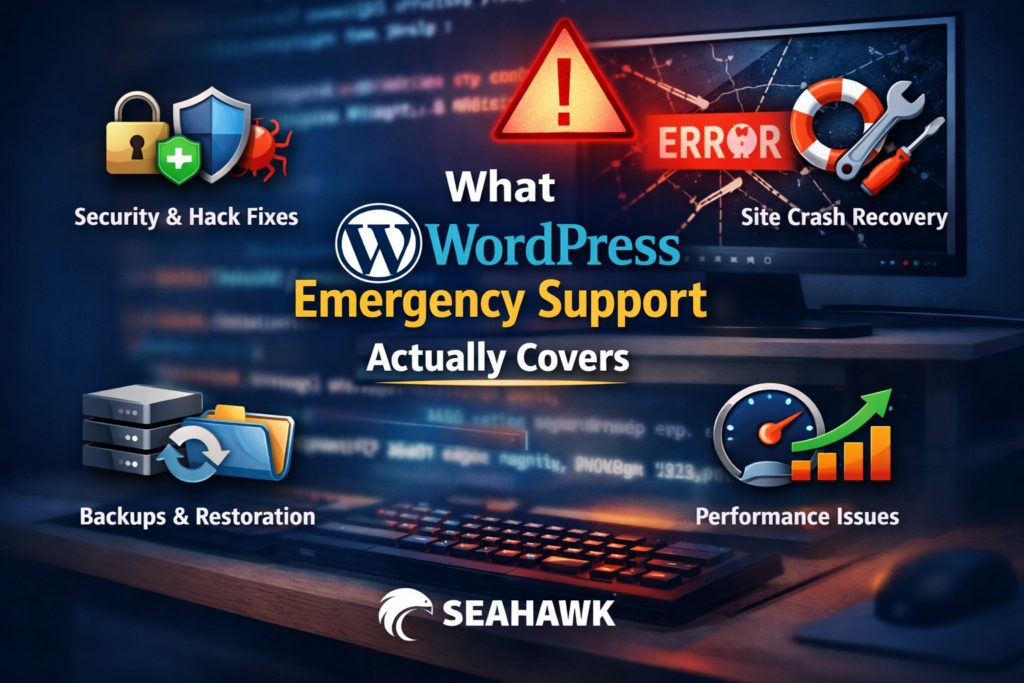
WordPress emergency support focuses on rapid recovery and damage control. It goes beyond basic fixes and addresses the root cause under pressure.
Immediate Issue Diagnosis
Emergency support begins with fast and accurate diagnosis. This includes reviewing error logs, server resources, database behavior, and recent changes. The goal is to identify what broke and why without trial and error.
Rapid Site Restoration
Restoring access is often the first priority. This may involve rolling back updates, restoring backups, repairing databases, or fixing corrupted files. The aim is to get the site functional as quickly as possible while planning permanent fixes.
Security Containment and Cleanup
For hacked sites, emergency support includes isolating infected files, removing malicious code, resetting credentials, and closing security gaps. This prevents further damage while ensuring the site is safe for users again.
Emergency Bug Fixes and Conflict Resolution
When a plugin or theme causes a critical error, emergency support teams resolve conflicts without dismantling the entire site. This includes disabling problematic components, patching code, or replacing broken dependencies.
Server and Hosting Level Intervention
Many emergencies originate beyond WordPress itself. Emergency support may involve fixing server configurations, resolving DNS issues, adjusting PHP settings, or coordinating with hosting providers to stabilize the environment.
Step by Step What To Do During a WordPress Emergency
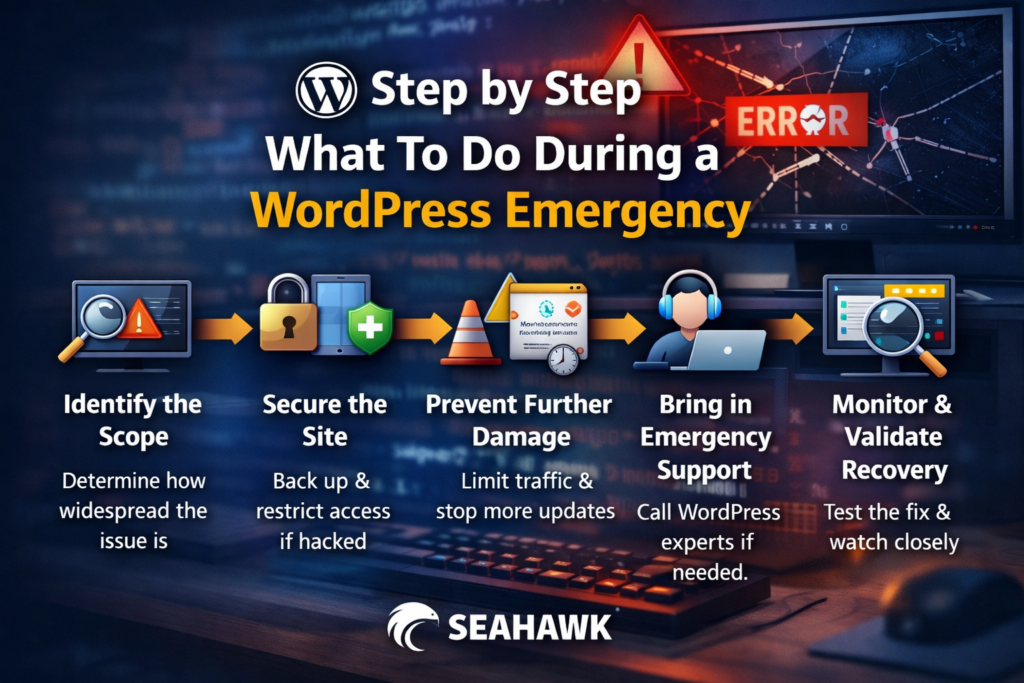
A WordPress emergency can feel overwhelming, especially when your website is tied directly to revenue, leads, or customer trust. The key is not to rush blindly, but to follow a calm and structured response. Acting in the right order helps you reduce downtime, avoid making the problem worse, and recover faster with fewer long term consequences.
Step 1: Identify the Scope of the Issue
The first priority is understanding what is actually broken. Start by checking whether the issue affects the entire website or only specific pages or features. For example, is the homepage down while the admin panel still loads, or is the whole site inaccessible?
Look closely at error messages, browser warnings, or server notifications. Try accessing the site from different devices or networks to confirm whether the problem is global or local. Logging into the WordPress admin area can also provide clues, such as plugin update errors or system warnings.
If you use uptime monitoring or performance alerts, review those logs to pinpoint when the issue started. This timing often correlates with recent updates, deployments, or traffic spikes. Identifying the scope early prevents unnecessary troubleshooting and helps you focus on the real issue.
Step 2: Secure the Site Immediately
Once you understand the scope, your next move is protection. Before making any fixes, create a full backup of your website if access allows. This ensures you can safely roll back if something goes wrong during troubleshooting.
If there is any indication of a security breach, take immediate action. Change administrator passwords, review user accounts, and remove any unfamiliar users. Restrict backend access where possible to prevent further intrusion.
If sensitive user data or checkout processes may be affected, place the site in maintenance mode. Temporarily taking the site offline can feel uncomfortable, but it is often safer than allowing users to interact with a compromised or unstable website.
Step 3: Prevent Further Damage
In an emergency, doing too much too quickly can make things worse. Avoid repeatedly updating plugins, reinstalling themes, or refreshing configurations without a clear plan. Pause automated updates to stop new conflicts from appearing while you investigate.
If traffic spikes are contributing to the issue, consider temporarily limiting access or scaling server resources. Isolate the problem area by disabling non essential plugins or features one at a time, rather than making sweeping changes.
At this stage, stability matters more than speed. The goal is to stop the situation from escalating while you work toward a proper fix.
Step 4: Bring in Emergency Support
If the issue affects revenue, security, or site availability and cannot be resolved quickly, this is the moment to involve professional WordPress emergency support. Waiting too long often increases recovery time and cost.
Experienced emergency teams can diagnose issues faster because they have seen similar scenarios many times before. They also know when a problem goes beyond WordPress and requires server, hosting, or database level intervention.
Bringing in experts early can prevent data loss, prolonged downtime, and reputational damage, especially for ecommerce and business critical websites.
Step 5: Monitor and Validate Recovery
After the fix is applied, recovery is not complete until everything is verified. Test all critical functionality including forms, checkout flows, login systems, and page performance. Check error logs to confirm that no new issues are appearing.
Set up or review monitoring tools to track uptime, performance, and security alerts in real time. Continued observation helps catch repeat issues before users notice them.
If downtime or disruption occurred, communicate transparently with users or customers. Clear communication builds trust and reassures them that the issue was handled responsibly.
Following these steps turns a chaotic WordPress emergency into a controlled recovery process and significantly reduces long term impact on your business.
Emergency Support vs Regular WordPress Maintenance
Emergency support and maintenance serve different purposes. Maintenance focuses on prevention through updates, monitoring, and optimization. Emergency support focuses on response during active failures.
Even well maintained sites can experience emergencies due to hosting outages, zero day vulnerabilities, or unexpected traffic surges. Maintenance reduces risk, but emergency support ensures recovery when prevention is not enough.
Businesses that rely solely on maintenance without an emergency plan often struggle during crises. The strongest WordPress strategies combine both.
How to Choose the Right WordPress Emergency Support Partner
Not all support providers are equipped for true emergencies. Choosing the right partner matters.
Availability and Response Time
Emergency support must be available around the clock. Issues rarely wait for business hours. Fast response time is more important than long feature lists.
WordPress Specific Expertise
Generic support teams may lack experience with complex WordPress setups. Look for teams skilled in WooCommerce, multilingual sites, custom themes, and performance heavy environments.
Clear Scope and Transparency
Good providers explain what is included, how emergencies are handled, and what happens after resolution. Transparency builds trust during stressful situations.
Agency Friendly and White Label Options
Agencies managing client websites benefit from white label emergency support. This allows seamless service delivery without exposing third party involvement.
How Seahawk Handles WordPress Emergencies Differently

Seahawk approaches WordPress emergencies with a structured and business first mindset. The focus is not just on fixing what broke, but on restoring confidence and stability.
Seahawk’s team works exclusively with WordPress, allowing faster diagnosis and smarter solutions. From hacked site repair to performance stabilization, emergencies are handled with clarity rather than chaos.
Each incident is treated as both a technical and operational issue. Clear communication, careful execution, and post recovery guidance ensure that the same problem does not repeat.
Here is what our emergency WordPress support covers.
Backups and Restore Support
Seahawk provides round the clock assistance for WordPress backups and restores. When something breaks, having a clean and reliable backup can be the difference between minutes of downtime and days of recovery. Our team helps create, verify, and restore backups safely, ensuring your website returns to a stable state without data loss or corruption.
Performance Improvement During Critical Situations
Performance slowdowns can quickly escalate into emergencies, especially for high traffic or ecommerce websites. Our WordPress technical support team identifies bottlenecks related to hosting, caching, plugins, or database performance. We focus on stabilizing your site first, then optimizing it to prevent recurring performance related incidents.
Features Development and Emergency Fixes
Sometimes emergencies are triggered by broken features or failed updates. Through our support plans, Seahawk developers step in to fix malfunctioning components, resolve conflicts, and restore essential functionality. We also help develop or adjust features and extensions when emergency fixes require more than a quick patch.
Expert WordPress Advice When It Matters Most
During a crisis, clear guidance is just as important as technical fixes. Our WordPress specialists provide expert advice to help you understand what went wrong, what actions to avoid, and how to move forward safely. From plugin conflicts to complex site behavior, we guide you through every step of the recovery process.
Security and Continuous Monitoring
Security incidents demand immediate attention. Seahawk offers comprehensive security monitoring to detect threats early and respond quickly. From malware cleanup to access control and vulnerability fixes, we focus on containing damage and strengthening your site against future attacks.
White Label Emergency Support for Agencies
For agencies managing multiple client websites, Seahawk offers white label WordPress emergency support. This allows you to deliver fast, professional assistance under your own brand while we handle the technical resolution behind the scenes. It ensures your clients receive timely support without stretching your internal resources.
Preventing Future WordPress Emergencies
While emergencies cannot always be avoided, their impact can be significantly reduced with the right preparation. Prevention is not about eliminating risk entirely, but about building resilience so issues are detected early and resolved quickly without turning into full scale crises.
Proactive Updates and Testing
Regular updates are essential, but they should never be rushed. All core, plugin, and theme updates should be tested in a staging environment before being applied to the live site. This allows teams to catch compatibility issues, layout breaks, or performance drops without affecting users. Maintaining a clear update schedule also prevents large batches of changes from piling up and increasing risk.
Security Hardening and Monitoring
Strong security practices form the foundation of prevention. Firewalls, malware scanning, and strict access controls reduce exposure to common attack vectors. Continuous monitoring tools provide early warnings for suspicious activity, unusual login attempts, or file changes, allowing intervention before real damage occurs.
Performance Optimization for Stability
Performance issues often trigger emergencies. Choosing reliable hosting, enabling caching, optimizing databases, and managing resource usage help prevent crashes during traffic spikes or heavy usage periods.
Documented Recovery Plans
A written emergency response plan saves valuable time. Clearly defined roles, access details, and recovery steps reduce confusion and ensure faster, more confident action when every minute counts.
Final Thoughts: Why Emergency Support Is Not Optional Anymore
WordPress emergencies are not a question of if but when. As websites become central to revenue and brand perception, downtime and security failures carry serious consequences.
Emergency support is not about fear. It is about readiness. Having expert help available during critical moments protects your business from avoidable losses and long recovery periods.
With the right preparation and a trusted WordPress emergency support partner, even the most stressful situations become manageable. Your website stays resilient, your customers stay confident, and your business stays online when it matters most.
Frequently Asked Questions
Is WordPress emergency support available 24 hours?
Yes. True emergency support operates around the clock because outages and security incidents can happen anytime.
How fast can a hacked WordPress site be fixed?
Recovery time depends on the severity, but many hacked sites can be cleaned and restored within hours when handled promptly.
Does emergency support include malware removal?
Yes. Comprehensive emergency support includes malware cleanup, vulnerability fixes, and security hardening.


