
WordPress vs Notion for websites is one of the most common questions we get at Seahawk Media, especially from freelancers, startup founders, and small business owners who want a clean, functional site without overcomplicating the process.
WordPress is a full-featured content management system designed to build, grow, and scale websites of any kind. Notion Sites is a lightweight publishing tool that lets you quickly turn Notion pages into simple public websites.
If your website needs to rank on Google, support e-commerce, or grow with your business, WordPress is the right choice. If you need something live fast with minimal setup, Notion Sites gets you there.
Here is the detailed breakdown of the 7 most important differences between WordPress and Notion for websites, based on what we see every week at Seahawk Media, building and migrating WordPress sites for real clients.
TL;DR: WordPress CMS vs Notion for Websites
- WordPress is a self-hosted, open-source CMS powering 43% of the web, offering full control over SEO, design, ecommerce, and scalability.
- Notion Sites turns Notion pages into simple public websites, making it quick and easy to launch without technical setup.
- Notion has limitations in SEO, e-commerce functionality, and design flexibility, which can restrict long-term growth.
- WordPress is better suited for business websites, monetization, and scalable projects with higher performance needs.
- Notion works best for personal pages, documentation, and simple portfolios where speed and simplicity matter.
WordPress.org vs WordPress.com: A Brief Overview
Before anything else, let’s address something that trips up thousands of people every year. When most people say “WordPress,” they mean two different things, and the distinction matters.
WordPress.org is the free, open-source content management system (CMS) you download and install on your own hosting. You choose your hosting provider, own your data completely, and have unrestricted access to every plugin, theme, and customization option available. This is what powers over 43% of the internet. It is also what Seahawk Media builds on.
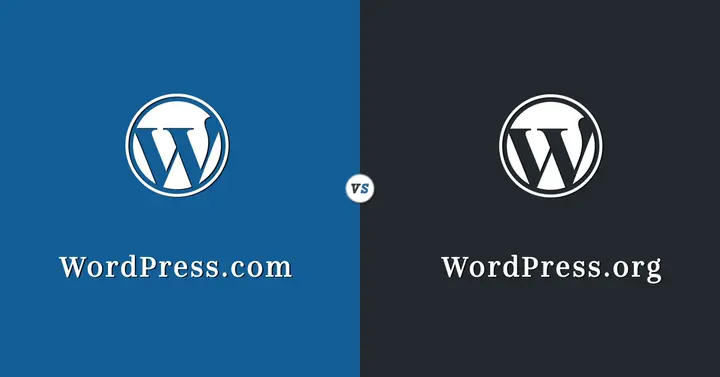
WordPress.com is a managed hosting platform owned by Automattic. It handles server maintenance and security for you, but comes with significant restrictions on plugins, monetization, and customization, especially on lower-tier plans. It is a more beginner-friendly starting point, but it is not the same product.
Throughout this comparison, when we say “WordPress,” we mean WordPress.org, the self-hosted version. That is the platform serious websites, businesses, and agencies use.
Who Should Use WordPress?
WordPress is the right platform if you are building a website that needs to rank on Google, running an e-commerce store or selling any kind of product or service, managing a business website with plans for long-term growth, building a client site as an agency or freelancer, launching a membership site, online course, or event platform, or need complete ownership and portability of your content.
What Are Notion Sites?
Notion started as a productivity and note-taking workspace. In June 2024, it officially launched Notion Sites, a feature that turns any Notion page into a publicly accessible website.
You can add a custom domain, set metadata, connect Google Analytics, and toggle your page live in minutes. It is clean, fast to set up, and requires zero technical knowledge.
The Notion team themselves described it as a solution for when “you just need a quick website.” That honest positioning tells you a lot about where Notion Sites belongs in the conversation.
Who Should Use Notion Sites?
Notion Sites makes sense when you need a personal portfolio or resume page with minimal traffic goals, you are publishing simple internal documentation for a team already living in Notion, you are prototyping a site concept before committing to a build, or your audience is primarily internal, and search engine visibility is not a priority.
Quick Comparison: WordPress vs Notion for Websites
Here is a short summary of both platforms to help you decide:
| Features | WordPress (self-hosted) | Notion |
| Setup complexity | Easy | Very easy |
| SEO control | Advanced | Basic |
| Design customisation | Extensive | Minimal |
| Ecommerce | Full native support | Not available |
| Security | Manageable with right tools | Handled by Notion |
| Team collaboration | Plugin-dependent | Built-in, real-time |
| Community and support | Massive global ecosystem | Limited |
| Offline access | Yes | No |
| Scalability | Enterprise-level | Small sites only |
| Pricing | Free core, pay for hosting/plugins | Free tier, $10+/user/month for custom domain |
Overall Verdict at a Glance: WordPress is the stronger platform for any website with SEO, ecommerce, design, or growth requirements. Notion Sites is the right tool for quick, simple, internally-focused publishing. Most businesses start on Notion out of convenience and migrate to WordPress out of necessity. Starting on WordPress saves you that migration entirely.
Still on Notion? It’s Time to Move to WordPress
Seahawk Media handles your full Notion to WordPress migration seamlessly.
WordPress vs Notion: Feature Comparison
Explore the core differences between WordPress and Notion across performance, customization, and SEO capabilities. Understand which platform aligns better with your website goals.
Difference 1: Ease of Use: Which Platform Saves You More Time?
Notion wins on initial simplicity. You write the same way you take notes, hit publish, and your page is live. There is no hosting to set up, no theme to configure, and no plugins to install. For someone who just needs a public-facing page within the next hour, that is a genuinely compelling advantage.
WordPress has a steeper entry curve. You need to choose a hosting provider, install WordPress, select a theme, and configure your basic settings before you publish anything.
With managed hosts, a lot of that setup is now automated. And tools like KadenceWP and SeedProd make building pages visually very approachable. However, for a complete beginner, WordPress takes longer to feel comfortable with.
The more important question is not which platform is easier to start on. Which platform is easier to grow on? WordPress rewards the time you invest in setup. Notion hits a ceiling very quickly when your needs become anything beyond a simple static page.
Verdict: Notion wins on day one. WordPress wins every day after that. If you are building something you genuinely plan to grow, the setup investment in WordPress pays back within weeks.
If you are building something you plan to grow, invest in the setup phase once and build on a platform that scales with you.
Difference 2: SEO Capabilities: Where Google Notices the Real Gap?
This is the most consequential difference for anyone building a website to generate traffic.
WordPress gives you complete control over every SEO element: meta titles, meta descriptions, canonical tags, XML sitemaps, Open Graph data, structured data (schema), image alt text, heading hierarchy, page speed optimization, and internal linking architecture.
Plugins like Rank Math and AIOSEO make managing all of this straightforward for non-technical users. PushEngage adds browser notifications to bring visitors back.
Notion Sites has only the most basic SEO features. You can add a page title, a custom description, and connect a custom domain. On the free plan, search engine indexing is not even available. There is no XML sitemap, no structured data support, no control over canonical URLs, and no way to handle technical SEO issues when they arise.
There is a real pattern among website owners who tried Notion first and found that their content simply was not appearing on Google. The infrastructure needed for search visibility just is not there. Free Notion users have no access to indexing or SEO in any meaningful sense.
If ranking on Google, appearing in AI search tools like Perplexity or ChatGPT, or building long-term organic traffic matters to you, WordPress is not just the best choice. It is the only real choice.
Verdict: WordPress wins this category completely. Notion Sites was not built for search visibility, and no workaround fully compensates for that. If organic traffic matters at all to your website goals, this difference alone should settle the decision.
Difference 3: Design and Customization: Templates vs Real Creative Control
Notion Sites produces clean, minimal pages that look exactly like what they are: public Notion documents. You can toggle between light and dark themes, add a header, choose a favicon, and adjust your navigation.
That is roughly the extent of it. The design ceiling is very low, and your site will have a distinct “Notion aesthetic” that works fine for personal use but rarely meets the brand standards businesses need.
WordPress gives you a whole new level of design freedom. You can choose from thousands of free and premium themes, including Astra, Kadence, Avada, and Bricks. Page builders like Elementor, Beaver Builder, and Spectra let you design visually, with complete control over layout, spacing, typography, and color at every breakpoint.
At Seahawk Media, we build client websites every week. Clients come to us with specific branding guidelines, design systems, and visual expectations. Not once has a Notion page met those requirements without significant workarounds. WordPress, combined with the right theme and builder, consistently delivers what a professional brand needs.
For freelancers and agencies building for clients, design flexibility is non-negotiable. WordPress is where that work happens.
Verdict: WordPress wins by a significant margin. Notion Sites produces clean pages, but clean is not the same as branded, distinctive, or conversion-optimized. For any client-facing or business website, the design depth of WordPress is non-negotiable.
Difference 4: E-commerce and Monetization: Can Notion Even Compete?
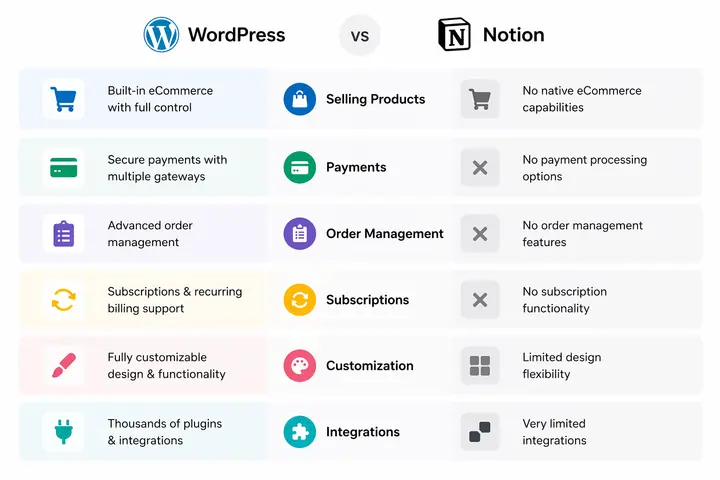
No. Notion has no native e-commerce functionality. Selling products, processing payments, managing orders, and running a subscription service are not possible directly inside Notion Sites. You would need to embed third-party tools and accept a fragmented, unreliable buying experience.
WordPress with WooCommerce is one of the most powerful and flexible ecommerce stacks in existence. It supports physical and digital products, variable pricing, subscriptions, and complex fulfillment workflows.
SureCart offers a modern, lighter-weight experience for simpler stores. MemberPress handles paywalled content and membership tiers. EDD (Easy Digital Downloads) is purpose-built for selling digital files.
Beyond direct ecommerce, WordPress supports every monetization model: advertising with Google AdSense or Mediavine, affiliate marketing with proper nofollow link management, lead generation with MonsterInsights, and audience retention with PushEngage.
If building a revenue-generating website is part of your goal, even eventually, you need WordPress.
Verdict: WordPress wins without contest. Notion has no e-commerce capability and no realistic path to building one. If revenue is part of your website’s purpose, even in the long term, this is not a fair comparison.
Difference 5: Security: The Part Every Comparison Glosses Over
This is an area where Notion has a genuine structural advantage that most comparison articles do not acknowledge honestly. Because Notion is a closed, managed platform, your page is not directly exposed to the attack vectors that affect self-hosted WordPress sites. There is no server to misconfigure, no outdated plugin to miss, no brute-force attack on a login page.
WordPress, being open-source and powering 43% of the web, is a permanent target. In 2025, more than 14,000 WordPress sites reported security vulnerabilities caused by weak passwords, outdated plugins, and configuration gaps. The majority of WordPress vulnerabilities come from plugins, not from the core. The security burden is real.
However, this is not a reason to avoid WordPress. It is a reason to approach it correctly. Tools like SolidWP (formerly iThemes Security), Wordfence, and WP Umbrella provide effective firewall protection, malware scanning, brute-force prevention, and vulnerability monitoring. Managed hosting includes server-level security, which reduces much of the risk.
The honest position: Notion is simpler to keep secure because there is nothing for you to manage. WordPress requires active security management, but with the right setup, it is very secure and gives you far more control over your data and your site’s future.
Verdict: Notion wins on simplicity, WordPress wins on control. For most businesses, the right answer is WordPress with proper security tooling in place from day one. The risk is manageable. The alternative is giving up too much in every other category.
Difference 6: Community, Support, and Ecosystem: An Underrated Difference
WordPress has one of the largest open-source communities in the world. WPBeginner alone reaches millions of readers monthly. There are hundreds of thousands of tutorials, official documentation covering every edge case, and a global network of developers, designers, and agencies available to help. If you encounter a problem on WordPress, someone has already solved it and written about it.
Notion’s community is growing, but it is still a fraction of its size. Notion Sites, in particular, is a newer product with limited third-party documentation and a much smaller pool of developers who are professionally familiar with building on it. If you run into an issue, your options for finding help are more limited.
This matters practically. When a client’s WordPress site has a problem at 11 pm, there are freelancers on Upwork, WordPress specialists like Seahawk Media, and a wealth of documentation to resolve it. When a Notion Site has a configuration issue, your resolution path narrows.
For businesses that depend on their website to function reliably, the depth of the WordPress ecosystem is a genuine safety net.
Verdict: WordPress wins this category, and it is not particularly close. The size and depth of the WordPress community are two of the most underrated advantages of the platform. When something goes wrong, help is always one search away.
Difference 7: Scalability: Which Platform Grows With You?
Notion Sites was built, as Notion said themselves, for when “you just need a quick website.” That is not criticism. It is clear about the product’s intended scope.
As your content grows, large Notion databases slow down noticeably. There is no plugin ecosystem to extend functionality. You cannot add server-side logic, custom post types, or complex integrations. The platform will eventually limit what you can build.
WordPress scales from a personal blog to a global enterprise platform without changing the underlying foundation. The same CMS that powers a freelancer’s portfolio also powers major media publications and ecommerce stores, doing millions in revenue.
LearnDash turns your site into a full learning management system. GiveWP powers nonprofit fundraising. The Events Calendar manages large ticketed events. WooCommerce handles thousands of SKUs. All of this runs on the same WordPress core.
In 2026, WordPress will also integrate increasingly with AI-powered tools, headless architecture, and performance optimization layers. It is actively evolving. Notion Sites, for all its simplicity, lacks a credible roadmap for the depth of features serious websites require.
For anyone with genuine growth ambitions, WordPress is the platform that keeps pace.
Verdict: WordPress wins decisively. Notion Sites has a defined ceiling, and Notion has been clear about what it was built for. If your website is a business asset with a growth trajectory, build it on a platform that grows with you.
Notion vs WordPress: What We Actually See at Seahawk Media?
We work with clients at every stage of their website journey. Here is what we see consistently.
Teams come to us having built a Notion site for their early-stage startup. It served them well to get something live quickly. But once they need proper SEO, a blog that ranks, a contact form that integrates with their CRM, or a product page that handles checkout, the migration to WordPress becomes necessary and inevitable.
The earlier you make that move, the less work it involves. Waiting until you have 50 Notion pages and a domain people actually visit means more content to migrate and more SEO equity to rebuild.
We also see the opposite. Companies are considering WordPress when all they actually need is a clean internal wiki or a simple portfolio for a freelance project. In those specific cases, Notion Sites is the right call. It launches faster, costs less to maintain, and requires no technical support to keep running.
The honest recommendation: if your website is a business asset that needs to grow, convert, and rank, build it on WordPress from the start.
Can You Use Both? The Notion Plus WordPress Workflow
Many teams already do this, and it is worth knowing about. Notion is an excellent editorial workspace. Your team writes, edits, plans content calendars, and manages assets inside Notion. WordPress is where that content gets published and optimized.
Some plugins bridge this gap directly. WP Sync for Notion connects your Notion database to WordPress and pushes content across without copy-pasting.
Once configured, writers stay in Notion, and content is automatically published to WordPress. It is a genuinely practical workflow for content teams who love Notion but need the SEO and publishing infrastructure of WordPress.
How to Migrate From Notion to WordPress?
If you are currently on Notion and ready to move to WordPress, the process is more straightforward than most people expect.
- Start by exporting your Notion content. Notion allows you to export pages as Markdown or HTML files.
- From there, you can import that content into WordPress using the built-in importer or a tool like WP Sync for Notion if you want an ongoing sync rather than a one-time move.
- Images and embedded media will need to be re-uploaded and placed correctly within each post or page.
The parts that need rebuilding are the design and structure. Your navigation, page layouts, and any custom functionality do not transfer automatically.
This is typically where a WordPress agency like Seahawk Media comes in. We handle the technical migration, rebuild the design to match or improve your existing brand, set up Rank Math for on-page SEO, and ensure everything is properly connected before the site goes live.
A typical Notion-to-WordPress migration for a small business site takes one to two weeks. For larger sites with more complex content or functionality, plan for three to four weeks. The investment is worth it when your new WordPress site starts generating organic traffic that a Notion site simply cannot.
Conclusion
Both platforms have real, legitimate use cases, and we have tried to be honest about both throughout this guide.
Notion Sites is a genuinely useful tool for quick, simple publishing. If you are a solo creator who needs something live this afternoon, it is hard to argue against it. The collaboration features are excellent, and for internal use cases, it remains best-in-class.
However, for any website that needs to rank, grow, convert visitors, handle ecommerce, or support a real business, WordPress is the answer in 2026. The SEO depth, design flexibility, security tooling, plugin ecosystem, and global community are not things Notion will match anytime soon.
The choice was never really between two equals. The question is whether you need a quick page or a real website. For most businesses reading this, the answer leads straight to WordPress.
Overall Verdict: WordPress wins for any website with SEO, e-commerce, design, or growth requirements. Notion Sites is the right tool for quick, simple, internally focused publishing.
Most businesses start on Notion out of convenience and migrate to WordPress out of necessity. Starting on WordPress from day one eliminates the need for that migration entirely.
FAQs About WordPress vs Notion
What is the difference between WordPress and Notion for building a website?
WordPress is a full content management system that gives you complete control over SEO, design, e-commerce, and functionality. Notion Sites is a lightweight tool for publishing simple public pages directly from Notion. WordPress is built for websites with growth goals. Notion Sites is built for speed and simplicity.
Which is better for SEO, WordPress or Notion?
WordPress is significantly better for SEO. It supports XML sitemaps, structured data, meta optimization, canonical URLs, and advanced plugins like AIOSEO and Rank Math. Notion Sites offers only basic meta tags and does not support indexing on the free plan. For any website that needs to rank on Google, WordPress is the only practical choice.
Is Notion good for building a professional website?
Notion Sites works for simple personal pages and internal documentation. However, it lacks the design flexibility, SEO tools, ecommerce functionality, and scalability that a professional website typically requires. Most businesses that start on Notion eventually migrate to WordPress as their needs grow.
Should I use Notion or WordPress for my blog?
WordPress is the better choice for blogging if you want to build an audience through search. It was built for blogging and supports post scheduling, a category and tag architecture, RSS feeds, and integration with every major SEO tool. Notion has no native blogging structure and limited SEO support, making it very difficult to grow a blog organically.
Can AI tools like ChatGPT or Perplexity find my Notion website?
Poorly. Notion Sites offers limited structured data support and basic crawlability, making it harder for AI-powered search tools to surface and cite your content confidently. WordPress with proper SEO setup, structured schema markup, and clean URL architecture is far more likely to be referenced by AI tools like Perplexity, ChatGPT, and Google’s AI Overviews.


