The most popular guide for turning a membership site into a web app tells you to spend $1,199 per year on MemberPress AppKit, set up Apple and Google developer accounts, hand over 15% to 30% of every in-app sale to Apple or Google, and wait several days for App Store approval.
That is the mobile app route. It works. But it is not the only route, and for most membership site owners, it is not the best one.
A web app gives your members the same home screen icon, offline access, push notifications, and app-like experience without a single App Store submission, without the annual AppKit fee, and without surrendering a cut of your revenue to Apple or Google.
This guide shows you exactly how to build it.
A membership site web app is a Progressive Web App (PWA) version of your WordPress membership site that gives users an app-like experience directly through their browser. Members can install it on their home screen, receive push notifications, access content offline, and use it like a native mobile app without downloading anything from an App Store. It works across iOS, Android, and desktop while keeping payments processed through Stripe or PayPal without platform commission fees.
Web App vs Native App vs Mobile App: What is the Difference?
Not all app approaches are created equal, and choosing the wrong one costs you time, money, or both. Here is a clear breakdown to help you make the right call before building anything.
| Feature | Web App (PWA) | Native Mobile App | MemberPress AppKit |
| App Store required | No | Yes | Yes (Apple + Google) |
| Annual platform fee | None | $99 Apple + $25 Google | $1,199/year AppKit + $124 developer accounts |
| Revenue cut | None | 15% to 30% on in-app purchases | 15% to 30% on in-app purchases |
| Works on iOS | Yes | Yes | Yes |
| Works on Android | Yes | Yes | Yes |
| Works on desktop | Yes | No | No |
| Push notifications | Yes (Firebase, free) | Yes | Yes |
| Offline access | Yes | Yes | Limited |
| App store discoverability | No | Yes | Yes |
| Time to launch | Hours | Days to weeks (approval) | Days to weeks (approval) |
| Developer required | No (plugin) / Yes (custom) | Yes | No |
When a native app is worth it: Your audience primarily discovers apps through App Store search, and you have budget for the annual AppKit fee and the platform revenue cut.
When a web app is better: You want to keep 100% of membership revenue, launch without waiting for App Store approval, and reach members on any device, including desktop, without asking them to download anything.
For most independent membership site owners, the web app wins on cost, speed, and revenue protection.
What You Need Before You Start?
A few things need to be in place before your PWA setup will work correctly. Most of these you likely already have; the ones you do not take under 30 minutes to sort out.
- A WordPress membership site using membership plugins such as MemberPress, MemberDash, Restrict Content Pro, or a similar plugin
- HTTPS (SSL certificate active). PWAs require HTTPS to function. Most hosts provide this free
- A hosting environment that supports service workers. Most modern WordPress hosts do. Check with your host if unsure
- A 512×512 pixel app icon in PNG format for the home screen
- A splash screen image (optional but recommended for a polished install experience)
- A free Google Firebase account if you want push notifications
How to Turn Your Membership Site into a Web App: 4 Easy Methods
Each method below suits a different budget, technical level, and membership site size. Start with the one that matches where your site is today and upgrade as your needs grow.
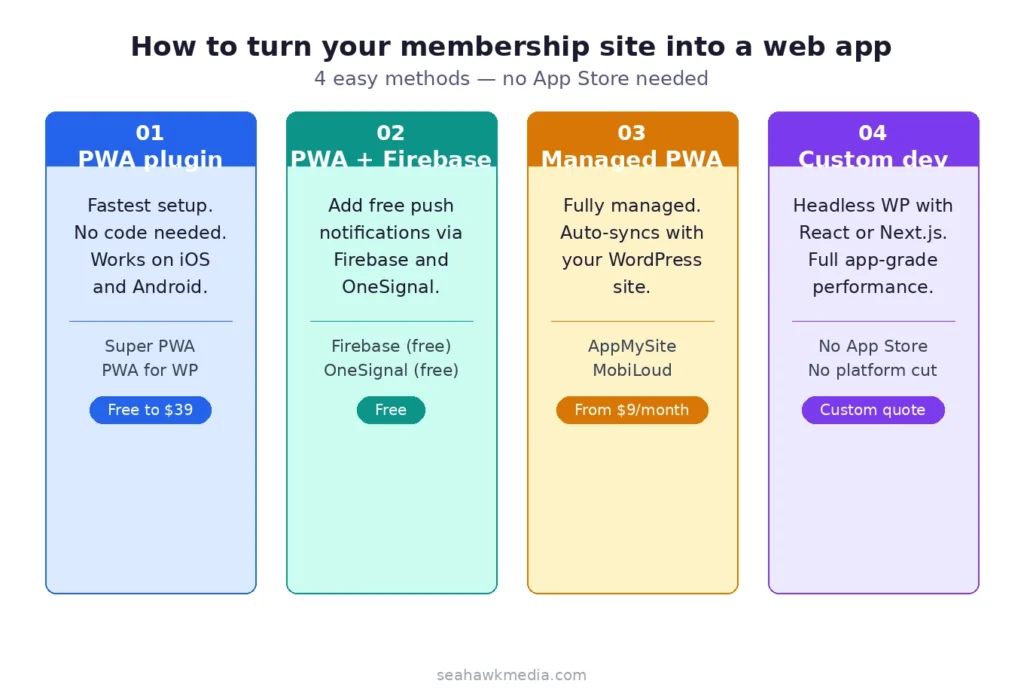
The quickest path to a membership site web app is a dedicated WordPress PWA plugin. These plugins handle the web app manifest, service worker registration, and installability prompt without touching a line of code.
Best PWA Plugins for Membership Sites
Super PWA is the most widely installed WordPress PWA plugin with over 200,000 active installs. It generates your web app manifest, registers a service worker, and adds an “Add to Home Screen” prompt automatically. The free version covers the core setup. Super PWA Pro adds push notifications, advanced caching strategies, and custom offline pages.
PWA for WP and AMP supports both standard WordPress and AMP pages. It adds the full PWA feature set, including offline access, push notifications via OneSignal, and manifest configuration directly from the WordPress dashboard.
Web App Manifest by Phil Johnston is a lightweight option focused on manifest generation and installability. Pair it with a separate caching plugin (WP Rocket or W3 Total Cache) for the best offline experience.
Step-by-Step Setup With Super PWA
- Go to Plugins > Add New and search for Super PWA. Install and activate.
- Navigate to Settings > Super PWA in your dashboard.
- Enter your app name, short name (used under the home screen icon), and background color.
- Upload your 512×512 app icon.
- Set your start page. For a membership site, this should be the URL for your member dashboard or content library.
- Select your application display: Standalone removes browser chrome for a full-screen app feel.
- Save settings. Super PWA generates your manifest and automatically registers the service worker.
- Visit your site on a mobile phone. Chrome and Safari will show an “Add to Home Screen” prompt after a few seconds.
Test the installation on both iOS (Safari) and Android (Chrome) before announcing it to members.
Want a Custom Web App for Your Membership Site?
Seahawk builds headless WordPress membership web apps that deliver native app performance without App Store fees or annual subscriptions. No contracts. No retainers.
Method 2: PWA + Push Notifications via Firebase
A web app without push notifications is missing its most powerful re-engagement tool. Members who install your web app and opt into push notifications can be brought back with a single message. This is equivalent to the push notification feature in MemberPress AppKit, but free.
Setting Up Push Notifications With Firebase
Go to console.firebase.google.com and create a new project. Give it the name of your membership site.
In Firebase, go to Project Settings > Cloud Messaging. Note your Server Key and Sender ID. You will need both in the next step.
Install the OneSignal WordPress plugin. Go to OneSignal Push > Configuration in your dashboard. Select Google Android (FCM) and paste your Firebase Server Key and Sender ID. For iOS Safari push notifications, you will also need an Apple Push Notification (APN) key from your Apple Developer account. Unlike MemberPress AppKit, the APN key for Safari push notifications does not require a paid developer account for basic web push.
Configure your prompt settings in OneSignal. Set a delay so the prompt appears after a member has logged in, not immediately on first visit. Members who see the prompt in context are significantly more likely to opt in.
With Firebase and OneSignal active, you can send push notifications directly from your WordPress dashboard or automate them based on membership triggers such as new content, membership renewal reminders, or community activity.
Method 3: Managed PWA Service (MobiLoud or AppMySite)
If you want more than a plugin can deliver but less than a full custom build, managed PWA services sit in the middle.
MobiLoud converts your WordPress membership site into a fully managed web app and optionally a native app. It supports MemberPress, handles push notifications, and includes a content management layer that automatically keeps the app in sync with your WordPress site. Pricing starts at $199 per month.
AppMySite generates a PWA and optionally native iOS and Android apps from your existing WordPress site. It supports membership login flows, restricted content access, and push notifications. The PWA-only plan starts at $9 per month, making it the most affordable managed option.
Both services handle the technical complexity for you. The tradeoff is an ongoing monthly fee rather than a one-time plugin setup.
Method 4: Custom WordPress Web App Development
For membership sites that need true application-grade functionality, a custom web app built on headless WordPress and the WooCommerce or MemberPress REST API delivers the most powerful result.
In a headless setup, WordPress handles content management and membership logic in the backend. A React or Next.js frontend delivers the member-facing experience as a fast, app-like interface. The result is indistinguishable from a native app in terms of speed and user experience, works on every device, and processes payments through your existing gateway without any platform cut.
This approach requires custom development but has no ongoing AppKit subscription, no App Store dependency, and no ceiling on what the member experience can do.
Seahawk builds custom headless WordPress membership web apps for organizations that have outgrown plugin-based solutions. Talk to the Seahawk team about your membership site.
Best PWA Plugins for WordPress Membership Sites
Choosing the right plugin depends on whether you need push notifications, AMP support, or a fully managed service. This table covers the five best options so you can match the right tool to your setup.
| Plugin | Best For | Push Notifications | Offline Access | Price |
|---|---|---|---|---|
| Super PWA | Quick setup, works with all major membership plugins | Pro version only | Yes | Free / $39 one-time |
| PWA for WP and AMP | AMP-enabled membership sites | Yes, via OneSignal | Yes | Free / $59 per year |
| Web App Manifest | Manifest-only, pair with WP Rocket or W3 Total Cache | No | Via caching plugin | Free |
| AppMySite | Managed PWA with minimal technical setup | Yes | Yes | From $9 per month |
| MobiLoud | Managed PWA plus optional native iOS and Android apps | Yes | Yes | From $199 per month |
How to Make Your Membership Web App Installable
Installation is what separates a web app from a mobile-optimized website. Once installed, your membership site lives on the member’s home screen exactly like a native app.
Three Conditions for the Install Prompt
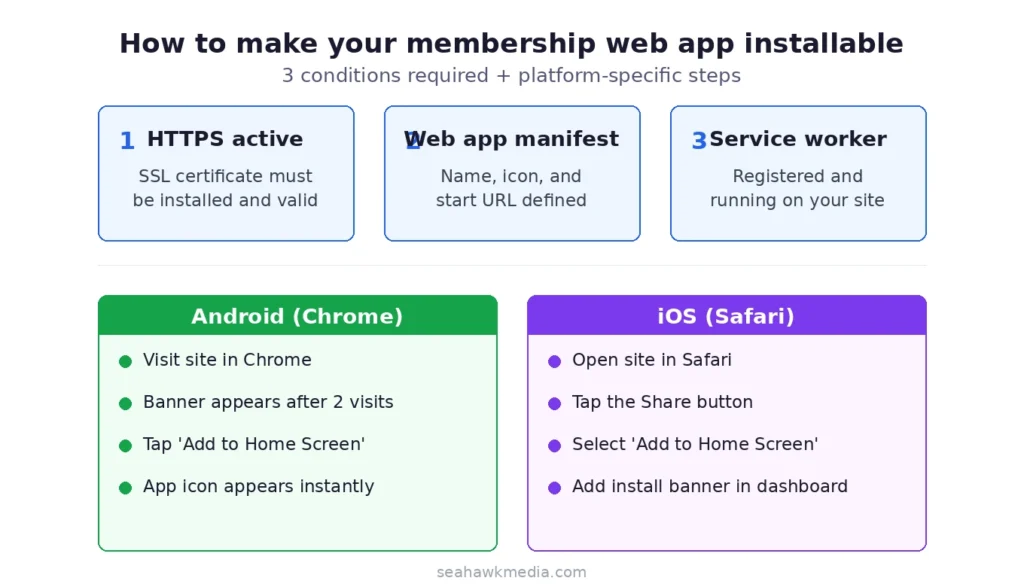
For the install prompt to appear, three conditions must be met:
- Your site must be served over HTTPS
- You must have a valid web app manifest with name, icons, and start URL defined
- You must have a registered service worker
When all three are in place, Chrome on Android shows an automatic “Add to Home Screen” banner after a member visits twice within five minutes.
Installing on iOS (Safari)
Safari on iOS does not show an automatic prompt. Members can manually add your site from the Share menu. Consider adding a small dismissible banner on your member dashboard that guides iOS members through the manual install step. This single addition significantly increases iOS install rates.
What Your Members Experience After Installing?
Understanding the member-side experience is what makes the web app worth building. Here is exactly what happens from the moment a member installs your web app on their device.
Once installed, your app icon appears on their home screen alongside Netflix, Instagram, and every other app they use daily. Tapping the icon opens your member dashboard in full-screen mode, with no browser bars visible. The site loads instantly from cache even on slow connections.
Ongoing Engagement Features
- Push notifications appear in their notification tray just like any other app
- Content they have previously visited is available offline
- Logging in persists across sessions without repeated browser login prompts
- New content and membership updates sync automatically without requiring an app store update
This is the same experience MemberPress AppKit delivers through a native app, built on your existing WordPress site, without the App Store, without the $1,199 annual fee, and without surrendering revenue to Apple or Google.
Final Thoughts: Choose the Right Path for Your Membership Site
The right approach depends on your audience, your budget, and what you need the app to do. Here is how to make the decision cleanly and move forward without second-guessing. If your members discover apps through App Store search and you have a budget for the annual subscription, MemberPress AppKit is a solid product.
But most membership site owners do not need App Store discoverability. Their members are already on the site. The problem is not discovery, it is retention. Members forget to come back. A web app solves that with a home screen icon and push notifications, both of which a PWA delivers for free.
Start with Super PWA or PWA for WP. Add Firebase push notifications through OneSignal. Guide iOS members through the manual install process with a simple in-app banner. For most membership sites, that setup takes an afternoon and costs nothing beyond your existing hosting.
If your membership site has grown to the point where you need true application-grade performance, custom authentication flows, or a mobile experience that goes beyond what plugins can deliver, Seahawk builds custom WordPress web apps from the ground up.
Frequently Asked Questions About Membership Site Web Apps
Can I turn my WordPress membership site into a web app without coding?
Yes. Plugins like Super PWA and PWA for WP convert your WordPress membership site into an installable web app without writing a single line of code. The setup takes under an hour and works with all major WordPress membership plugins, including MemberPress, Paid Memberships Pro, and Restrict Content Pro.
Do I need MemberPress AppKit to build a membership web app?
No. MemberPress AppKit builds native iOS and Android apps, unlike a web app. A PWA plugin achieves most of the same member-facing features (home screen installation, push notifications, offline access) without the $1,199 annual AppKit subscription or App Store requirements.
How do push notifications work in a membership web app?
Push notifications in a membership web app are delivered through browser push technology using a service like Google Firebase and a plugin like OneSignal. Members who opt in receive notifications on their phone or desktop just like native app notifications. Firebase is free for most membership site volumes.
Will my web app work on an iPhone?
Yes. iOS Safari supports PWA installation and most PWA features, including offline access and home screen installation. Push notifications on iOS via web apps require iOS 16.4 or later. Members on older iOS versions can still install the web app and use all features except push notifications.
How much does it cost to turn a membership site into a web app?
A basic PWA setup using free plugins costs nothing beyond your existing WordPress hosting. Super PWA Pro adds advanced features for a one-time $39 fee. Managed services like AppMySite start at $9 per month. Custom headless WordPress web app development varies based on scope. All of these options are significantly less expensive than MemberPress AppKit at $1,199 per year.
What membership plugins work with WordPress PWA plugins?
All major WordPress membership plugins work with PWA plugins because PWA functionality operates at the WordPress level, not the membership plugin level. MemberPress, Paid Memberships Pro, Restrict Content Pro, WooCommerce Memberships, and LearnDash all work with Super PWA, PWA for WP, and similar plugins without compatibility issues.