
WordPress maintenance and managed hosting serve different purposes. Managed WordPress hosting provides server infrastructure, uptime, and platform stability that keeps your site online.
WordPress maintenance manages everything inside your site, including updates, security, performance, and ongoing optimization handled by specialists.
In simple terms, hosting manages where your site runs, while maintenance manages how your site performs.
Most WordPress site owners assume that signing up for managed hosting means their site is fully taken care of. The hosting dashboard looks comprehensive. The server is fast. Support responds quickly. It feels like everything is covered. Then a plugin update breaks the checkout, malware is detected inside a theme file, or page speed scores drop, and the hosting support team explains that these issues are outside their scope.
This is not a failure of the hosting support team. It is a genuine misunderstanding of what managed hosting covers versus what it does not. This guide explains the difference clearly, maps out exactly where each service begins and ends, and helps you decide whether you need one or both.
TL;DR: WordPress Maintenance vs Managed Hosting
- Managed WordPress hosting covers the server, hardware uptime, and basic platform stability. It does not cover plugin updates, malware removal from within WordPress, Core Web Vitals optimization, broken link monitoring, or monthly performance reporting
- WordPress maintenance covers the ongoing technical upkeep of everything inside your WordPress installation, including updates, backups, security scans, speed optimization, uptime monitoring, and reporting
- A Sucuri survey found 67% of WordPress site owners incorrectly believe their managed host handles all security and maintenance
- Most production sites benefit from having both because they solve different problems and do not overlap as much as people assume
- Seahawk’s WordPress maintenance plans start at $49/mo and cover everything your managed host leaves unmanaged
What Managed WordPress Hosting Covers?
Managed WordPress hosting is a hosting product, not a site management service. The word “managed” refers to the management of the hosting environment, not your WordPress site.
Here is what is genuinely included in most managed WordPress hosting plans:
Server infrastructure and hardware reliability. Your host owns and maintains the physical or virtual servers on which your site runs. When a server has a hardware issue, they fix it without any action required from you.
Server-level uptime monitoring. Hosts monitor whether their servers are online. If a server goes down, they respond. This is different from monitoring whether your specific WordPress site is functioning correctly.
Server-level security. Managed hosts implement firewalls, DDoS protection, and network-level security at the server layer. This protects against attacks directed at the infrastructure itself.
Server-level performance optimization. Managed hosts configure server caching, PHP versions, and infrastructure-level performance settings. Kinsta and WP Engine, for example, use high-performance server stacks that speed up WordPress at the infrastructure level.
Automated server-side backups. Most managed hosts take regular server snapshots. These are infrastructure-level backups, not application-level backups with one-click restore from within WordPress.
Basic WordPress installation support. Most managed hosts will help you install WordPress, configure basic settings, and resolve issues caused by their hosting environment.
Platform updates. Some managed hosts handle WordPress core updates as part of their platform. Plugin and theme updates are almost universally excluded.
Your Managed Host Handles the Server. Seahawk Handles Everything Else.
Seahawk’s WordPress maintenance plans start at $49/mo and cover plugin updates, malware scanning, Core Web Vitals optimization, broken link detection, daily backups, and monthly reporting; everything your managed host leaves unmanaged.
What Managed WordPress Hosting Does NOT Cover?
This is the section most site owners have never read. Here is what falls outside the scope of managed hosting plans at virtually every provider.
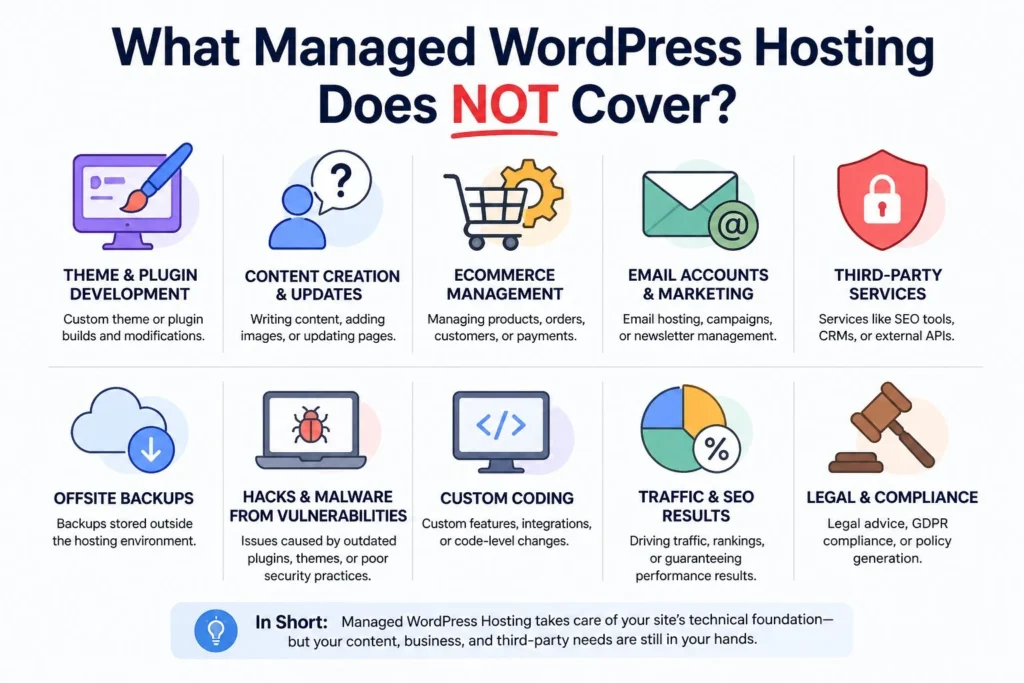
Application-level updates and testing: Managed hosting does not handle plugin and theme updates properly or adequately test them. WordPress maintenance ensures updates are tested in staging before going live, preventing conflicts and downtime.
Malware detection and removal inside WordPress: If malware is injected into a plugin file, theme file, or database, it becomes an application-level issue. Most hosting providers do not clean infected WordPress installations as part of their plans.
Core web vitals optimization: Metrics like LCP, INP, and CLS depend on how your site is built and configured. Hosting infrastructure alone cannot improve these performance scores.
Broken link detection and repair: Managed hosting does not monitor or fix broken links across your website content. WordPress Maintenance services handle ongoing link health and user experience.
Database optimization and cleanup: Over time, post revisions, spam comments, and unused data slow down your site. Hosting does not clean or optimize your database regularly.
Form and checkout testing: Critical elements like forms and checkout flows can break after updates. Hosting does not test these user-facing functions, but maintenance services do.
Monthly performance reporting: Hosting dashboards show server metrics, not application insights. WordPress Maintenance providers deliver reports on updates, issues, and performance trends.
Dedicated WordPress support: Hosting support focuses on infrastructure. Application-level issues require WordPress specialists with defined response times.
Security hardening inside WordPress: Tasks like login protection, admin URL changes, permission audits, and file integrity monitoring are not handled by hosting. These are part of a complete WordPress maintenance setup.
What WordPress Maintenance Covers?
WordPress maintenance is the ongoing management of everything inside your WordPress installation. A professional maintenance plan handles the application layer that hosting does not touch.
Plugin, theme, and core updates: Tested on a staging environment first, then deployed to live after compatibility is confirmed. This is the single most important risk control in WordPress maintenance.
Daily automated backups with tested restore capability: Application-level backups are stored off-site or in the cloud, separate from hosting infrastructure backups. Retention of at least 30 days so you can restore to any point within the last month.
Malware scanning and removal: Daily scans of WordPress files and the database for malicious code, injected scripts, and suspicious activity. Immediate removal and cleanup when something is detected.
Uptime monitoring with instant alerts: Site-specific monitoring that checks whether your WordPress installation is responding correctly, not just whether the server is online.
Core Web Vitals and speed optimization: Regular audits of LCP, INP, and CLS scores with targeted fixes. Image optimization, script deferral, caching configuration, and CDN management are handled on an ongoing basis.
Security hardening: Login attempt limits, admin URL protection, file permission audits, and WordPress-specific firewall rules are applied and maintained proactively.
Broken link detection and repair: Regular scans of internal and external links with prompt repair to maintain both user experience and SEO health.
Database optimization: Regular cleanup of post revisions, spam, transients, and orphaned data to keep the database lean and queries fast.
Monthly performance reports: A detailed monthly report showing what was updated, what was flagged, what was fixed, and how the site is performing against key metrics.
If you are ready to explore managed maintenance, WordPress maintenance plans from Seahawk start at $49/mo and cover every task listed above.
5 Key Differences Between WordPress Maintenance and Managed Hosting
Most site owners do not realize how different these two services are until something goes wrong. Here are the five differences that matter most.
What do they manage? Managed hosting handles the server on which your site runs. WordPress maintenance manages the WordPress application on that server. These operate at different levels, and none replaces the others.
Who handles security incidents? Managed hosts respond to network-level threats. If malware enters through a plugin or the database is compromised, it falls outside their scope. WordPress maintenance handles malware removal and application-level security.
Who Handles Updates? Managed hosts may handle WordPress core updates. Most do not manage plugin or theme updates, and rarely test changes on staging. WordPress maintenance ensures safe updates with proper testing.
Who Provides Reporting? Managed hosting provides server-level data, including bandwidth, storage, and uptime. WordPress maintenance provides application-level insights like updates, security issues, Core Web Vitals, and broken links.
What Happens When Something Breaks? If the server fails, the host fixes it. If a plugin breaks your site, checkout stops working, or malware appears, a maintenance provider handles it. Hosting support usually does not cover application issues.
Full Comparison: Managed Hosting vs WordPress Maintenance
A clear side-by-side comparison of managed hosting and WordPress maintenance, covering features, responsibilities, and what each service actually includes.
| Application-level uptime monitoring | Managed Hosting | WordPress Maintenance |
|---|---|---|
| Server hardware and infrastructure | Yes | No |
| Server uptime monitoring | Yes | No |
| Server level DDoS protection | Yes | No |
| Server level caching | Yes | No |
| PHP version management | Yes | Advises |
| WordPress core updates | Sometimes | Yes |
| Plugin updates tested on staging | No | Yes |
| Theme updates tested on staging | No | Yes |
| Malware removal from WordPress files | No | Yes |
| Database optimization and cleanup | No | Yes |
| Core Web Vitals optimization | No | Yes |
| Broken link detection and repair | No | Yes |
| Form and checkout testing | No | Yes |
| Application level uptime monitoring | No | Yes |
| Backup with tested restore capability | Basic only | Yes |
| Monthly performance reporting | No | Yes |
| Security hardening within WordPress | No | Yes |
| File integrity monitoring | No | Yes |
| Defined support response times | Hosting issues only | Yes |
| Dedicated WordPress specialist support | No | Application-level uptime monitoring |
Do You Need Both?
For most production WordPress sites, yes. Here is the simplest way to think about it.
Your managed host is the foundation. It determines how fast the server responds, whether the infrastructure stays online, and how the platform-level environment is configured.
Your WordPress maintenance plan is the building. It determines whether everything within that foundation is secure, up to date, optimized, and functioning correctly. A great host cannot protect a site running 40 outdated plugins with three known security vulnerabilities.
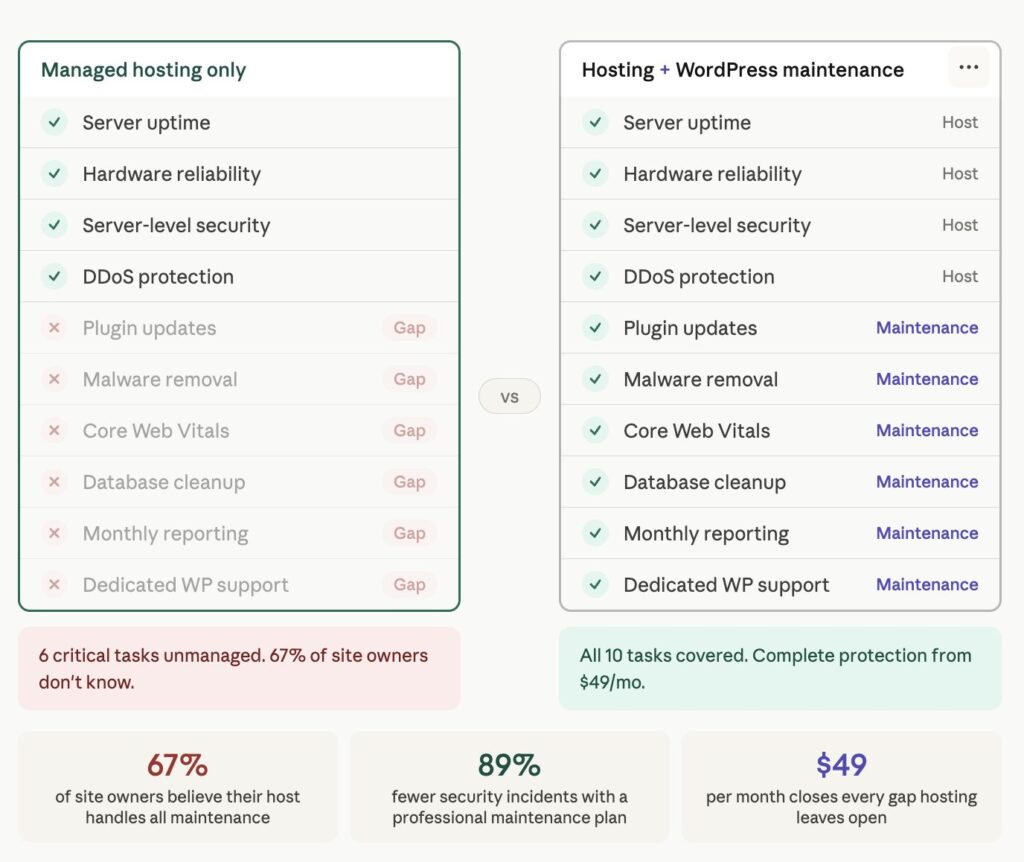
The Sucuri research makes this concrete. In their survey, 67% of WordPress site owners believed their managed host was handling security and maintenance tasks that were actually outside the host’s scope. That belief means that two-thirds of those site owners had an active gap in their site protection that they were unaware of.
The practical test is straightforward. Ask your host these four questions directly.
Do you handle plugin updates tested on staging before going live? Do you include malware removal from within WordPress files? Do you provide Core Web Vitals optimization? And, do you deliver monthly performance reports?
For most managed hosts, the honest answer to all four is no. That gap is exactly what a WordPress maintenance plan fills.
When Hosting Alone is Enough: WordPress Maintenance vs Managed Hosting
There are genuine situations where hosting without a professional maintenance service is acceptable.
A personal blog with no revenue, low traffic, and a simple plugin stack where the site owner has technical WordPress skills and consistent time to run updates manually.
A staging or development environment not yet in public use.
A static or near-static site that has not been actively updated in years and carries no sensitive user data or transactions.
For any site generating revenue, handling user data, running an eCommerce site, or representing a business to customers, hosting alone leaves too much unmanaged to be considered a responsible approach.
When You Need Both: WordPress Maintenance vs Managed Hosting
The answer is both when any of the following apply to your situation.
Your site generates revenue directly through sales, bookings, or leads, and downtime or a security incident has a measurable financial cost.
You run WooCommerce or any payment processing on the site, and checkout testing is not something you do manually after every update cycle.
You manage multiple sites, and the time required for manual maintenance is pulling you away from work that generates more value.
You have experienced a hacked site, a failed update, or a data loss event before, and you understand the real cost of those incidents.
You publish content regularly, and your site’s search rankings are meaningful to your business model.
WordPress Maintenance vs Managed Hosting: Why You Need Both?
Managed hosting and WordPress maintenance are not competing services. They are complementary layers that together create a complete, well-protected WordPress site. Your host handles the server. A maintenance plan handles everything running on it.
67% of site owners who believe their managed host handles application-level maintenance are unaware of a gap in their site protection. The cost of closing that gap with a professional maintenance plan is almost always less than the cost of finding out the gap existed after something goes wrong.
Frequently Asked Questions
Does managed WordPress hosting include maintenance?
No. Managed WordPress hosting manages the server environment your site runs in. Plugin updates, malware removal from within WordPress, Core Web Vitals optimization, database cleanup, broken link monitoring, and monthly reporting are outside the scope of virtually all managed hosting plans. These tasks require a separate WordPress maintenance service.
Is managed hosting the same as a WordPress maintenance plan?
No. Managed hosting and WordPress maintenance are different services that complement each other. Managed hosting covers infrastructure reliability, server security, and platform performance. A WordPress maintenance plan covers application-level upkeep, including plugin and theme updates, security scanning, backups with tested restore, speed optimization, and dedicated support. Most production sites need both.
How much does WordPress maintenance cost on top of hosting?
WordPress maintenance plans start at $49/mo for entry-level coverage, including plugin and theme updates, daily backups, uptime monitoring, malware scanning, and monthly reporting. Mid-tier plans range from $99 to $299/mo and include staging environments, Core Web Vitals optimization, and dedicated support. Enterprise plans at $999/mo include SLA-backed response times and dedicated account management. The combined cost of managed hosting and a professional maintenance plan is almost always less than the cost of a single emergency recovery after a hack or failed update.
Can I do WordPress maintenance myself if I have managed hosting?
Yes, but it requires consistent time and technical knowledge each month. Full WordPress maintenance takes 3 to 5 hours per site per month when done properly. For site owners whose time is worth more than the $49/mo plan, or who manage more than one site, outsourcing is almost always the more efficient choice.
Do I still need backups if my managed host takes backups?
Yes. Host-level backups are server snapshots taken at the infrastructure level. They are not always accessible on demand, do not always retain 30 or more days of history, and cannot always restore to a granular point within WordPress. Application-level backups from a maintenance plan include tested restore capability, off-site storage, and retention periods that give you genuine recovery options after a hack, a failed update, or accidental content deletion.
Which managed hosts pair well with Seahawk maintenance?
Seahawk’s maintenance plans work alongside any managed WordPress host. Common combinations include Kinsta, WP Engine, DreamHost, and SiteGround paired with Seahawk maintenance. The host provides the server environment, and Seahawk provides the application-level maintenance. Both services operate independently and do not conflict with each other.


