
WordPress website AI support has matured significantly in the last 24 months. What used to take a human technician 30 minutes of log diving now takes 30 seconds of pattern recognition. What used to require a senior developer’s gut feel now gets flagged automatically by anomaly detection. But AI has also created a new class of mistakes that confident-sounding tools make at scale, and the WordPress support service teams that handle the highest-stakes work have learned exactly which tasks to automate and which to keep firmly in human hands.
This guide explains what WordPress website AI support actually delivers today, where it consistently fails, the specific tools professional teams use, and how to evaluate a provider’s AI approach before signing up.
WordPress website AI support refers to the use of machine learning and large language models to automate and enhance specific WordPress maintenance and support tasks, including vulnerability detection, malware pattern recognition, performance anomaly alerts, predictive maintenance scheduling, and code review assistance.
AI works best for high-volume pattern recognition tasks where the data is structured and the decision rules are explicit. It works poorly for context-dependent judgment calls involving brand identity, legacy code interpretation, compliance, and business-specific tradeoffs.
Professional WordPress website AI support teams in 2026 use AI as a co-pilot for routine scanning and triage, while human experts handle decisions that require business context and nuanced judgment.
TL;DR: WordPress Website AI Support
- WordPress website AI support handles plugin vulnerability scanning, malware pattern detection, performance anomaly alerts, and customer support triage faster than human-only workflows can
- AI fails consistently on context-dependent decisions involving brand identity, legacy code, compliance requirements, and business-specific tradeoffs
- The best WordPress support teams in 2026 use AI as a co-pilot for routine scanning while keeping human experts as final decision-makers on every change
- Common AI tools used in WordPress support include Patchstack for vulnerability detection, Sucuri SiteCheck for malware scanning, AI-powered uptime monitors, and large language models for ticket classification
- A WordPress support provider that claims AI will replace human expertise should be treated with caution, while a provider that explains specifically which tasks they automate and which they keep manual is being honest about how the technology actually works
- For site owners, the practical question is not whether a support team uses AI, but how they balance AI efficiency with human judgment on decisions that matter
- Seahawk’s WordPress support team uses AI for routine scanning and pattern detection while keeping human specialists in charge of every actual change applied to client sites
The State of WordPress Website AI Support in 2026
WordPress agencies and support providers have integrated AI into their workflows at significantly different speeds. The category leaders use AI for specific high-leverage tasks while keeping human judgment central. The category laggards either treat AI as a replacement for human expertise or ignore it entirely. Both are mistakes.
What has actually changed in the WordPress website AI support landscape in the last two years:
Plugin vulnerability detection moved from weekly to real-time. Before AI-assisted scanning, vulnerabilities surfaced through manual review of CVE databases and plugin update notes. Now, services like Patchstack continuously monitor 7,000-plus tracked plugins and surface exploitable vulnerabilities within hours of disclosure, rather than days.
Malware pattern recognition improved dramatically. AI-trained classifiers now identify novel malware variants that signature-based scanners miss, by recognizing structural patterns in obfuscated code rather than waiting for a known signature to be added to a database.
Customer support triage became faster. Large language models classify incoming support tickets by severity, type, and likely cause within seconds, routing them to the right specialist without manual triage time.
Predictive maintenance alerts emerged. AI tools now flag plugins likely to break before the next update based on historical conflict patterns, allowing support teams to test updates more thoroughly on at-risk plugins.
Code review assistance accelerated development cycles. GitHub Copilot, Claude, and similar tools help developers write and review WordPress plugin code faster, though final review still requires human judgment.
What has not changed:
Context-dependent decisions still require human judgment. AI cannot reliably tell whether a flagged plugin is essential to a client’s business model or genuinely safe to remove. It cannot read a client’s brand voice or their compliance environment. It cannot understand why a custom field that looks redundant to an algorithm is actually load-bearing for the site’s content workflow.
Final responsibility still sits with humans. When something goes wrong, no client wants to hear “the AI made the wrong call.” The buck stops with a person, meaning the person must remain the actual decision-maker, not just a rubber stamp for AI recommendations.
WordPress Support That Combines AI Efficiency with Human Expertise.
Seahawk’s WordPress support uses AI for continuous scanning and pattern detection, while WordPress specialists handle every actual change applied to client sites. From $39 per hour with no retainer required.
These are the seven specific applications where AI delivers measurable value in WordPress support workflows in 2026.
Plugin Vulnerability Detection
AI-assisted vulnerability scanning is the single highest-impact application of AI in WordPress support today. Services like Patchstack continuously monitor the WordPress plugin ecosystem and flag exploitable vulnerabilities within hours of disclosure.
What AI does: Continuously crawls plugin code repositories, security disclosure feeds, and exploit databases. Cross-references against installed plugin lists on managed sites. Surfaces vulnerabilities ranked by exploitability rather than severity score alone.
What humans do: Decide whether the flagged plugin is essential to the site’s function, whether the vulnerability is exploitable in the specific configuration, and whether the recommended patch will break anything else.
Why it matters: Outdated plugins are the entry point for 97% of WordPress hacks, according to Patchstack 2025 data. Every hour between vulnerability disclosure and patch deployment is a window of exposure. AI-assisted detection compresses that window from days to hours.
Malware Pattern Recognition
Modern malware uses obfuscation techniques that bypass signature-based scanners. AI classifiers trained on malware structural patterns catch novel variants that traditional scanners miss.
What AI does: Analyzes file structure, function call patterns, and code obfuscation signatures to identify likely malware even when no exact signature match exists. Flags suspicious files for human review.
What humans do: Confirm whether flagged files are actual malware or false positives (legitimate plugins occasionally trigger heuristic scanners). Execute the cleanup, isolate the source, and harden the site against re-infection.
Why it matters: The number of unique WordPress malware variants doubled between 2023 and 2025. Signature-based detection alone cannot keep up. AI pattern recognition catches the long tail that signatures miss.
Performance Anomaly Detection
AI-assisted monitoring tools establish a baseline of normal performance for each site and alert on deviations that human dashboards would not catch.
What AI does: Tracks Core Web Vitals, server response times, database query patterns, and traffic distribution against a learned baseline. Surfaces anomalies before they become user-visible problems.
What humans do: Diagnose whether the anomaly is a genuine issue (a plugin update degraded performance, a traffic spike is overwhelming the server) or expected behavior (a legitimate marketing campaign driving traffic).
Why it matters: Performance issues are silent killers. A site that experiences 200ms of latency on its largest contentful paint will lose conversions before any user reports a problem. AI catches these regressions automatically.
Predictive Maintenance Alerts
By analyzing historical update patterns and conflict data, AI flags which plugin updates are most likely to break a specific site before they are applied.
What AI does: Cross-references plugin update history, compatibility data, and the specific plugin and theme combinations on each site. Predicts which updates carry elevated breakage risk.
What humans do: Schedule extra testing time on at-risk updates, set up rollback procedures, and confirm the prediction was accurate after the fact to refine future predictions.
Why it matters: Plugin conflicts cause 52% of all WordPress troubleshooting requests, according to Wordfence 2024 data. Predicting which updates pose conflict risk lets support teams allocate diagnostic time where it matters most.
Automated Backup Verification
Untested backups are not backups. AI-assisted backup verification automates the testing process by spinning up restored copies in isolated environments and comparing them to the live site.
What AI does: Restores each backup to a sandboxed environment, compares file integrity and database structure against the live site, and flags any backups that fail to restore correctly.
What humans do: Investigate failed backup verifications, identify the root cause (corrupted backup or an incompatible restore environment), and resolve the underlying issue.
Why it matters: Most sites discover their backups are broken when they actually need them. Continuous backup verification catches this problem proactively rather than during a crisis.
Customer Support Triage and Classification
Large language models classify incoming support tickets by severity, issue type, and likely root cause in seconds, routing them to the appropriate specialist without manual triage.
What AI does: Reads the support ticket text, extracts key indicators (error messages, plugin names, urgency signals), classifies the issue, and routes it to the right team member.
What humans do: Handle the actual support work. Confirm the AI classification was accurate. Communicate with the client throughout the resolution process.
Why it matters: Triage time is dead time during an emergency. A ticket sitting in a queue waiting for human classification while the site is down is a ticket where every minute costs money. AI triage compresses this to near-zero.
Code Review and Development Assistance
AI tools like GitHub Copilot and Claude help developers write, review, and debug WordPress plugin code faster than manual workflows alone.
What AI does: Suggests code completions based on context, identifies potential bugs and security issues in code review, generates boilerplate for common WordPress patterns, and explains unfamiliar code.
What humans do: Make all final decisions about what code ships. Review every AI suggestion for security implications, performance impact, and alignment with the site’s specific needs.
Why it matters: AI does not replace developers in WordPress work, but it can compress routine development by 30 to 50 percent, according to internal surveys at major WordPress agencies. That time gets reinvested in the judgment-heavy work that AI cannot do.
AI Tools Used by WordPress Website AI Support Teams in 2026
Here is a practical comparison of the AI-assisted tools that professional WordPress support teams actually use in 2026.
| Tool | Primary Use | What It Does | Limitations |
| Patchstack | Vulnerability detection | Continuous monitoring of 7,000+ plugins for exploitable vulnerabilities | Cannot determine site-specific exploitability without human review |
| Sucuri SiteCheck | Malware scanning | Pattern-based detection of malware in WordPress files | False positives require human verification |
| Wordfence Intelligence | Threat detection | Real-time threat data feeds firewall and scanning rules | Generates noise that requires human filtering |
| Pingdom RUM | Performance monitoring | Real-user monitoring with anomaly detection | Cannot distinguish between expected traffic spikes and issues |
| MalCare | Malware cleanup | AI-assisted scanning plus automated removal | Removal automation requires human supervision for custom code |
| GitHub Copilot | Code assistance | Code completion and suggestions for WordPress development | Final code review must be human |
| Claude (Anthropic) | Triage and analysis | Classification of support tickets and analysis of error logs | Must be configured carefully for WordPress-specific accuracy |
| WP-CLI with AI extensions | Command-line operations | Bulk operations across multiple sites with AI suggestions | Bulk operations carry bulk risk; human review is essential |
| Jetpack AI | Content and SEO | Automated content suggestions and SEO recommendations | Content suggestions need editorial judgment |
The pattern across all of these tools is the same. AI handles the volume of work where pattern recognition is the core skill required. Human experts handle the judgment work where context and stakes require accountability.
Where WordPress Website AI Support Falls Short?
These are the four categories where AI consistently fails, and human expertise is genuinely irreplaceable in 2026.
Context-Dependent Plugin Decisions
AI flags an old plugin as deprecated and recommends removal. The plugin is the only thing handling the custom checkout flow that the original developer spent six weeks building. Removing it would break the site’s primary revenue path. AI does not know this. It sees deprecation status and removal recommendation. A human specialist assesses the plugin’s role in the site’s functionality and makes the final call.
This category includes any decision where the right answer depends on understanding the site’s business purpose, customer expectations, or technical history. AI scanners can rank options by surface metrics. They cannot rank options by what actually matters to the specific business.
Brand-Specific Communication
AI ticket triage classifies an incoming complaint as “low priority, billing question.” The complaint is from a long-term enterprise client whose contract is up for renewal next month and is genuinely frustrated by a recent issue on their site. The “low priority” classification misses the relationship context entirely. A human account manager recognizes the situation immediately.
This is not a failure of AI specifically. It is a structural limitation of how AI evaluates inputs. AI sees text and applies classification rules. Humans see a person with history, stakes, and emotional context.
Legacy Code Interpretation
A plugin built five years ago by a developer who is no longer reachable contains custom code that hooks into WordPress in non-standard ways. AI flags the code as suspicious because it does not match common patterns. A human developer reads the code, recognizes a creative solution to a problem the original developer was solving, and confirms it is safe.
WordPress sites accumulate legacy code over their lifetimes. The interpretation of that code requires the kind of historical context that AI cannot reliably synthesize from training data.
Compliance and Regulatory Judgment
AI recommends optimizing performance by removing a third-party tracking script. The script is required for the site’s GDPR consent management workflow. Removing it would create a compliance violation. AI does not know this. A human specialist with compliance awareness recognizes it immediately.
Compliance considerations cross WordPress, hosting, business operations, and legal requirements. Any of those can override a technically valid AI recommendation. Human judgment is required to weigh these correctly.
The Framework: When to Use WordPress Website AI Support vs Human Expertise
This four-quadrant framework is what professional WordPress support teams actually use to decide which tasks to automate and which to keep manual.
| Task Type | Decision Method | Example |
| High volume, low stakes | AI fully automated | Plugin vulnerability scanning |
| High volume, high stakes | AI suggests, human approves | Plugin update deployment |
| Low volume, low stakes | Human handles directly | Routine content questions |
| Low volume, high stakes | Human handles, AI assists | Hacked site recovery |
The key insight is that high stakes never go fully automated, regardless of volume. A high-volume, high-stakes task (such as deploying plugin updates across 500 client sites) requires AI for efficiency and human approval for safety. Both elements are essential. Removing either creates failure modes that compound at scale.
For site owners evaluating support providers, the framework tells you what to ask. A provider that automates only high-volume, low-stakes work and keeps humans in the loop for high-stakes decisions is making the right trade-off. A provider who claims to automate everything is either overpromising or taking on risks they should not.
How Professional WordPress Support Teams Balance AI and Human Expertise?
The teams that handle the highest-stakes WordPress work share specific operational practices that combine AI efficiency with human judgment.
Continuous AI-Assisted Scanning, Human-Approved Action
Every site under management is continuously scanned by AI tools. Vulnerabilities, performance regressions, and malware patterns are flagged in real-time. But no automated action is taken on a client site without a human reviewing the alert and approving the response. This means alerts come in 24/7, but actions occur on a schedule controlled by humans.
Severity-Based Routing with Human Override
Incoming support tickets are AI-classified by severity and routed to the appropriate specialist. But every classification can be overridden by a human reading the ticket. The classification is a starting point, not a final decision. Tickets that look low-priority based on the text but involve enterprise clients or specific historical context are routed appropriately.
Staging Environment Testing for Every AI-Suggested Change
AI predicts that a specific plugin update is likely to break compatibility with the active theme. The support team takes the prediction seriously by testing the update on a staging environment before applying it to production. The prediction informs the workflow but does not replace the testing. Predictions are imperfect, and staging tests catch what predictions miss.
Documented Decision Logs With AI Recommendations and Human Reasoning
Every meaningful decision is logged, including both the AI recommendation and the human reasoning behind the final action. This serves three purposes: it creates accountability for outcomes, it provides training data to refine AI accuracy over time, and it gives clients visibility into how their site is being managed.
Compliance Review for AI-Suggested Optimizations
AI optimization suggestions are routed through a human compliance review before implementation. Performance, accessibility, and security recommendations are weighed against the site’s specific regulatory environment. A faster site that violates GDPR is not actually a better site.
AI in WordPress Maintenance vs AI in WordPress Emergency Support
The role of AI looks different across the two main categories of WordPress support work.
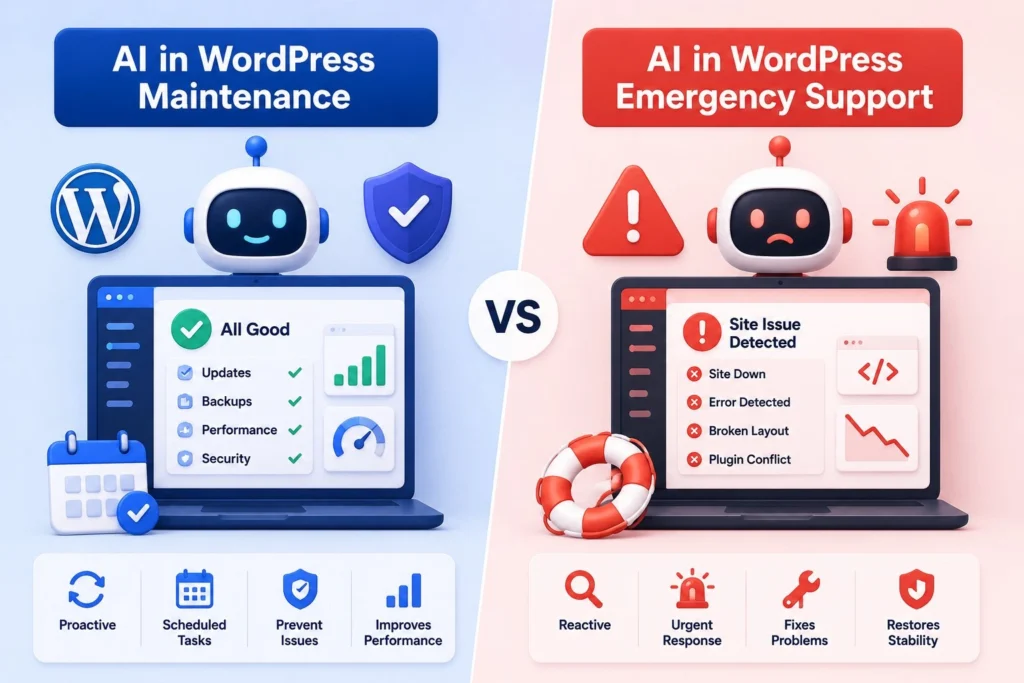
In WordPress maintenance, AI handles continuous monitoring, vulnerability detection, predictive alerts, and routine scanning. Maintenance work is largely scheduled and pattern-based, which is exactly where AI excels. A WordPress maintenance plan that uses AI for continuous scanning and human specialists for final update decisions delivers measurably better outcomes than either a pure-AI or a pure-manual approach.
In WordPress emergency support, AI handles initial triage and pattern matching, but the actual diagnosis and resolution work remains human. Emergencies are, by definition, unusual situations that AI training data underrepresents. A site that has been hacked, a checkout that has stopped working, or a database that has been corrupted requires human investigation rather than pattern matching against historical data. Seahawk’s WordPress emergency support uses AI for initial triage and severity classification, but the actual recovery work is handled by human specialists.
The two contexts call for different AI-to-human ratios. Maintenance is roughly 70% AI-assisted with human approval gates. Emergency support is roughly 30% AI-assisted, with humans owning the entire diagnosis and resolution process.
Sensible AI. Real WordPress Experts.
Seahawk’s WordPress support combines AI-assisted scanning with human specialist judgment on every change. Plans from $49/mo for ongoing maintenance, $39/hr for emergency support with no retainer.
What Does This Mean for Site Owners Choosing a WordPress Support Provider?
If you are evaluating a WordPress support provider in 2026, here are four questions to determine whether they have a sensible AI approach.
1. Which specific tasks does AI handle in your workflow?
A good answer names specific tools and specific tasks: “We use Patchstack for continuous vulnerability detection, Pingdom for performance anomaly alerts, and Claude for ticket triage.” A bad answer is vague: “We use AI to enhance our processes.”
2. Where does human judgment override AI recommendations?
A good answer identifies clear decision gates: “AI flags vulnerabilities and we verify exploitability before recommending action. AI predicts plugin update risk, and we test on staging regardless.” A bad answer is vague: “We always have human oversight.”
3. How do you handle high-stakes decisions that AI cannot make safely?
A good answer demonstrates that the team understands which decisions are high-stakes: “Hacked site recovery, custom code modifications, and compliance-affecting changes are always handled by named specialists with documented expertise in those areas.” A bad answer claims AI can handle everything.
4. What is your accountability model when AI gets something wrong?
A good answer identifies the human responsible: “Every change applied to a client site is signed off by a named specialist who is accountable for the outcome.” A bad answer obscures accountability behind automation.
The provider that answers all four questions clearly is using AI sensibly. The provider that gives vague answers or claims AI handles everything is either overpromising or actively unsafe to engage with.
Final Thoughts
WordPress website AI support has changed meaningfully in the last 24 months, but not in the way most marketing copy suggests. AI has not replaced human expertise. It has compressed the routine portions of WordPress support work, allowing human experts to focus their time on decisions that genuinely require judgment.
The WordPress website AI support providers winning in 2026 are not the ones with the most AI features in their marketing copy. They are the ones who have figured out exactly which tasks to automate and which to keep manual, and who can explain that distinction clearly to clients. The framework is consistent: high-volume pattern recognition goes to AI, context-dependent decisions stay with humans, and high-stakes work gets human approval regardless of volume.
For site owners, the practical implication is straightforward. Choose a provider who uses AI sensibly rather than one who either avoids it entirely or overpromises what it can do. Ask the four diagnostic questions above. The answers will tell you everything you need to know about whether the team understands the technology they are working with and whether they are accountable when AI gets something wrong.
Frequently Asked Questions
Does WordPress website AI support replace human teams?
No. WordPress website AI support handles specific high-volume tasks like vulnerability scanning, malware pattern detection, and ticket triage faster than human-only workflows. But context-dependent decisions, brand-specific judgment, legacy code interpretation, and compliance considerations all require human expertise. The most effective WordPress website AI support teams in 2026 use AI as a co-pilot for routine work while keeping human specialists in charge of every actual change applied to client sites.
What WordPress support tasks should be handled by AI?
WordPress website AI support handles plugin vulnerability detection, malware pattern recognition, performance anomaly alerts, predictive maintenance scheduling, automated backup verification, customer support triage, and code review assistance well. These are high-volume, pattern-based tasks where AI accuracy is high and the cost of being slightly wrong is low.
What WordPress support tasks should never be handled by AI alone?
Hacked site recovery, custom code modifications, compliance-affecting changes, plugin removal decisions, and any task requiring brand or business context should always involve human judgment. These are situations where being slightly wrong has a high cost, and where the correct answer depends on context that AI cannot reliably synthesize.
Which AI tools do WordPress support teams use in 2026?
Common AI-assisted tools include Patchstack for vulnerability detection, Sucuri SiteCheck and MalCare for malware scanning, Pingdom RUM for performance monitoring, GitHub Copilot for code assistance, Claude for ticket classification, and Wordfence Intelligence for threat detection. Each tool handles specific tasks, and professional teams typically use multiple tools layered together rather than relying on any single solution.
Is AI WordPress support more expensive than traditional support?
Not typically. AI-assisted support workflows reduce the time human agents spend on routine tasks, enabling support teams to serve more clients without proportional staff increases. This generally translates to either lower prices or better service at the same price. Seahawk’s WordPress support is billed at $39 per hour with no retainer required, which is competitive with the lowest published rates among reputable providers.
How do I evaluate a WordPress support provider’s AI approach?
Ask four specific questions: which tasks AI handles in their workflow, where human judgment overrides AI, how they handle high-stakes decisions, and what their accountability model is when AI gets something wrong. A good provider answers all four with specifics. A vague answer is a warning sign.
Will AI WordPress tools eventually replace developers entirely?
No, at least not in any timeframe currently visible. AI excels at pattern recognition and automating routine tasks, but WordPress sites are complex systems with extensive legacy decisions, brand-specific requirements, and compliance considerations that resist full automation. AI compresses the time developers spend on routine work, freeing them to focus on judgment-intensive work that drives real value. The role evolves rather than disappears.
Can AI prevent WordPress emergencies?
Partially. AI-assisted vulnerability detection, malware scanning, and performance monitoring catch many emergencies before they impact users. Sites on professional WordPress maintenance plans that use AI-assisted scanning experience 89% fewer incidents that escalate to emergencies. But AI cannot prevent every emergency. Hosting outages, brand-new attack vectors, and complex multi-system failures still require a reactive human response.
Does Seahawk use AI in its WordPress support workflow?
Yes. Seahawk uses AI for continuous vulnerability scanning, malware pattern detection, performance anomaly alerts, and ticket triage. Every actual change applied to a client site is reviewed and approved by a human specialist before deployment. This combination delivers the efficiency benefits of AI with the accountability and judgment of human expertise.


