

Enterprise websites built on WordPress power everything from global media platforms to large corporate portals. However, as these sites scale, WordPress enterprise UX mistakes often emerge, turning powerful digital platforms into frustrating experiences for both visitors and internal teams.
Complex navigation, overloaded plugins, inconsistent layouts, and cluttered dashboards can quickly make a website difficult to manage and navigate.
When these UX issues accumulate, they slow down editorial workflows, reduce user engagement, and create operational inefficiencies across teams.
The good news is that most of these problems are preventable. By identifying common WordPress UX pitfalls early, organizations can build enterprise websites that are intuitive, scalable, and far easier for users and content teams to manage.
TL;DR: Avoid These WordPress Enterprise UX Pitfalls
- Enterprise WordPress websites often face UX challenges as they grow in size and complexity.
- Common issues include cluttered dashboards, confusing navigation, plugin overload, and inconsistent page designs. These problems can slow down editorial workflows and create frustrating experiences for website visitors.
- Improving information architecture helps users find content faster and navigate the website easily.
- Implementing role-based workflows and simplifying backend interfaces improves productivity for content teams.
- Optimizing performance and reducing unnecessary plugins enhances site speed and reliability.
- Following accessibility and design consistency standards ensures a better experience for all users.
- Addressing these UX issues helps create WordPress platforms that are easier to manage, scalable, and more engaging for visitors.
Why UX Matters in Enterprise WordPress Websites?
Enterprise WordPress websites are far more complex than standard websites. They often manage large volumes of content, multiple user roles, and integrations with various business tools.

Because of this complexity, user experience (UX) plays a critical role in determining how efficiently both visitors and internal teams interact with the platform.
A well-designed UX not only improves usability but also helps organizations maintain consistency, productivity, and scalability across their digital ecosystem.
Improves Content Management Efficiency
Enterprise websites typically involve multiple contributors, including content writers, editors, marketers, and administrators.
A well-structured UX simplifies the content management process by providing intuitive dashboards, clear workflows, and organized content structures.
As a result, teams can publish and update content faster without relying heavily on developers.
Enhances Website Navigation for Users
When enterprise websites grow, navigation structures can become complicated. Effective UX design ensures that information architecture remains clear and logical. This helps visitors quickly locate relevant information, reducing frustration and improving overall user engagement.
Supports Scalability and Growth
Enterprise WordPress platforms must support continuous growth in terms of content, features, and integrations. Strong UX foundations ensure that the website structure remains flexible and scalable as the organization expands.
Strengthens Brand Consistency
Consistent layouts, design components, and content presentation across pages create a cohesive brand experience. UX guidelines help maintain visual and functional consistency throughout large enterprise websites.
How Seahawk Media Can Help Avoid These WordPress Enterprise UX Mistakes?
Building and managing an enterprise WordPress website requires more than just technical development. It demands a strong focus on usability, performance, scalability, and content governance.

Without a structured UX approach, organizations often face challenges such as cluttered dashboards, inconsistent design, and inefficient workflows.
Seahawk Media helps enterprises overcome these challenges by implementing strategic UX practices that improve both user experience and content management efficiency.
Enterprise UX-Focused WordPress Development
We build enterprise WordPress platforms with usability at the core. By designing intuitive interfaces, simplified backend experiences, and scalable site architectures, our team ensures that both visitors and internal teams can interact with the website efficiently.
Streamlined Content Workflows
Managing large volumes of content requires structured editorial processes. We help organizations implement role-based workflows, custom dashboards, and optimized content management systems that allow teams to publish and manage content more efficiently.
Performance and Scalability Optimization
Enterprise websites must handle heavy traffic and large content libraries. We focus on performance optimization through improved site architecture, efficient coding practices, and scalable infrastructure to deliver fast, reliable user experiences.
Consistent Design and Accessibility Standards
To maintain a unified brand experience, we implement design systems and accessibility best practices. This ensures consistent layouts, improved usability, and inclusive digital experiences across enterprise WordPress websites.
Transform Your Enterprise WordPress UX Today
Our WordPress experts can help you streamline your enterprise platform with smarter UX, scalable architecture, and optimized performance, so your teams work faster, and your users stay engaged.
Top WordPress Enterprise UX Mistakes and Tips to Fix Them
Recognizing common WordPress enterprise UX mistakes is the first step toward building a platform that is efficient for internal teams and seamless for users. Below are some of the most common mistakes enterprises make, along with practical tips to fix them.
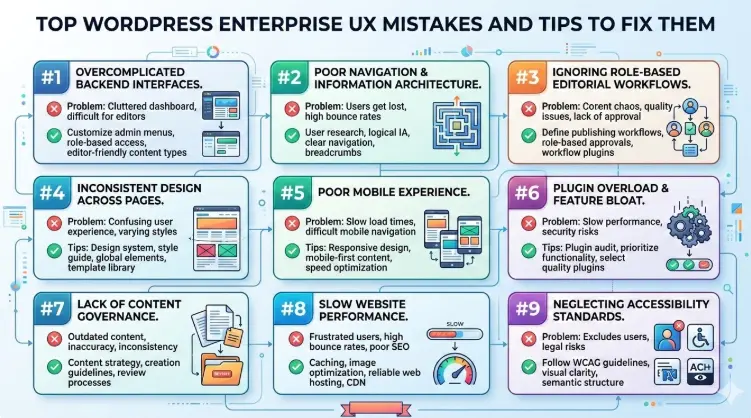
Mistake #1: Overcomplicated Backend Interfaces
Enterprise WordPress websites often include numerous plugins, custom fields, and configuration settings. While these features add flexibility, they can also overwhelm editors with cluttered dashboards and too many options during content creation.
Why It’s a Problem: When backend interfaces become complex, content teams spend more time navigating the admin panel than actually creating and publishing content. This slows down workflows and increases the likelihood of publishing errors.
Tip to Fix it: Simplify the WordPress admin experience by hiding unnecessary fields and customizing dashboards for different user roles.
Using structured content blocks and intuitive page templates can also help editors focus only on the elements required for their tasks. A cleaner backend interface significantly improves editorial productivity and reduces the need for extensive training.
Mistake #2: Poor Navigation and Information Architecture
As enterprise websites expand, their navigation structures often become overloaded with too many menu items, categories, and subpages. Without proper planning, users may struggle to locate relevant information.
Why It’s a Problem: Confusing navigation increases bounce rates and frustrates users who are trying to find specific content or services. It can also negatively affect search performance when content is poorly structured.
Tip to Fix it: Develop a clear information architecture based on user behavior and content priorities.
Conduct website and content audits to remove outdated or redundant pages and organize the remaining content into logical categories. Simplifying menus and ensuring that key pages are accessible within a few clicks can significantly improve usability.
Mistake #3: Ignoring Role-Based Editorial Workflows
Enterprise WordPress environments usually involve multiple contributors, including writers, editors, marketing teams, and administrators. However, many websites fail to establish structured workflows that reflect these roles.
Why It’s a Problem: Without clear workflows, content publishing becomes inconsistent and inefficient. Teams may encounter approval delays, accidental edits, or unclear responsibilities during the publishing process.
Tip to Fix it: Implement role-based workflows that align with how teams create and review content. Assign appropriate permissions to each role and establish approval processes before content goes live. This ensures accountability, reduces errors, and streamlines collaboration among teams.
Mistake #4: Inconsistent Design Across Pages
Large enterprise WordPress websites often contain hundreds or even thousands of pages created by different teams. Without design guidelines, these pages can end up with inconsistent layouts, fonts, and visual elements.
Why It’s a Problem: Inconsistent design disrupts the user experience and weakens brand identity. Visitors may feel they are navigating completely different websites rather than a unified platform.
Tip to Fix it: Adopt a design system that standardizes components such as page templates, typography, color schemes, and content blocks. Using reusable UI elements ensures that new pages follow the same design patterns, helping maintain consistency across the entire website.
Mistake #5: Poor Mobile Experience
Despite the rise of mobile browsing, some enterprise WordPress websites still prioritize desktop layouts during development. This often leads to poor mobile usability.
Why It’s a Problem: Mobile users may face slow-loading pages, difficult navigation, or forms that are hard to complete on smaller screens. These issues reduce engagement and increase bounce rates.
Tip to Fix it: Design with a mobile-first approach, ensuring layouts, images, and navigation elements adapt smoothly across different screen sizes. Optimize media files, simplify mobile menus, and ensure that interactive elements such as buttons and forms are easy to use on touch devices.
Mistake #6: Plugin Overload and Feature Bloat
One of WordPress’s biggest advantages is its vast plugin ecosystem. However, enterprise websites often accumulate too many plugins over time as different teams add features.
Why It’s a Problem: Too many plugins can lead to performance issues, security vulnerabilities, and inconsistent user interfaces. Conflicting plugins may also cause unexpected functionality problems.
Tip to Fix it: Establish a plugin governance strategy that regularly audits installed plugins. Remove unnecessary tools and prioritize well-supported, enterprise-grade solutions. In some cases, custom development may be a better option than installing multiple plugins for similar features.
Mistake #7: Lack of Content Governance
Enterprise websites frequently have multiple departments publishing content. Without proper governance, the website can quickly become disorganized.
Why It’s a Problem: Over time, websites accumulate outdated pages, duplicate content, and inconsistent messaging. This not only confuses users but also weakens the website’s overall credibility.
Tip to Fix it: Create clear content governance policies. Assign ownership for each section of the website and establish guidelines for content updates, reviews, and archival processes. Regular content audits help maintain accuracy and ensure that the website remains relevant.
Mistake #8: Slow Website Performance
Enterprise WordPress websites often include heavy themes, large media files, and multiple scripts, all of which can slow down page loading times.
Why It’s a Problem: Slow websites negatively impact user experience and search rankings. Visitors are more likely to abandon a page if it takes too long to load, thereby reducing conversions and engagement.
Tip to Fix it: Improve performance through optimization strategies such as caching, image compression, and content delivery networks (CDNs). Choosing reliable hosting infrastructure and minimizing unnecessary scripts can also help maintain faster load times.
Mistake #9: Neglecting Accessibility Standards
Accessibility is a crucial component of enterprise UX but is often overlooked during website development. Enterprise organizations serve diverse audiences, and digital platforms must be inclusive.
Ignoring accessibility not only limits usability but can also impact compliance with accessibility standards and regulations.
Why It’s a Problem: Many enterprise websites suffer from accessibility issues such as poor color contrast, navigation elements that cannot be accessed using a keyboard, and forms that are not compatible with screen readers.
These barriers make it challenging for users with visual, motor, or cognitive impairments to access important information or complete tasks on the website.
Tip to Fix it: Adopt accessibility best practices by following WCAG guidelines, testing pages with accessibility tools, designing keyboard-friendly navigation, and ensuring readable typography and clear content structure.
Best Practices for Improving Enterprise WordPress UX
Enterprise WordPress websites often support large content ecosystems, multiple stakeholders, and complex integrations. As these platforms grow, maintaining a smooth and intuitive user experience becomes increasingly important.
A well-structured UX strategy helps organizations improve website usability, streamline content workflows, and ensure consistent digital experiences.
By following a few proven best practices, enterprises can avoid common usability challenges and build WordPress platforms that are both scalable and efficient.
Prioritize Both Editor and Visitor Experience
A successful enterprise website should work seamlessly for both visitors and internal teams. Simplifying the backend dashboard, organizing content structures, and providing clear editing interfaces enable content teams to manage pages efficiently while ensuring a smooth user experience on the front end.
Build a Clear Information Architecture
Well-organized navigation and logical content hierarchies help users quickly find the information they need. Conducting regular content audits and structuring pages based on user behavior ensures that the website remains easy to navigate even as it expands.
Maintain Design Consistency Across the Website
Using standardized templates, reusable design components, and consistent visual elements helps create a unified brand experience. A design system ensures that new pages follow the same structure and styling across the site.
Optimize Performance and Accessibility
Fast loading speeds and an accessible design are essential for a positive UX. Optimizing images, reducing unnecessary scripts, and following accessibility guidelines ensures that the website remains usable for all audiences.
Final Thoughts
WordPress has evolved into a powerful enterprise CMS capable of supporting complex websites, large content ecosystems, and high user traffic. However, many enterprise websites struggle not because of the platform itself, but due to poor UX planning and implementation.
When usability is overlooked, teams face inefficient workflows, inconsistent design, and frustrating user experiences.
By identifying and avoiding common WordPress enterprise UX mistakes, organizations can build platforms that are easier to manage, faster for teams to use, and more intuitive for visitors to navigate.
Implementing strong UX practices, from better information architecture to streamlined editorial workflows, helps create a more scalable and efficient website.
Ultimately, investing in UX not only improves operational efficiency but also enhances user engagement and long-term digital success.
FAQs on WordPress Enterprise UX Mistakes
What are common WordPress enterprise UX mistakes?
Common WordPress enterprise UX mistakes include cluttered backend dashboards, complex navigation structures, plugin overload, inconsistent page designs, slow website performance, and poor accessibility practices.
These issues often arise as enterprise websites grow and add more features without proper UX planning. Addressing these problems early helps improve usability for both internal teams and website visitors.
Why is UX important for enterprise WordPress websites?
UX is essential for enterprise WordPress websites because these platforms typically handle large volumes of content, multiple user roles, and complex integrations.
A well-designed user experience improves navigation, streamlines editorial workflows, and ensures visitors can easily find relevant information, ultimately increasing engagement and operational efficiency.
How can organizations improve UX on enterprise WordPress websites?
Organizations can improve enterprise WordPress UX by simplifying backend interfaces, creating clear information architecture, implementing role-based editorial workflows, optimizing website performance, and maintaining consistent design standards. Regular content audits and accessibility improvements also help ensure a better overall user experience.
How does improving UX benefit enterprise WordPress platforms?
Improving UX helps enterprise WordPress platforms become easier to manage, faster for teams to use, and more intuitive for visitors. Better UX reduces content management complexities, improves user engagement, and supports long-term scalability as the website continues to grow.


