
If you manage a government website built on WordPress, then the U.S. Department of Justice finalized its Title II ADA rule in April 2024, requiring all state and local government websites to meet WCAG 2.1 Level AA accessibility standards. ADA compliance for WordPress government websites is no longer a best practice. It is a legal requirement with real consequences attached.
In this blog, you will learn what the 2026 ADA deadline means, how WCAG 2.1 Level AA works, how to choose the right accessible WordPress theme and plugins, how to audit your site properly, and what non-compliance will actually cost you if you wait too long to act.
TL;DR: ADA-Compliant WordPress Government Websites
- The DOJ requires state and local government websites to meet WCAG 2.1 Level AA standards by April 24, 2026, for jurisdictions serving 50,000 or more residents.
- Smaller entities and special districts have until April 26, 2027, to achieve the same standards.
- Government websites currently average 307 accessibility violations per page, meaning most agencies have significant work ahead.
- WordPress is a capable platform for full ADA compliance when the right theme, plugins, and workflows are in place.
- Automated tools alone are not enough. Manual testing and screen reader evaluation are both required for a complete audit.
- Non-compliance exposes your agency to DOJ complaints, private lawsuits, civil penalties, and serious reputational damage.
What the 2026 ADA Deadline Really Means for Your Agency?
This update to Title II of the Americans with Disabilities Act is the most significant digital accessibility mandate in over a decade. For years, government agencies operated in a grey zone where web accessibility was expected, but enforcement was inconsistent. That ambiguity is now gone.
The DOJ now requires that digital content, including web pages, mobile apps, PDF files, and third-party tools embedded on government websites, be fully accessible to people with disabilities.
Agencies serving populations of 50,000 or more must comply by April 24, 2026. Smaller entities and special districts have until April 26, 2027.
Research from AudioEye found that government websites average 307 accessibility violations per page. That number means the overwhelming majority of agencies have serious remediation work ahead of them.
Roughly 13% of Americans, or one in eight residents, live with a disability that affects how they navigate the web.
When a government site is inaccessible, residents cannot pay utility bills, apply for permits, access emergency information, or complete basic civic tasks online. The law is finally catching up to what should have always been a public service standard.
Title II vs Title III: Which One Applies to You?
Title II of the Americans with Disabilities Act covers state and local government entities. It requires them to make all their programs, services, and activities accessible to individuals with disabilities.
This is the provision that applies directly to city websites, county portals, transit apps, and school district platforms.
Title III covers private businesses open to the public. If you are running a government WordPress website, Title II is your governing framework, and WCAG 2.1 Level AA is the technical standard you must meet before your deadline arrives.
Build a Government Website with WordPress That Meets ADA Standards
From accessibility audits to fully compliant WordPress builds, Seahawk Media helps government agencies create secure, accessible, and future-ready websites.
Understanding WCAG 2.1 Level AA Without the Jargon
WCAG 2.1 organizes every accessibility requirement around four core principles: Perceivable, Operable, Understandable, and Robust, commonly known as POUR.
Your content needs to be perceivable, interfaces need to work for people using assistive technologies, information needs to make sense to everyone, and digital content needs to function reliably across screen readers and other tools.
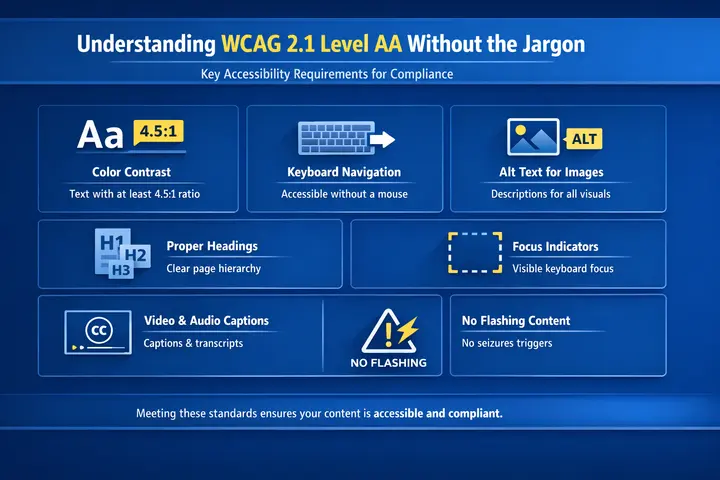
At Level AA, the compliance standard required by the DOJ, the most common requirements agencies need to address include the following.
- Color contrast ratios of at least 4.5:1 for normal text and 3:1 for large text.
- Keyboard navigation that allows users to reach every interactive element without a mouse.
- Alt text for all meaningful images so screen reader users understand the visual content.
- Proper heading structure so that assistive technologies can parse the page hierarchy correctly.
- Visible focus indicators so keyboard users always know where they are on a page.
- Captions for all prerecorded video content and transcripts for audio files.
- No content that flashes more than three times per second, which can trigger seizures.
Agencies that also align with WCAG 2.2 put themselves in an even stronger position, since that version adds criteria around focus appearance and accessible authentication that matter as government portals become more interactive.
Where Section 508 Fits into the Picture?
Section 508 of the Rehabilitation Act applies specifically to federal agencies and requires their electronic and information technology to be accessible to people with disabilities. It aligns closely with WCAG 2.1, making it the practical benchmark across all levels of government.
Section 508 also applies to vendors and contractors building digital products for government use. Local governments should include language in their vendor contracts requiring that all digital content developed for the agency meet WCAG 2.1 Level AA standards.
If a contractor cannot meet those requirements, the agency needs to explore alternatives rather than inherit non-compliant third-party tools.
Why WordPress is a Strong Platform for Government Accessibility?
There is a misconception that WordPress is not suited for government-level accessibility requirements. That is simply not accurate.
WordPress has consistently improved its core accessibility features over the years, and its ecosystem includes accessible themes, compliant plugins, and a developer community that understands WCAG requirements well.
The real issue is not WordPress itself but how it is configured. The chosen theme, installed plugins, and day-to-day content publishing all determine whether a WordPress website achieves and maintains full ADA compliance.
A well-built WordPress site absolutely can meet WCAG 2.1 Level AA when the right decisions are made from the start.
Choosing an Accessible WordPress Theme for a Government Site
The theme is the structural foundation of your WordPress website, and choosing the wrong one creates accessibility barriers that are expensive to fix after the fact.
Many WCAG-compliant themes still require configuration and testing before they fully meet Level AA requirements.
When evaluating an accessible theme for a government WordPress site, look for semantic HTML structure using proper heading tags and landmark regions rather than divs for everything.
The theme should include built-in skip navigation links, visible focus states, and high-contrast color support by default.
Key Theme Features That Actually Matter for Compliance:
- Look for ARIA landmark regions covering the header, navigation, main content area, and footer.
- The theme vendor should also provide a VPAT (Voluntary Product Accessibility Template) or an accessibility conformance statement that documents how the theme meets the relevant standards.
A compliant accessible theme is your starting point, not your finish line. You still need to test it with real assistive technologies and audit the entire WordPress website, including all custom post types, widgets, and theme files, before you can confirm your site is genuinely accessible.
WordPress ADA Compliance Plugins That Actually Help
Plugins play an important supporting role in achieving and maintaining ADA compliance on a government WordPress site.
The WP ADA Compliance Check plugin is one of the most comprehensive options available, offering 83 individual error checks and evaluating your entire website against WCAG 2.1, WCAG 2.2, and Section 508 standards.
It automatically detects and corrects 28 error types and generates accessibility reports that provide references and easy-to-follow remediation instructions.
Those reports can be exported in Excel format for your records, which is useful when documenting compliance progress for leadership or legal review.
Why PDF Accessibility Deserves Separate Attention?
Government websites tend to host large volumes of PDF files, and untagged PDFs are completely invisible to screen reader users.
- The WP ADA Compliance Check plugin identifies untagged PDF files so they can be evaluated and corrected using tools like Adobe Acrobat Pro.
- Every PDF you publish on a government WordPress site needs proper tagging, a clear reading order, and screen reader testing before you can call it accessible.
Government digital teams overlook this step more often than any other, and it remains one of the top reasons agencies fail accessibility audits even after fixing everything else on their site.
Accessible Plugins vs Overlay Widgets: Know the Difference
Some tools called accessibility overlay widgets claim to automatically fix your site for end users without requiring any backend changes.
- Courts and legal experts have repeatedly challenged these overlays in litigation and rejected them as inadequate substitutes for genuine compliance.
- Do not rely on them as a primary accessibility strategy because they create a false sense of security while real accessibility barriers remain in place for disabled users.
- Accessible plugins that handle form label associations, ARIA label enhancements, and image alt text management during content creation are genuinely useful.
Overlays that promise instant compliance without real remediation work are a legal and reputational risk you do not want to take.
How to Audit Your Government WordPress Site Before the Deadline?
A structured accessibility audit is the only way to know where your site actually stands before April 2026.
Relying solely on a plugin scan or a quick Lighthouse check will leave accessibility barriers in place, potentially exposing your agency to complaints or lawsuits.
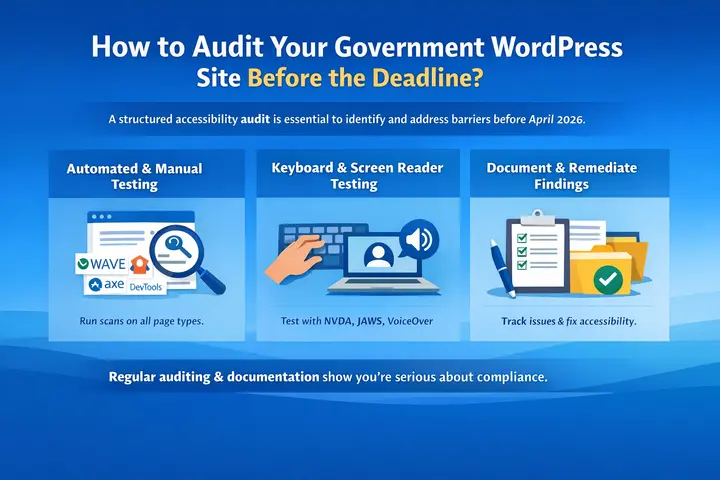
- The most effective approach layers automated scanning with manual testing and real-world screen reader evaluation.
- Start by running your site through WAVE, the axe DevTools browser extension, and Google Lighthouse across multiple page types, not just the homepage.
Government websites include forms, tables, maps, calendars, and document libraries, each with its own accessibility requirements.
What to Prioritize After Your Initial Scan?
After automated scanning, perform manual keyboard navigation testing. Tab through every page without touching the mouse and confirm that every interactive element is reachable and usable.
- Check that focus indicators are always visible and that there are no keyboard traps that cause users to get stuck inside a component.
- Then test with a screen reader. NVDA is free and widely used. JAWS is the industry standard in government environments.
VoiceOver is built into macOS and iOS. Screen reader testing reveals issues that automated tools simply cannot detect, including reading order problems, missing link context, and unlabeled form controls.
Why Documentation is Part of Compliance?
Document every finding from your audit with screenshots and remediation notes. This documentation matters because demonstrating a good-faith effort and a structured remediation roadmap can make a meaningful difference if compliance is ever legally challenged.
Accessibility is not a one-time task. It requires monitoring, continuous improvement, and ongoing documentation to show that your agency takes its obligations seriously and is actively working toward and maintaining accessible websites.
Building an Accessibility-First Workflow for Your Government Team
Reactive fixes after a complaint is filed are always more expensive than building accessibility into your workflow from the start.
Government digital teams need a repeatable process that embeds accessibility into every stage of the content lifecycle rather than treating it as a final checklist item before publishing.
- Before writing a single line of code, use accessible color palettes and test design prototypes with assistive tools during the design phase.
- Development should follow semantic HTML and ARIA best practices while avoiding div-heavy code that creates navigation problems for screen reader users.
- Content teams need training on writing descriptive alt text, using proper heading hierarchy, creating meaningful link labels, and adding captions to all video content before anything goes live.
Run accessibility audits before major content updates or new feature launches, and schedule quarterly reviews to catch regressions that creep in over time.
What Non-Compliance Will Actually Cost Your Agency?
Missing the ADA compliance deadline is not a minor administrative oversight. Residents can file complaints directly with the DOJ, which has the authority to investigate, require corrective action, and impose civil penalties. Private lawsuits are also possible, with plaintiffs able to recover attorney fees and costs.
- Accessibility audits typically range from $2,000 to $10,000, depending on site complexity.
- Remediating a non-compliant site can cost anywhere from $5,000 to $50,000 or more.
- Those numbers climb sharply when emergency fixes are required under legal pressure, with legal fees and settlement costs compounding quickly.
Beyond the financial exposure, an inaccessible government website sends a clear message to disabled residents that their access is an afterthought.
That erosion of public trust is difficult to quantify, but it is very real in its long-term impact on your agency’s reputation and relationship with the community.
The Bottom Line
ADA compliance for WordPress government websites is achievable, but it requires intentional action right now. The DOJ has made the rules clear, the deadline is approaching fast, and the cost of waiting is far higher than the cost of building accessibility in from the start.
Whether you are auditing an existing site, rebuilding on a compliant foundation, or training your team to publish accessible content going forward, every step you take today determines whether every resident in your community can access the digital services they depend on.
That is not just a legal obligation. It is the foundation of equitable governance in the digital age.
FAQs About ADA Compliance for Government Websites
What is the ADA compliance deadline for government websites?
State and local government agencies serving populations of 50,000 or more must comply with WCAG 2.1 Level AA standards by April 24, 2026. Smaller jurisdictions and special districts have until April 26, 2027. These deadlines were set by the DOJ under the final Title II ADA rule published in April 2024, and no extensions are currently in place.
What happens if a government website fails to meet ADA compliance standards?
Non-compliance can result in DOJ complaints, federal investigations, required corrective action, and civil penalties. Private lawsuits are also possible under the Americans with Disabilities Act, and plaintiffs can recover attorneys’ fees and legal costs. Beyond legal exposure, inaccessible government websites damage public trust and exclude disabled residents from critical services.
Can accessibility plugins make a WordPress government site fully compliant?
Accessibility plugins like WP ADA Compliance Check are powerful for identifying and fixing a wide range of web accessibility issues, but they cannot deliver full compliance on their own. Automated tools typically catch around 30 to 40 percent of all accessibility issues. Manual keyboard testing and screen reader evaluation are both required to cover what automated tools miss.


