

Software development is changing faster than most people realize. Vibe coding has gone from a niche Twitter idea to one of the most talked-about approaches in the developer and creator world, and if you have not heard of it yet, you are about to understand exactly why it matters.
TL;DR: What You Need to Know About Vibe Coding
- Vibe coding refers to using AI to generate code based on natural language prompts instead of writing code manually line by line.
- The term was coined by AI researcher Andrej Karpathy in February 2025 when he described a new way of building software by simply describing what you want and letting the AI handle the rest.
- You do not need programming experience to get started. You describe the outcome, the AI generates functional code, and you refine it through follow up prompts.
- The core workflow is simple: prompt the AI, run the output, see what breaks, and iterate until it works the way you want.
- Vibe coding is best suited for rapid prototyping, solo projects, internal tools, and throwaway weekend projects where speed matters more than long-term scalability.
- AI generated code is not automatically secure. Always review, test in a sandbox environment, and audit before going live.
- It is not a complete replacement for traditional software development, but it dramatically lowers the barrier to building real, working applications for non coders and experienced developers alike.
- Tools like Cursor Composer and all-in-one AI app builders represent two different paths, one hands-on and one fully automated, and both are legitimate depending on your goals.
Where Did the Term “Vibe Coding” Come from?
The phrase was coined by Andrej Karpathy, a well-known AI researcher and former lead at Tesla and OpenAI. In February 2025, he posted on X describing a new way he had started working with AI:
“There’s a new kind of coding I call vibe coding, where you fully give in to the vibes, embrace exponentials, and forget that the code even exists.”
That post spread fast. Developers, founders, and non-technical creators all latched onto the idea because it described something they were already starting to feel, that writing code manually was no longer the only path to building something real.
The phrase “embrace exponentials and forget” points to something deeper than just using an AI tool.
It reflects a mindset shift where you stop managing every code line and start thinking entirely in outcomes. The code even exists somewhere in the background, but your attention stays on what you are trying to build.
Need Help Building Smarter Web Products?
From rapid prototypes to fully custom WordPress builds, we help you turn ideas into fast, scalable, and user-friendly digital experiences.
What Exactly is Vibe Coding and Why is Everyone Talking About it?
Vibe coding refers to the practice of using AI systems to generate code based on natural language descriptions rather than manually writing every line yourself. You describe what you want in plain English, and the AI handles the actual code creation.
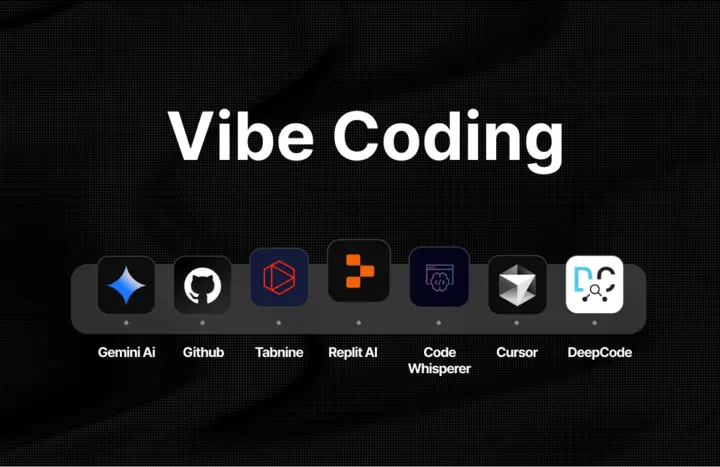
It is not a single tool or platform. It is more of a coding approach, a way of thinking about software creation that puts intent ahead of syntax.
The Core Idea Behind Vibe Coding
At its heart, vibe coding means you are no longer the one doing the writing code part. You become the director. You describe the goal, the AI coding tools generate code, and you review, run, and refine based on what you see.
This is not about being passive. You are still making every important decision about what the app should do, how it should behave, and what problems it should solve. The difference is that you are not the one wrestling with programming languages or debugging cryptic error messages at 2am.
The paradigm shift here is significant. For the first time, people who have ideas but no coding experience can actually build functional software without hiring a software engineer or spending months learning to write code themselves.
How Vibe Coding Differs From No-Code and Low-Code Tools?
No-code tools give you drag-and-drop interfaces. You pick components from a menu and arrange them visually.
Vibe coding is different because the AI generates actual code, not just a visual layout. The result is real, functional code that can be inspected, modified, and deployed like anything a software engineer would write.
Low-code tools still require you to understand some logic. Vibe coding with the right AI tools means non coders can describe complex functionality in plain language and get working results without any prior coding experience.
How Does Vibe Coding Actually Work?
The workflow is simpler than most people expect. You do not need a technical background to follow it.
The Prompt-Run-Iterate Loop Explained
This is the heart of how vibe coding works in practice. The loop looks like this:
- Describe your idea in a text box or chat interface. Be specific. Instead of “make a booking form,” say “build a booking form with a date picker, name field, email input, and a confirmation message after submission.”
- The AI generates code. Depending on the tool, this might appear as a live preview, a code file, or a complete working interface you can interact with right away.
- You run stuff and see what breaks. Maybe the date picker does not work on mobile. Maybe the confirmation message does not appear. You note what is wrong.
- Follow up prompts fix the issues. You describe the problem in plain language, the AI updates the existing code, and you test again.
- Repeat. Each cycle is fast. You can go from an idea to a working prototype in a single session.
This replaces the traditional process of writing specs, reviewing pull requests, and waiting on development cycles. The feedback loop is immediate, and the iteration feels more like a conversation than a technical process.
All-in-One Builders vs AI Coding Assistants
There are two main ways to approach vibe coding, and they serve different types of users.
All-in-one AI app builders handle everything in one place. You describe your complete application, the platform generates the front end and back end together, and you get a working result without ever seeing a single code line.
This is the most beginner-friendly path and works well for complete application builds like micro-SaaS products, booking systems, or internal tools.
AI coding assistants like ChatGPT, GitHub Copilot, or Cursor Composer give you more hands-on control. You write prompts, get code snippets back, paste them into your project, and manage the code base yourself.
This approach suits people with some technical background who want AI-assisted coding rather than full automation. Cursor Composer in particular has become popular among developers who want to stay close to the code while still getting the speed benefits of AI code generation.
Both paths involve the same basic rhythm: prompt, generate code, test, refine.
What Are the Real Benefits of Vibe Coding?
The reason vibe coding has grown so quickly is that it solves real, frustrating problems for a wide range of people.
Speed and Rapid Prototyping
Rapid prototyping used to take weeks. Now it takes hours. A founder can describe a product idea on Monday and have a working prototype to show investors by Tuesday. There is no need to wireframe every screen, write technical specifications, or wait on a dev queue.
For throwaway weekend projects, the kind where you want to test whether an idea is even worth pursuing, this is genuinely transformative. You can create code for an experiment, run it, learn from it, and throw it away without any significant time loss.
Accessibility for Non-Technical Builders
This is where vibe coding changes the game most dramatically. Marketers, designers, educators, and entrepreneurs can now build tools that solve their own problems without needing to hire a software engineer or spend six months learning Python.
The barrier used to be syntax. You had to know exactly how to write code in a specific programming language before anything would work. Now you just describe the outcome, and the AI generates code that handles the implementation.
Creative Freedom Over Technical Bottlenecks
When you are not stuck on repetitive tasks like setting up file structures or writing boilerplate, you spend your energy where it actually matters: figuring out what to build and how it should feel for the people using it.
Generative AI handles the parts of software development that used to eat up time without adding creative value. That frees you to focus on design decisions, user experience, and the actual problem you are trying to solve.
Is AI Generated Code Actually Secure?
This is one of the most important questions to ask before you go all-in on vibe coding. The honest answer is: AI generated code can be secure, but it is not automatically secure.
The Security Risks You Should Know About
Large language models are trained to generate code that works, not necessarily code that is hardened against attacks. Common issues include:
- Missing input validation, which opens doors to injection attacks.
- Exposed API keys that get baked into the code base without the AI flagging the risk.
- Skipped error handling that creates unpredictable behavior in edge cases.
- Security vulnerabilities that would be caught in a proper code review but go unnoticed when you are moving fast.
These are not hypothetical problems. AI assisted coding tools have been shown to produce code with real security vulnerabilities when users skip the review step entirely.
How to Make Your Vibe-Coded App Safer?
Before deploying anything publicly, review the AI generated code carefully. If you are not technical enough to do this yourself, ask the AI to audit it explicitly.
- Prompt it to check for common security vulnerabilities, review input handling, and flag anything that looks risky.
- Always test in a sandbox environment before going live.
- Do not use vibe-coded software in production systems that handle sensitive user data without a proper security audit.
- Validate inputs on the server side, not just the client side, and make sure error messages do not expose internal system details.
Code quality matters even when you did not write the code yourself. Treat AI generated code the way you would treat code from any external contributor: inspect it, test it, and own the result.
Vibe Coding vs Traditional Coding: Which One Should You Use?
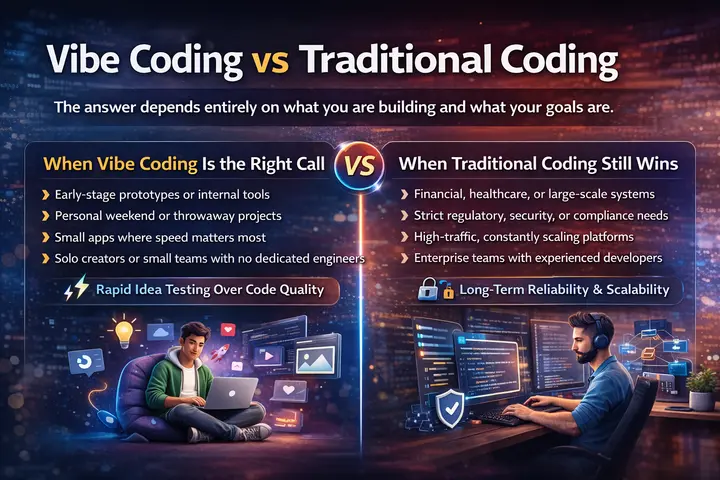
The answer depends entirely on what you are building and what your goals are.
When Vibe Coding is the Right Call?
Vibe coding works best for early-stage prototypes where you need to test an idea fast. It is great for internal tools, personal projects, throwaway weekend projects, and small apps where getting to a working prototype quickly matters more than code quality or long-term maintainability.
If you are a solo creator or a small team without dedicated engineering resources, vibe coding gives you a way to move forward without the usual bottlenecks.
For real world applications where speed of learning matters more than production reliability, it is often the better choice.
When Traditional Coding Still Wins?
For applications that handle financial transactions, personal health data, or large volumes of user information, traditional coding with experienced developers and established coding standards is still the right approach.
Systems that need to scale, integrate with complex existing code, or maintain strict regulatory compliance require the kind of careful architecture that a software engineer builds intentionally.
AI generated code tends to be functional but messy at scale. Code grows in unexpected directions when there is no long-term structural plan guiding it, and that becomes a serious problem in production environments.
Think of vibe coding as a powerful starting point, not always the finish line.
Best Practices for Getting Better Results from Vibe Coding
The quality of what you build with vibe coding depends almost entirely on how you approach it.
Writing Prompts That Actually Work
Specificity is everything. Vague prompts produce vague results. Compare these two approaches:
Weak prompt: “Make a contact form.”
Strong prompt: “Build a contact form with fields for full name, email address, subject line, and message. Include a submit button that shows a success confirmation message after submission. Style it using Tailwind CSS with a clean, minimal look.”
The second prompt gives the AI enough context to produce something genuinely useful on the first try. You still might need follow up prompts to refine edge cases, but you are starting from a much stronger foundation.
Managing Your Project Without Losing Control
Give the AI one task at a time. Asking it to build an entire platform in a single prompt leads to overwhelming output that is hard to test and even harder to fix when something breaks.
Save working versions before trying new changes. If the existing code is working well, checkpoint it before experimenting with new features. Random changes that break something are much easier to recover from when you have a stable version to fall back on.
Use version control even if you are not technical. Platforms that support it make this automatic, and it will save you significant frustration when the code base starts growing.
Knowing When to Rewrite the Prompt Entirely
If the AI keeps missing the mark after two or three follow up prompts, the problem is almost always the prompt itself, not the AI’s capability. Stop trying to patch the direction and start fresh with a clearer description of what you actually want.
This is a skill that develops with own experience. The more you vibe code, the better you get at describing intent in ways that AI coding tools can translate reliably into working results.
The Limitations of Vibe Coding Tools and How to Handle Them
Being honest about where vibe coding falls short helps you use it more effectively.
AI generated code is often messy. It works, but it does not follow clean coding standards, and it can become difficult to maintain as the project grows. This is fine for prototypes and personal tools. It becomes a problem if you expect to hand the project off to a developer or scale it significantly.
Debugging can be harder than expected. Without usual comprehension of how the code works internally, tracing a bug to its source requires either technical knowledge or patience with follow up prompts asking the AI to explain what it built.
Projects can lose structure quickly. Without a plan, the code base grows in unpredictable directions. Once you have a working prototype, it is worth adding intentional structure before building on top of it.
What Does the Future of Vibe Coding Look Like?
Generative AI is improving at a remarkable pace. The capabilities that feel impressive today will likely feel basic within a year. By 2026, the majority of new applications are being built with some form of AI assisted coding involved, and that number is only going to grow.
What will not change is the need for clear thinking about what you are building and why. Vibe coding removes the technical barrier, but it does not replace product judgment, design instinct, or an understanding of what your users actually need.
Think of it as a paradigm shift in app development access, not a complete replacement for software engineering. The experienced developers are not going anywhere.
But the gap between having an idea and being able to test it has closed dramatically, and that changes what is possible for everyone.
Wrapping Up
Vibe coding is not a gimmick. It is a real shift in how software gets created, and it is already enabling a new generation of builders to turn ideas into functional products without writing a single code line manually.
If you are curious about how AI powered development fits into your next project, Seahawk Media is here to help you think it through. From rapid prototyping to production-ready builds, we work with you at every stage of the process.
FAQs About Vibe Coding
Do I need to understand code to fix errors when vibe coding?
Not necessarily. Most of the time you can describe the problem in plain language and the AI will diagnose and fix it through follow up prompts. However, having basic familiarity with how code works does help you catch issues faster and ask better questions.
Can vibe coded apps be used in production?
Simple tools and internal apps can work fine in production if properly reviewed and tested. For large scale or security sensitive applications, vibe coding is better treated as a starting point rather than a final solution.
Is vibe coding only for non-technical people?
Not at all. Experienced developers use vibe coding too, mainly to speed up repetitive tasks, prototype ideas faster, and skip boilerplate work so they can focus on more complex problems.


