
Learning how to create a web app using no-code and low-code platforms is no longer reserved for engineers or technical founders.
In 2026, a no-code app builder gives anyone the ability to go from idea to live product without writing a single line of code. According to Gartner, 75% of new applications now use some form of visual development tooling.
Whether you are a founder testing an MVP, a business manager automating a process, or a marketer building an internal tool, this guide will walk you through exactly how to get it done.
TL;DR: How to Create a Web App Using No-Code and Low-Code Platforms
- No-code platforms are built for non-technical users who want to build fully functional web apps without writing a single line of code.
- Low-code platforms are better suited for developers or technical teams who need visual speed with the flexibility to add custom logic where needed.
- Before touching any platform, map out exactly what your app needs to do, who it is for, and what data it needs to handle.
- Match the platform to your use case, not to what looks impressive in a tutorial. The best no-code app builder for a simple internal tool is not the same as the best one for a SaaS product.
- Set up your backend, data structure, and automated workflows carefully. A poorly designed data model early on is one of the hardest things to fix after real users are in the system.
- Test on real devices before launch, not just browser previews.
- Launch the smallest version that delivers real value, collect feedback from actual users, and iterate from there rather than trying to build every feature before going live.
What is the Difference Between No-Code and Low-Code Platforms?
Understanding that distinction before you pick a platform will save you a significant amount of frustration mid-build.
No-code platforms remove the barrier of traditional programming entirely. It replaces it with visual development environments built around drag & drop functionality and graphical user interfaces.
No-code tools are for non-technical users, business managers, and anyone with a clear idea but no background in software development.
Platforms like Bubble, Glide, and AppSheet sit firmly in this category. They are fast to start, beginner-friendly, and capable enough to handle a wide range of real-world use cases. This includes customer portals, internal tools, and fully functional web applications.
Low-code platforms sit one step above. They give professional developers a faster starting point while still allowing them to add custom code where the situation demands it.
Low-code development tends to attract developers who want speed without sacrificing flexibility or the ability to handle complex logic.
Platforms like Retool, Microsoft Power Apps, and Mendix are built for this audience. Especially for teams building enterprise-grade applications or connecting to complex external APIs and data sources.
The practical question is simple: if you have no technical background and need something working quickly, start with a no-code solution.
If your project involves complex backend requirements or will be maintained by a development team, low-code development is the better fit.
Why Build a Web App This Way Instead of Hiring a Developer?
No-code development has expanded what is possible for small teams and business users in ways that traditional development methods simply cannot match at the same price point or speed.
Speed That Traditional Approaches Cannot Match
A typical custom web application built through traditional coding methods takes 4 to 9 months to design, build, test, and deploy.
No-code apps compress that same timeline to days or weeks. For business users who need to build apps, create apps, or develop apps without depending on an already-stretched IT team, that speed advantage is transformative.
The rise of what the industry calls citizen developers, those who build apps without formal training, is a direct result of how accessible no-code software has become.
Lower Development Costs Without Sacrificing Core Functionality
No-code development dramatically reduces development costs. A web app that would cost $30,000 to $150,000 in custom development can often be built on a no-code app builder for a few hundred dollars per year in subscription fees.
There is no need to write complex code, manage dependencies, or wait through long development cycles before something usable exists.
You can create applications that handle real business logic, manage data, and connect to data sources entirely through visual interfaces, with no manual coding required.
Non-Technical Teams Can Iterate Without Waiting
When a business process changes or a product needs a new feature, teams using no-code tools can often make that change themselves the same day.
In traditional software development, the same change might sit in a backlog for weeks. That speed of iteration is one of the genuine competitive advantages of the no-code approach, especially for teams where the people closest to the problem are not the people who traditionally write code.
How Seahawk Media Can Help You Build and Grow Your Web Presence?
No-code and low-code platforms are powerful tools, but they are still tools. Getting the most out of them requires clear strategy, good design thinking, and an understanding of what each platform can and cannot do well.
Seahawk Media works with founders, businesses, and growing teams who want to build a strong digital presence without the overhead of a traditional development agency. No-code tools are excellent for getting started fast.
For web experiences that need to perform well in search, convert visitors at a high rate, and scale reliably as your audience grows, working with an experienced team makes a measurable difference.
We bridge the gap between what visual builders produce quickly and what a mature, optimized web presence actually requires.
Need a Web App That Goes Beyond No-Code Limits?
Seahawk Media helps businesses turn early ideas into high-performance WordPress platforms built to grow.
Steps to Create a Web App Using No-Code and Low-Code Platforms
Building a web app without writing code sounds simple in theory, but the process still has real steps that need to happen in the right order.
Skip one and you will feel it later. Follow them and you can go from a blank canvas to a deployed, working product faster than most people expect.
Step 1: Map Out What Your Web App Actually Needs to Do
Before opening any platform, be clear on what specific problem this app solves and who it is designed for.
- Think through the core user flow from the moment someone opens the app to the moment they get the result they came for.
- Also define what data the app needs to collect, store, or display. Being vague here leads to choosing the wrong platform, building the wrong features first, and then having to rebuild significant chunks after launch.
- Define what success looks like on day one. Not after six months, not after a full feature rollout. What is the minimum version of this app that delivers real value to a real user?
Simple apps that solve one problem well almost always outperform bloated first versions of more ambitious projects. That is your target for the first build.
Step 2: Choose the Right Platform for Your Use Case
This is the most important decision you will make in the entire app building process. The best no-code app for your project depends entirely on what you are building, not on what looks impressive in a tutorial.
- For simple internal tools and data apps: If your goal is to turn a Google Sheets dataset into a usable application or give a team a cleaner interface for managing information, Glide and AppSheet are excellent starting points. Both are built around taking data you already have and wrapping a proper app interface around it.
- For full web applications and SaaS products: Bubble is the most capable no-code app builder for complete web applications. It supports user authentication, a built-in database, custom workflows, payment processing, and responsive design without writing a single line of code. Startups have used Bubble to build everything from marketplaces to SaaS dashboards to progressive web apps.
- For enterprise-grade applications and developer teams: Retool and Microsoft Power Apps are the right choices when you need low-code development with the ability to add custom code. Retool connects to virtually any database or external API and allows developers to drop in JavaScript exactly where they need it.
- For AI-assisted app generation: Platforms like Lovable, Hostinger Horizons, and Base44 now let you describe your app using natural language prompts and generate working frontends, backend logic, and database schemas automatically. You describe what the app should do, the AI builds a working version, and you refine it through continued conversation.
Step 3: Design the User Interface
Once you have chosen your platform, you will spend most of your early time in the visual builder. Most platforms provide a canvas where you arrange components visually and configure them without writing complex code.
- Common components include input fields and forms, buttons that trigger actions, lists and tables for displaying records, navigation menus, and conditional visibility settings that show or hide elements based on user data or app state.
- Check your design on a mobile viewport before moving on. Nearly every no-code platform provides responsive settings, but they do not apply automatically.
- A user interface that works beautifully on desktop can be completely broken on a phone if you have not tested it.
Ask someone unfamiliar with the project to attempt the core user flow without guidance from you, and note every moment they hesitate or get confused. That feedback is pure signal.
Step 4: Set Up Your Backend, Database, and Workflows
This is the step most beginners underestimate. The user interface is what your users see, but the backend is what makes the app actually work. Three things need to be configured:
- Your data structure: Define what information your app needs to store and how different pieces of data relate to each other before you build anything else. Getting this right early prevents painful restructuring later. Most no-code apps that feel underpowered at scale are that way because the data model was not thought through at the start.
- Automated workflows: These are the rules that run automatically when something happens in your app. Common examples include sending a confirmation email when a user registers, updating a record when a form is submitted, or triggering an approval process when a request is made.
- No-code development tools like Zapier and Make handle workflow automation without requiring any traditional programming knowledge. These tools exist to automate repetitive tasks that users would otherwise handle manually.
- Third-party integrations: Very few apps exist in isolation. You will likely need to connect to external APIs, a payment gateway like Stripe, an email service like SendGrid, or a CRM like HubSpot.
Most major no-code platforms support these connections through native integrations or API connectors, and configuring them does not require writing complex code.
Step 5: Test Everything Before You Go Live
Testing is what separates apps that work in demos from apps that work in the real world. Even on a no-code development platform, workflows fire in the wrong order, data does not save correctly, and mobile layouts break in unexpected ways on specific devices.
- Run through a structured testing process before launch. Test every button, form, and workflow for correct behavior.
- Validate that data is being stored and retrieved correctly. Test edge cases, what happens when a user submits an empty form or enters unexpected characters.
- Check the app on a real phone, not just a browser preview.
If your app has multiple user roles with different access levels, test each one separately to confirm that permissions restrict access properly and that built-in security features are working as intended.
Step 6: Deploy, Monitor, and Improve After Launch
Deploying a no-code app is typically straightforward. Most platforms offer one-click publishing, include hosting as part of the subscription, and allow you to connect a custom domain in minutes.
After launch, your job shifts from app building to learning from real usage.
- Track where users drop off in the core user flow, which features are used most often, and whether any workflows fail under real conditions.
- No-code platforms make iteration fast. When you spot a problem, you can often fix it the same day without touching a deployment pipeline or writing any new code. That speed of iteration is one of the most underrated advantages of no-code app development.
You can also skip the steps and watch this video tutorial to build a professional WordPress website using AI-without writing a single line of code or staring at a blank screen.
Common Mistakes to Avoid in No-Code App Building
Most of the pain people experience with no-code and low-code development is completely avoidable.
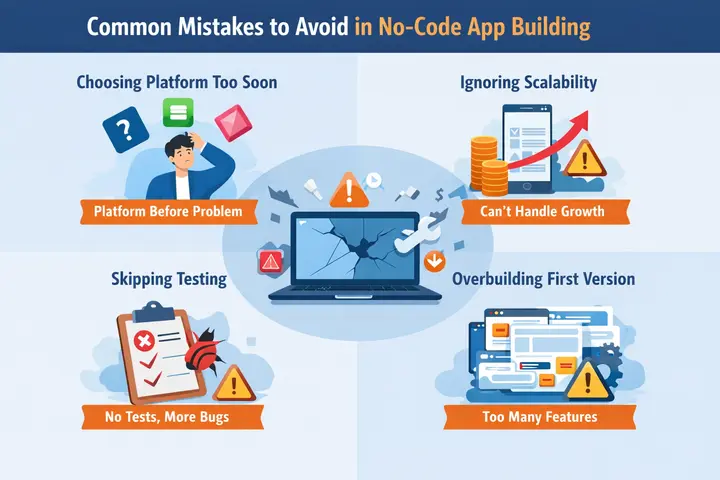
These are the mistakes that come up most consistently, and understanding them before you start is far more useful than discovering them mid-build.
- Choosing a platform before defining the problem: Many no-code platforms are excellent at specific things and weak at others. Picking based on brand recognition rather than use case leads to hitting hard limits mid-build.
- Ignoring scalability: Some no-code apps run into performance problems as user numbers grow. Pricing models that charge per action can also become expensive at scale. Think about your two-year ambitions when choosing a platform, not just your day-one requirements.
- Skipping testing: No-code apps break in ways that custom code also breaks, just differently. Treating the testing phase as optional is a false economy that reliably costs more time after launch than the testing would have taken before it.
- Overbuilding the first version: Every feature you add before validating that users want the core functionality is a feature that might need to be redesigned or removed entirely after the first round of real feedback. Launch small, learn fast, and add from there.
Conclusion
The gap between having an idea and having a live web app has never been smaller. Whether you are relying on a no-code solution to build simple apps or using a low-code development platform to build something far more complex, the fundamentals remain the same.
Define the problem clearly, pick the right platform for your use case, take testing seriously, and launch a small version before adding complexity.
The no-code and low-code space is evolving faster than almost any other area of software development, with new platforms, AI-assisted builders, and more powerful visual tools releasing every few months.
What feels like a limitation today may be a solved problem by the time your app is ready to scale. Staying curious about what these tools can do is just as important as learning how to use the ones you have already chosen.
Start with one clear problem, pick one platform, and build the smallest version that delivers real value to a real user. Everything else can be figured out from there.
FAQs About No Code Website Development
Can I really build a web app without any coding knowledge?
Yes. No-code platforms like Bubble and Glide are built specifically for non-technical users. You build everything through drag-and-drop interfaces and visual editors without writing a single line of code.
What is the difference between a no-code app and a custom-built app?
A custom-built app is written entirely in code by developers, giving full control but at a higher cost and longer timeline. A no-code app uses a visual platform that handles the underlying code for you, getting you to a working product much faster and at a fraction of the price.
Will my no-code app be able to scale as my business grows?
It depends on the platform you choose and how well you plan your data structure from the start. Most no-code platforms handle moderate growth comfortably, but choosing one with a clear upgrade path and monitoring performance after launch makes a significant difference long term.


