

TLDR Malware and ransomware are related but not the same. Malware often works silently in the background, while ransomware locks access and demands payment. Website owners need different prevention strategies for each, including updates, access control, and isolated backups.
Most website attacks do not start with chaos. They begin quietly, often unnoticed, until traffic drops, warnings appear, or access is suddenly locked.
Malware and ransomware are two of the most common threats behind these incidents, yet they are often misunderstood or treated as the same problem. Knowing the difference is not just technical knowledge. It shapes how you protect your website and how quickly you can recover when something goes wrong.
This guide breaks down both threats in plain language, with real implications for website owners.
Key Takeaways
- Malware is a broad category of threats that often operate silently, while ransomware is a specific type focused on extortion.
- A website can stay online and functional while malware causes long term damage in the background.
- Ransomware creates immediate disruption by locking files, databases, or servers and demanding payment.
- Prevention strategies differ, and treating both threats the same leaves security gaps.
- Consistent updates, access control, and backup isolation are critical for reducing risk.
What Malware Really Means in Website Security
Malware is a broad term used to describe any software designed to harm, exploit, or misuse a system. For websites, malware does not usually announce itself loudly. It often works quietly in the background, modifying files, injecting scripts, or abusing server resources without the owner noticing.
When malware infects a website, its goal is rarely to destroy everything at once. Instead, it might steal user data, inject spam links for SEO manipulation, redirect visitors to malicious pages, or turn the server into part of a larger attack network. In many cases, the website continues to function, which makes detection harder.
Malware is not limited to one specific behavior. It includes a wide range of malicious code types, each designed for a different purpose. Some malware targets visitors. Others target search engines. Some exist only to give attackers ongoing access to the site.
For website owners, malware is especially dangerous because it often spreads through trusted components. A vulnerable plugin. An outdated theme. A compromised admin account. Once inside, it blends into legitimate files, making manual cleanup risky without experience.
Protect Your Website Before Security Issues Turn Costly
Malware and ransomware often start quietly and escalate fast. Seahawk Website Care helps keep your WordPress site updated, monitored, and secure so small gaps do not become major incidents.
Common Website Focused Malware Types
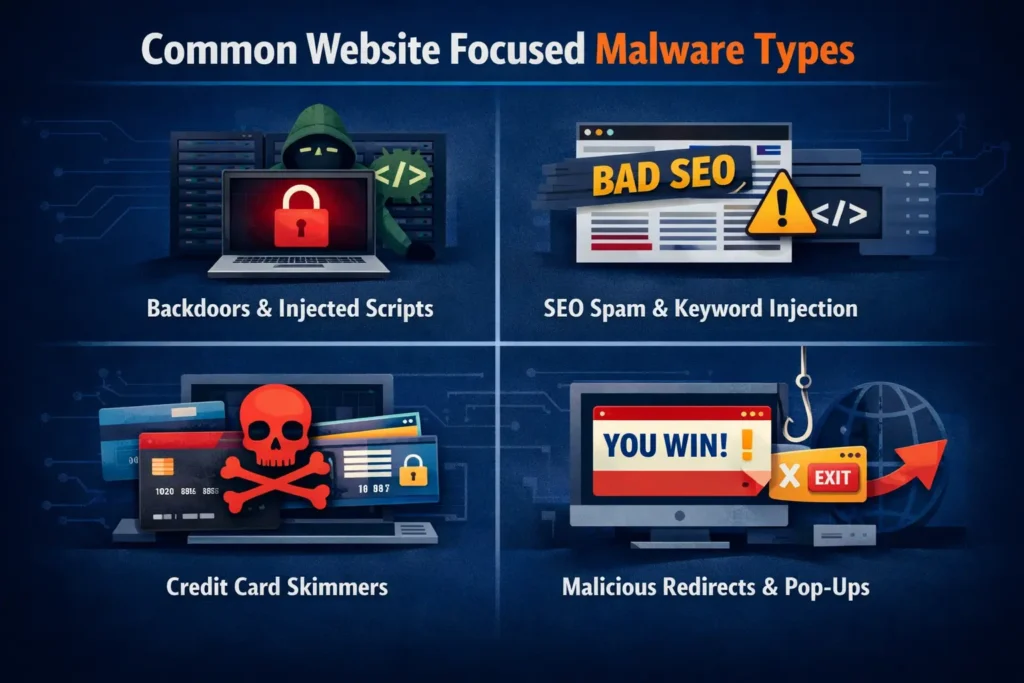
Malware takes many forms, but certain types are especially common in websites and hosting environments.
Website backdoors and injected scripts
Backdoors allow attackers to regain access even after a partial cleanup. Attackers hide these scripts inside theme files, upload folders, or core files to maintain persistent control over the website.
SEO spam malware and keyword poisoning
This type of malware injects spam pages or hidden links designed to manipulate search rankings. Website owners often discover it only after traffic drops or search console warnings appear.
Credit card skimmers and form hijackers
Skimmer malware targets checkout pages and contact forms. It silently captures sensitive data such as card numbers, passwords, and personal information, sending it to attackers without breaking site functionality.
Redirect malware and malicious popups
Redirect malware sends visitors to spam or scam websites. Sometimes this happens only for users coming from search engines, making it difficult for owners to reproduce the issue.
Bot malware used for traffic abuse and attacks
Some malware turns websites into bots that send spam emails, scrape content, or participate in distributed attacks. This can lead to IP blacklisting and hosting account suspension.
What Malware Can Do to a Website
Malware damage is often gradual but deeply harmful. A compromised website may load slower, behave unpredictably, or display warnings in browsers and search results. Visitors lose trust quickly when security warnings appear.
Search engines may penalize or remove infected pages, leading to traffic loss that does not recover immediately after cleanup. Hosting providers may suspend accounts to protect shared environments, causing unexpected downtime.
In more severe cases, malware steals customer data, exposing businesses to legal and reputational risks. Even after removal, the long term impact on credibility and SEO can linger for months.
How Malware Enters Websites
Malware does not magically appear. It exploits weaknesses that are often overlooked.
Vulnerable plugins and themes
Outdated or poorly maintained plugins are one of the most common entry points. Attackers actively scan the internet for known vulnerabilities.
Outdated WordPress core files
Running an outdated CMS version leaves known security holes open. These vulnerabilities are widely documented and easy to exploit.
Compromised hosting accounts
Weak passwords, shared access, or reused credentials allow attackers to access hosting panels and inject malware directly.
Stolen admin credentials
Phishing emails and fake login pages trick site owners into handing over admin access without realizing it.
Infected third party scripts
External scripts such as analytics, ads, or chat widgets can become compromised and inject malicious code into otherwise clean websites.
What Ransomware Means for Website Owners
Ransomware is a specific type of malware with one primary goal: money. Instead of silently exploiting a website, ransomware forces the victim into a crisis by denying access to data, files, or systems until a ransom is paid.
For website owners, ransomware often targets servers, databases, or backups rather than individual pages. An attack can lock an entire site, making it impossible to restore content without paying or rebuilding from scratch.
Unlike many malware infections, ransomware does not aim to stay hidden. It wants to be noticed. The attacker needs the victim to panic, feel pressure, and act quickly. This urgency is what makes ransomware especially dangerous for businesses with limited recovery plans.
Types of Ransomware That Target Websites and Servers
Ransomware does not target websites in just one way. Different variants focus on files, databases, or entire hosting environments, depending on where attackers see the fastest path to pressure and payment.
Website file encryption ransomware
This type encrypts website files, making themes, plugins, and uploads unusable. The site may display error messages or stop loading entirely.
Database encryption attacks
Attackers encrypt databases that store posts, customer data, and transactions. Even if files remain intact, the site becomes unusable without database access.
Server level ransomware
Some ransomware targets the entire server, affecting multiple websites hosted on the same account. This is especially damaging for agencies and resellers.
Leak based extortion ransomware
Attackers steal sensitive data before encrypting it and threaten to publish it publicly if the ransom is not paid.
Double and triple extortion attacks
In advanced attacks, ransomware operators pressure victims by targeting customers, partners, or even launching additional attacks such as traffic floods to increase urgency.
Ransomware vs Malware: Key Differences Website Owners Must Know
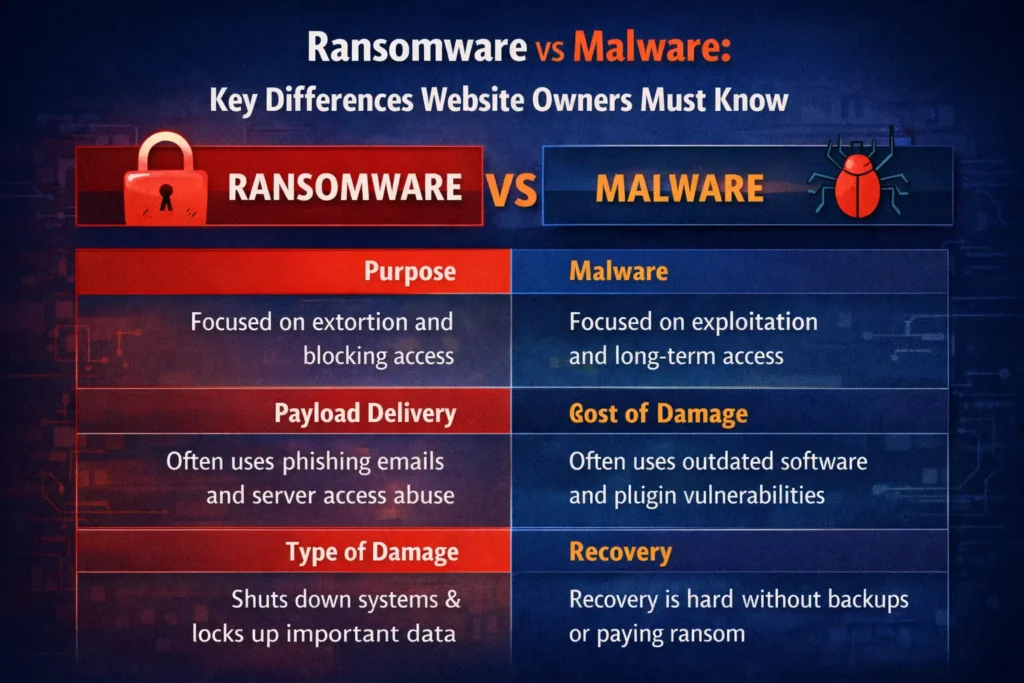
Malware and ransomware are closely related, but they are not interchangeable. Understanding how they differ helps website owners make better security decisions and avoid false assumptions that often lead to bigger problems later.
While ransomware is a form of malware, it represents a very specific threat model. Malware focuses on exploitation. Ransomware focuses on extortion. That distinction shapes how each attack unfolds and how difficult recovery becomes.
Scope and Purpose of Each Threat
Malware is designed to achieve a wide range of goals. It may steal data, manipulate search rankings, redirect visitors, or give attackers long term access to a website or server. Many malware infections aim to stay hidden for as long as possible.
Ransomware has a narrow and aggressive purpose. Its goal is to force payment. Instead of hiding, it blocks access to files, databases, or systems and makes its presence obvious. The attack is meant to create urgency and pressure.
How Malware and Ransomware Enter Websites
Malware often enters through common weaknesses such as outdated plugins, insecure themes, exposed file permissions, or compromised admin credentials. These infections are frequently automated and opportunistic.
Ransomware usually arrives through more targeted entry points. Phishing emails, stolen server credentials, or compromised remote access are common methods. Attackers often spend time inside the system before triggering encryption.
Speed and Visibility of Damage
Malware damage is usually gradual. A website may continue to function while search rankings decline, spam content appears, or data is silently collected. Many owners do not realize anything is wrong until secondary symptoms appear.
Ransomware causes immediate disruption. Files stop working, databases become inaccessible, or entire servers are locked. The impact is sudden and impossible to ignore, which is why ransomware incidents escalate quickly.
Recovery and Cleanup Complexity
Most malware infections can be removed if detected early and handled properly. Cleanup involves identifying malicious files, closing vulnerabilities, and resetting access credentials. Recovery is possible without negotiating with attackers.
Ransomware recovery is far more uncertain. Even when a ransom is paid, there is no guarantee that data will be restored or that attackers will not return. In many cases, recovery depends entirely on the quality and isolation of backups.
Business Impact and Long Term Risk
Malware often causes slow, compounding damage. Loss of search visibility, data leakage, and reputation harm may continue long after the infection is removed.
Ransomware creates immediate financial and operational risk. Downtime, data exposure, and legal consequences can affect not only the website owner but also customers and partners. Some businesses never fully recover from the reputational impact.
Why Treating Them as the Same Threat Creates Gaps
When malware and ransomware are treated as identical problems, security strategies become incomplete. Malware prevention focuses on hygiene, updates, and monitoring. Ransomware prevention requires backup isolation, access restriction, and incident readiness.
Website owners who understand these differences are better equipped to prioritize protection efforts and respond effectively when something goes wrong.
Common Myths Website Owners Believe About Malware
One of the most dangerous assumptions is believing malware is obvious. In reality, many infected websites continue to look normal while quietly leaking data or damaging SEO. Silence does not mean safety.
Another common myth is that small websites are not worth attacking. Automated scanners do not care about business size. They look for vulnerabilities, not revenue. A small site with weak security is often easier to exploit than a large one.
Some website owners believe hosting providers handle all security. While hosts do provide baseline protection, they cannot prevent malware caused by weak passwords, outdated plugins, or insecure admin access.
There is also a belief that malware only affects the frontend. In practice, attackers often target server files, databases, and background processes that are never visible to visitors.
Common Myths Website Owners Believe About Ransomware
Many assume paying a ransom guarantees recovery. In reality, attackers may provide broken decryption keys or disappear after payment. Even when files are restored, trust is already lost.
Another misconception is that backups alone are enough. If backups are stored on the same server or connected storage, ransomware can encrypt them too. Restoring infected backups can also reintroduce the attack.
Some believe ransomware only targets large companies. Individuals, small stores, agencies, and freelancers are regularly targeted because they often lack robust recovery plans.
There is also a belief that ransomware is always obvious from the start. In some cases, attackers spend time inside systems before triggering encryption, making prevention and detection even harder.
How Website Owners Can Reduce Malware Risk
Reducing malware risk starts with consistency. Keeping WordPress core, plugins, and themes updated closes many common attack paths. Updates are not just feature improvements. They are security patches.
Access control is equally important. Admin accounts should be limited, passwords should be unique, and unused accounts should be removed. File permissions must be set correctly to prevent unauthorized modifications.
Monitoring plays a critical role. Regular scans and file integrity checks help detect changes early, before malware spreads or causes visible damage. Log reviews can reveal suspicious activity that automated tools might miss.
Choosing reliable hosting with proper isolation and security policies adds another layer of protection. Cheap hosting often trades security for cost, increasing long term risk.
How Website Owners Can Reduce Ransomware Risk
Ransomware prevention requires planning for worst case scenarios. Backups should be frequent, tested, and stored separately from the main server. Offline or isolated backups reduce the risk of encryption.
Permissions should follow the principle of least access. Users and services should only have the access they need. Limiting server level privileges reduces the impact of compromised credentials.
Credential security is essential. Multi factor authentication, strong passwords, and restricted admin access reduce the chances of unauthorized entry.
Finally, having a response plan matters. Knowing who to contact, what to shut down, and how to isolate systems can significantly reduce damage during an active attack.
What To Do If Your Website is Infected
If malware or ransomware is suspected, the first step is containment. Limiting access and stopping further changes prevents additional damage. Avoid making random edits without understanding the scope of the infection.
Next comes assessment. Identify what files are affected, how the infection entered, and whether data was accessed or stolen. This step determines whether cleanup or restoration is possible.
Cleanup should be thorough. Partial fixes often leave backdoors behind. Credentials should be reset, vulnerabilities patched, and monitoring increased.
After recovery, review security practices. Most infections are not caused by advanced attacks, but by small oversights repeated over time.
Final Thoughts: Security Awareness Is the First Line of Defense
Malware and ransomware are not abstract threats. They affect real websites, real businesses, and real people every day. Understanding the difference between them is not about fear. It is about preparedness.
Malware often damages quietly, eroding trust and visibility over time. Ransomware strikes loudly, forcing difficult decisions under pressure. Both thrive on neglect and confusion.
For website owners, security does not require perfection. It requires awareness, consistency, and a willingness to treat protection as part of ongoing operations rather than a one time task.
The earlier these threats are understood, the easier they are to prevent.
Frequently Asked Questions
Can a clean backup fully protect a website from ransomware?
Backups help, but only if they are isolated and regularly tested. Backups stored on the same server or restored without proper cleanup can still lead to reinfection.
Is ransomware always caused by phishing emails?
No. While phishing is common, ransomware can also enter through stolen admin credentials, insecure server access, or unpatched software vulnerabilities on the website or hosting environment.
Can malware exist on a website without showing obvious signs?
Yes. Many malware infections are designed to stay hidden. A website can look normal while malicious code steals data, injects spam, or damages search visibility in the background.


