
WordPress vs Webflow Enterprise is one of the most consequential platform decisions a growing business can make in 2026. Webflow Enterprise is genuinely impressive. It loads fast, ships clean code, looks beautiful, and removes almost all technical overhead from marketing teams. We acknowledge that at Seahawk Media, without hesitation.
But impressive design tools and zero maintenance do not tell the full story for businesses that need their website to generate revenue, scale with complex integrations, and remain theirs unconditionally for the next five years. That is the conversation that most comparison articles avoid.
At Seahawk Media, we build and migrate enterprise WordPress sites for businesses at every stage. We see the patterns. This is what the data and real-world client experience tell us.
TL;DR: WordPress vs Webflow Enterprise
- WordPress is a self-hosted, open-source CMS powering over 43% of all websites globally.
- Webflow Enterprise is a managed SaaS platform with strong visual design tools, built-in hosting, and no plugin dependencies. It starts at approximately $212 per month per site.
- WordPress gives you complete data ownership. Webflow stores your content on its own servers.
- WooCommerce powers 20%+ of all online stores. Webflow Commerce cannot handle subscriptions, wholesale pricing, or complex B2B ecommerce.
- WordPress offers deeper SEO tooling, a 60,000+ plugin ecosystem, and native Multisite support. Webflow has no equivalent.
- For businesses that need full ownership, advanced ecommerce, deep SEO control, and no vendor lock-in risk, WordPress is the stronger long-term platform.
- Webflow Enterprise is the right choice for design-led marketing teams with simpler requirements and no in-house developer.
What is Webflow Enterprise?
Webflow Enterprise is the top tier of Webflow’s managed SaaS platform. Pricing is custom-quoted and starts at approximately $212 per month per site, with additional Workspace plan fees charged per user.
It includes SOC 2 Type II compliance, custom SLAs, dedicated account management, SSO, advanced security features, and priority support.
It is positioned at design-led marketing teams, B2B SaaS companies, and enterprise brands that want fast publishing cycles without developer dependency. For the right use case, it is a strong product.
WordPress vs Webflow Enterprise: Quick Comparison
Here is a summary table that offers a quick overview of both platforms:
| Feature | WordPress | Webflow Enterprise |
|---|---|---|
| Data Ownership | You own everything: database, files, code | Data lives on Webflow’s servers |
| Ecommerce Depth | Full via WooCommerce, EDD, SureCart | Limited: no subscriptions or wholesale natively |
| Plugin Ecosystem | 60,000+ plugins | Growing App Marketplace, far smaller |
| SEO Control | Advanced: AIOSEO, Rank Math, Schema Pro | Strong foundations, limited structured data |
| Developer Talent Pool | Global, abundant, affordable | Smaller specialist pool, typically higher cost |
| Pricing Predictability | Flexible: you control hosting and stack | Predictable but expensive, no competitive alternatives |
| Vendor Lock-in Risk | None: move hosts anytime | High: full rebuild required to migrate away |
| Scalability Ceiling | No ceiling: powers Fortune 500 sites | E-commerce Depth |
| Multisite Support | Yes: WordPress Multisite native | No equivalent |
| Migration Flexibility | Easy: portable across any host | Difficult: content and design must be rebuilt |
Key Reasons Businesses Choose WordPress over Webflow
The five reasons below explain why most businesses with serious growth requirements still choose WordPress instead.
Reason 1: You Own Your Data, and Webflow Does Not Give You That
In a nutshell: With WordPress, your content, database, and files live on your own server. With Webflow Enterprise, they live on Webflow’s infrastructure, and they stay there until you pay to rebuild somewhere else.
This is the reason that matters most to businesses in regulated industries and to any organization thinking five years ahead, not just next quarter.
WordPress is open-source software. Your database, your media files, your theme, your custom code: all of it lives on a server you control. You choose your hosting provider. You can switch at any time, keep everything intact, and negotiate price because you have alternatives. No single company has leverage over your website.
Webflow is a SaaS platform. Your CMS content, page architecture, and site logic run on Webflow’s infrastructure. If Webflow decides to restructure Enterprise pricing, as SaaS platforms regularly do, your options narrow to two: absorb the increase or undertake a full site rebuild.
That is not a hypothetical. Webflow has made significant pricing and product changes before, and there is no reason to expect that pattern to stop.
Here is what data ownership actually means for your business:
- Your entire content database is portable and can be moved between hosts without losing a single file.
- You can choose EU-only, US-only, or any jurisdiction-specific hosting to satisfy data residency requirements.
- No SaaS price change can hold your website hostage because your data is never on someone else’s server.
- If your hosting provider closes down tomorrow, your site migrates intact in hours, not weeks.
For enterprises in healthcare, finance, legal services, or any sector with GDPR, HIPAA, or data residency obligations, the question of where your content database physically lives is not optional.
WordPress lets you host in a specific geography, on infrastructure you control. Webflow does not offer that level of data sovereignty.
The practical test is simple: if Webflow doubled its Enterprise pricing tomorrow, what would you do? With WordPress, the answer is to move hosts. With Webflow, the answer is much more complicated.
Verdict: WordPress wins on data ownership. For any business where portability, data sovereignty, or regulatory compliance matters, this is not a close comparison.
Want to Migrate From Webflow Enterprise to WordPress?
From content transfer and design rebuild to hosting setup and go-live testing, we migrate enterprise sites with ease.
Reason 2: E-commerce Depth and the Real Ceiling of Webflow Commerce
In a nutshell: WooCommerce powers over 20% of all online stores worldwide. Webflow Commerce cannot support subscriptions, wholesale pricing, or complex B2B ecommerce, and that ceiling is a genuine business constraint.
Webflow Commerce is well-built for what it does. Product listings, clean checkout pages, basic payment processing. It handles a simple catalog with the same visual elegance as the rest of the platform. If you are selling ten to twenty products to individual consumers, Webflow Commerce is fine.
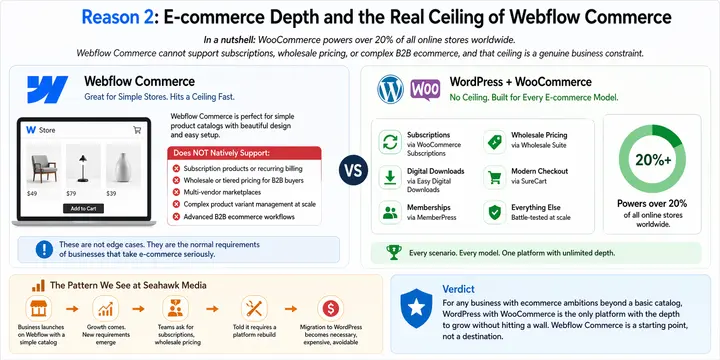
The ceiling becomes apparent the moment business requirements grow. Webflow Commerce does not natively support:
- Subscription products or recurring billing
- Wholesale or tiered pricing structures for B2B buyers
- Multi-vendor marketplaces
- Complex product variant management at scale
- Advanced B2B ecommerce workflows that enterprise buyers expect
These are not edge cases. They are the normal requirements of businesses that take e-commerce seriously.
WordPress with WooCommerce is a tool category entirely different from the others. WooCommerce powers more than 20% of all online stores globally and supports every ecommerce scenario a serious business needs.
Subscriptions via WooCommerce Subscriptions, digital downloads via EDD, membership-gated content via MemberPress, wholesale pricing via Wholesale Suite, and modern, lightweight checkout via SureCart. Every model is covered and battle-tested at scale.
The pattern Seahawk Media sees regularly is this: a business launches on Webflow with a simple product catalog. Growth comes. The marketing team asks for subscriptions. The sales team asks for wholesale pricing. The development team is told that those features require a platform rebuild.
The migration to WordPress becomes necessary, expensive, and entirely avoidable if the right foundation had been chosen from the start.
Verdict: For any business with ecommerce ambitions beyond a basic catalog, WordPress with WooCommerce is the only platform with the depth to grow without hitting a wall. Webflow Commerce is a starting point, not a destination.
Reason 3: SEO Control, Schema, Technical SEO, and AI Search Visibility
In a nutshell, WordPress gives granular control over every SEO element, including structured data and schema markup. Webflow Enterprise handles the fundamentals well, but cannot replicate the depth that serious enterprise SEO strategies require without custom code.
Here is where honesty matters. Webflow Enterprise has genuinely strong technical SEO foundations. Clean semantic HTML output, fast Core Web Vitals by default, automatic sitemaps, customizable meta titles and descriptions per page, and Open Graph control are all built in.
For a marketing site that needs solid SEO without a dedicated SEO team, Webflow is a very capable starting point.
What Webflow Enterprise lacks is the depth layer. Structured data and schema markup are the signals that tell Google and AI search tools exactly what your content is, who wrote it, what it is about, and how authoritative it is. In Webflow, these require custom code embeds.
There is no native equivalent to Rank Math and AIOSEO. Specifically, none of the following are available without a developer writing custom embed code on every relevant page:
- FAQ schema for People Also Ask eligibility
- Article schema for news and blog content attribution
- Breadcrumb schema for cleaner search result display
- How-to markup for instructional content
- Product and review schema for e-commerce pages
This matters more in 2026 than it did two years ago. Google AI Overviews, Perplexity, and ChatGPT, when web browsing, all favor content that is well-structured, schema-rich, clearly attributed, and technically crawlable.
A properly configured WordPress site with AIOSEO or Rank Math handling structured data is significantly more likely to appear in AI-generated answers than a Webflow site without custom schema embeds.
At enterprise scale with hundreds or thousands of pages, the gap compounds. For enterprise content operations running complex taxonomy structures, multilingual SEO with Weglot, international hreflang configurations, or large-scale technical SEO audits, the plugin ecosystem and developer tooling around WordPress SEO simply has no Webflow equivalent.
Verdict: WordPress wins on SEO control in depth. For enterprise teams running sophisticated SEO strategies or targeting AI-powered search visibility, WordPress’s tooling is a stronger foundation.
Reason 4: Plugin Ecosystem, Developer Talent, and WordPress Multisite
In a nutshell: WordPress has over 60,000 plugins covering every enterprise use case. Webflow’s App Marketplace is growing but still lacks the depth of others. And finding a WordPress enterprise developer is dramatically easier than finding a Webflow Enterprise specialist.
The plugin ecosystem comparison is not even close. WordPress has over 60,000 free plugins in the official directory, plus thousands of premium options from independent developers.
Every CRM integration, LMS, membership system, analytics platform, booking tool, event manager, and custom functionality scenario has a tested, maintained WordPress solution.
To use the approved tools relevant to enterprise use cases, the WordPress ecosystem covers every requirement:
- LearnDash for full learning management system functionality
- MemberPress for memberships and paywalled content
- GiveWP for nonprofit fundraising and donation management
- The Events Calendar for ticketed event management
- MonsterInsights for analytics connected to Google Search Console
- AIOSEO for on-page and technical SEO management
- SolidWP for security hardening and monitoring
- WP Umbrella for multisite management and maintenance reporting
- Jetpack for all-in-one performance, backups, and uptime monitoring
These tools cover enterprise requirements that Webflow’s marketplace simply cannot match today.
WordPress Multisite deserves special attention because almost no comparison articles discuss it. WordPress Multisite allows an enterprise to manage hundreds of individual websites from a single installation.
One dashboard, shared user management, centralized updates, and consistent branding across every property. For franchise networks, university systems, media companies managing multiple publications, or global enterprises running regional sites, this is an enormous operational advantage. Webflow has no equivalent feature.
The developer talent pool is a practical consideration that enterprise teams consistently underestimate. WordPress developers are available globally in abundance at every price point and across every time zone. Finding a developer to implement a custom integration, build a bespoke plugin, or troubleshoot a complex issue is straightforward.
Finding a Webflow Enterprise specialist with comparable experience is meaningfully harder; the talent pool is smaller, and rates reflect that scarcity.
Verdict: WordPress wins on ecosystem depth, multisite capability, and developer availability. For enterprises that need complex integrations, multi-property management, or reliable access to technical talent, WordPress has no peer.
Reason 5: Cost at Scale and Why Webflow Enterprise Gets Expensive Fast
In a nutshell, Webflow Enterprise starts at approximately $212 per month per site with separate Workspace fees per user. WordPress hosting for enterprise sites starts at $25 per month, with no per-user seat charges and full pricing transparency across providers.
The sticker price comparison is misleading in both directions. Webflow advocates point out that WordPress has hidden costs: hosting, plugins, developer maintenance, and security patching.
WordPress advocates point out that Webflow Enterprise costs add up fast. Both are partly right. The honest answer requires looking at the total cost of ownership across three years.
Webflow Enterprise cost reality:
- Custom-quoted pricing typically starts around $212 per month per site
- Workspace plan fees are charged separately per user on top of site fees
- A 10-person team across multiple sites adds significantly to the monthly total
- Annual contracts are standard, with no competitive hosting alternative
- When Webflow raises prices, you have no leverage and no alternative
WordPress enterprise cost reality:
- Managed hosting from WP Engine, Kinsta, or Liquid Web runs $25 to $300 per month
- A fully equipped enterprise plugin stack adds $300 to $1,000 per year
- Developer maintenance cost depends on whether your team has in-house WordPress expertise
- Teams with WordPress developers on staff absorb maintenance into existing headcount
- Full pricing competition between dozens of managed hosts means you always have leverage
One real pattern worth noting: businesses that migrated from Webflow to WordPress and moved to managed WordPress hosting consistently reported meaningful reductions in hosting costs while gaining significantly more functionality. The Webflow brand premium is real, and it compounds over time.
The counterpoint deserves acknowledgment. Webflow Enterprise genuinely saves developer maintenance time for teams without technical resources.
If your entire web team is designers and marketers with no developers, Webflow’s all-in-one model reduces a specific category of operational cost. That saving is legitimate. But for any organization with access to WordPress expertise, the total cost of ownership over three years strongly favors WordPress.
Verdict: WordPress offers significantly more pricing flexibility and competitive leverage at scale. Webflow Enterprise pricing is predictable but expensive, and the absence of competitive infrastructure alternatives creates long-term commercial risk that compounds with contract renewals.
When Webflow Enterprise Actually Makes Sense?
Seahawk Media does not dismiss Webflow Enterprise for every use case. That would be dishonest, and dishonest comparisons do not help anyone make a good decision.
Webflow Enterprise is genuinely the right choice when:
- Your team is designers and marketers with no in-house developer, and publishing speed is the priority
- You are a SaaS company building a conversion-focused marketing site with no ecommerce complexity
- You need fast iteration on landing pages without raising development tickets
- Your website is a brand and marketing asset, not a revenue engine with complex functionality
- You value absolute pricing predictability and are willing to pay a premium for it
If your website’s primary job is to look exceptional, load fast, and let non-technical marketers publish independently, Webflow Enterprise delivers that experience better than almost anything else available.
The honest question is: Will your website requirements remain within those boundaries over the next three to five years? For businesses with growth ambitions, the answer is usually no.
Real Patterns Seahawk Media Sees From Enterprise Clients
The pattern is consistent across clients who come to us after time on Webflow Enterprise. The design team loved it. Publishing was fast. The site looked great. Then the business grew.
Here is what the growth stage looked like for most of them:
- The e-commerce team asked for subscription products. Webflow Commerce could not do it.
- The SEO team asked for structured data across two hundred product pages. Custom code on every page was the only option.
- The IT team asked where the content database was hosted and whether it was GDPR compliant. There was no clean answer.
- The marketing team wanted WordPress Multisite for three regional properties. Webflow had no equivalent.
The finance team questioned why Enterprise pricing had increased again and what the alternative was. There was none.
The migration from Webflow to WordPress is possible, but it is not a simple content export. Webflow does not produce a migration file that imports cleanly into WordPress.
Content needs to be manually transferred or rebuilt. Page designs need to be recreated in a WordPress theme or page builder. Integrations need to be reconnected. Redirects need to be mapped to protect SEO equity. The process takes weeks for a small site and months for a large one.
Every client who goes through that migration says the same thing: they wish they had built on WordPress from the start. If your website is a business asset with a growth trajectory, build it on a platform that grows with you.
Conclusion
Webflow Enterprise is a well-built platform and deserves its reputation among design-led teams. The speed, visual editor, clean code output, and zero-maintenance model are all real advantages for the right organization.
However, for businesses where the website is a growth asset rather than a design asset, the five reasons above consistently point to WordPress.
Full data ownership with no vendor lock-in. E-commerce depth through WooCommerce that Webflow Commerce cannot match. SEO tooling that covers structured data, schema markup, and AI search visibility at a level that Webflow requires custom code to approximate.
An ecosystem of over 60,000 plugins and a global developer talent pool that has no Webflow equivalent. And pricing flexibility at scale that gives you leverage, Webflow Enterprise simply does not allow.
Overall Verdict: WordPress is the stronger long-term platform for any enterprise that needs full ownership, complex functionality, advanced SEO, and cost control at scale.
Webflow Enterprise is excellent for design-led marketing teams with simpler requirements and no developer resources. Build on the platform your business will need in three years, not the one that feels easiest today.
WordPress vs Webflow Enterprise FAQs
Is WordPress better than Webflow Enterprise for large businesses?
For most large businesses, yes. WordPress offers complete data ownership, unlimited plugin extensibility, advanced SEO tooling, WordPress Multisite for managing multiple properties, and significantly more pricing flexibility. Webflow Enterprise suits design-led marketing teams with simpler functional requirements and no in-house developer.
What is Webflow Enterprise pricing compared to WordPress?
Webflow Enterprise starts at approximately $212 per month per site, with additional Workspace plan fees charged per user.
WordPress enterprise hosting typically costs $25 to $300 per month, depending on the provider, with a full plugin and tooling stack adding $300 to $1,000 per year. For teams managing multiple sites with multiple users, the cost gap widens considerably.
Can you migrate from Webflow to WordPress?
Yes, but it requires a full rebuild. Webflow does not export content in a format that imports cleanly into WordPress. Content, design, and integrations all need to be reconstructed from scratch. Seahawk Media handles full Webflow-to-WordPress migrations, including content transfer, design rebuild, SEO redirect mapping, and go-live testing.
Does WordPress have better SEO than Webflow Enterprise?
WordPress offers deeper SEO tooling through plugins like AIOSEO, Rank Math, and Schema Pro. It covers structured data, schema markup, breadcrumb navigation, and technical SEO auditing at a level that Webflow cannot replicate natively. Webflow Enterprise has strong technical SEO foundations but requires custom code embeds for advanced schema configuration.
Is Webflow Enterprise good for e-commerce?
Webflow Commerce handles simple product catalogs well. It does not support subscriptions, wholesale or tiered pricing, complex product variants at scale, or multi-vendor setups. For serious ecommerce, WordPress with WooCommerce, which powers over 20% of all online stores worldwide, is significantly more capable and scalable.
What is vendor lock-in risk with Webflow Enterprise?
Because your CMS data and site logic live on Webflow’s servers, you are commercially dependent on Webflow’s pricing decisions. If Webflow raises Enterprise prices, your only alternative is an expensive full-site rebuild. With WordPress, you can move between hosting providers at any point with no platform dependency and full content portability.
Can WordPress handle enterprise-level websites?
Yes. WordPress powers enterprise platforms for major media publications, global ecommerce operations, and Fortune 500 companies.
WordPress VIP provides enterprise-grade managed infrastructure specifically built for high-traffic, compliance-sensitive organizations. WordPress Multisite allows enterprises to manage hundreds of sites from a single installation.


