
Your WordPress membership content could be circulating on public forums for free right now, and you would not know it until your revenue starts to drop.
Nearly 30% of digital creators have experienced their content being stolen. For membership site owners, the consequences go beyond reputation damage. When premium content leaks, paying members cancel because the value proposition disappears. Potential members choose the free version over a subscription.
Most site owners rely on basic password protection, which does nothing to stop a member from sharing their login credentials or posting a downloaded file in a private group. The good news is that a well-configured WordPress membership site can prevent the vast majority of content theft without building custom security systems or hiring a developer.
This guide covers ten proven ways to prevent content theft on your WordPress membership site in 2026.
Content theft occurs when premium membership content is accessed, copied, or distributed without authorization. This can include account sharing, content scraping, direct link sharing, screen recording, AI scraping, and RSS feed harvesting.
Because content theft takes many forms, the most effective protection strategy combines multiple security measures rather than relying on a single tool or restriction.
Why Basic Content Theft Protection is Not Enough?
The most common membership site protection setup is a membership plugin that restricts logged-in access and a simple password on download files. This setup stops casual unauthorized access. It does not stop determined content thieves.
Here is what it fails to prevent:
| Threat | Basic Protection | What Actually Stops It |
| Account sharing | Not addressed | Concurrent login limits |
| Download link sharing | Not addressed | Expiring download links |
| Bot scraping | Not addressed | Bot protection and rate limiting |
| RSS harvesting | Not addressed | RSS excerpt restriction |
| Screenshot/recording | Not addressed | User-specific watermarking |
| AI crawlers | Not addressed | robots.txt and paywall configuration |
| Video redistribution | Not addressed | Hosted video with access controls |
Use this table to audit your current setup and identify which gaps need to be closed.
Need a Secure WordPress Membership Site Built Right?
Seahawk builds WordPress membership sites with access control, content dripping, download protection, and bot security configured from day one. No contracts. No retainers.
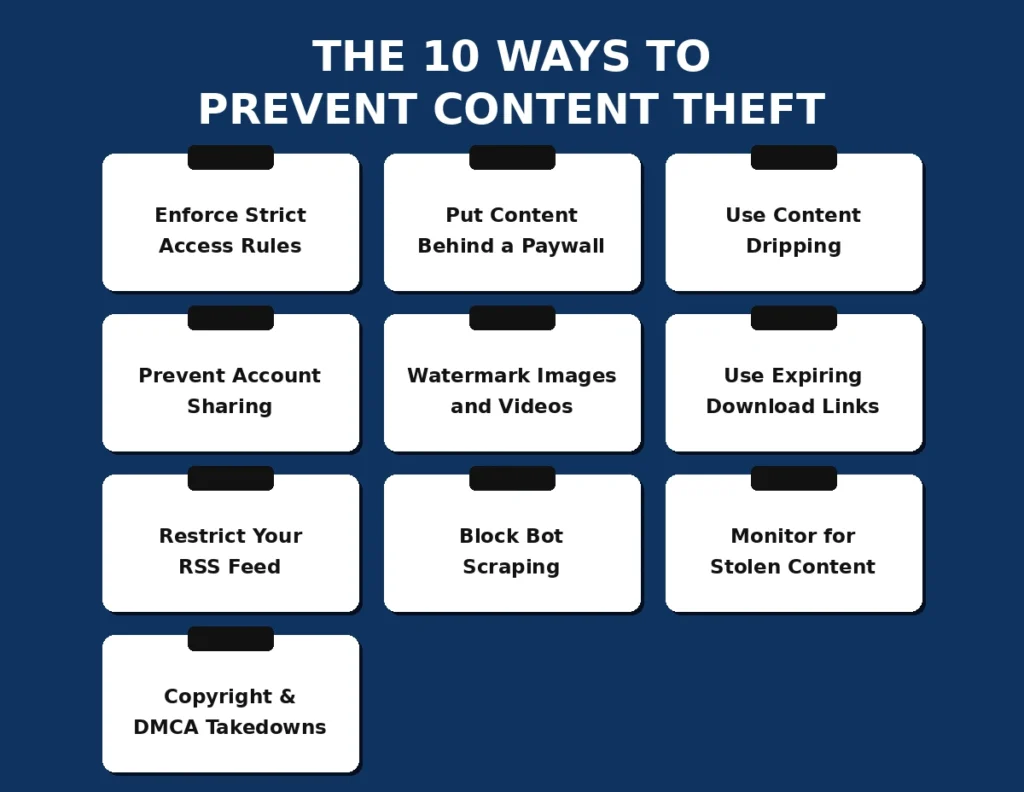
The 10 Ways to Prevent Content Theft
No single method stops every type of theft. These ten work together as a layered system, each closing a specific gap left open by the others.
Enforce Strict Access Rules With Your Membership Plugin
The foundation of all content protection on a WordPress membership site is properly configured access rules. Every piece of premium content must be explicitly restricted to logged-in members at the appropriate membership level.
MemberPress handles this through its Rules system. Go to MemberPress > Rules and create rules that restrict individual posts, pages, categories, or custom post types to specific membership levels. Do not assume content is protected because it is not linked from public pages. Unlinked URLs can still be accessed directly if no access rule covers them.
Restrict Content Pro and WooCommerce Memberships use similar rule-based systems. Whichever plugin you use, audit your access rules after every new content addition to verify nothing has slipped through without restriction.
What to check:
- Every premium post and page has an explicit access rule
- Category-level restrictions cover all posts in that category
- Download pages are restricted, not just the download files themselves
- Your checkout and thank-you pages correctly trigger membership activation before content access is granted
Put Your Most Valuable Content Behind a Paywall
A paywall adds a financial barrier between your content and unauthorized users. Casual content thieves who can access your site for free will not subscribe to steal it. The paywall ensures that anyone who accesses your premium content has made a financial commitment.
MemberPress, Paid Memberships Pro, and WooCommerce Memberships all support paywalled access. Configure your paywall to appear on any page where premium content is teased. Show enough free content to demonstrate value and create the desire to subscribe, then lock the rest.
For content that generates the most subscription conversions, consider a preview model where the first 20% of a post is visible to non-members and the remainder is gated. This preview approach converts better than a hard paywall that shows nothing.
Use Content Dripping to Limit Mass Copying
Content dripping releases your content gradually over time rather than giving new members instant access to your entire library. A member who subscribes today receives access to Week 1 content now, Week 2 content in seven days, and so on.
Dripping serves two protection functions simultaneously. First, it prevents a common exploitation pattern where someone subscribes, downloads your entire library in 48 hours, and immediately cancels. Second, it reduces the volume of content a single compromised account can distribute, since each member has access only to a portion of your full catalog.
Content dripping is also one of the most effective retention tools available on membership sites. Members who have upcoming content to look forward to churn at lower rates than those who receive everything immediately.
MemberPress, Restrict Content Pro, and WooCommerce Memberships all support content dripping natively. Configure drip schedules based on days since membership start to maintain full control over the release timeline.
Prevent Account Sharing With Concurrent Login Limits
Account sharing is the most common form of membership content theft, and the one that most membership site owners do not address. One member subscribes and shares their credentials with friends, family members, or an entire private Discord group.
The solution is concurrent login limits: restricting each account to a single active session at a time. When a second login is attempted from a different device or location, the first session is automatically terminated.
Plugins that handle this:
- Prevent Concurrent Logins (free WordPress plugin): Blocks multiple simultaneous logins on the same account
- WP Bouncer: Limits sessions per user with configurable kick behavior
- MemberPress with custom session handling: Can be extended with filters to limit concurrent sessions
For membership sites where members legitimately need access from multiple devices (home and work computers, for example), set the limit to 2 or 3 concurrent sessions instead of 1. This stops mass credential sharing while accommodating legitimate multi-device use.
Pair concurrent login limits with an IP-based alert system that notifies you when an account logs in from an unusual geographic location. Several security plugins, including Wordfence, include this functionality.
Watermark Images and Videos With User-Specific Identifiers
Standard visible watermarks (your logo in a corner) deter casual content theft but do not identify the source of a leak. User-specific watermarking embeds the member’s name, email, or account ID into every piece of content they access. When stolen content surfaces online, you can identify exactly who leaked it.
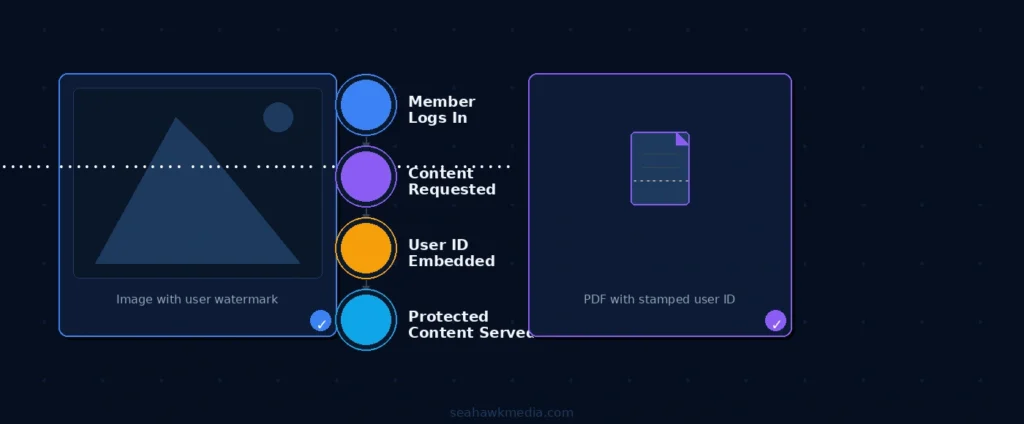
For images: Use a plugin like Watermark My Images or Image Watermark to dynamically add user-specific text to images served to logged-in members. The watermark appears as an overlay containing the member’s name and the date of access.
For PDFs and documents: Use PDF protection plugins that stamp the member’s account details on each page during download. PDF Embedder and WP PDF Stamper both support dynamic watermarking.
For videos: Host your membership videos through a platform with access controls and watermarking, such as Vimeo OTT, Uscreen, or Bunny.net Stream. Vimeo OTT supports forensic watermarking that is invisible to the viewer but detectable in distributed copies.
User-specific watermarking acts as a deterrent even when members know it’s there. Knowing they can be identified reduces the likelihood of intentional redistribution.
Protect Downloads With Expiring and User-Specific Links
Direct file URLs are among the most exploited vectors for content theft on membership sites. A member downloads a resource, copies the URL, and shares it publicly. Anyone with the link can download the file without a membership.
The solution is expiring download links: URLs that are unique to each user, contain a time-limited token, and expire after a set period or a set number of uses.
How to implement this in WordPress:
- MemberPress Downloads: Generates user-specific download links that expire after a configured time. Available as an add-on within the MemberPress ecosystem.
- Easy Digital Downloads: Supports download limits and expiring download URLs natively. Each purchase generates a unique download link tied to the customer’s email.
- Download Monitor: A standalone download management plugin that supports access restrictions and link expiration for any file type.
Configure your download links to expire within 24 to 48 hours of generation. Members who need to re-download can return to the members’ area to generate a fresh link.
Restrict Your RSS Feed to Excerpts
An unprotected RSS feed publishes your full post content to every feed reader and bot that subscribes to it. This is one of the most commonly overlooked content theft vulnerabilities on membership sites.
Restricting your RSS feed to post excerpts ensures that your posts’ full content is never distributed through it. Feed subscribers see a teaser with a link back to your site, where access rules enforce membership requirements.
How to restrict your RSS feed in WordPress: Go to Settings > Reading in your WordPress dashboard. Under, for each article in a feed, show, select Summary instead of Full text. This restricts all feeds on your site to excerpts.
For membership sites with multiple content types, verify that custom post type feeds are also restricted. Some membership plugins create separate feeds for their content types that are not affected by the WordPress reading settings. Check your membership plugin’s feed documentation and restrict or disable any feeds that publish full content.
Block Bot Scraping and AI Crawlers
Automated scraping bots and AI crawlers represent an increasingly significant vector for content theft on membership sites. AI training data collection bots, in particular, are known to attempt access to paywalled content.
Protecting against bots and scrapers:
Configure your robots.txt file. Add Disallow directives for your membership content URLs. While this does not block malicious crawlers (which ignore robots.txt), it signals to legitimate crawlers that your content should not be indexed or collected.
Install a Web Application Firewall. Wordfence Premium, Sucuri, and Cloudflare all include bot-protection rules that block known scraping and AI-crawling signatures. Configure rate limiting to block IP addresses that make excessive page requests within a short window.
Use Cloudflare’s AI Scraping Blocker. Cloudflare now offers a specific setting to block AI crawler bots, including GPTBot, ClaudeBot, and similar agents. Enable this under Cloudflare > Security > Bots if you are using Cloudflare in front of your WordPress site.
Add CAPTCHA to login and registration. Preventing automated account creation reduces the bot attack surface on your membership registration flow. Use WPForms or Gravity Forms with Google reCAPTCHA v3 on your membership registration and login forms.
Monitor the Web for Stolen Content
Prevention is the goal, but detection matters too. Content that has already been stolen and published elsewhere needs to be found quickly so you can act before it compounds your damage.
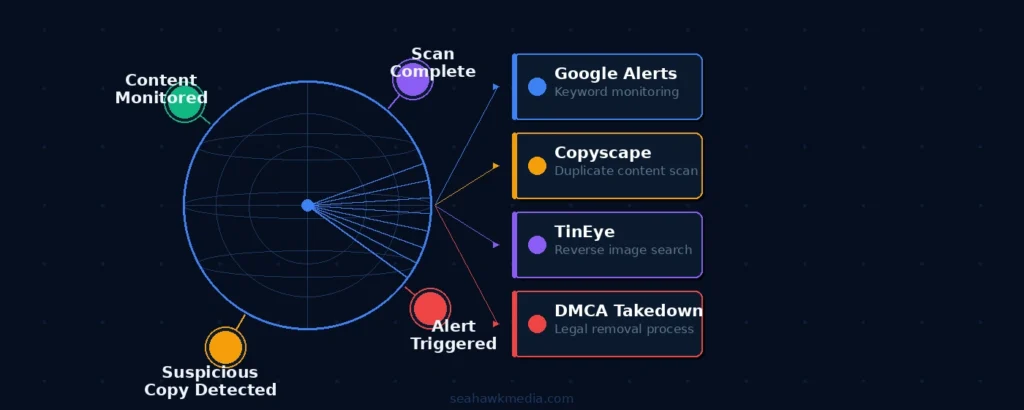
Google Alerts: Set up alerts for distinctive phrases from your premium content. When Google indexes a page containing those phrases, you receive an email notification. Go to google.com/alerts and create alerts for your most unique phrases, your course titles, and your business name, along with words like “free download.”
Copyscape: Paste your content URLs into Copyscape to find websites that have published copies of your content. Copyscape Premium allows batch scanning across your full content library. Run a scan monthly.
TinEye and Google Reverse Image Search: For image-heavy membership sites, use reverse image search tools to find your watermarked or proprietary images appearing on other sites.
Social media monitoring: Set up searches on Reddit, Facebook Groups, and Discord for your membership site name and content titles. Members frequently share login credentials or redistribute content in these communities.
Use Copyright Notices, Creative Commons Licensing, and DMCA Takedowns
Legal standing matters when content is stolen, and you need to force its removal. Copyright notices and appropriate licensing establish your ownership clearly before any dispute arises.
Copyright notice: Add a visible copyright statement to your footer and to every piece of premium content. For example: Copyright [Year] [Your Business Name]. All rights reserved. Unauthorized reproduction or redistribution is prohibited.
Creative Commons licensing: If you want to allow some sharing (such as with attribution) while protecting commercial use, choose an appropriate Creative Commons license. For most membership content, CC BY-NC-ND (Attribution-NonCommercial-NoDerivatives) allows members to share content with credit but prohibits commercial use and modification.
DMCA takedown process: When you find stolen content published on another website, a DMCA (Digital Millennium Copyright Act) takedown notice is the most effective way to remove it. The process:
- Document the stolen content with screenshots and the URL where it appears
- Identify the hosting provider or platform where it is published (use a WHOIS lookup)
- Submit a DMCA takedown notice to the hosting provider’s designated DMCA agent. Most large hosts publish a DMCA contact address
- Include your contact information, a description of your original work and where it is hosted, the URL of the infringing copy, and a statement of good faith belief that the use is unauthorized
- Send a separate DMCA notice to Google requesting deindexing of the infringing URL via Google’s copyright removal tool at support.google.com/legal/contact/lr_dmca
Most hosting providers respond to DMCA takedowns within 48 to 72 hours. Google deindexing typically occurs within a few days.
Best WordPress Plugins for Preventing Content Theft
| Plugin | Primary Function | Best For | Price |
| MemberPress | Access rules, paywall, content dripping | Full membership site protection | From $179/year |
| Restrict Content Pro | Access rules, download protection | Lightweight membership protection | From $99/year |
| Prevent Concurrent Logins | Account sharing prevention | Stopping credential sharing | Free |
| Download Monitor | Expiring download links | File protection | Free / $69/year |
| Wordfence Premium | Bot protection, WAF | Bot scraping and brute force | $119/year |
| WP PDF Stamper | User-specific PDF watermarking | Document watermarking | $29/year |
| Image Watermark | Dynamic image watermarking | Image content protection | Free / $19/year |
| Copyscape Premium | Content theft monitoring | Finding stolen content | Pay per scan |
Final Thoughts on Preventing Content Theft on WordPress Membership Sites
No single protection method prevents every type of content theft. The membership sites with the strongest content protection layer use multiple methods that address specific threat vectors.
Start with the foundation: strict access rules in your membership plugin, content dripping on your most valuable assets, and expiring download links for any downloadable files. Add concurrent login limits to address account sharing. Configure your RSS feed to excerpts to close that vulnerability. Install a WAF and bot protection to address scraping.
Then build the detection layer: Google Alerts, Copyscape, and reverse image search running monthly so you catch theft that slips through your prevention layer. Know your DMCA rights so you can act quickly when something is found.
A fully protected WordPress membership site is not impenetrable. But a well-configured one makes content theft difficult enough that most bad actors move on to easier targets.
If you need help building or hardening a WordPress membership site with robust content protection, Seahawk’s development team handles the full implementation.
Frequently Asked Questions About Preventing Content Theft on WordPress Membership Sites
How do I prevent content theft on my WordPress membership site?
The most effective approach combines multiple layers: strict access rules in your membership plugin to restrict content to logged-in members; concurrent login limits to prevent account sharing; expiring download links for downloadable files; RSS feed restrictions to excerpts; bot protection via a WAF; and regular monitoring with Copyscape and Google Alerts. No single method prevents all types of theft. Layering protections that address each threat type is the most reliable strategy.
What is the best plugin to prevent content theft on WordPress?
MemberPress is the most comprehensive option for membership sites because it combines access restriction rules, content dripping, download protection, and paywall functionality into a single plugin. For bot and scraper protection, Wordfence Premium adds a WAF and rate-limiting layer that MemberPress does not. Use both together for the strongest protection stack.
How do I stop members from sharing their login credentials?
Install a concurrent login limit plugin such as Prevent Concurrent Logins. This limits each membership account to one or two active sessions at a time. When a third device attempts to log in with the same credentials, the first session is automatically terminated. This stops mass credential sharing while allowing members to use your site on their personal devices.
Can I stop bots from scraping my membership content?
Partially. A Web Application Firewall (Wordfence Premium, Sucuri, or Cloudflare) blocks known scraping bot signatures and rate-limits excessive requests. Cloudflare offers a specific AI bot blocking feature that blocks OpenAI, Anthropic, and similar crawlers. Configure your robots.txt file to disallow access to your content directories. These measures stop most automated scrapers but cannot stop all determined manual copying.
What should I do if my membership content has already been stolen?
Document the stolen content with screenshots and note the URL where it appears. Submit a DMCA takedown notice to the hosting provider of the infringing site and, separately, to Google via its copyright removal tool. Most hosting providers respond within 48 to 72 hours. Google typically deindexes reported URLs within a few days. File a separate DMCA notice for each distinct infringing URL.
Does watermarking actually prevent content theft?
Standard watermarks (your logo in the corner) deter casual sharing but do not prevent determined distribution. User-specific watermarks that embed the member’s name, email, or account ID are more effective because they identify the source of any leak. The knowledge that they will be personally identified is a strong deterrent to intentional redistribution. Use PDF stamping and video forensic watermarking tools that embed identifiers directly into the content rather than as a visible overlay.
How do I protect video content on my WordPress membership site?
Do not self-host membership videos on your WordPress server. Use a video hosting platform with built-in access controls, such as Vimeo OTT, Bunny.net Stream, or Uscreen. These platforms support domain-restricted embedding (videos only play on your domain), expiring signed URLs, and forensic watermarking. Self-hosted videos stored in your WordPress uploads directory can be accessed via direct URL and are difficult to protect comprehensively.


