

Ever noticed how a website loads instantly one day, and feels painfully slow the next. Or how you stay logged into your favorite store even after closing your browser. These everyday experiences are not accidents. They are the result of two quiet systems working behind the scenes, cache and cookies.
While most users never think about them, cache and cookies directly influence website speed, user experience, privacy, and even SEO performance. For website owners and WordPress users especially, understanding how they work is no longer optional.
In this guide, we explain cache vs cookies in plain language. No deep technical jargon. Just what they are, how they work, and why they matter for faster, more reliable websites.
TL;DR: Cookies vs Cache
- Cache speeds up websites by storing files like images, stylesheets, and scripts, so pages load faster on repeat visits.
- Cookies store small pieces of user data such as login status, preferences, and shopping cart details.
- Cache focuses on performance and benefits all users equally.
- Cookies focus on personalization and are unique to each user.
- Cache works one way by reusing stored files, while cookies communicate back to the server.
- Excessive cookies can affect privacy and performance, while poorly managed cache can show outdated content.
- Used together correctly, cache delivers speed, and cookies deliver a smoother user experience.
What is Cache and Why Websites Rely on It
Cache is a temporary storage system that helps websites load faster by saving copies of commonly used files. Instead of downloading the same images, stylesheets, and scripts every time a page loads, cache allows browsers and servers to reuse previously saved versions.
Think of cache as your browser remembering what it has already seen. When you visit a website for the first time, your browser downloads everything from the server. On your next visit, it checks the cache first. If the files are already there, they load instantly.
Cache helps websites store static resources such as images, logos, CSS files, JavaScript files, and even HTML pages. These files do not change often, so caching them makes sense.
Without cache, every page visit would start from zero. That means more server requests, longer load times, and a worse experience for users.
Improve Website Speed Without Guesswork
Performance issues often stem from poor cache configuration and unnecessary scripts. Seahawk helps optimize WordPress sites for speed, stability, and long term growth.
How Cache Improves Website Speed
Cache improves website speed by reducing the need to repeatedly fetch the same files from the server. This lowers network requests, reduces server load, and shortens page rendering time.
For users, this means pages feel faster and smoother. For website owners, it means lower hosting strain, improved engagement, and better performance metrics like bounce rate and time on site
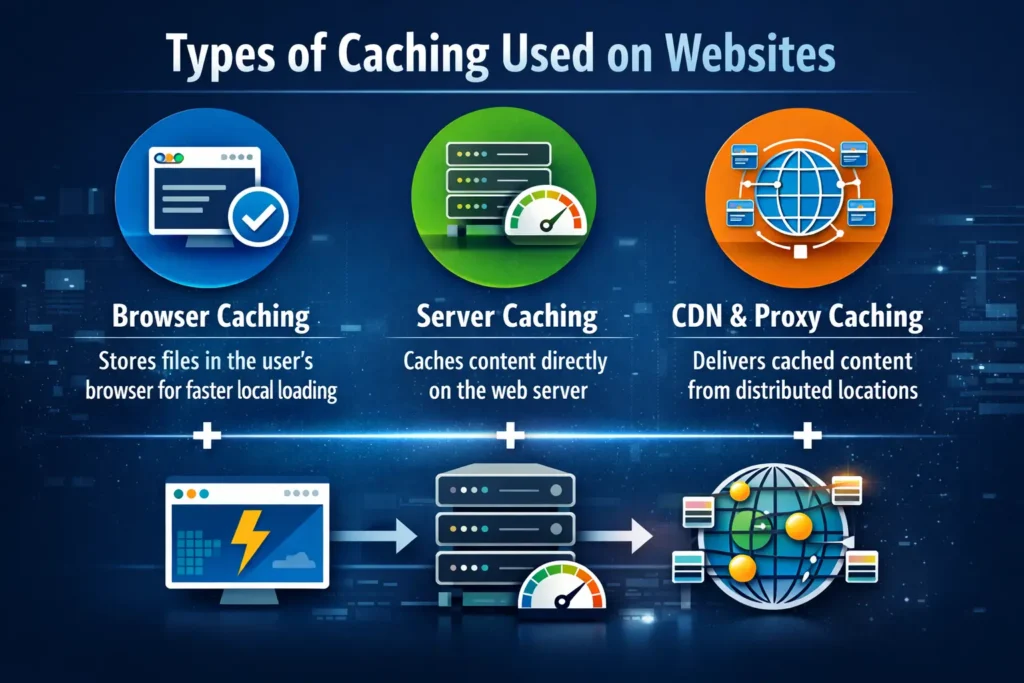
Types of Caching Used on Websites
Modern websites use multiple layers of caching to deliver content quickly. Each layer plays a different role, but they all serve the same purpose, speed and efficiency.
Browser Caching Explained
Browser caching stores website files directly on a visitor’s device. When someone visits a site, their browser saves images, scripts, and styles locally. On repeat visits, the browser loads these files from local storage instead of downloading them again.
This is why logos, icons, and layouts appear instantly after the first visit. Browser caching is especially effective for returning users and content heavy websites.
Proper browser cache settings can significantly reduce load times without affecting how the website looks or functions.
Server and Proxy Caching Explained
Server side and proxy caching store copies of website content closer to users. Instead of every request hitting the main server, cached versions are served first.
Proxy caching is often used by hosting providers and CDNs. When a user requests a page, the system checks if a cached version exists. If it does, the page is delivered immediately without touching the origin server.
This reduces latency, improves global load speeds, and protects servers during traffic spikes.
What Are Cookies and Why Websites Use Them
Cookies are small text files stored on a user’s browser by a website. Unlike cache, cookies do not store images or files. They store information about the user and their interaction with the site.
Cookies help websites remember who you are. They keep you logged in, save your preferences, and track session details. Every time your browser sends a request, it also sends relevant cookies back to the server.
This two way communication allows websites to personalize the experience for each visitor.
Cookies typically store data like session IDs, login status, language preferences, shopping cart contents, and analytics identifiers.
How Cookies Improve User Experience
Cookies make websites feel personal and consistent. Without cookies, users would need to log in repeatedly, reset preferences, and rebuild shopping carts every time they visit.
They allow websites to remember display settings, language choices, and saved actions. When used responsibly, cookies reduce friction and create smoother user journeys.
Types of Cookies You Should Know About
Not all cookies serve the same purpose. Understanding the different types helps explain their impact on performance and privacy.
Session Cookies
Session cookies exist only during a single browsing session. They help websites track activity while a user is actively navigating pages. Once the browser closes, session cookies are deleted automatically.
These cookies are commonly used for login sessions and temporary interactions.
Persistent Cookies
Persistent cookies remain on a user’s device for a defined period. They store preferences like language settings, remembered logins, and user customization.
These cookies make repeat visits more convenient, but should be used carefully to avoid unnecessary data retention.
Authentication Cookies
Authentication cookies confirm a user’s identity after login. They allow secure access to accounts, dashboards, and protected areas.
Without authentication cookies, users would need to re enter credentials constantly. These cookies are essential for secure, personalized experiences.
Tracking Cookies
Tracking cookies collect data about browsing behavior, interactions, and usage patterns. They are often used for analytics, advertising, and performance monitoring.
While useful for insights, excessive tracking cookies can affect performance and raise privacy concerns.
Cache vs Cookies: The Core Differences Explained Clearly
Although cache and cookies are often mentioned together, they serve very different purposes. Understanding these differences helps website owners make smarter performance decisions.
Purpose Speed vs Personalization
Cache is designed to make websites load faster. It focuses entirely on performance. Cookies are designed to personalize the user experience. They remember preferences, identity, and session details.
Data Stored Files vs Text
Cache stores website files like images, scripts, and stylesheets. Cookies store small text based information such as session IDs and preferences.
Communication One Way vs Two Way
Cache is a one way system. Once files are stored, they are reused without communicating back to the server. Cookies are sent back to the server with every request, allowing websites to read and respond to user data.
Storage Size and Lifespan
Cache can take up significant storage space, depending on website size. Cookies are very small, but may persist for long periods depending on their expiration rules.
Who Benefits From Each
Cache benefits every visitor equally by speeding up page loads. Cookies are unique to each user and shape their individual experience.
How Cache Affects Page Speed and Core Web Vitals
Caching plays a direct role in how fast a website feels and how well it performs in real world conditions. When caching is implemented properly, browsers and servers do far less work to display a page. Instead of downloading every file repeatedly, cached assets are reused instantly.
This reduces page load time and improves key performance signals that search engines measure. Faster rendering means users see content sooner and interact more smoothly. This directly supports metrics like First Contentful Paint and Largest Contentful Paint.
Caching also reduces server strain. Fewer requests reach the origin server, which helps websites remain stable during traffic spikes. For WordPress websites especially, caching can be the difference between a smooth experience and a slow one under load.
However, cache must be managed carefully. If cached content becomes outdated, users may see old versions of pages. Proper cache expiration and invalidation ensure users always receive accurate content without sacrificing speed.
How Cookies Affect Page Speed and Website Performance
Cookies primarily exist to improve usability, but they can influence page speed in subtle ways. Every time a browser sends a request to a server, it includes cookies related to that domain. If cookies are excessive or too large, request sizes increase.
This additional data can slow down responses, especially on mobile connections or high traffic websites. Cookies that trigger third party services, such as analytics or advertising scripts, may also introduce extra loading steps.
While cookies can reduce server work by remembering login states and preferences, poor cookie management often leads to performance issues. The goal is balance. Store only what is necessary, and avoid overloading pages with unnecessary tracking.
Cookie Privacy Concerns: Every Website Owner Should Understand
Cookies raise privacy concerns because they store and transmit user related data. While most cookies are harmless, tracking cookies can follow users across multiple websites and build behavior profiles.
This tracking is often used for targeted advertising and analytics. Users are increasingly aware of this and expect transparency and control. Excessive cookie usage can reduce trust and harm brand perception.
Security risks also exist. If attackers steal session cookies, they can gain unauthorized access to user accounts. Secure cookies, HTTPS connections, and limited lifespans help reduce this risk.
Website owners must treat cookies as a responsibility, not just a convenience.
How to Optimize Cookies Without Hurting Performance
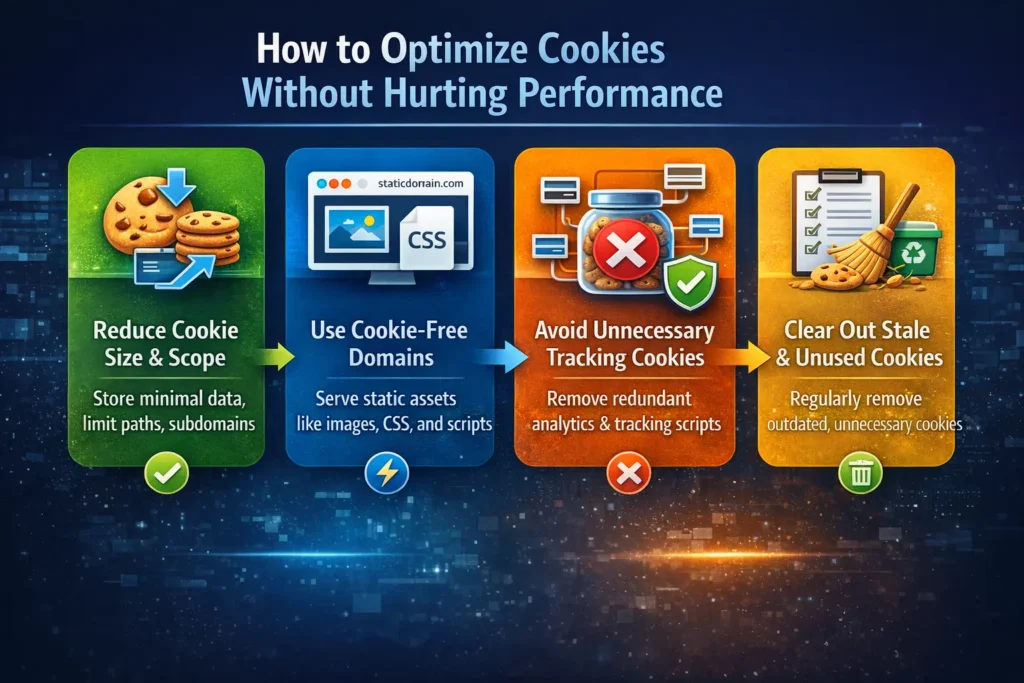
Optimizing cookie usage improves both performance and trust. The goal is not to remove cookies entirely, but to use them wisely.
Reduce Cookie Size and Scope
Cookies should store only essential data. Avoid placing large datasets inside cookies. Keep values minimal, and limit cookie availability to necessary paths and subdomains.
Smaller cookies mean lighter requests and faster responses.
Use Cookie Free Domains for Static Assets
Static assets like images, stylesheets, and scripts do not require cookies. Serving them from cookie free domains prevents unnecessary cookie transmission and improves load speed.
This approach pairs well with browser caching and content delivery networks.
Avoid Unnecessary Tracking Cookies
Not every website needs extensive tracking. Remove redundant analytics tools and third party scripts that add little value. Fewer tracking cookies mean faster pages and better privacy.
When Clearing Cache and Cookies Makes Sense
Clearing cache and cookies is sometimes necessary, but it should not be routine.
Clearing cache helps when pages display outdated content or load incorrectly. It forces the browser to fetch fresh files.
Clearing cookies helps resolve login problems, session issues, or privacy concerns. However, it also logs users out and resets preferences.
A smart approach is selective clearing. Clear cache when performance issues appear. Clear cookies when authentication or privacy problems arise.
Cache and Cookies Working Together in Real Life
A fast and seamless website experience relies on more than one system working behind the scenes. Cache supports speed by storing website files locally and closer to users, while cookies manage personalization.
Imagine revisiting an online store. Cache loads product images instantly. Cookies remember your login and keep items in your cart. One delivers speed. The other delivers continuity.
Together, they create smooth, fast, and personalized experiences.
Conclusion: Understanding Cache vs Cookies Helps You Build Faster Websites
Cache and cookies are not competing technologies. They solve different problems and support each other when used correctly. Cache focuses on performance. Cookies focus on personalization and usability.
When website owners understand this balance, they can improve speed, protect privacy, and deliver better experiences. Faster websites engage users longer. Thoughtful cookie usage builds trust.
For growing WordPress websites especially, mastering cache and cookies is part of building a stable, scalable foundation.
Frequently Asked Questions
Does clearing cache or cookies harm a website?
No. Clearing cache may temporarily slow loading until files are re downloaded. Clearing cookies logs users out but does not damage the browser or website.
Will clearing cookies remove saved passwords?
Usually no. Passwords are stored separately by the browser. Clearing cookies may log users out but saved passwords typically remain.
How often should cache and cookies be cleared?
Only when needed. Clear cache for display or loading issues. Clear cookies for login problems or privacy reasons.
Which matters more for website speed cache or cookies?
Cache has a far greater impact on speed. Cookies influence usability more than performance.
Are cache and cookies the same?
No. Cache stores website files to speed up loading. Cookies store small pieces of user information like login status and preferences.


