Keyword cannibalization occurs when multiple pages on your website target the same keyword and compete against each other in search results. This can confuse search engines, dilute ranking signals, and prevent your best page from reaching its full ranking potential.
By identifying overlapping content and aligning pages with the right search intent, you can strengthen rankings, improve visibility, and build a more effective SEO strategy.
Keyword cannibalization happens when multiple pages on the same site target the same primary keyword and compete against each other in search results. Instead of one strong page ranking well, you end up with several weak pages splitting authority, confusing search engines, and reducing your overall organic traffic.
What is Keyword Cannibalization and Why Does it Hurt Rankings?
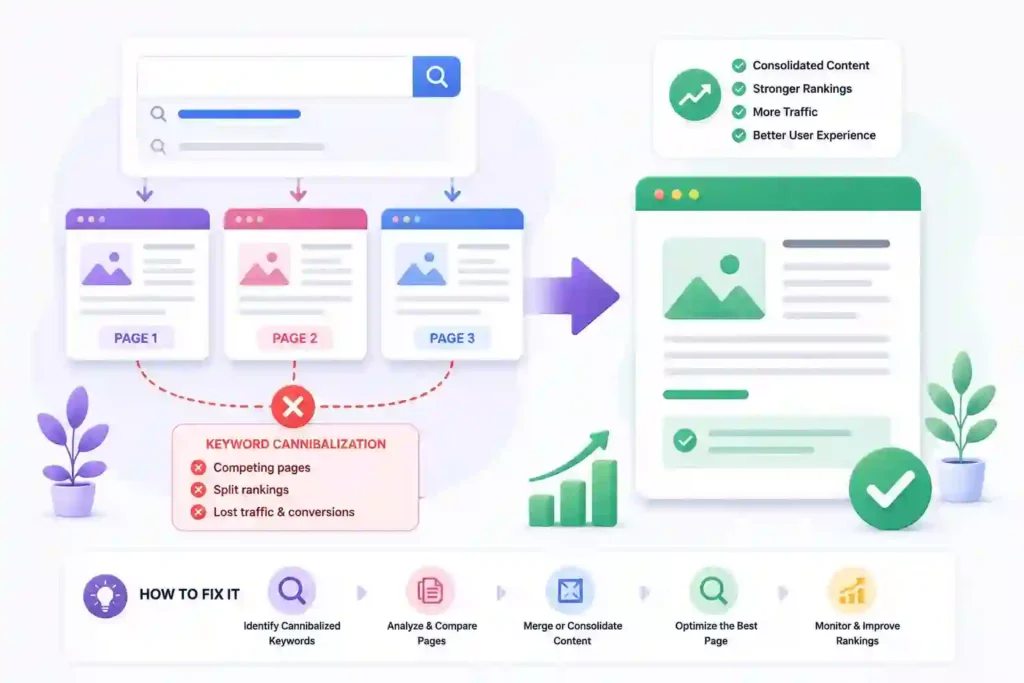
Keyword cannibalization happens when two or more pages on your site target the same primary keyword. Search engines can’t determine which page is more relevant, so they either rank both weakly or keep switching between them.

The damage goes beyond rankings. Cannibalization splits internal link equity, dilutes page authority, and sends confusing signals to Google. The result is lower positions, lower click-through rates, and less organic traffic than a single well-optimized page would generate.
Common Signs You Have a Keyword Cannibalization Problem
Cannibalization doesn’t always announce itself clearly. These signals tell you competing pages are hurting your rankings.
- Multiple Pages Ranking for the Same Keyword: Two or more of your URLs appearing in the same search results for the same query is the clearest sign of cannibalization.
- Rankings Fluctuating Between Two or More Pages: Google keeps switching which of your pages it shows because it can’t determine which one is more relevant.
- Low Click-Through Rates Across Competing Pages: Both pages get impressions, but neither ranks strongly enough to dominate and earn consistent clicks.
- Pages Losing Rankings After Publishing New Content: A new post on the same topic pulls authority away from an existing page that was previously ranking well.
- Google Indexing the Wrong Page for a Keyword: Google consistently ranks a weaker page over the stronger one you intended to rank.
- Thin or Overlapping Content Across Multiple Posts: Multiple posts covering the same topic at shallow depth with no clear differentiation between them.
- Internal Link Equity Split Across Competing Pages: Your internal links point to multiple pages targeting the same keyword, rather than consolidating authority on a single primary page.
What Causes Keyword Cannibalization on WordPress Sites?
Keyword cannibalization on WordPress almost always stems from content strategy decisions made without a clear understanding of what already exists.
Understanding the root cause helps you fix the current problem and stop it from recurring.
Publishing too Much Content on the Same Topic
The most common cause is publishing too many posts on the same or very similar topics without clearly differentiating them for search engines.
This happens naturally on sites that publish frequently. You write a post about topic A, then months later, write another covering similar ground from a slightly different angle. Both posts target overlapping keywords, and over time, they compete rather than complement each other.
Poor Site Architecture and URL Structure
A site architecture that doesn’t clearly signal the relationship between pages increases the likelihood of cannibalization. When category pages, tag archives, and individual posts all target similar keywords, search engines struggle to determine which URL should rank.
WordPress sites are particularly prone to this. Without deliberate architecture decisions and proper indexing controls, you end up with multiple competing URLs by default.
Targeting the Same Keyword Across Multiple Pages
Sometimes cannibalization occurs when the same primary keyword is explicitly targeted across multiple pages. A product page, a blog post, and a category page, all optimized for the same keyword, will compete directly regardless of how different their content is.
This often happens when keyword research is done in isolation for each new piece of content without cross-referencing existing pages.
How to Find Keyword Cannibalization on Your Site?
Finding cannibalization requires looking at your content from a search engine’s perspective. These three methods cover most cannibalization issues across sites of any size.

Use Google Search Console to Identify Competing Pages
Google Search Console is the most direct way to find cannibalization. Go to the Performance report, filter by a specific keyword, and check the Pages tab to see how many different URLs appear for that query.
If more than one URL appears for the same keyword, you have a cannibalization issue. Sort your queries by impressions and work through your highest-traffic keywords first.
Run a Site Search in Google
Type “site:yourdomain.com” followed by your target keyword into Google, then review the results. If multiple pages appear for the same keyword query, those pages are likely cannibalizing each other.
This method is fast and free but less comprehensive than a dedicated SEO tool. Use it as a quick initial check before doing a deeper audit.
Use an SEO Tool to Audit Competing URLs
Tools like Semrush, Ahrefs, and Screaming Frog give you a more systematic view of cannibalization across your entire site. Semrush’s Position Tracking tool shows which URLs rank for each keyword and flags cases where multiple URLs compete for the same query.
Ahrefs’ Site Audit identifies pages with overlapping keyword targets. Screaming Frog exports on-page data that lets you spot pages with duplicate title tags and meta descriptions, which often indicate cannibalization.
How to Fix Keyword Cannibalization: Step-by-Step
These steps systematically resolve most keyword cannibalization issues. Work through them in order and track every change to accurately monitor the impact.
Step 1: Map Your Keywords to Specific Pages
Create a keyword map that assigns one primary keyword to each page on your site. Export your content inventory and list the primary keyword each page targets, along with its URL.
Where multiple pages target the same primary keyword, flag them as a cannibalization conflict. This map serves as your reference throughout the fixing process.
Step 2: Choose a Canonical Page for Each Keyword
For every cannibalization conflict, choose one page to be the canonical page for that keyword. This is the page you want Google to rank.
Consider traffic, backlinks, internal links, and content quality when choosing. The goal is to consolidate all the authority currently split across competing pages into one strong page.
Step 3: Consolidate or Redirect Competing Pages
Once you’ve chosen your canonical page, decide what to do with the competing pages. If a competing page has unique content that adds value, merge it into the canonical page and redirect the old URL.
If a competing page is thin or adds nothing unique, redirect it to the canonical and remove it. Set up 301 redirects from every competing page to the canonical URL.
Step 4: Update Internal Links to the Canonical Page
After setting up redirects, update every internal link across your site to point directly to the canonical URL rather than through the redirect.
Go through your most linked pages, navigation menus, and any content referencing the topic. Update every link to point to the correct canonical URL.
Step 5: Add Canonical Tags Where Needed
When you need to keep multiple pages live, add canonical tags to point search engines to the primary page. The canonical tag tells Google which version to index and rank.
Use canonical tags carefully. They’re a signal, not a directive, which means Google may choose to ignore them if other signals contradict the tag.
Step 6: Monitor Rankings After Making Changes
Track your rankings for affected keywords for at least four to six weeks after making changes. Cannibalization fixes often take time to be reflected in Google’s recrawl.
Use Google Search Console to monitor which URLs appear for your target keywords. If the wrong page still appears, check that your redirects are working correctly and your internal links have been updated.
How to Prevent Keyword Cannibalization Before It Happens?
Fixing cannibalization reactively is significantly more work than preventing it proactively. These habits keep your content strategy clean from the start.
Build a Keyword Map Before Publishing Content
A keyword map assigns one primary keyword to every existing and planned page on your site. Before publishing any new content, check the map to confirm the target keyword isn’t already assigned to an existing page.
Keep your keyword map in a shared document that everyone involved in content creation can access and update. It takes minutes to check and saves hours of cleanup later.
Use a Content Calendar to Track Topic Coverage
A content calendar that tracks the primary keyword and topic for each piece gives you visibility into what you’ve already covered. Review it before commissioning or writing any new piece.
If a similar topic is already covered, decide whether the new piece is genuinely differentiated enough to justify its own URL or whether updating the existing piece makes more sense.
Audit Existing Content Before Writing New Posts
Before writing on any topic, run a quick site search and check your keyword map to confirm you’re not duplicating existing coverage. A five-minute check prevents hours of consolidation work months later.
Build this check into your content brief process. Anyone writing content for your site should verify that no existing page already targets the primary keyword before writing begins.
Keyword Cannibalization vs Duplicate Content: What is the Difference?
Keyword cannibalization and duplicate content are related but distinct problems. Duplicate content refers to identical or near-identical text appearing on multiple URLs. Search engines don’t know which version to index and typically only show one.
Keyword cannibalization is about keyword targeting rather than content similarity. Two pages can have completely different content and still cannibalize each other if both target the same primary keyword.
You can have cannibalization without duplicate content and duplicate content without cannibalization, though the two often occur together.
Does Keyword Cannibalization Always Hurt SEO?
Not always. In some cases, having multiple pages appear for the same query can increase overall visibility by occupying more positions in search results. This is more common for branded queries and for very low-competition keywords.
For competitive keywords, cannibalization almost always hurts. Splitting authority across multiple pages means none of them accumulate enough signals to rank in the top three positions, where the majority of clicks go.
Best Tools to Detect and Fix Keyword Cannibalization
The right tools make finding and resolving cannibalization significantly faster. Each of these covers a specific part of the detection and fixing process.
| Tool | Best For | Benefit |
|---|---|---|
| Google Search Console | Identifying competing URLs | Free performance data. |
| Semrush | Full cannibalization audit | Keyword position tracking. |
| Ahrefs | Competing page analysis | Organic keyword overlap. |
| Screaming Frog | Technical URL audit | On-page SEO crawl. |
| Rank Math | WordPress cannibalization alerts | Built-in SEO monitoring. |
Keyword Cannibalization Mistakes to Avoid
Most cannibalization fixes that don’t work are failing because of one of these common mistakes. Avoiding them saves you from having to redo the work.
- Deleting Pages Without Setting Up Redirects: Every deleted URL without a redirect loses its link equity and returns a 404 error, wasting crawl budget.
- Ignoring Cannibalization Between Category and Post Pages: Category pages and blog posts targeting the same keyword are one of the most overlooked sources of cannibalization on WordPress sites.
- Consolidating Content Without Updating Internal Links: Merging pages and setting up redirects without updating internal links means your site still points crawlers to the old competing URLs.
- Adding Canonical Tags Without Fixing the Underlying Content Issue: Canonical tags are a signal, not a solution. If content overlap is significant, consolidation is a more reliable fix.
- Fixing Cannibalization Without Monitoring Rankings Afterward: Making changes without tracking impact means you won’t know if the fix worked or if new issues have emerged.
- Creating New Content Without Checking Existing Keyword Coverage: Publishing without checking your keyword map is how cannibalization starts. Build the check into your process.
Conclusion: Fix Keyword Cannibalization
Keyword cannibalization is fixable and preventable. The fix requires a keyword map, a decision on the canonical page for each conflict, redirects, internal link updates, and consistent monitoring.
The prevention requires one habit: check your keyword map before publishing anything new. Do both, and your pages compete with other sites rather than each other.
FAQs About Keyword Cannibalization
What is keyword cannibalization?
Keyword cannibalization happens when multiple pages on the same site target the same primary keyword and compete against each other in search results. Authority gets split across several weaker pages, and overall organic traffic suffers as a result.
How do I find keyword cannibalization on my site?
Use Google Search Console to check which URLs appear for your most important keywords. Run a site search in Google using site:yourdomain.com plus your target keyword. Use Semrush or Ahrefs to run a full keyword overlap audit across your entire content library.
Does keyword cannibalization hurt SEO?
For competitive keywords, yes. Splitting authority across multiple pages prevents any single page from ranking in the top positions. For branded queries and very low competition keywords, having multiple pages appear can occasionally increase overall visibility without significantly hurting rankings
What is the best way to fix keyword cannibalization?
Choose one canonical page for each affected keyword, merge unique content from competing pages into the canonical, set up 301 redirects from competing URLs, update all internal links to point directly to the canonical URL, and monitor rankings for four to six weeks after making changes.
What is the difference between keyword cannibalization and duplicate content?
Duplicate content is identical text appearing on multiple URLs. Keyword cannibalization occurs when multiple pages target the same primary keyword, regardless of content similarity. Both problems can occur independently, but often appear together on sites that haven’t been actively maintained.
How do I prevent keyword cannibalization on a WordPress site?
Build a keyword map that assigns one primary keyword per page, and check it before publishing any new content. Use a content calendar that tracks topic coverage. Audit existing content before writing new posts on similar topics. These three habits eliminate most cannibalization before it starts.