
Online accounts face greater threats than ever before. Two-factor vs multi-factor authentication is a critical decision for anyone managing websites, apps, or sensitive digital systems. Both methods go beyond just a password to confirm a user’s identity.
But they differ in scope, security strength, flexibility, and use cases. Choosing the right one depends on your risk tolerance, compliance requirements, and user needs.
TL;DR: Beyond Just a Password
- 2FA uses exactly two authentication factors; MFA uses two or more.
- MFA offers stronger protection for high-risk systems and sensitive data.
- Both methods significantly reduce the risk of unauthorized account access.
- Your choice depends on your security requirements, user experience priorities, and compliance obligations.
Overview of Two-Factor vs Multi-Factor Authentication
Two-factor authentication (2FA) is a specific form of multi-factor authentication (MFA). It requires exactly two distinct types of authentication factors to verify a user’s identity.
Multi-factor authentication is the broader category. It requires two or more factors, including three or more in high-security environments.
Both 2FA and MFA go far beyond relying on just a password. They add one or more verification steps to confirm the user’s identity before granting access. This layered approach is the foundation of modern identity verification and digital security.
The two terms are often used interchangeably. But there is a clear distinction: all two-factor authentication is a type of MFA, but not all MFA is limited to two factors.
| Feature | 2FA | MFA |
|---|---|---|
| Number of factors | Exactly 2 | 2 or more |
| Security level | High | Very high |
| Flexibility | Limited | High |
| Implementation complexity | Low to moderate | Moderate to high |
| Best for | Consumer accounts | Enterprise/sensitive systems |
Secure Your Website Before Hackers Strike
Protect and recover your WordPress site with expert hacked site repair and advanced authentication security solutions.
Why is Authentication Necessary for Website and User Security?
Cyberattacks are more sophisticated and frequent than ever. Authentication has become a critical frontline defense against online account breaches, computer system compromises, and the theft of sensitive data.
Weak or outdated access controls are now among the leading causes of data breaches globally.
Risks of Single-Factor Authentication (Passwords Only)
Single-factor authentication relies entirely on just a password to confirm a user’s identity. This creates serious vulnerabilities that attackers actively exploit.
Passwords are easy to steal. Phishing attacks, credential stuffing, and large-scale data breaches regularly expose password combinations. An attacker who captures a password can immediately gain full access to the account, with no other barrier in place.
Many users also reuse the same password across multiple platforms. If one site is breached, every account that shares that password becomes vulnerable. This chain reaction makes single-factor authentication a critical weak point in any security chain.
Additionally, security questions, often offered as a fallback, are not reliable. Personal data is increasingly public and easily guessable through social media profiles.
How Multi-Layer Authentication Improves Security Posture?
Adding layers to the authentication process dramatically reduces risk. Even if compromised passwords fall into the hands of attackers, they cannot complete the authentication process without the second factor.
This is the core principle behind both 2FA and MFA. A malicious actor would also need access to the user’s device, the ability to replicate their biometric authentication, or possession of a physical security key, not just a stolen password.
Multi-layer authentication also makes phishing attacks far less effective. Stolen credentials alone are no longer sufficient to access protected accounts. The attacker would need to compromise multiple independent factors simultaneously, a much harder task.
Key Benefits of Two-Factor and Multi-Factor Authentication
The key benefits of implementing stronger authentication go well beyond stopping unauthorized access:
- Protection against phishing attacks and credential theft
- Defense against account takeovers caused by compromised passwords
- Support for regulatory compliance requirements across industries
- Increased customer trust through visible commitment to account security
- A foundational step toward adopting the zero-trust security model
- Reduced exposure to insider threats and compromised internal accounts
- Audit trails that document every access request and authentication attempt
Two-Factor vs Multi-Factor Authentication: Detailed Comparison
Let’s compare 2FA and MFA across the most important dimensions for security professionals and website owners.
Definition and Core Concept (2FA vs MFA Meaning)
This section clarifies the fundamental difference between 2FA and MFA by defining how each approach uses authentication factors to verify user identity.
Two-Factor Authentication (2FA), also called two-step verification, is an authentication process that requires exactly two distinct types of credentials. For example, a user enters a password (knowledge factor) and then enters a verification code sent to their mobile device (possession factor). This two-factor authentication process adds a meaningful layer of security beyond a single password.
Multi-Factor Authentication (MFA) is an authentication system that requires two or more factors. MFA requires users to verify their claimed identity through multiple independent methods. These can include a one-time password from an authenticator app, a fingerprint scan, and a physical security key, all combined in high-security setups.
Number of Authentication Factors Used
Two-factor authentication 2FA uses exactly two of these categories. MFA uses two or more, often combining all three types for maximum identity verification strength.
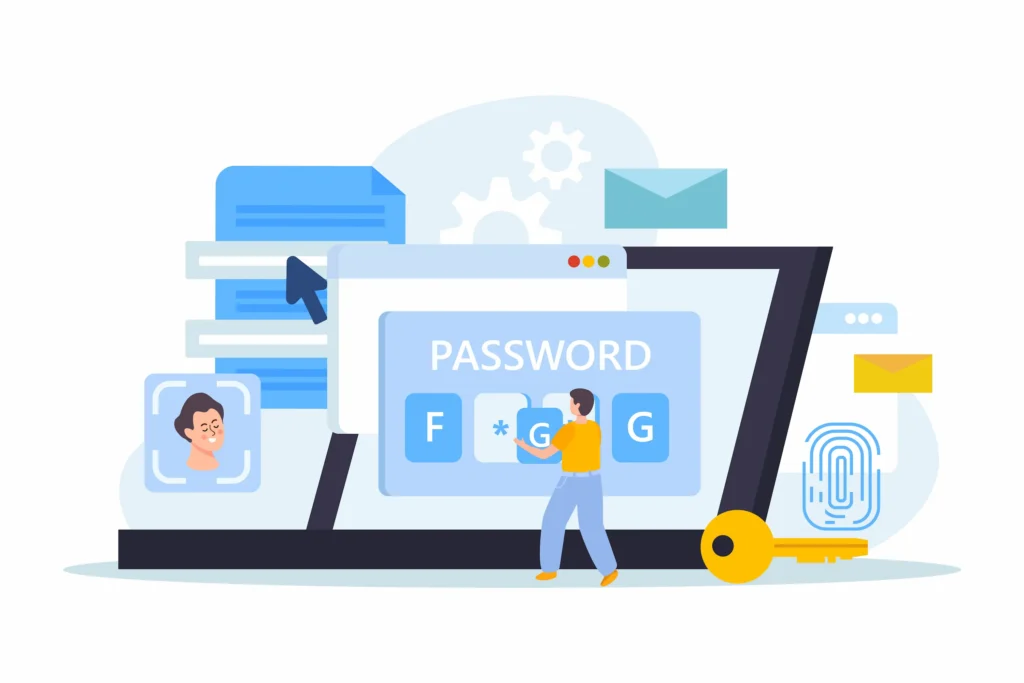
Authentication factors fall into three recognized categories:
- Knowledge factor: something the user knows: a password, PIN, or security questions.
- Possession factor: Something the user has: a mobile device, a physical device, hardware tokens, or a physical security key.
- Inherent factor: Something the user is: biometric authentication, such as a fingerprint scan, facial recognition, or voice recognition.
Security Strength and Risk Level
2FA is significantly more secure than relying on just a password. However, using only two factors still leaves some attack vectors open.
Certain threats, like SIM swapping or real-time phishing that captures both the password and the authentication code, can bypass standard 2FA in some scenarios.
MFA, especially when it incorporates biometric authentication or a physical security key, is much harder to defeat.
Using multiple authentication factors from different categories substantially reduces the attack surface. Even if one factor is compromised, the authentication attempt still fails without the others.
Systems that require three or more factors, combining something the user knows, something they physically possess, and something biologically inherent to them, offer the highest level of protection.
User Experience and Login Convenience
The two-factor authentication process is generally more user-friendly. It is a quick, familiar interaction. Users receive an authentication code via text message, from an authenticator app, or through push notifications, then enter it to complete login. This keeps friction low for everyday users.
MFA adds more steps and can introduce friction, especially when users must manage multiple devices or hardware tokens.
However, adaptive MFA changes this dynamic. It evaluates risk in real time based on context such as the user’s location, device fingerprint, or time of access.
When everything looks normal, the user faces minimal extra steps. When an access request seems unusual, the system demands stronger verification.
This balances the user experience for routine logins while enforcing stricter checks for genuinely suspicious authentication attempts.
Implementation Complexity and Cost
2FA is simpler and less expensive to implement. Most platforms and identity providers support it natively.
Tools like Google Authenticator and Microsoft Authenticator are free and can be configured in minutes. Enabling two-factor authentication in most account settings is straightforward, even for small teams.
MFA implementation is more involved, particularly for enterprises. It may require dedicated authentication systems, integration with identity providers, configuration across multiple devices, and ongoing policy management.
The upfront investment is higher, but for organizations handling sensitive data or customer data, the security gains far outweigh the cost.
Flexibility and Adaptability (Adaptive MFA)
Standard 2FA applies the same authentication methods to every login regardless of context or perceived risk level.
Adaptive MFA is more intelligent. It monitors each access request and compares it against behavioral baselines.
If a user logs in from a trusted device in a familiar location, the system may waive extra steps. If the same user attempts to access from an unrecognized device or overseas IP address, adaptive MFA triggers additional verification in real time.
This context-aware approach makes MFA both more secure and more usable, making it especially well-suited for enterprise environments and modern zero-trust security architectures.
Common Authentication Methods Used in 2FA and MFA
Both 2FA and MFA draw from the same pool of authentication methods:
- Authenticator app: Tools like Google Authenticator and Microsoft Authenticator generate time-based one-time passwords for each authentication attempt.
- Text message (SMS): A verification code is sent to the user’s mobile device. Simple but vulnerable to SIM-swapping attacks.
- Push notifications: The authentication app sends an approval prompt directly to the user’s own device.
- Hardware tokens: Small physical devices that generate time-sensitive authentication codes.
- Physical security key: A USB or NFC device that the user plugs in or taps for strong possession-factor verification.
- Biometric authentication: Fingerprint, facial, and voice recognition, tied directly to the user’s identity.
- Backup codes: Pre-generated emergency codes for account recovery when primary methods are unavailable.
- One-time password (OTP): A temporary authentication code that expires within seconds or minutes.
Two-factor authentication typically combines just two of these. MFA systems often combine three or more for layered resilience.
Use Cases and Industry Applications
Explore how two-factor and multi-factor authentication are applied across different industries to balance security, user experience, and risk levels effectively.
2FA works well for:
- Personal online accounts like email, social media, and banking apps
- Small businesses that want to improve account security quickly
- Consumer-facing apps where simplicity and speed matter most
MFA is mandatory or strongly recommended for:
- Healthcare organizations must comply with the Health Insurance Portability and Accountability Act (HIPAA), which requires strict access controls around patient data and electronic health records
- Financial services protecting sensitive transactions and customer data
- Government agencies and defense contractors handling classified information
- Enterprise companies operating under a zero-trust security model
- Any organization subject to HIPAA compliance frameworks, PCI-DSS, SOC 2, NIST, or GDPR
The Health Insurance Portability and Accountability Act mandates multi-factor access controls under its Security Rule, making MFA a legal requirement, not just a best practice, for healthcare providers and business associates.
Vulnerabilities and Limitations of 2FA vs MFA
Neither method is entirely immune to attack. Understanding the limitations helps organizations plan more effectively.

2FA limitations:
- SMS-based verification codes are vulnerable to SIM-swapping attacks
- Phishing attacks can trick users into entering their authentication code on fake login pages
- Using only two factors may not meet compliance standards for high-risk industries
- Lost or stolen mobile devices can complicate account recovery for the user
MFA limitations:
- More factors add complexity and can frustrate less technical users
- Poor implementation introduces new security vulnerabilities into the authentication system
- Hardware tokens and physical security keys can be lost, damaged, or forgotten
- Enrolling and managing multiple devices adds administrative overhead for IT teams
The more independent authentication factors a system requires, the harder it becomes to breach, but implementing such a system requires careful design, ongoing management, and user education.
When to Choose Two-Factor Authentication vs Multi-Factor Authentication
Your choice should reflect your specific risk level, compliance obligations, and the nature of the systems you are protecting.
Choose 2FA when:
- A quick and accessible security upgrade is needed for standard online accounts
- Simplicity is a priority, especially for non-technical users
- The environment involves low to moderate risk, where two-factor authentication is sufficient
- Fast implementation is required with minimal configuration in the account settings
Choose MFA when:
- Systems manage sensitive information such as financial records or customer data
- Compliance with regulations like HIPAA, PCI DSS, or GDPR is required
- Operations exist within healthcare, finance, government, or enterprise environments
- A zero-trust security model is being implemented to verify every access request
- Adaptive authentication is needed to respond to real-time risk signals across multiple devices
Most organizations benefit from starting with 2FA and scaling to full MFA as their user base, compliance obligations, and threat profile grow. The key is getting started; both methods are vastly superior to relying on a password alone.
Best Practices for Implementing Secure Authentication
Whether you choose 2FA or MFA, these best practices help you get the most out of your authentication system and keep your users protected over time.
- Move beyond SMS where possible. Text message verification codes are better than just a password alone, but they are vulnerable to interception. Use a dedicated authenticator app or a physical security key for stronger, more reliable protection.
- Always provide backup codes. Users need a secure way to recover their accounts if they lose access to their primary authentication method. Store backup codes safely and never share them digitally without encryption.
- Pair strong passwords with MFA. Authentication layers work best when the underlying password is robust as well. Avoid common passwords, reused password combinations, and predictable patterns that attackers can guess.
- Monitor every authentication attempt. Track failed logins, unusual access patterns, and anomalous behavior using a WP activity log or equivalent tool for your platform. Early detection of unusual behavior can prevent account takeovers before they escalate into full breaches.
- Review your error logs. Consistently reviewing error logs helps surface failed authentication attempts, plugin conflicts, and other system-level signals that may indicate unauthorized access to your site.
- Protect the account recovery process. Weak account recovery flows can undo even the strongest authentication system. Require verified identity steps before restoring access to any user who has been locked out.
- Use trusted devices selectively. Marking a personal device as trusted can simplify the login experience for legitimate users without lowering the security bar for new or unrecognized devices.
- Conduct regular security reviews. Threats evolve constantly. Periodically audit your authentication system to identify outdated methods, configuration gaps, and emerging risks. A security review should be part of your standard maintenance cycle.
Final Thoughts
Both two-factor and multi-factor authentication are far more secure than relying on just a password. They add critical layers of protection that make it much harder for attackers to access accounts, systems, and sensitive data.
2FA is an ideal starting point for individuals and small to mid-sized organizations. It is simple to set up, widely supported, and effective against common threats. Enabling it on important accounts is a quick security win.
MFA is better suited for businesses that handle sensitive data or operate in regulated industries. By requiring multiple verification factors, it significantly reduces the risk of breaches and supports compliance.
The most effective solution is one that users will adopt consistently. Start with 2FA, assess your risk level and needs, then scale to MFA as your security requirements grow.
FAQs About Two-Factor and Multi-Factor Authentication
What is the difference between two-factor and multi-factor authentication?
Both follow the same principle of verifying identity in multiple steps. Two-factor authentication uses exactly one additional factor beyond a password. Multi-factor authentication uses two or more factors, making it a more secure way to gain access to sensitive systems.
How does multi-factor authentication prevent unauthorized access?
Multi-factor authentication adds layers of verification. Even if a password is stolen, an attacker still needs another secure method, such as a one-time code or biometric check. This is why MFA prevents unauthorized access more effectively than passwords alone.
What are common examples of a second authentication factor?
A second authentication factor can include OTPs, authenticator apps, biometrics, or hardware keys. Some methods require physical presence, such as fingerprint scans or security keys, which adds stronger protection.
Should I enable MFA on my Microsoft account?
Yes, enabling multi-factor authentication on a Microsoft account is highly recommended. It protects emails, files, and connected services. It also works well with single sign-on systems to secure multiple apps with one login.
Is multi-factor authentication difficult to use for everyday users?
Modern MFA solutions are user-friendly. Many systems use push notifications or biometric checks for quick approval. While it adds a factor, it remains a secure method without significantly slowing down access.


