
If you’re managing a WordPress site on traditional hosting, you’ve likely run into the same frustrations: unexpected traffic spikes that crash the server, maintenance tasks that eat into development time, and hosting bills that don’t scale fairly. Serverless architecture in WordPress development changes that equation entirely.
Instead of managing infrastructure, your team focuses on building. Instead of paying for idle server time, you pay only for what you actually use. At Seahawk Media, we’ve seen this shift transform how WordPress sites are built, hosted, and scaled, and this guide breaks down exactly how it works.
TL;DR: Serverless Architecture
- Serverless architecture hands infrastructure management to a cloud provider so developers focus entirely on code and functionality.
- WordPress sites on serverless setups pay only for resources consumed, not idle server time.
- Automatic scaling handles traffic spikes without manual intervention or emergency upgrades.
- Provisioned concurrency keeps cold starts in check, making them a manageable rather than a blocking performance challenge.
- Serverless pairs well with headless WordPress and Jamstack architectures for maximum speed and flexibility.
- Teams most commonly use AWS Lambda, Google Cloud Functions, Netlify Functions, and Vercel for serverless WordPress deployments.
What Serverless Architecture Actually Means?
Servers still exist in a serverless setup. However, the developer doesn’t need to provision, configure, or maintain them. The cloud provider handles all of that, and your team works only with the code and logic that matters for the application.
The Traditional Server Problem
Most WordPress sites run on always-on servers that consume resources whether or not a single visitor is on the site.
That model works until traffic spikes unexpectedly, maintenance falls behind, or hosting costs grow faster than the business does. In those moments, the infrastructure becomes the bottleneck rather than the product itself.
Managing a traditional server also pulls developer attention toward tasks that don’t directly improve the site.
OS updates, capacity planning, security patching, and uptime monitoring all take time that could be spent on building features and improving performance.
How Serverless Flips That Model?
In a serverless setup, code runs only when a specific event triggers it. A cloud provider spins up a container, executes the function, and shuts it back down immediately after.
The site owner pays only for the compute time actually used, which makes the cost model fundamentally different from traditional fixed-rate hosting.
This approach works particularly well for event-driven tasks, such as processing a form submission, resizing an uploaded image, triggering an email, or handling an API request.
Each of those tasks runs independently, scales automatically, and costs nothing when it’s not in use.
Modern WordPress Needs Modern Architecture
From serverless setups to performance-first builds, we help you create WordPress websites that scale without limits.
How Serverless Architecture Works Under the Hood?
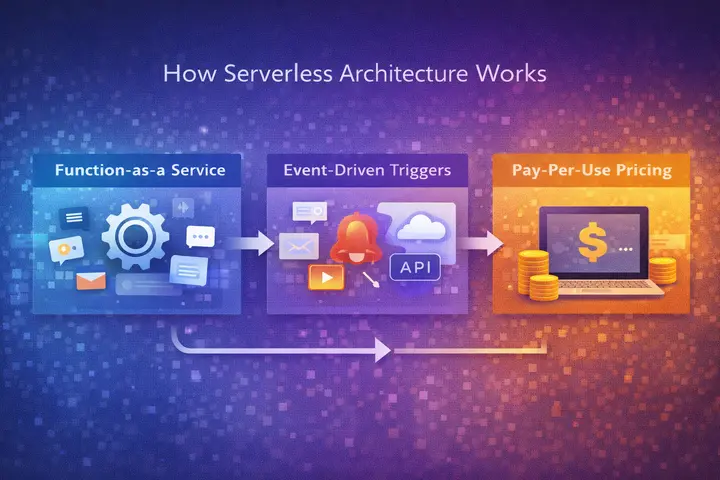
Three components drive every serverless setup: Function-as-a-Service, event-driven triggers, and pay-per-use pricing.
Understanding how they interact explains why serverless behaves so differently from traditional WordPress hosting environments.
Function as a Service
Function-as-a-Service (FaaS) is the execution layer of serverless architecture. Developers write small, focused functions that each perform a single task. Each function is independent, making it easy to deploy, update, and scale without affecting the rest of the application.
Platforms like AWS Lambda and Google Cloud Functions both operate on this model. A WordPress developer can write a function that handles contact form submissions, for example, and deploy it independently of everything else running on the site.
Event-Driven Triggers
Serverless functions activate when something happens. That something can be an HTTP request, a file upload, a database change, a scheduled task, or a third-party webhook.
The event-driven model keeps resources completely idle until they’re needed, which is the core reason serverless is so much more cost-efficient than always-on infrastructure.
In a WordPress context, this means tasks like sending a confirmation email after a purchase, generating a PDF on form submission, or syncing data with an external CRM can all run as individual serverless functions triggered by the relevant event.
Cold Starts and How to Handle Them
When a function hasn’t run in a while, the provider needs extra time to spin it back up before it can respond.
That delay is the most frequently cited limitation of serverless architecture, and it’s a real consideration for user-facing functions where response time matters.
Provisioned concurrency solves this by keeping a set number of function instances warm and ready to respond immediately. For functions that trigger infrequently and don’t sit in the critical path of a user interaction, cold starts rarely cause a meaningful problem.
Why Serverless Makes Sense for WordPress Sites?
WordPress powers over 43% of the web, but traditional server infrastructure creates real bottlenecks for performance, cost, and developer time. Serverless removes those bottlenecks in ways that most managed hosting plans simply can’t match, especially at scale.
Automatic Scaling Without Manual Work
Traffic spikes from a viral post, a product launch, or a seasonal campaign no longer require manual scaling or emergency server upgrades.
Serverless platforms allocate resources dynamically based on actual demand and scale back down when the spike ends. The site handles the load without any intervention from the development team.
This is particularly valuable for WordPress e-commerce sites and media publications where traffic is highly unpredictable. The infrastructure adjusts in real time, and the cost reflects only what the site actually consumed.
Pay Only for What You Use
Traditional hosting charges a fixed monthly rate regardless of how much capacity the site actually uses. Serverless billing ties directly to usage: the number of function executions and the duration of each one.
For sites with variable or seasonal traffic, that model produces meaningful cost savings over a fixed-rate plan.
In practice, this also removes the need to over-provision. Teams no longer pay for headroom they may never need just to feel safe during traffic surges.
Developers Focus on Building, Not Maintenance
Server maintenance, OS updates, capacity planning, and security patching are all handled by the cloud provider in a serverless model.
WordPress developers spend that time on feature development and performance work instead. That shift shortens development cycles and directly improves what gets delivered to the end user.
For agencies and in-house teams managing multiple WordPress properties, that time saving compounds significantly across projects.
A Stronger Security Posture
Serverless reduces the attack surface considerably. Without a persistent server to compromise, many common server-side vulnerabilities simply don’t apply.
Functions run in isolated containers that are torn down after each execution.
Providers like AWS and Google Cloud also maintain their own compliance and security standards, which adds an additional layer of protection without extra configuration.
How Serverless and WordPress Work Together?
Serverless doesn’t replace WordPress. It extends WordPress’s capabilities by offloading specific tasks to cloud functions while keeping the CMS in its strongest role: managing and delivering content.
Headless WordPress with Serverless Functions
Headless WordPress separates the content management backend from the frontend presentation layer.
- The frontend runs on a framework like Next.js or Astro.
- Content is delivered via the WordPress REST API or WPGraphQL.
- Backend tasks, such as form processing and image optimization, run as independent cloud functions.
This approach gives development teams full control over the frontend experience while preserving the WordPress editing workflow that content teams are already familiar with. It’s one of the fastest-growing architectural patterns in WordPress development right now.
Offloading Heavy Tasks to Cloud Functions
Image compression, email delivery, payment processing, and scheduled tasks are all strong candidates for serverless functions. Instead of running these operations on the WordPress server and adding to its load, they execute independently in the cloud and return results when complete.
AWS Lambda handles image resizing and file processing well. Netlify Functions work cleanly for contact form handling and third-party API calls.
Assigning these tasks to dedicated functions keeps the core WordPress installation leaner and more stable.
Jamstack and Static WordPress
Jamstack architecture pre-renders WordPress content into static HTML files, which are served through a CDN. The result is near-instant load times, reduced reliance on servers, and a much smaller attack surface.
Serverless functions handle dynamic operations that the static layer can’t handle, such as form submissions, user authentication, and personalized content delivery.
Platforms like Netlify and Vercel make this pattern accessible for WordPress projects of most sizes. The combination of static content and on-demand functions produces some of the fastest WordPress experiences currently achievable.
Platforms That Support Serverless WordPress Deployments
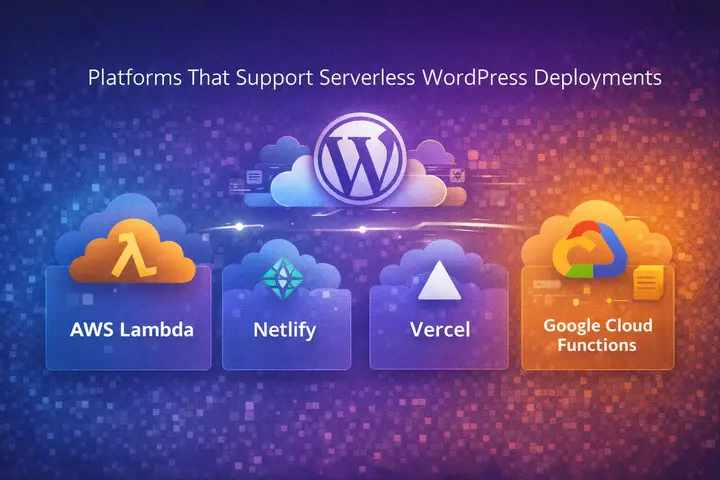
Several cloud platforms support serverless WordPress setups today.
Choosing the right one depends on the site’s scale, the team’s existing stack, and the required level of infrastructure visibility.
- AWS Lambda leads the serverless market and integrates deeply with other AWS services, including S3, CloudFront, and RDS. It supports PHP via custom runtimes, making it a capable backend layer for WordPress-specific tasks at scale. Teams already using AWS infrastructure will find the integration straightforward.
- Netlify Functions support JavaScript, Go, and TypeScript, and deploy alongside the frontend with minimal configuration. They are a practical starting point for teams already hosting static WordPress frontends on Netlify. The platform handles the deployment pipeline, scaling, and environment management automatically.
- Vercel is widely used with Next.js-based headless WordPress frontends. Its serverless functions execute at the edge, reducing latency for global audiences by a meaningful amount. The platform integrates cleanly with Git workflows and supports rapid iteration, making it a strong fit for teams that deploy frequently.
- Google Cloud Functions provides a managed serverless environment with strong integration into Google’s broader infrastructure. It handles event-driven WordPress tasks reliably and suits teams already working within the Google Cloud ecosystem for storage, analytics, or data processing.
Challenges to Understand Before Going Serverless
Serverless delivers real advantages, but committing to it without understanding the trade-offs is where teams run into trouble. Here’s what to weigh before making the call.
Cold Start Latency
Cold starts add noticeable response time for functions that haven’t been called recently. For infrequently used background functions, this is rarely a problem. For user-facing functions where speed matters, provisioned concurrency and periodic invocations keep the most critical functions warm and responsive.
Execution Time Limits
Most serverless platforms cap how long a single function can run per invocation.
This makes serverless unsuitable for long-running processes like video encoding, large database migrations, or complex machine learning workloads that require sustained compute time.
Understanding these limits before building is essential to avoid architectural problems later.
Vendor Lock-In
Serverless functions often integrate deeply with a specific provider’s ecosystem, which makes migrating between platforms later a significant undertaking. Evaluating providers carefully before committing and designing functions with portability in mind from the start reduces that risk considerably.
Is Serverless Architecture Right for Your WordPress Site?
Not every WordPress site benefits from a full serverless migration. The architecture fits best in specific scenarios, and understanding those scenarios makes the decision much clearer before any development work begins.
When Serverless is the Right Fit?
Serverless works well for high-traffic marketing sites, e-commerce platforms with unpredictable demand, headless WordPress builds, and any site where specific backend tasks would benefit from running independently of the core WordPress installation. Sites with significant traffic variability gain the most from the pay-per-use billing model.
When Traditional Hosting Still Makes Sense
For straightforward blogs, small business sites, or teams without experience with cloud infrastructure, managed WordPress hosting often makes more practical sense.
Serverless adds real architectural complexity, and development teams that don’t regularly manage cloud functions, deployment pipelines, and event-driven logic will feel that overhead quickly.
Final Thoughts
Serverless architecture has moved well past the hype stage. Teams adopting it now are building faster, spending less on infrastructure, and scaling without the headaches of traditional server management.
That said, it’s not a one-size-fits-all solution. The right move is to understand where serverless genuinely helps your specific setup and implement it in those areas first. Start with a single use case, measure the impact, and expand from there.
If you’re unsure where to begin or want an expert team to handle the architecture from day one, Seahawk Media is ready to help.
Our team has built serverless WordPress setups across a range of client projects and knows exactly where the complexity hides. Get in touch today and let’s talk about what the right setup looks like for your site.
FAQs About Serverless Architecture
What is the difference between serverless and managed WordPress hosting?
Managed hosting still runs WordPress on a dedicated or shared server, with the host handling updates and security. Serverless removes the need for a persistent server and runs backend logic only when triggered by specific events.
How does serverless affect WordPress site speed?
When implemented correctly, serverless significantly improves performance. Leaner infrastructure, CDN-delivered static content, and edge-executed functions all reduce load times compared to traditional server setups.
Can any WordPress site be moved to a serverless setup?
Not every site is a good fit. Serverless works best when traffic varies unpredictably, the architecture is headless, or specific backend tasks need to run independently of the core WordPress installation.
Does serverless mean there are no servers involved?
No. Servers still exist, but the cloud provider manages them entirely. Developers interact only with the functions and logic they write, not the underlying infrastructure.


