Stripe charges 2.9% plus $0.30 on every card transaction. That sounds small until you do the math.
At $10,000 in monthly sales, you are paying approximately $320 in Stripe fees. At $50,000 per month, that becomes $1,580. At $100,000 per month, the number exceeds $3,000. Every month. For the same transactions.
The good news is that Stripe fees are not fixed for most businesses. Several legitimate strategies reduce your per-transaction costs, starting with the payment methods you offer, the plugin you use, and whether you have ever asked Stripe for a better rate.
This guide covers seven proven ways to reduce Stripe transaction fees on your WordPress site without compromising your checkout experience or switching payment gateways.
Stripe charges a fee on every payment processed through its platform. For most online card payments in the United States, the standard rate is 2.9% plus $0.30 per successful transaction.
Additional fees may apply for international cards, currency conversion, chargebacks, and instant payouts. While the percentage fee scales with transaction size, the fixed $0.30 charge has a greater impact on smaller purchases.
As a result, low value transactions can carry a much higher effective fee rate, making strategies such as increasing order values or bundling purchases effective ways to reduce overall processing costs.
How Much are Stripe Fees Costing You?
Before implementing any of the strategies below, calculate your current Stripe fee burden to measure the impact of each change.
| Monthly Revenue | Standard Stripe Fees (2.9% + $0.30) | With ACH (0.8% capped $5) | Monthly Saving |
| $5,000 | ~$175 | ~$40 | ~$135 |
| $10,000 | ~$320 | ~$80 | ~$240 |
| $25,000 | ~$775 | ~$200 | ~$575 |
| $50,000 | ~$1,580 | ~$400 | ~$1,180 |
| $100,000 | ~$3,080 | ~$800 | ~$2,280 |
These figures assume average transaction sizes and a full ACH adoption rate, which is not realistic for all customer bases. Even partial adoption of ACH for higher-value transactions yields significant savings.
Want Your WordPress Payment Setup Fully Optimized?
Seahawk configures ACH payments, subscription billing, chargeback prevention, and Stripe optimization for WordPress and WooCommerce stores. No contracts. No retainers.
7 Proven Ways to Reduce Stripe Transaction Fees in WordPress
Paying too much in Stripe fees? Learn practical strategies to reduce Stripe transaction costs on your WordPress site, including optimizing payment methods, reducing chargebacks, and improving checkout efficiency.
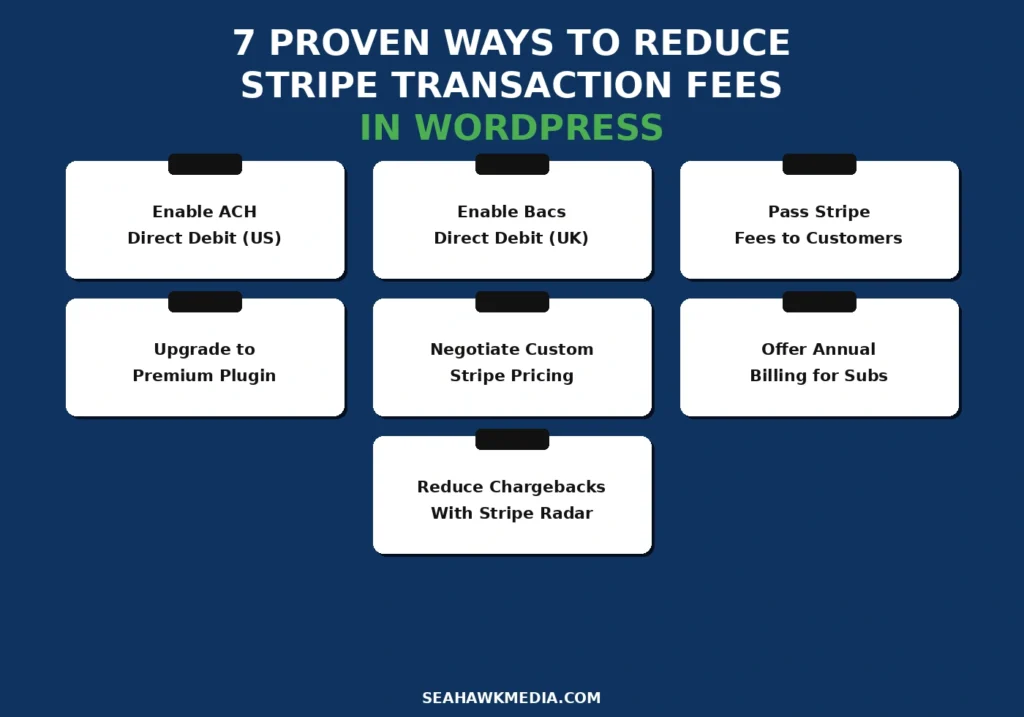
Tip 1: Enable ACH Direct Debit for US Customers
ACH (Automated Clearing House) Direct Debit is a bank transfer payment method available to US customers. Instead of charging a percentage plus a fixed fee, Stripe charges 0.8% of the transaction amount, capped at $5.00, regardless of order size.
The math on a $500 transaction:
- Standard card payment: 2.9% + $0.30 = $14.80
- ACH Direct Debit: 0.8% = $4.00 (capped at $5)
- Saving per transaction: $10.80
For B2B stores, high-value purchases, or recurring subscription payments where customers pay $100 or more per transaction, ACH adoption can reduce Stripe fees by 60% to 70% on participating transactions.
How to enable ACH in WordPress:
In WooCommerce, go to WooCommerce > Settings > Payments. If using WooPayments (powered by Stripe), click Manage on the WooPayments row. Under Payment Methods, toggle on a US Bank Account (ACH Direct Debit). Customers will see the option at checkout alongside card payments.
For WP Simple Pay, go to WP Simple Pay > Payment Forms and edit your form. Under the Payment tab, find Payment Methods and enable ACH Direct Debit. The form will present both card and bank account options at checkout.
What to expect: ACH payments take one to three business days to settle, compared to instant card settlement. Communicate this timeline clearly to customers placing time-sensitive orders.
Tip 2: Enable Bacs Direct Debit for UK Customers
For WordPress stores serving UK customers, Bacs Direct Debit offers the same fee advantage as ACH in the US. Stripe charges 1% of the transaction amount, capped at £4.00 per transaction.
The math on a £300 transaction:
- Standard card payment: 1.5% + £0.20 = £4.70 (UK rate)
- Bacs Direct Debit: 1% = £3.00 (capped at £4)
- Saving per transaction: £1.70
For UK subscription businesses, Bacs is particularly effective because the low fixed cap makes recurring monthly charges significantly cheaper than card billing.
How to enable Bacs in WordPress:
In WooPayments, navigate to Payment Methods and enable Bacs Direct Debit for UK transactions. In WP Simple Pay, enable Bacs under Payment Methods in your form settings. Ensure your Stripe account has Bacs enabled in your Stripe Dashboard under Settings > Payment Methods.
Note that Bacs requires customers to provide their bank account sort code and account number and to complete a one-time verification step. This adds a slight delay to the first payment, but subsequent charges occur automatically.
Tip 3: Pass Stripe Fees to Customers
Rather than absorbing Stripe’s transaction fees yourself, you can add them to the customer’s order total at checkout. This approach is legally permitted in most US states (except Connecticut and Massachusetts), most of Canada, and many other jurisdictions. Always verify the laws in your specific jurisdiction before implementing.
How to enable fee passing in WooCommerce:
Install the WooCommerce Stripe Fee plugin or use WooCommerce’s built-in payment surcharge feature if available on your plan. Configure the surcharge as a percentage equal to Stripe’s rate (2.9%) plus a fixed amount ($0.30), and label it clearly as a payment processing fee at checkout.
Transparency matters. Customers who see a hidden fee added at the final checkout step abandon at significantly higher rates than those who see it disclosed earlier. Display the fee on your cart page, not only at the payment step.
How to enable fee passing in WP Simple Pay:
WP Simple Pay Pro includes a built-in fee recovery option. Go to WP Simple Pay > Settings > Stripe > Fees and enable fee recovery. Set the percentage and fixed amount. The plugin handles the calculation and displays the fee transparently on the payment form.
What to expect: Some customers will react negatively to payment surcharges, particularly in B2C contexts. Test this with a segment of your audience before applying it site-wide. B2B customers tend to accept fee passing more readily than retail consumers.
Tip 4: Upgrade to a Premium Payment Plugin
Several WordPress payment plugins charge their own per-transaction fee in addition to Stripe’s standard rate. Free plugin tiers are the most common offenders.
WP Full Pay’s free tier adds a 5% per-transaction fee on top of Stripe’s fees. Upgrading to the paid tier (starting at €79.50/year) removes this entirely. On $10,000 per month in sales, the 5% plugin fee costs $500 per month, compared to €79.50 per year for the paid plan.
Easy Digital Downloads’ free tier with Stripe integration applies only the standard Stripe fees. No additional plugin fee. Upgrading to EDD paid plans adds features rather than removing fees.
WooPayments (WooCommerce’s native Stripe integration) has no additional transaction fee beyond Stripe’s standard rate. It is the most cost-efficient plugin option for WooCommerce stores.
What to check in your current setup:
Go to your payment plugin’s settings and look for any fee, commission, or platform percentage field. If your plugin charges a percentage on top of Stripe, calculate the annual cost of that fee against the plugin’s paid upgrade price. In most cases, the upgrade pays for itself within one to three months.
Tip 5: Ask Stripe for Custom Pricing
Stripe offers negotiated custom pricing for businesses processing a consistent volume of $80,000 or more per month. Most businesses at this volume never ask for it.
Custom pricing typically includes:
- Reduced percentage rate (2.5% or lower, depending on volume and chargeback rate)
- Reduced fixed fee per transaction
- Volume discounts for high-frequency transaction types
- Custom rates for specific payment methods
How to request custom pricing:
Log in to your Stripe dashboard. Go to Settings > Billing and pricing and look for the Contact sales link, or go to stripe.com/contact/sales. Provide your current monthly processing volume, your average transaction size, and your chargeback rate. Stripe’s sales team typically responds within two to three business days for qualifying accounts.
Even a 0.3% reduction in processing for $100,000 per month saves $300 per month, $3,600 per year, for a single conversation.
Tip 6: Offer Annual Billing for Subscriptions
For membership sites and subscription businesses, annual billing reduces the number of transactions processed per customer per year from 12 to 1. The $0.30 fixed component of Stripe’s fee is charged once annually rather than 12 times monthly.
The math per subscription customer:
- Monthly billing at $20/month: 12 transactions × ($0.58 + $0.30) = $10.56 per year in fixed fees alone
- Annual billing at $200/year: 1 transaction × ($5.80 + $0.30) = $6.10 per year in total fees
- Saving per customer: $4.46 per year just on fixed fees
Across 500 subscription customers, annual billing saves approximately $2,230 in fixed fees alone, before accounting for the percentage reduction from fewer transactions.
How to implement in WordPress:
In WooCommerce with WooCommerce Subscriptions, set up both monthly and annual billing options for your subscription products and incentivize annual billing with a discount (two months free is the standard offer). In MemberPress, create a separate membership tier for annual billing at a discounted equivalent monthly rate. Most members choose annual when the discount is clearly presented.
Tip 7: Reduce Chargebacks with Stripe Radar and Clear Policies
Stripe charges $15 for every chargeback filed against your account, whether you win or lose. If you contest the dispute, a second $15 fee applies. On a $50 transaction, a single chargeback can cost more than the original transaction value.
Chargeback reduction is a direct fee reduction. Every chargeback prevented saves $15 to $30, plus the time spent managing the dispute.
How to reduce chargebacks in WordPress:
Enable Stripe Radar. Stripe Radar is Stripe’s built-in machine-learning fraud-detection system. It is active on all Stripe accounts by default. In your Stripe Dashboard under Radar > Rules, review and tighten your fraud rules. Block transactions from high-risk countries if you do not ship there. Require 3D Secure authentication for transactions above a set threshold.
Add CAPTCHA to checkout. Card testing attacks attempt hundreds of small transactions to validate stolen card numbers. Adding Google reCAPTCHA v3 to your WooCommerce or WP Simple Pay checkout prevents automated card testing. Install WPForms or use the WooCommerce reCAPTCHA plugin to implement this in minutes.
Write clear product descriptions. Many chargebacks are filed because customers do not recognize the charge on their bank statement or received something different from what they expected. Use your legal business name as your Stripe statement descriptor. Write product descriptions that set accurate expectations about delivery times, digital vs physical, and refund eligibility.
Maintain a clear refund policy. Customers who cannot get a refund easily file chargebacks instead. A visible, accessible refund policy with a clear process reduces chargebacks from dissatisfied customers who would accept a refund if the process were easier.
Bonus: Raise Your Minimum Order Value
The $0.30 fixed component of Stripe’s fee hits small transactions hardest. On a $3 transaction, $0.30 represents 10% of the total before the percentage fee is applied.
Setting a minimum order value of $10 to $15 on your WooCommerce store ensures the fixed fee never exceeds 2% to 3% of any transaction. This reduces your effective fee rate without changing anything about your Stripe account.
In WooCommerce, go to WooCommerce > Settings > Shipping and add a minimum order threshold, or use the WooCommerce Minimum Order Amount plugin for more granular control.
Which Strategy is Right for Your WordPress Site?
| Business Type | Best Strategy |
| US B2B store with an average order of over $100 | ACH Direct Debit |
| UK subscription business | Bacs Direct Debit |
| Processing over $80,000/month | Negotiate custom pricing |
| Membership or subscription site | Annual billing option |
| High-volume store with chargebacks | Stripe Radar + clear policies |
| Using a free plugin with added fees | Upgrade to premium plugin |
| Low average order value | Raise the minimum order amount |
Most WordPress businesses benefit from combining two or three of these strategies rather than relying on a single approach. ACH for high-value US transactions, annual subscription billing, and Stripe Radar for chargeback prevention are a common combination that can reduce effective Stripe fees by 30% to 50% over the standard rate.
Final Thoughts on Reducing Stripe Fees in WordPress
Stripe is the right payment gateway for most WordPress businesses. The fees are not the lowest available, but the reliability, developer ecosystem, and plugin support justify the cost for the majority of use cases.
What most businesses do not do is actively optimize those fees. ACH adoption for qualifying transactions alone saves hundreds or thousands of dollars per month at meaningful volume. Annual billing for subscriptions reduces fixed fee exposure per customer. Asking for custom pricing at $80,000+ monthly volume is a single conversation that can deliver permanent rate improvements.
Start with the strategies that apply to your current business model and volume. Measure the impact over 30 days. Add the next strategy from there.
If you need help configuring ACH payments, subscription billing, or Stripe optimization on your WordPress or WooCommerce site, Seahawk’s development team handles the full setup.
Frequently Asked Questions About Reducing Stripe Fees in WordPress
What are Stripe’s standard transaction fees?
Stripe charges 2.9% plus $0.30 per successful online card transaction in the US. International cards add 1.5%. Manually entered cards are charged at 3.4% plus $0.30. ACH Direct Debit costs 0.8%, capped at $5.00 per transaction. Disputes cost $15 per chargeback filed, with an additional $15 if you contest it. These are the default rates. Businesses processing over $80,000 per month can negotiate lower custom rates directly with Stripe.
Can I pass Stripe fees to customers in WordPress?
Yes, in most jurisdictions. Fee passing (also called surcharging) is legal in most US states except Connecticut and Massachusetts, most Canadian provinces, and many other countries. In WooCommerce, use the WooCommerce Stripe Fee plugin or a similar surcharge plugin. In WP Simple Pay Pro, enable fee recovery in the plugin settings. Always label the fee clearly at checkout. Hidden fees added only at checkout significantly increase cart abandonment.
What is ACH Direct Debit, and how does it reduce Stripe fees?
ACH (Automated Clearing House) Direct Debit is a US bank transfer payment method. Stripe charges 0.8% of the transaction, capped at $5.00, compared to 2.9% plus $0.30 for card payments. On a $300 transaction, ACH costs $2.40 versus $9.00 for a card, saving $6.60 per transaction. ACH is most effective for B2B stores, high-value purchases, and subscription payments where customers pay $100 or more per transaction.
How do I reduce Stripe chargeback fees?
Enable Stripe Radar in your Stripe Dashboard and configure fraud rules to block high-risk transactions. Add Google reCAPTCHA to your WordPress checkout to prevent automated card testing attacks. Use your legal business name as your Stripe statement descriptor so customers recognize the charge. Maintain a clear, accessible refund policy so that dissatisfied customers request refunds rather than filing chargebacks. Each dispute avoided saves $15 to $30 in fees, plus the time spent managing the dispute.
Does Stripe offer discounts for high-volume WordPress businesses?
Yes. Stripe offers custom-negotiated pricing for businesses processing a consistent volume of $80,000 or more per month. Custom pricing can include a lower percentage rate (2.5% or below), a reduced fixed fee per transaction, and volume discounts for specific payment methods. Contact Stripe’s sales team through stripe.com/contact/sales to request a custom rate review. Provide your monthly volume, average transaction size, and chargeback rate.
How does annual billing reduce Stripe fees for subscription businesses?
Stripe charges $0.30 per transaction regardless of the amount. Monthly billing means 12 transactions per subscriber per year, each incurring the $0.30 fixed fee. Annual billing reduces this to one transaction per subscriber per year. With 500 subscribers at $20 per month, switching to annual billing saves approximately $2,230 in fixed fees alone. Annual billing also reduces the risk of failed payments and subscription churn by locking customers in for a full year.