

If you are actively working on optimizing your website for search engines, chances are you have used the Google Lighthouse tool that offers insights into how to improve the performance of your web pages. Here, one of the common errors highlighted by Lighthouse is that ‘links do not have a discernible name.’
This error is highlighted under the ‘SEO section’ of the audit report and relates to improving your website’s user experience.
In this article, we will look at how to fix this Google Lighthouse error. But, before that, here is a brief description of the Google Lighthouse tool.
TL;DR: Quick Fix for Unclear Link Labels
- Google Lighthouse flags links that lack meaningful text, which can hurt accessibility and user experience.
- Replace vague phrases like “click here” with clear, descriptive link text that explains the destination.
- Add relevant alt text for clickable images so assistive technologies can understand their purpose.
- Use attributes like aria-label for icons, buttons, or dynamic elements to make them accessible and easy to interpret.
What is Google Lighthouse?
As an open–source software, Lighthouse is a free Google tool that helps audit web pages and provides helpful suggestions on how to improve them.
The five parameters based on which the Google Lighthouse tool audits a website are performance, accessibility, SEO, best practices, and progressive web app (PWA).
Based on these parameters, it offers suggestions to improve the website’s overall performance. Let’s take a brief look at each of these parameters.
Performance
Lighthouse’s performance audit measures a website’s page speed. It measures how fast the website loads and how well-optimized it is for users. The performance score is divided into three categories: 0-49, 50-89, and 90-100.
A score between 90-100 indicates the website is well-optimized. Anything below 90 means the website needs improvement. Lighthouse highlights the issues and provides suggestions to improve the website’s performance.
Accessibility
This parameter measures how accessible a website is to people using assistive technologies. When links lack a discernible name, buttons aren’t described well, or images don’t include alt text (alternate text), it can make it difficult for people with limited or no vision to access a website.
In the accessibility audit report, Lighthouse scores the website out of 100. Again, a higher score indicates greater accessibility. The tool also provides suggestions for improving accessibility.
Read: WordPress Accessibility Compliance with WCAG
Search Engine Optimization
From an SEO perspective, this tool analyzes a website’s technical SEO. Though it doesn’t offer a comprehensive SEO audit report, it does highlight critical errors that need to be corrected.
Some of the things it analyzes are:
- Valid structured data
- Links with descriptive text
- Valid robots.txt
- Web page responsiveness and indexability.
- Meta tags – title and description
- Images and image alt text
- Crawlability of internal links
Best Practice Checks
This parameter analyzes the web development standards used to build a website or web page. The best practices audit report provides a score out of 100 and highlights issues that need to be fixed.
The tool helps determine whether or not the web pages are:
- Free from browser errors and deprecated frameworks & APIs
- Loading resources from secure servers with HTTPS
- Using the correct aspect ratio for images
- Safe against cross-site scripting (XSS) attacks
- Safe from vulnerabilities in JavaScript libraries.
If you want to build a website that adheres to the best practices sans any failing elements, get in touch with a top WordPress development company.
Read: Common Technical SEO Issues and Best Practices
Progressive Web App (PWA)
The final Google Lighthouse audit report helps validate the web application. It checks whether the web app is fast & reliable, and whether it offers an optimal user experience.
The tool checks whether the web app is easy to install across multiple devices and whether it offers offline functionality and push notifications. It also checks if the progressive web apps are optimized & configured, and if it redirects all HTTP traffic to HTTPS.
This audit report assigns a PWA badge based on how well the web app performs across different factors. Google Lighthouse also provides helpful suggestions to improve the performance of the web application.
Time to Tackle and Fix Those Tricky SEO Blunders!
Join us on a wild ride to SEO success, let’s transform your website’s performance with our expert touch!
What Does ‘Links Do Not Have A Discernible Name’ Mean?
While the ‘links do not have a discernible name’ is quite self-explanatory, here is an example that will provide some context.
Example 1
<h3>Want to Check Your Website Speed?</h3>
<li><a href="https://seahawkmedia.com/tools/website-speed-test/">Click Here</a></li>
Example 2
<h3>Want to Check Your Website Speed?</h3>
<li><a href="https://seahawkmedia.com/tools/website-speed-test/">Use our free tool to check your site's speed</a></li>
Which of the two examples would flag the “links do not have a discernible name” error?
If you said Example 1, you are absolutely right!
To put it simply, Google states that you should use descriptive or hyper-explicit text for all links and buttons on your website. The text should clearly indicate to the user what will happen if they click on it. For instance, example 2 clearly states, ‘use this free tool to check your site’s speed.’
Google is all about improving user experience. So by keeping the text in your links/buttons/images descriptive, you are adhering to Google guidelines, which can help improve your website’s performance on the search results.
How to Fix ‘Links Do Not Have a Discernible Name’ Error?
If your link test audit fails in Google Lighthouse, it will show the following error message under the ‘SEO section.’
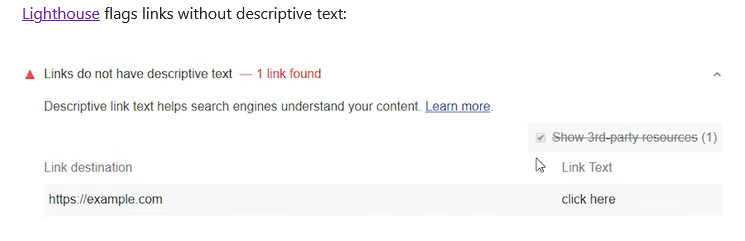
Image Source: https://developer.chrome.com/en/docs/lighthouse/seo/link-text/
To avoid this error, you should follow the link text best practices provided by Lighthouse, such as:
- Stick to the web page or blog post topic while writing the link text. Avoid a link text that is not related to the page’s content.
- Ensure the link text description is short and precise. Stick to short phrases.
- Avoid using the page’s URL as a link description.
- Ensure your internal links have descriptive text. This will make navigation easy for users and search engine robots.
Other tips to fix the ‘links do not have a discernible name’ error are:
Add Descriptive Name to Text Hyperlinks
As mentioned in the above example, hyperlinked text such as ‘click here’ or ‘read more’ is not considered sufficiently descriptive by Google, as it does not specify the purpose to users.
A user should be able to determine the link’s purpose from the text alone, as described below. This improves the user experience and reduces bounce rate.
<h3>Want to Check Your Website Speed?</h3>
<li><a href="https://seahawkmedia.com/tools/website-speed-test/">Use our free tool to check your site's speed</a></li>
The Google Lighthouse tool will list the web pages with the ‘links do not have a discernible name’ error. All you need to do to correct this error is add a brief and descriptive text within the HTML tags.
Add Image ALT Text to Hyperlinked Images
For hyperlinked images, add an alt attribute that explains the link’s purpose. Since images don’t have on-screen text (like text hyperlinks), an image alt text describes what will happen or which page the user will land on when they click the image.
For example, in the image below, the alt attribute is set to “W3Schools.com”. So, when a user hovers over the image, they know exactly where they’ll land by clicking the image.
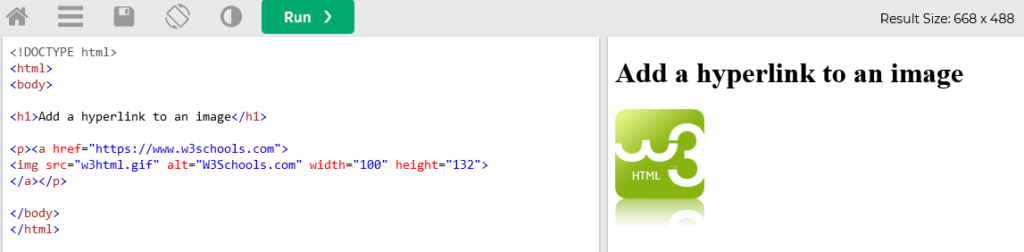
Image Source: https://www.w3schools.com/tags/tryit.asp?filename=tryhtml_image_link
Keep the image alt text simple and concise. You don’t need to describe the image; just specify its purpose to fix the ‘links do not have a discernible name’ error for images.
Add Discernible Name to Links with Complex Content
For complex & dynamic elements or non-textual content, you need to add the aria-label attribute to the link. This will make the link more accessible, especially for assistive technology users.
Example: A close button (X) in a pop-up box
<div id="box">
This is a pop-up box.
<button aria-label="Close" onclick="document.getElementById('box').style.display='none';" class="close-button">X</button>
</div>
In the above example, when you click the link, a pop-up box (a div) will appear. The ‘close’ element is a button with just the letter ‘X’.
Here, aria-label=”close” provides a discernible name for the button (X).
Final Thoughts
Fixing the ‘links do not have a discernible name’ error is pretty simple. Google Lighthouse highlights this error in its SEO audit report.
Once you identify the web pages that don’t have a discernible name in the link, you can correct the issue by adding descriptive text within the HTML tag. For hyperlinked images, add an image alt text. Whereas, you can use the aria-label attribute for dynamic elements, icons, and non-textual content.
Technical SEO errors can not only hurt your website’s performance but can also lead to poor user experience. They could also impede web crawlers from accurately indexing your website, affecting your site’s ranking.
To improve user experience and your site’s performance, identify and rectify common SEO issues immediately. Or, if you need help, you can always connect with a managed SEO service provider.
FAQs on ‘Links Do Not Have a Discernible Name’ Error
What does it mean when a link is not discernible?
It means the link does not contain clear or meaningful text. When link text and alternative descriptions are missing or vague, assistive technologies cannot determine their purpose. Adding accessible names in the code helps create links that are discernible and improves the navigation experience for screen reader users.
How can I solve unclear link text issues on a website?
Use descriptive words in the anchor text instead of generic phrases. Ensure every link appears with meaningful context. A simple code solution is to update the link text or add aria label attributes so each element has unique and focusable accessible names
Why is alternate text for images important for links?
If an image serves as a clickable link, it must include alt text. This alternate text defines the link’s purpose for screen readers and ensures it remains accessible even if the visual element is hidden due to style or layout changes.
How do accessible names improve navigation?
Accessible names help users understand where a link leads. When links are discernible, unique, and focusable, it improves the navigation experience for screen reader users and makes the page structure easier to follow.
How can developers fix this issue in code?
Developers can update the HTML snippet by adding descriptive link text, aria labels, or alternate attributes. A small change to a line of code in the theme can resolve the issue and improve accessibility.


