
Ecommerce cyberattacks are increasing rapidly in 2026 as hackers target online stores for customer data, payment information, login credentials, and financial fraud. A single security breach can damage customer trust, hurt SEO rankings, interrupt sales, and create long-term reputation problems for ecommerce businesses.
Strong ecommerce website security is a baseline requirement for any online store handling customer data, payment information, and business operations.
This guide covers practical ecommerce security tips to help prevent hacks, malware infections, payment fraud, bot attacks, and website downtime.
Ecommerce website security covers the systems, tools, and practices that protect online stores from cyberattacks, data breaches, payment fraud, and malware. It includes SSL encryption, firewall protection, secure payment gateways, malware scanning, regular updates, and strong access controls. Without it, a single breach can expose customer data, damage search rankings, and take a store offline for days.
Common Security Threats Ecommerce Websites Face
Ecommerce websites handle customer accounts, payment information, and sensitive business data, which makes them major targets for cyberattacks.
- Malware Infections: Malicious code can steal customer data, redirect traffic, or damage website functionality.
- SQL Injection and Cross-Site Scripting (XSS): Attackers manipulate database queries or inject malicious scripts into web pages to steal data, hijack sessions, or redirect visitors.
- Credit Card Theft: Hackers target payment systems to steal customer card details and financial information.
- Fake Checkout Transactions: Fraudulent orders and payment abuse can create financial losses for online stores.
- Brute Force Login Attacks: Attackers repeatedly try passwords to gain unauthorized admin access.
- AI Bot Traffic and Scraping: Automated bots scrape product data, overload servers, and distort analytics.
- Phishing Attacks: Fake emails and scams target customers to steal login credentials and payment information.
- Plugin and Theme Vulnerabilities: Outdated or poorly coded plugins often create major security risks for ecommerce websites.
Essential Security Features Every Ecommerce Website Needs
Strong ecommerce security requires multiple layers of protection working together to defend customer data, payment systems, and website infrastructure.

Each of these protections addresses a specific attack vector. Together, they form the baseline security stack every ecommerce site needs.
- SSL Certificates and HTTPS Encryption: Secure encryption protects customer data and payment information during transactions.
- Web Application Firewall Protection: Firewalls help block malicious traffic, bots, and hacking attempts before they reach the website.
- Secure Payment Gateways: PCI DSS-compliant gateways like Stripe and PayPal handle payment data securely and reduce the liability of storing card information on your servers.
- Two-Factor Authentication: 2FA adds an extra layer of protection for admin logins and sensitive accounts.
- Automated Backups: Regular backups help businesses recover quickly after hacks, crashes, or malware infections.
- Malware Scanning and Monitoring: Continuous scanning helps detect suspicious activity and malicious files early.
- Role-Based Admin Access Controls: Limiting admin permissions reduces internal security risks and unauthorized access.
Ecommerce Security Tools: Quick Comparison
Choosing the right security tools depends on what your store needs most. Here is how the most widely used ecommerce security tools compare:
| Login protection, two-factor authentication, and hardening | Primary Function | Best For |
|---|---|---|
| Cloudflare | Firewall, DDoS protection, CDN | All ecommerce sites regardless of platform |
| Wordfence | WordPress security, login protection, malware scanning | WordPress and WooCommerce stores |
| Sucuri | Malware scanning, website monitoring, security hardening | Sites needing continuous monitoring and cleanup |
| Patchstack | Plugin vulnerability detection, virtual patching | WordPress plugin security management |
| MalCare | Automated malware scanning, one-click cleanup | Fast recovery after a malware infection |
| Solid Security | Login protection, two-factor authentication, hardening | WordPress admin panel security |
Most ecommerce stores benefit from combining Cloudflare for traffic-level protection with Wordfence or Sucuri for application-level scanning. Patchstack is a strong addition for stores running multiple plugins that need vulnerability monitoring between update cycles.
Ecommerce Website Security Tips: What to Do Right Now
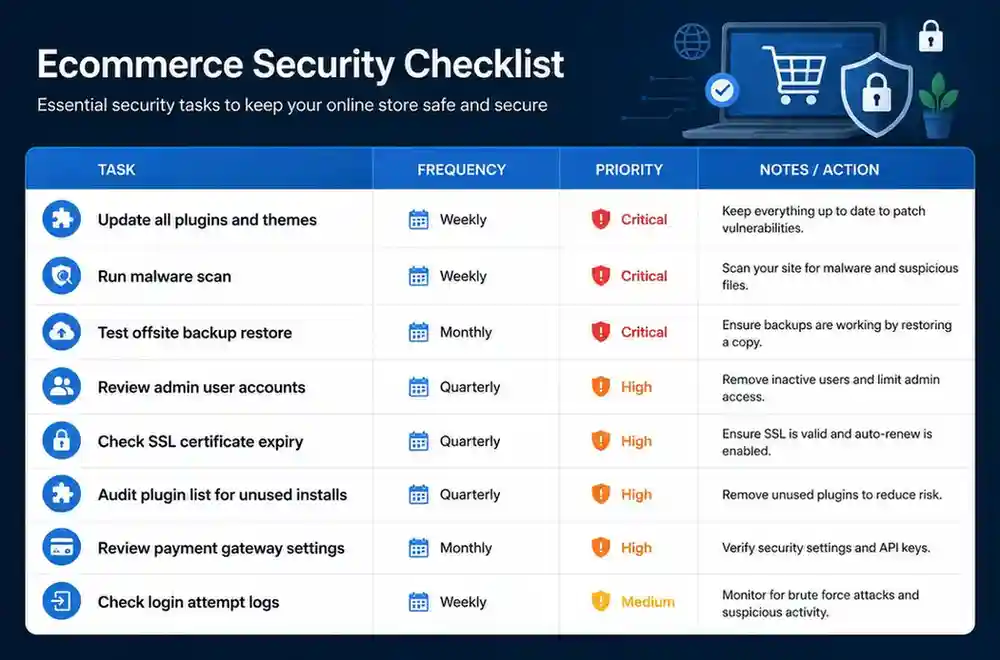
These are the most impactful security actions for any online store. Each one addresses a specific vulnerability that attackers actively exploit in 2026.
Install an SSL Certificate and Force HTTPS
Every page on your store should load over HTTPS, not just the checkout page. Install an SSL certificate through your hosting provider and set up a redirect so all HTTP traffic automatically goes to HTTPS.
Under GDPR, transmitting customer data without encryption creates regulatory risk. Modern browsers also display visible security warnings on HTTP sites, which directly reduces customer confidence and conversion rates.
Use a Web Application Firewall
A WAF filters malicious traffic before it reaches your site. Cloudflare is the most widely used option and works on any ecommerce platform, blocking DDoS attacks, bot traffic, and known malicious IP addresses at the network level.
Set it up once, and it runs continuously without manual management. For most ecommerce stores, Cloudflare’s free plan covers the majority of traffic-level threats.
Enable Two-Factor Authentication on Every Admin Account
Two-factor authentication stops attackers from accessing your admin panel even if they have your password. Install a 2FA plugin like WP 2FA and require it for every user with administrator access.
This single step eliminates the majority of risk from credential theft and brute force attacks on your login page. It takes less than ten minutes to set up and costs nothing.
Change Your Default Admin Login URL
The default WordPress admin URL is publicly known and is constantly targeted by automated bots. Use a plugin like WPS Hide Login to change it to a custom path that attackers cannot guess.
This reduces bot traffic to your login page and makes brute force attacks significantly harder to execute. It adds no performance cost and takes under five minutes to configure.
Update Every Plugin and Theme Every Week
According to Patchstack, 91% of WordPress vulnerabilities are caused by plugins. Set a fixed weekly update window, test updates in a staging environment first, and apply them to live once confirmed safe.
Attackers scan for outdated plugin versions automatically and exploit known CVEs within hours of disclosure. A missed update is rarely noticed until it becomes a breach.
Use a PCI DSS-Compliant Payment Gateway
Never store card data on your own server. Use a hosted payment gateway like Stripe or PayPal that handles all payment data transmission and storage in compliance with PCI DSS.
This removes the most sensitive data from your server entirely and transfers the compliance burden to the payment provider. It also significantly reduces your liability in the event of a breach.
Install Malware Scanning and Monitoring
Run weekly malware scans using Wordfence, Sucuri, or MalCare. Without active scanning, malware can sit undetected in your files for weeks, redirecting visitors and stealing data before anyone notices.
Set up email alerts so you are notified immediately if anything suspicious is detected. Most security plugins handle this automatically once configured.
Set Up Offsite Automated Backups
Back up your full site daily and store copies offsite, separate from your hosting server. Use UpdraftPlus or BlogVault and configure backups to go to Amazon S3, Google Drive, or Cloudflare R2.
Test a restore at least once a month to confirm the backup actually works. A backup you have never tested is a backup you cannot rely on when you need it most.
Limit Admin Account Access
Only give administrator permissions to people who genuinely need them. For everyone else, assign the minimum role required for their work and review your user list quarterly.
Delete or downgrade accounts for anyone who no longer works with your site. Every unnecessary admin account is an additional attack surface that an attacker can exploit with no effort.
Use Strong Unique Passwords on Every Account
Every admin, FTP, database, and hosting account needs a unique password of at least 16 characters. Use a password manager like 1Password or Bitwarden to generate and securely store credentials.
Never reuse passwords across accounts. If one account is compromised in a data breach, reused passwords give attackers access to everything connected to it.
Remove Unused Plugins and Themes
Every inactive plugin and theme still installed on your site is a potential entry point. Deactivate and delete anything not actively in use, including old themes that came pre-installed with WordPress.
Fewer plugins mean a smaller attack surface and fewer compatibility issues during updates. A lean plugin list is one of the simplest and most effective security improvements available.
Switch to Managed Ecommerce Hosting
Shared hosting environments are a security liability. A breach on one site on the same server can affect yours without you doing anything wrong.
Move to a managed WordPress hosting provider like WP Engine, Kinsta, or Cloudways. These platforms include server-level malware scanning, automatic updates, staging environments, and DDoS protection as standard features of every plan.
How Ecommerce Security Impacts Performance and Stability?
Ecommerce security affects far more than just protection against hackers, as security issues also degrade website speed, SEO performance, uptime, customer trust, and the overall shopping experience. Strong security systems help online stores maintain stable performance, reduce downtime, and create safer browsing experiences for customers.
How Ecommerce Security Affects SEO and UX?
Ecommerce security issues can directly harm SEO rankings, customer trust, and user experience, as hacked or infected websites quickly lose credibility with both search engines and visitors. Malware infections, downtime, and security warnings often increase bounce rates and significantly reduce conversions.
Is Your Online Store Fully Protected?
Secure your ecommerce website, remove hidden threats, and protect customer data with expert help built for hacked and vulnerable sites.
Slow website performance caused by attacks, malicious scripts, or overloaded servers also weakens Core Web Vitals and overall ecommerce UX. Strong website security helps maintain faster performance, stable rankings, safer browsing experiences, and better long-term customer confidence.
Why Regular Updates are Critical for Ecommerce Security?
Regular updates are among the most important parts of ecommerce website security because outdated software often makes it an easy target for hackers and automated attacks. Keeping ecommerce systems up to date helps reduce vulnerabilities and improve website stability.
- Outdated Plugins Create Vulnerabilities: Old plugins often contain security flaws that attackers can exploit easily.
- Old Themes Increase Hacking Risks: Unsupported themes may expose ecommerce websites to malware and security breaches.
- Security Patches Fix Known Exploits: Updates close vulnerabilities discovered in plugins, themes, and core software.
- Updated Software Improves Stability: Newer versions improve compatibility, performance, and website reliability.
- Regular Maintenance Reduces Attack Surfaces: Ongoing updates help minimize security gaps across the ecommerce website.
How Secure Hosting Protects Ecommerce Websites?
Hosting plays a major role in ecommerce security because weak hosting environments often lack advanced monitoring, firewall protection, malware prevention, and server-level security controls. Cheap hosting can leave online stores more vulnerable to attacks and downtime.

Managed ecommerce hosting improves security monitoring, threat detection, DDoS protection, and server performance while helping reduce malware risks. Better hosting also improves website speed, uptime, scalability, and long-term ecommerce stability.
Why Backup Systems Matter for Ecommerce Security?
Website backups are critical for ecommerce security because they help businesses recover quickly after hacks, malware infections, server failures, or accidental data loss. Without reliable backups, recovering customer data, product information, and website functionality can become expensive and time-consuming.
Offsite, automated backups improve disaster recovery by storing clean website copies separate from the live server. Regular backup testing also ensures ecommerce websites can be restored quickly and reliably during emergencies or security incidents.
Conclusion: Ecommerce Store Security
Ecommerce website security is directly connected to customer trust, revenue protection, SEO performance, and long-term business stability. A secure online store not only protects payment data and customer information but also helps prevent downtime, malware infections, fraud, and operational disruptions.
Businesses that invest in strong ecommerce security systems, secure hosting, regular updates, backups, and proactive monitoring are better prepared to handle modern cyber threats in 2026. Strong security practices also improve website performance, checkout confidence, and overall customer experience.
FAQs About Ecommerce Site Security
Why is ecommerce website security important?
Ecommerce security protects customer data, payment information, business operations, and online stores from hacks, malware, fraud, and unauthorized access.
What are the biggest security threats for online stores?
Common ecommerce threats include malware infections, payment fraud, phishing attacks, brute force login attempts, bot traffic, and plugin vulnerabilities.
How do SSL certificates improve ecommerce security?
SSL certificates encrypt customer and payment data, improve secure checkout experiences, and help ecommerce websites use HTTPS encryption safely.
What security tools help protect ecommerce websites?
Tools like Cloudflare, Wordfence, Sucuri, Patchstack, and malware monitoring systems help improve ecommerce cybersecurity and threat protection.
How can ecommerce websites reduce payment fraud?
Businesses can reduce fraud using secure payment gateways, fraud detection systems, address verification, suspicious activity monitoring, and CAPTCHA protection.


