Every business that sells anything gets complaints. WooCommerce stores get them about shipping. Membership sites get them about billing. Service businesses get them about response times. The complaints are not the problem. What you do with them is.
Most guides on this topic stop at “acknowledge and resolve.” That advice is incomplete. A complaint without a system behind it disappears into an inbox, gets forgotten, and resurfaces with the next customer who hits the same issue. Handled with a real process, that same complaint becomes the most useful piece of feedback your business receives that week.
This guide covers what complaint management actually means, the five-step process that resolves complaints properly, the complaint types every WordPress business needs to plan for, and the WordPress-native tools that make this manageable without a separate SaaS subscription.
Complaint management is the process of receiving, tracking, investigating, and resolving customer complaints while identifying the root causes behind recurring issues. Its purpose is not only to resolve individual concerns but also to improve products, services, and the overall customer experience.
An effective complaint management system captures feedback from every channel, assigns issues to the right team, tracks progress, and ensures customers receive timely updates until the issue is resolved.
By centralizing complaints and analyzing trends, businesses can reduce repeat issues, strengthen customer trust, and continuously improve their operations.
Why Complaint Management Matters?
Most unhappy customers do not complain. They simply leave. The customer who takes the time to send a complaint is, counterintuitively, giving the business a second chance rather than walking away silently. That distinction should shape how every complaint is treated.
Complaint Data Reveals Patterns You Cannot See Otherwise
A single complaint is one data point. Ten complaints about the same issue within a month are a pattern that demands attention. A spike in billing complaints immediately after a pricing change signals unclear communication. Multiple complaints about the same product feature signal that the feature needs fixing, not just individual customer reassurance.
Without a centralized system tracking these, the signal disappears into scattered inboxes, Slack messages, and one-off conversations. No one connects the dots because no one can see all the dots at once.
Acknowledgment Alone Rebuilds Trust
Research cited by the Federal Reserve Bank of Minneapolis found that even a basic acknowledgment of a customer’s problem can rebuild loyalty before the issue is fully resolved. The act of being heard carries weight independent of the eventual outcome. A customer who receives a prompt, genuine acknowledgment is more patient and more forgiving through the resolution process than one who hears nothing.
This has direct operational implications: an automated acknowledgment the moment a complaint arrives, even before a human has reviewed it, measurably improves the customer’s experience of the entire interaction.
Complaint Documentation is a Compliance Requirement in Regulated Industries
In finance, healthcare, and other regulated industries, regulators treat complaint logs as direct evidence of an institution’s commitment to consumer protection. Failing to document and systematically address complaints is not only a service gap. It is a compliance risk that can lead to regulatory consequences, regardless of whether any individual complaint was resolved satisfactorily.
Even outside formally regulated industries, complaint documentation protects the business in disputes, provides a clear record for legal or insurance purposes, and creates institutional memory that survives staff turnover.
Need a Complaint Management System Built Into Your WordPress Site?
Seahawk sets up support ticketing, automated routing, and complaint tracking integrated with WooCommerce and membership platforms. No contracts. No retainers.
Common Types of Customer Complaints
Understanding which categories of complaints your business is likely to face helps you route and resolve them faster and build the right intake categorization from day one.
Product or service quality. The customer expected one thing and received another. This includes defective items, features that did not perform as described, or services that fell short of what was advertised. For WooCommerce stores, this is typically the largest single category.
Billing and payment issues. Unexpected charges, incorrect invoices, failed payments, or confusion about pricing. These escalate faster than other complaint types because money is directly involved, and customers interpret billing errors as a trust violation rather than a simple mistake.
Delivery and fulfillment problems. Late shipments, incorrect items received, damaged goods, or order-tracking failures. For eCommerce businesses, this category is closely tied to shipping carrier performance and inventory accuracy.
Customer service failures. Sometimes the support experience itself becomes the complaint: slow response times, repeated transfers between agents, or unresolved follow-ups. This category is the most damaging to long-term retention because it signals a structural problem rather than an isolated incident.
Policy confusion. Return policies, warranty terms, or service conditions that were not clearly communicated. The customer did not get what they expected, not because the policy was unfair, but because it was not understood at the point of purchase.
Technical and access issues. Broken links, login failures, plugin conflicts, or anything preventing a customer from using what they paid for. For membership sites and SaaS products built on WordPress, this category requires close coordination between support and development teams.
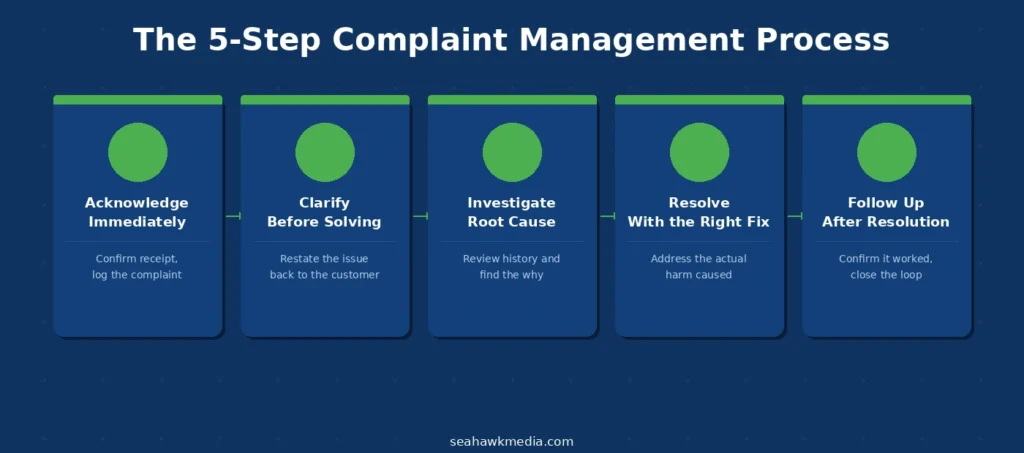
The 5-Step Complaint Management Process
No matter the channel or the complaint type, a structured process keeps every complaint moving consistently toward resolution.
Step 1: Acknowledge Immediately
Confirm receipt of the complaint as soon as it arrives. A customer who hears nothing assumes nothing is happening, which compounds their frustration independent of the original issue. An automated acknowledgment with an expected response timeline costs almost nothing to implement and prevents a flood of follow-up messages from anxious customers.
Log the complaint into your tracking system the instant it arrives, not after a human has had time to review it. The acknowledgment and the logging should happen automatically, not sequentially.
Step 2: Clarify Before You Solve
Before jumping to a solution, confirm you understand what the customer is actually upset about. Restate the issue back to them in your first substantive response. This prevents wasted effort solving the wrong problem and demonstrates to the customer that they were heard accurately, not just acknowledged generically.
Ask one clarifying question if genuinely needed. Avoid lengthy back-and-forth on clarification questions, which can become a source of frustration.
Step 3: Investigate the Root Cause
Review account history, transaction records, agent notes, and any related documentation. The goal is not only to determine what went wrong, but why. Root cause analysis is what separates a complaint that gets handled from one that gets solved. Skip this step, and the same problem resurfaces with the next customer who encounters it.
For WordPress businesses, this often means checking the WooCommerce order history, reviewing form submission logs, or checking plugin and error logs if the complaint involves a technical issue.
Step 4: Resolve with the Right Fix
Offer a resolution that matches the actual situation, not a default script response. Sometimes that is a refund. Sometimes it is a correction to an order or account. Sometimes, a clear explanation resolves a misunderstanding without requiring any compensation. The resolution should address the actual harm caused, not simply close the ticket as quickly as possible.
Where relevant, check whether other customers were affected by the same underlying issue. A billing error affecting one customer often affects several others who have not yet noticed or complained.
Step 5: Follow Up After Resolution
Check back with the customer after the resolution has been applied. A short message confirming the issue is resolved and asking if anything else is needed closes the loop and catches cases where the fix did not fully work. This step is frequently skipped, and it is the step most responsible for the same complaint reappearing weeks later because the original resolution was incomplete.
What Makes a Complaint Management Program Effective?
A documented process is only as good as the infrastructure supporting it. These are the structural elements that separate reactive complaint handling from a program that scales as the business grows.
Centralized intake. Every complaint, whether it arrives via email, contact form, social media, live chat, or phone, flows into a single tracked location. Nothing gets lost in a personal inbox, a team Slack channel, or a sticky note on someone’s desk.
Clear ownership and automated routing. Each complaint needs a named owner and a defined resolution timeline. Manual triage at any meaningful scale creates delays and gaps. Rule-based automated routing assigns complaints faster and more consistently than any manual process, and it does not depend on whoever happens to check the inbox first.
Documentation at every step. Timestamped records of every action, internal notes, and customer communications protect the business and enable later pattern analysis. This matters more in regulated industries, but it is valuable for every business handling disputes or audits.
Trend analysis. Individual complaints become strategic insight when aggregated. Seeing that 30% of this month’s complaints point to the same checkout step turns a support queue item into a product or development priority. This requires the data to be structured and tagged consistently from intake, which is why categorization matters from the first step.
Staff training. Front-line staff need to identify what qualifies as a formal complaint versus a routine inquiry, respond with the appropriate tone, and know when to escalate. This distinction matters especially for businesses in regulated industries, where misclassifying a complaint as a routine ticket exposes them to compliance risks.
How to Choose a Complaint Handling System for WordPress?
The right tool depends on team size, the number of channels you need to monitor, and the level of customization your process requires.
Enterprise and Mid-Market SaaS Helpdesks
Enterprise platforms like Zendesk and Salesforce Service Cloud offer deep integrations and AI-powered features, but come with per-agent pricing that scales directly with headcount. For a team of 10 agents, monthly costs can range from $1,000 to $2,000, depending on the plan tier.
Mid-market tools like Freshdesk and Zoho Desk offer a reasonable balance of features and pricing for growing teams, typically in the $15-$50 per agent per month range.
WordPress-Native Complaint Handling Tools
For businesses already running on WordPress, a native complaint and support ticket system avoids a separate SaaS subscription, per-seat billing, and the data residency question of customer information leaving your own server.
Fluent Support is a comprehensive complaint and support ticket system built natively for WordPress. Email piping automatically converts incoming support emails into tracked tickets, without requiring customers to log in to a separate portal. Workflow automation enables rule-based routing. For example, the system can automatically send billing complaints to the finance team, mark them as high priority, and assign them to the appropriate person without any manual intervention. Ticket tagging supports categorization by complaint type, enabling the trend analysis described above. Pricing uses a flat annual license rather than per-agent billing, so cost does not increase as ticket volume or team size grows.
WP Ticket offers a frontend ticket submission form, agent assignment, priority and status tracking, and role-based access on a freemium model. The free tier covers basic complaint capture and routing. Premium tiers add WooCommerce integration, SLA tracking automation, and advanced filtering.
WPForms with Zapier integration is a lighter-weight option for businesses that want a complaint intake form without a full ticketing system. Complaints submitted via the form can trigger Zapier automations that create tasks in Asana, Trello, or similar project tools, and can schedule follow-up calls via a connected calendar.
Decision Framework
| Business Profile | Recommended Approach |
| WordPress site, small team, budget-conscious | WP Ticket free tier or WPForms + Zapier |
| WordPress site, growing complaint volume, need automation | Fluent Support |
| Multi-platform business with WordPress as one channel | Freshdesk or Zoho Desk |
| Enterprise with deep compliance and integration needs | Zendesk or Salesforce Service Cloud |
For most WordPress-based businesses, particularly those running WooCommerce or a membership site, a native WordPress solution avoids the recurring per-agent cost of SaaS helpdesks while covering the core requirements: centralized intake, automated routing, categorization, and a complete audit trail.
Final Thoughts on Complaint Management
Complaint management is not a support function you configure once and forget about. It is an ongoing system that reflects how seriously a business takes the customer relationship, and the businesses that grow are the ones that treat it that way.
The fundamentals do not change with scale: capture every complaint, route it to the right person, investigate the actual root cause, resolve it properly, and use the resulting data to prevent the next occurrence. What changes is how well your tools and processes support each of those steps as complaint volume grows.
Start with centralization. Every other improvement in this guide becomes meaningfully easier once all complaints are visible in one place rather than scattered across inboxes and channels.
If you need help setting up a WordPress-native complaint and support system, or integrating it with your WooCommerce or membership platform, Seahawk’s development team handles the full setup.
Frequently Asked Questions About Complaint Management
What is complaint management?
Complaint management is the systematic process a business uses to receive, record, investigate, resolve, and analyze customer complaints. The objective is not just to fix a single customer’s issue, but to understand the root cause and prevent the same problem from recurring with future customers. A complete system covers intake from every channel, routing to the right owner, documented investigation, an appropriate resolution, and a follow-up to confirm the fix worked.
What are the steps in the complaint management process?
The standard five-step process is acknowledge, clarify, investigate, resolve, and follow up. Acknowledge the complaint immediately upon receipt. Clarify the issue by restating it to the customer before attempting a solution. Investigate the root cause using account history and related documentation. Resolve the issue with a fix that addresses the actual harm. Follow up after resolution to confirm the issue is fully fixed and close the loop.
Why is complaint management important for a business?
Complaint management is important because unhappy customers who do not complain simply leave without giving the business a chance to fix the issue. Customers who complain are, in effect, offering a second chance. Beyond individual retention, aggregated complaint data reveals patterns: a spike in billing complaints after a pricing change or repeated complaints about the same feature, pointing directly to issues worth fixing at the source rather than handling one customer at a time.
What are the most common types of customer complaints?
The most common categories are product or service quality issues, billing and payment problems, delivery and fulfillment failures, customer service experience failures, policy confusion, and technical or access issues. For WordPress and WooCommerce businesses specifically, product quality and delivery issues are the highest-volume categories, while billing issues escalate fastest due to the direct financial stakes involved.
What is the best complaint management tool for a WordPress website?
For WordPress businesses, Fluent Support is a strong option because it functions as a complete complaint and support ticket system built natively into WordPress, with email piping, automated routing rules, ticket tagging for trend analysis, and flat annual licensing rather than per-agent SaaS pricing. WP Ticket is a lighter, free option for smaller teams. For businesses needing deeper enterprise integrations beyond WordPress, Zendesk or Freshdesk are stronger choices, at a higher per-agent cost.
How do you track patterns across customer complaints?
Pattern tracking requires complaints to be categorized consistently at intake, typically by tagging them with a complaint type (billing, delivery, product defect, technical issue). Once tagged consistently, the data can be filtered and aggregated to reveal trends: a sudden increase in a specific complaint category, a correlation with a recent product or pricing change, or a recurring issue tied to a specific product or feature. This requires a centralized tracking system rather than scattered individual emails, since pattern analysis is impossible across disconnected inboxes.