
Monochromatic design proves that simplicity can create powerful visual experiences. Instead of combining multiple colors, this approach uses variations of a single hue to create cohesive, elegant designs. As a result, brands can achieve a clean aesthetic while maintaining a clear visual hierarchy.
From websites and brand identities to product packaging and editorial layouts, monochromatic palettes help designers create consistent and memorable visuals. Moreover, when used strategically, they improve readability, reduce visual clutter, and strengthen brand recognition.
In today’s web design landscape, where clarity and user experience matter more than ever, monochromatic color schemes offer a practical and timeless solution for modern digital and branding projects.
TL;DR: Monochromatic Design Quick Takeaways
- Monochromatic design uses variations of a single color, including tints, shades, and tones, to create cohesive and visually balanced designs across web, branding, and graphic projects.
- Choosing the right base color is crucial, as it sets the mood and influences how users perceive the brand’s personality and message.
- A strong palette includes multiple values for backgrounds, content, and emphasis, helping establish a clear visual hierarchy and improve readability.
- Strategic use of contrast, texture, and typography prevents designs from looking flat while maintaining a clean, engaging monochrome aesthetic.
- Testing across devices and lighting conditions ensures consistent color appearance, accessibility compliance, and an optimal user experience.
What is Monochromatic Design?
A monochromatic color scheme uses different variations of a single hue. These variations include lighter and darker versions of the same color, often created by adjusting tints, shades, and tones.
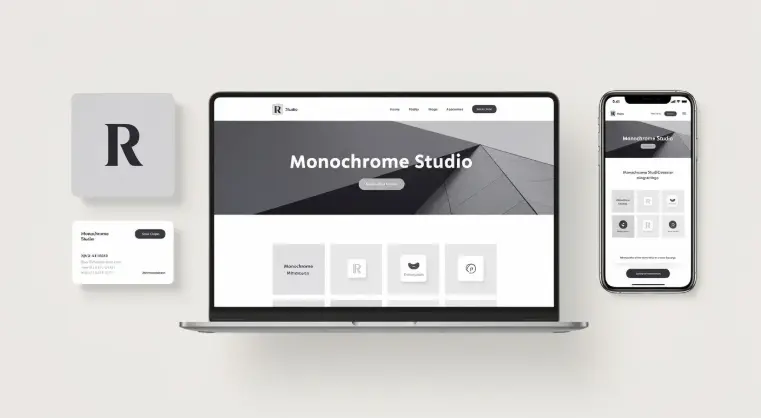
Instead of combining multiple color families, designers work within one color spectrum. Consequently, the final design appears consistent, harmonious, and easy to interpret.
Key Benefits of Monochromatic Design
A monochromatic approach offers several advantages for digital and branding projects:
- Visual cohesion: Using one color family keeps layouts organized and aesthetically consistent.
- Perceived simplicity: Fewer color variables reduce cognitive load for users.
- Clear visual hierarchy: Variations in lightness and saturation naturally guide attention.
- Brand consistency: A single dominant hue strengthens brand recognition across platforms.
- Design efficiency: Fewer color decisions simplify the design and development process.
Because of these benefits, monochromatic design is widely used in websites, brand identity systems, product packaging, editorial layouts, and modern UI frameworks.
Monochromatic Color Basics: Base Color and Tints
Every monochromatic palette begins with a base color. This primary hue determines the overall mood and personality of the design. For example:
- Blue tones typically convey trust, stability, and calmness.
- Red hues suggest energy, urgency, and excitement.
- Neutral palettes such as gray or beige communicate sophistication and flexibility.
Therefore, selecting the right base color is crucial because it influences how users perceive the brand.
Once the base color is selected, designers create variations using three common techniques:
- Tints are lighter versions of the base color created by adding white. These are commonly used for background surfaces, card components, and highlight areas. They help create a light and airy interface while maintaining color consistency.
- Shades are darker variations produced by adding black. These are typically used for headers and strong visual anchors, buttons & emphasis areas, and navigation elements. Darker shades help establish structure and contrast.
- Tones are produced by mixing gray with the base color. They reduce color intensity while maintaining the original hue. As a result, tones are ideal for secondary elements, supporting visuals, and icons & UI components.
Together, tints, shades, and tones create depth without introducing new color families.
Building an Effective Monochromatic Color Palette
A successful monochromatic design system relies on a structured color palette. Even though only one hue is used, multiple values are required to create visual hierarchy.
Essential Palette Components
A practical monochromatic palette should include the following elements:
- Background Color: Usually the lightest tint. It forms the foundation of the interface and ensures readability.
- Primary Color: The base hue used for branding elements, buttons, or important visual components.
- Secondary Values: Mid-tone variations used for sections, cards, and supporting UI elements.
- Accent Shade: A darker value used for focal points such as headings, navigation bars, or CTAs.
Establishing Visual Hierarchy
At a minimum, a monochromatic palette should include three distinct values: a light background, a mid-tone content color, and a dark emphasis shade. This layered structure ensures that users can easily identify content sections, actions, and key messages.
Testing Across Devices and Print
Designers should also test monochromatic palettes under real-world conditions. Colors can appear differently depending on screen calibration, device type, lighting conditions, and print materials. Therefore, validating tints and shades across multiple displays and printed samples helps ensure consistent legibility.
Steps to Create Monochromatic Designs: Process and Workflow
A well-executed monochromatic design requires more than selecting a single color. Instead, web designers should follow a structured workflow that ensures visual consistency, accessibility, and strong brand alignment across digital experiences.
Step 1: Define Brand Personality
Before selecting a color palette, identify the brand’s emotional tone and audience expectations.

The base color should reflect the brand’s personality and communicate the intended message effectively.
- Understand the Brand’s Emotional Goals: Start by identifying the feelings the brand wants to evoke. For instance, calm colors work well for professional platforms, while energetic hues support lifestyle or entertainment brands.
- Analyze Audience Preferences: Next, consider the target audience. Age group, industry, and cultural perceptions can influence how colors are interpreted and how effective they are in the design.
- Align Color With Brand Identity: Finally, ensure the chosen hue complements existing brand elements such as logos, typography, and imagery to maintain visual consistency across all channels.
Step 2: Generate Color Variations
Once the base color is selected, designers should create multiple variations to build depth and hierarchy within the monochromatic palette.
- Create Tints for Backgrounds: Generate lighter tints by adding white to the base color. These softer variations work well for backgrounds and spacious layout sections.
- Develop Shades for Emphasis: Then, create darker shades by adding black. These shades are ideal for navigation bars, headings, and key visual anchors.
- Use Tones for Balance: Add gray to produce tones that reduce color intensity. These tones help support secondary elements such as icons, cards, and UI components.
Step 3: Document a Style Guide
After establishing the palette, it is important to document how colors should be used within the design system.
- Record Exact Color Values: Start by listing hex, RGB, or HSL values for each tint, shade, and tone to ensure consistent implementation across design and development environments.
- Define Usage Rules: Next, specify where each color variation should appear, including backgrounds, typography, buttons, and interactive elements.
- Include Accessibility Guidelines: Ensure that all color combinations meet accessibility standards so that text and interactive elements remain readable across devices.
Step 4: Prototype and Test
Once the system is defined, designers should test the palette within real interface layouts to confirm usability and visual effectiveness.
- Apply Colors to Real Components: Start by integrating the palette into UI components such as buttons, navigation menus, and content sections.
- Readability and Contrast: Then, review contrast levels and visual hierarchy to ensure text and actions remain clear and accessible.
- Iterate Using User Feedback: Refine the design through usability testing or A/B experiments to improve readability, engagement, and overall user experience.
Practical Tips for Successful Monochromatic Design
Although monochromatic design is simple in concept, thoughtful execution is essential.
- Establish a Clear Focal Point: Every layout should highlight a primary element. Typically, designers achieve this by using the darkest or most saturated shade in the palette. This technique naturally directs the user’s attention.
- Maintain Strong Contrast: Accessibility remains a critical factor in digital design. Text and interactive elements must provide enough contrast to meet WCAG guidelines. Contrast testing tools help verify that color combinations remain readable.
- Add Texture and Material Depth: Because monochrome palettes limit color variation, designers often introduce textures or subtle patterns. Examples include gradient overlays, soft shadows, and material-inspired surfaces. These details add visual interest without disrupting the color harmony.
- Use Black and White Strategically: Pure black & white elements can strengthen a monochromatic palette. However, they should be used sparingly to maintain balance. Common applications include typography, icons, and high-contrast call-to-action buttons.
Monochromatic Color Palettes by Mood
Even within a single hue family, different colors evoke different emotional responses. Choosing the right palette depends on the message a brand wants to communicate.
Cool Monochromatic Palettes
Cool tones such as blue, teal, and cool gray create a calm and trustworthy visual environment.
They are ideal for SaaS websites, finance platforms, content-heavy blogs, and educational platforms. Because cool palettes reduce visual stress, they are often used for long-form reading experiences and professional interfaces.
Warm Monochromatic Palettes
Warm tones such as red, orange, and warm beige create energetic and inviting designs. They work well for hospitality brands, lifestyle companies, food & beverage websites, and promotional landing pages.
Warm palettes naturally draw attention, making them effective for call-to-action elements and marketing campaigns.
Neutral Monochromatic Palettes
Neutral color systems, such as grayscale, ivory, or layered whites, offer a refined, elegant look.
These palettes are commonly used in corporate branding, luxury product websites, premium WordPress themes, and editorial platforms.
Because neutrals are highly adaptable, they allow typography, imagery, and layout to take center stage.
Monochromatic Schemes in Graphic and Web Design
Monochromatic palettes are particularly powerful in digital interfaces.
- Simplified Visual Hierarchy: Since fewer colors compete for attention, designers can guide users using typography weight, layout spacing, and color intensity. This clarity makes monochrome systems effective for content-driven websites and modern UI frameworks.
- Image Overlays and Tinted Photography: Another common technique involves applying color overlays to images.
For example, designers may add a semi-transparent tint over photographs to ensure that all visuals match the palette. As a result, images feel integrated into the overall design system.
This approach is widely used in hero banners, landing pages, and editorial websites,
- Black-and-White Systems: Grayscale and black-and-white schemes represent the purest form of monochromatic design. They are often used for editorial layouts, minimalist product pages, and photography portfolios. Because of their high contrast, they deliver clean and timeless interfaces.
Monochromatic Design for WordPress Themes and Brand Identity
For agencies and development teams, monochromatic systems provide significant operational advantages.
- Simplified Theme Customization: When WordPress themes rely on a single color family, developers can easily adjust branding by modifying a few variables. For example, changing the base color automatically updates buttons, highlights, backgrounds, and icons. This reduces development time when creating white-label or multi-client websites.
- Stronger Brand Recognition: A consistent monochrome palette also reinforces brand identity. When users repeatedly encounter the same dominant hue, they quickly associate it with the brand. Consequently, monochromatic branding can improve recognition and visual memorability.
- Efficient Maintenance for Multisite Systems: Large organizations managing multiple sites benefit from monochromatic systems because they simplify theme updates, design consistency, and UI component libraries. As a result, maintenance becomes more manageable across large web ecosystems.
Helpful Tools and Resources for Monochromatic Design
Several tools simplify the process of building monochromatic palettes.
Color and Design Tools
- Palette generators for deriving color variations
- WCAG contrast checkers for accessibility testing
- Design software for UI prototyping
WordPress Implementation Tools
- Theme customization variables
- CSS custom properties for color control
- Image overlay plugins for tinted visuals
For agencies managing multiple client projects, structured tools help maintain consistent color systems across sites. To start implementing monochromatic design effectively, agencies can follow a few practical steps.
- First, create a style tile that showcases the chosen hue along with its tints, tones, and shades. Include hex or RGB values and sample UI components.
- Next, test the palette within a staging website or prototype. Evaluate accessibility, user interaction, and visual hierarchy before deploying the design.
Finally, document the system within a brand or theme guideline so designers and developers can maintain consistency over time.
Final Thoughts
Monochromatic design proves that simplicity can be powerful. By focusing on a single hue and carefully balancing its variations, designers can build interfaces that are visually cohesive, highly accessible, and easy to maintain.
Moreover, this approach works across a wide range of projects, from brand identity systems to modern websites and WordPress themes. When supported by thoughtful contrast, typography, and layout choices, monochromatic palettes can elevate both aesthetics and usability.
For agencies and design teams seeking a streamlined yet sophisticated visual strategy, monochromatic design offers a reliable path forward.
FAQs About Monochromatic Design
What does monochrome mean in design?
Monochrome means using monochrome colors derived from the same hue, which supports visual harmony. In color theory, the word monochromatic describes a one-color palette that creates a harmonious look and a visually appealing layout.
Why is monochromatic design popular in graphic design?
In graphic design, creating monochromatic designs helps designers maintain consistency. Because color selection plays a significant role, a memorable color palette strengthens brand identity while simplifying complex design elements.
How do designers create variation in a monochromatic palette?
Designers rely on different tints, varying shades, and different hues from the color wheel. These lighter shades, muted tones, and various shades help add depth and subtle contrasts.
How can monochrome designs create focal points?
Designers create focal points by using darker tones, a strong accent color, or contrast against a single shade background to add interest and guide visual attention.
Where are monochromatic palettes commonly used?
They appear in design project workflows for websites, interior design, and black and white photography, including minimalist concepts like an all-gray design.
What colors work best for monochromatic palettes?
Designers often use cool colors, warmer grays, or adaptable paint colors to develop consistent palettes that feel balanced.
Do monochromatic designs look boring?
Not at all. When layered with texture and thoughtful design elements, monochrome systems maintain clarity while remaining sophisticated.


