Most WordPress content fails before the first word is written.
Not because the writing is bad. Because the research was guesswork. The wrong headings, missing subtopics, ignored search intent, and no idea what the top-ranking pages are actually covering.
An AI-powered content brief fixes all of that before you start. It gives you a data-backed structure, the exact topics competitors are covering, keyword benchmarks, and content length targets, all in minutes instead of hours.
This guide covers exactly how to create AI-powered content briefs for your WordPress site, which tools work best, and a step-by-step workflow you can put into production today.
AI powered content briefs help WordPress teams create SEO focused content faster by analyzing top ranking competitors, extracting topic gaps, identifying search intent, and building optimized outlines before writing begins.
The fastest workflow combines keyword research tools like LowFruits, competitive brief tools like SEOBoost, and in editor optimization with Rank Math Content AI. Together, they reduce manual research from hours to minutes and improve the chances of ranking higher in search.
Why Traditional Content Briefs Do Not Work Anymore?
A traditional content brief lists headings, assigns a keyword, and sets a word count. That was enough in 2019.
In 2026, Google’s ranking signals are more sophisticated. AI Overviews, semantic search, and entity-based indexing mean that content needs to cover a topic comprehensively, not just target a phrase.
Manual research cannot keep up. Analyzing 30 top-ranking pages by hand to extract heading patterns, keyword usage, and topic gaps takes four to six hours per article. Most teams skip it entirely and wonder why their content sits on page three.
AI tools can scan those same 30 pages in under two minutes and produce a structured brief that maps every topic, heading, and question you need to cover.
The 80/20 rule applies directly here. AI handles the 80% that is repetitive: gathering data, analyzing competitors, and structuring headings. You focus on the 20% that actually builds an audience: your personality, stories, first-hand experience, and expertise that no AI can generate.
Need SEO Content That Actually Ranks?
Seahawk combines keyword research, AI-powered content briefs, and WordPress SEO execution to help your site grow traffic without the manual workload.
What Does a Strong AI Content Brief Include?
Before choosing your tools, understand what a complete brief looks like. A brief that only lists headings is not a content brief. It is an outline.
A strong AI-powered content brief includes all of the following:
Keyword Layer
- Primary focus keyphrase
- Secondary and LSI keywords to include naturally
- Keyword density benchmarks from top-ranking competitors
Structure Layer
- Recommended H2 and H3 heading hierarchy
- Suggested word count range
- Recommended reading level and tone
Intent Layer
- Search intent classification (informational, commercial, transactional)
- People Also Ask questions relevant to the topic
- Featured snippet opportunity identification
Competitive Layer
- Topics covered by the top 10 competitors that you must address
- Topics covered by fewer competitors represent a gap opportunity
- Content gaps: questions asked but not fully answered by competitors
Differentiation Layer
- A dedicated section for unique data, original research, or personal case studies
- Notes on what competitors are not covering that you can own
This last layer is what separates content that ranks temporarily from content that holds its position. AI builds the skeleton. You add the muscle.
How to Choose the Right AI Brief Workflow?
Not every team works the same way. The right workflow depends on whether you are writing content yourself, managing freelance writers, or running a high-volume content operation.
| Your Situation | Best Method | What You Get |
|---|---|---|
| Writing the post yourself | Rank Math Content AI | Live brief in your WordPress editor as you write |
| Sending to a freelance writer | SEOBoost | Shareable brief link or PDF with full competitor data |
| Finding low-competition keywords first | LowFruits + SEOBoost | Keyword clusters with weak competitors mapped to a brief |
| Running a high-volume blog or team | Uncanny Automator + OpenAI | Auto-generated briefs triggered directly in WordPress |
Start with the method that matches where your agency or blog is right now. Most teams get immediate results from SEOBoost or Rank Math before introducing automation.
Step-by-Step: How to Create AI-Powered Content Briefs for WordPress
Each method below targets a specific workflow stage, from finding the right keyword to automating brief generation at scale. Work through them in order or jump to the one that fits your current setup.
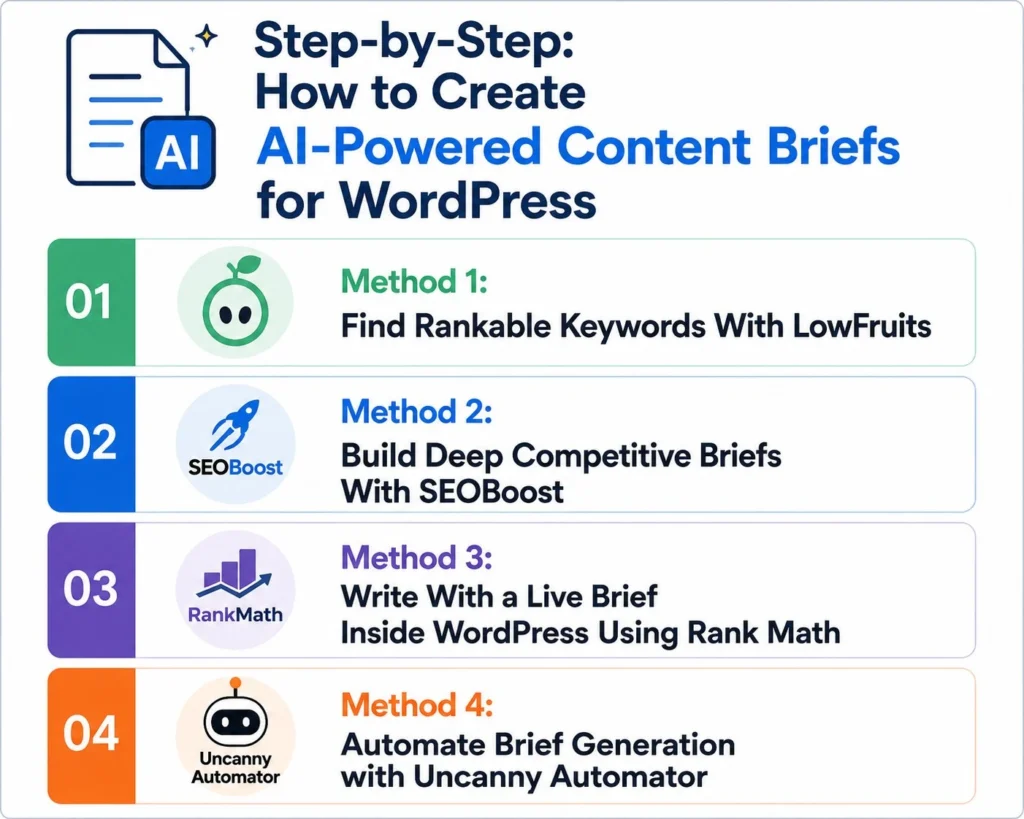
Method 1: Find Rankable Keywords with LowFruits
Before creating a brief, you need a keyword worth writing about. LowFruits specializes in finding keywords where the top 10 results include low-authority pages, forums, or user-generated content that you can realistically outrank.
How it works:
Go to LowFruits and enter your seed keyword. The tool scans the top search results and flags “weak spots” where low-authority pages are ranking. These are your best ranking opportunities because they show Google cannot find strong content on that topic yet.
Use the SERP Clustering feature (not Semantic Clustering) to group related keywords. SERP Clustering groups keywords based on what Google is actually ranking together, which prevents you from writing two separate posts for terms Google treats as the same topic.
The output: A list of keyword clusters with identified weak competitors. Take your best cluster into SEOBoost to build the brief.
Best for: Agencies and bloggers who want data-driven keyword selection before investing in content production.
Method 2: Build Deep Competitive Briefs with SEOBoost
SEOBoost analyzes the top 30 to 50 ranking pages for your target keyword and extracts the headings, topics, questions, and SEO benchmarks your content needs to compete.
Step 1: Create a Topic Report
Log in to SEOBoost and go to Topic Reports. Enter your target keyword, select your language and region, and click Create Report. The tool takes a few minutes to analyze the competitive landscape.
Step 2: Build Your Brief Using the Floating Editor
Open the report and click Create New Brief. A floating editor opens alongside the competitor analysis, so you can browse the top-ranking pages and click to add any heading or topic to your outline without switching tabs.
This is where the LowFruits research pays off. If your weak-spot keywords are not appearing as suggestions, add them manually as H2 or H3 subheadings. This ensures your brief targets the specific gaps competitors have missed.
Use drag-and-drop to organize your heading hierarchy. Drag headings right to demote them from H2 to H3.
Step 3: Review SEO Suggestions and Share
Under the SEO Suggestions tab, review keyword density recommendations, word count targets, and readability benchmarks. When the brief is ready, export as PDF, HTML, or share as a direct link with your writer.
Best for: Teams managing freelance writers who need a professional, shareable brief document.
Method 3: Write with a Live Brief Inside WordPress Using Rank Math
If you write your own content, Rank Math’s Content AI brings competitor-driven brief data directly into your WordPress editor. Instead of switching between a separate brief document and your editor, keyword suggestions, topic coverage, and SEO benchmarks appear in your sidebar as you write.
Step 1: Install Rank Math Pro and Enable Content AI
Install and activate Rank Math Pro. Go to Rank Math > Dashboard and enable the Content AI module. Navigate to Rank Math > Content AI and connect your Content AI credits. Rank Math uses its own AI engine to analyze top-ranking competitors for your target keyword, so no third-party brief tool connection is required for the core workflow.
Step 2: Generate Your Live Brief
Create a new post. Enter your focus keyword in the Rank Math meta box below the editor. Open the Content AI tab in the Rank Math sidebar panel and click Get Suggestions. Rank Math analyzes the top-ranking pages for your keyword and populates the sidebar with recommended terms, related keywords, headings used by competitors, People Also Ask questions, and content length benchmarks.
Step 3: Write Against the Brief in Real Time
As you write, Rank Math’s Content AI score updates in real time. It tracks which recommended terms you have used, highlights missing topics, and flags keyword usage issues. The AI also suggests meta titles, meta descriptions, and schema markup with a single click from the same sidebar panel.
For teams using Surfer SEO or SEOBoost alongside Rank Math, export the brief from those tools and use it as your structural guide while letting Rank Math handle real-time in-editor scoring and optimization.
Best for: Solo bloggers and in-house writers who want a fully integrated brief and optimization workflow inside WordPress without managing multiple tool connections.
Method 4: Automate Brief Generation with Uncanny Automator
For agencies managing high-volume content operations, manually building each brief creates a bottleneck. Uncanny Automator connects WordPress directly to OpenAI and generates a structured content brief automatically when triggered by a post tag.
How the workflow operates:
An editor creates a new WordPress post, adds a title, and assigns the author. They add the tag “generate-brief” to the post and click Save Draft. Uncanny Automator sends the post title to OpenAI, receives a structured HTML brief in return, and automatically pastes it into the post editor. The tag removes itself, so the automation does not run again on the same post.
The whole process takes under 30 seconds.
Setting it up:
Install Uncanny Automator and Uncanny Automator Pro. Connect your OpenAI API key under Automator > App Integrations > OpenAI. Create the tag “generate-brief” under Posts > Tags. Build a new recipe with the trigger set to fire when a post with that tag is updated. Add an OpenAI action with this prompt:
Act as a Senior SEO Strategist. Create a detailed content brief for a blog post titled: [Post Title]. Return the response in HTML format. The brief must include an optimized H1 and meta description, a detailed H2/H3 outline, and a specific section for unique expert insights that competitors have not covered.
Map the OpenAI response to the post content using the Update Post Content action. Add a final action to remove the “generate-brief” tag once the brief is delivered.
Critical notes:
- Test this on a staging site first. Incorrect prompt formatting can produce broken HTML
- The Update Post Content action overwrites existing content. Only run it on blank drafts
- Use the GPT-4o model or the latest available. Legacy models (Babbage, Davinci) produce inconsistent HTML output
- OpenAI API credits are separate from a ChatGPT subscription. Add credits to your OpenAI billing account before setting up the automation
Best for: Agencies producing 10 or more articles per week who need to eliminate the brief-creation bottleneck entirely.
Best AI Tools for Content Briefs: Quick Comparison
| Tool | Best For | Brief Output | WordPress Integration | Starting Price |
|---|---|---|---|---|
| SEOBoost | Competitive deep-dive briefs | PDF, HTML, shareable link | Via Rank Math Content AI | $30/month |
| Rank Math Content AI | Live brief inside WordPress editor | Sidebar scoring + term suggestions | Native WordPress plugin | $6.99/month (Pro) |
| LowFruits | Finding rankable keyword opportunities | Keyword clusters | No direct integration | $29/month |
| Surfer SEO | Real-time content scoring | In-editor optimization | Chrome extension | $89/month |
| Frase | Brief generation + AI drafting | Full brief + draft | No native integration | $45/month |
| Uncanny Automator | Automated bulk brief generation | Auto-generated HTML brief | Native WordPress plugin | $149/year |
| Clearscope | Enterprise-level content briefs | Detailed term reports | Google Docs + WordPress | $170/month |
For most WordPress agencies and bloggers, the SEOBoost and AIOSEO combination covers the full workflow at the lowest entry cost.
Best Practices for AI-Powered Content Briefs
Getting the most from AI briefs requires a few discipline habits that separate content teams who rank from those who publish and wonder why nothing happens.
Use the inverted pyramid structure. Brief your writers to put the direct answer in the first 60 words of every article. This structure wins featured snippets and Google AI Overview citations. The most important information comes first, followed by supporting details.
Always add an information gain section. AI can analyze competitors and generate structure. It cannot produce your original data, personal case studies, or first-hand experience. Every brief should include a section labeled “Unique Expert Insight” or “Original Data” where the writer must add something no competitor has covered. This is what determines whether your content holds its ranking long-term.
Review every AI-generated brief before it goes to a writer. AI occasionally suggests headings that sound logical in isolation but create a disjointed narrative when read in sequence. Spend 10 to 15 minutes reviewing each brief to remove redundant sections, reorder headings for better flow, and add notes about where to include screenshots, data points, or examples.
Do not ignore readability benchmarks. SEOBoost and Rank Math both provide readability targets based on competitor averages. If the top 10 results read at a Grade 8 level, content written at Grade 12 will feel out of step with what Google expects for that query. Match the complexity of your audience, not your personal writing style.
Combine methods rather than relying on a single tool. The strongest workflow starts with LowFruits for keyword discovery, uses SEOBoost for the full competitive brief, and finishes with Rank Math for in-editor real-time scoring. Each tool covers a different layer of the brief-creation process.
Final Thoughts: AI-Powered Content Brief in WordPress
AI-powered content briefs do not replace your expertise. They create the conditions for your expertise to actually reach the people searching for it.
Without a brief, even excellent writing misses ranking opportunities because it covers the wrong topics, ignores related questions, or structures information in a way Google cannot easily parse. A strong brief solves all three problems before the first paragraph is written.
The workflow is not complicated. Pick the method that fits your current team size and content volume. Start with SEOBoost or Rank Math if you are new to briefs. Add LowFruits when keyword strategy becomes a priority. Introduce Uncanny Automator when brief creation itself becomes the bottleneck.
Content that ranks consistently is planned with data and written with expertise. AI handles the first half. That is the part that has been slowing most WordPress teams down for years.
Frequently Asked Questions About AI-Powered Content Briefs for WordPress
What is an AI-powered content brief?
An AI-powered content brief is a structured research document created using AI tools that analyze top-ranking competitor pages. It extracts the headings, subtopics, keywords, People Also Ask questions, and SEO benchmarks your article needs to compete. Unlike a manual outline, it is based on live competitor data and updates as search results change.
Which is the best tool to create AI content briefs for WordPress?
For most WordPress users, SEOBoost combined with Rank Math is the most effective combination. SEOBoost analyzes the top 30-50 ranking competitors and generates a comprehensive, shareable brief. Rank Math Content AI brings the optimization layer directly into your WordPress editor so you can score and refine in real time as you write. Solo bloggers can start with Rank Math alone, while teams managing writers benefit from SEOBoost’s shareable brief format.
How long does it take to create an AI-powered content brief?
With a tool like SEOBoost, a complete competitive brief takes 5 to 10 minutes to generate and 10 to 15 minutes to review and refine. Manual competitor research covering the same ground typically takes 3 to 6 hours. For teams using Uncanny Automator, the entire brief is auto-generated in under 30 seconds after a post title is entered.
Will AI-generated content briefs hurt my SEO?
No. Google does not penalize content for being planned with AI tools. Google evaluates the quality, helpfulness, and expertise of the published content, not the method used to research or plan it. AI briefs actually improve SEO outcomes by ensuring your content covers every relevant topic, matches competitor depth, and addresses the full range of questions users are searching for.
What is the difference between an AI content brief and a standard outline?
A standard outline lists headings and subheadings. An AI content brief includes competitor-derived heading structures, keyword density benchmarks, content length targets, readability scores, People Also Ask questions, topic gap analysis, and recommendations for information gain. A brief is a complete specification document for a piece of content. An outline is a skeleton.
Can I use AI briefs for updating existing WordPress content?
Yes. Running a new Topic Report in SEOBoost for an existing post’s target keyword shows how search intent has shifted since the original publication date. The resulting brief highlights new subtopics your current content is missing, outdated sections to update, and new questions that have emerged in People Also Ask results. Updating with a fresh AI brief is one of the most efficient ways to recover rankings on content that has slipped over time.
Do I need all four tools (LowFruits, SEOBoost, Rank Math, Uncanny Automator) to create AI content briefs?
No. Each tool serves a distinct purpose, and the four can be used independently. LowFruits handles keyword discovery. SEOBoost builds the competitive brief. Rank Math integrates the brief into WordPress. Uncanny Automator automates the process at scale. For most individual bloggers or small teams, starting with SEOBoost and Rank Math delivers immediate, measurable results. Add the other tools as your content volume grows.